Spliti
Split the bill quickly
Free
1.15for iPhone, iPod touch
Age Rating
Spliti Screenshots
About Spliti
Spliti lets you split the bill and get your money back quickly.
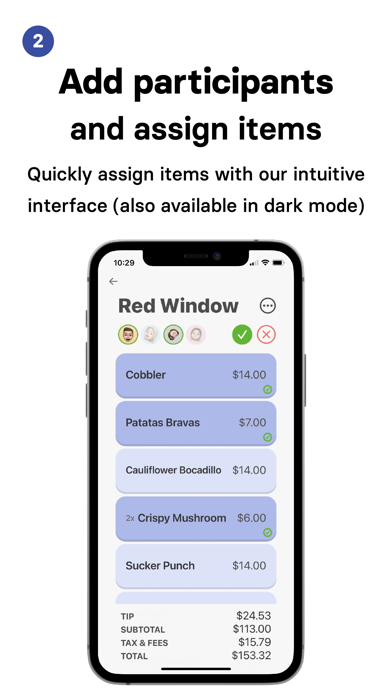
Spliti lets you add friends from your contacts and assign items to them in a fun, intuitive way that is much more enjoyable than opening your Calculator or Notes app and doing the math manually. Spliti also works with digital receipts: DoorDash, Uber Eats, Square or Toast receipts, you name it! Simply take a screenshot of a digital receipt and upload it to get started.
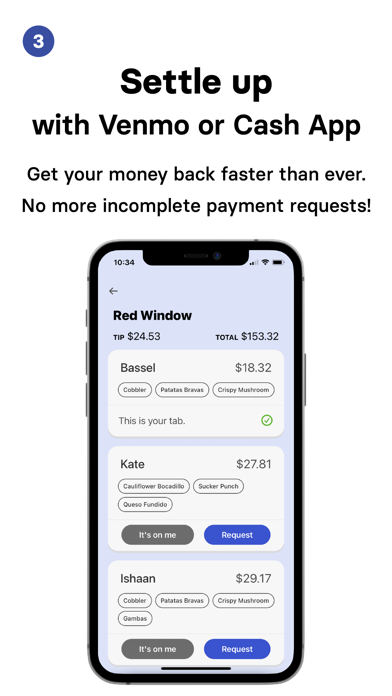
Spliti also works with Venmo and Cash App: simply select Request after assigning all the items and Spliti will send a text message to each person with a designated payment link. Spliti allows you to keep track of any receipts you scanned, or even receipts that you were added to. If you created a Spliti, you can mark payments as completed or send reminders to easily keep track of any missing payments. The days of chasing that one friend that still hasn't completed your Venmo or Cash App request are finally over!

Spliti lets you add friends from your contacts and assign items to them in a fun, intuitive way that is much more enjoyable than opening your Calculator or Notes app and doing the math manually. Spliti also works with digital receipts: DoorDash, Uber Eats, Square or Toast receipts, you name it! Simply take a screenshot of a digital receipt and upload it to get started.
Spliti also works with Venmo and Cash App: simply select Request after assigning all the items and Spliti will send a text message to each person with a designated payment link. Spliti allows you to keep track of any receipts you scanned, or even receipts that you were added to. If you created a Spliti, you can mark payments as completed or send reminders to easily keep track of any missing payments. The days of chasing that one friend that still hasn't completed your Venmo or Cash App request are finally over!
Show More
What's New in the Latest Version 1.15
Last updated on Mar 3, 2022
Old Versions
Receipts scanned with Spliti now save to your Photos! This can be disabled in your Settings.
Don't forget to try out the new Open in Venmo feature that lets you open Venmo instead of sending Spliti request texts. Let us know what you think!
Show More
Version History
1.15
Mar 3, 2022
Receipts scanned with Spliti now save to your Photos! This can be disabled in your Settings.
Don't forget to try out the new Open in Venmo feature that lets you open Venmo instead of sending Spliti request texts. Let us know what you think!
1.14
Feb 11, 2022
Fixed a bunch of new bugs that came with iOS 15 and added a couple of improvements/features:
- Added new, improved, and not-broken editing! Tap and hold on the restaurant title, receipt items, or any of the receipt totals to edit them!
- You now have the option to launch Venmo when requesting a payment, rather than sending a link via SMS. To toggle this setting, go to Payments under Settings. This feature is still a work in progress, but it should work for those of you who want to use it.
- Added new, improved, and not-broken editing! Tap and hold on the restaurant title, receipt items, or any of the receipt totals to edit them!
- You now have the option to launch Venmo when requesting a payment, rather than sending a link via SMS. To toggle this setting, go to Payments under Settings. This feature is still a work in progress, but it should work for those of you who want to use it.
1.13
Feb 5, 2022
Fixed a bunch of new bugs that came with iOS 15 and added a couple of improvements/features:
- Added new, improved, and not-broken editing! Tap and hold on the restaurant title, receipt items, or any of the receipt totals to edit them!
- You now have the option to launch Venmo when requesting a payment, rather than sending a link via SMS. To toggle this setting, go to Payments under Settings. This feature is still a work in progress, but it should work for those of you who want to use it.
Thanks for your feedback, everyone! Let me know if there's anything else you'd like me to fix or add :)
- Added new, improved, and not-broken editing! Tap and hold on the restaurant title, receipt items, or any of the receipt totals to edit them!
- You now have the option to launch Venmo when requesting a payment, rather than sending a link via SMS. To toggle this setting, go to Payments under Settings. This feature is still a work in progress, but it should work for those of you who want to use it.
Thanks for your feedback, everyone! Let me know if there's anything else you'd like me to fix or add :)
1.12
Aug 10, 2021
Bug fixes and a few small changes!
1.11
Jul 22, 2021
New feature: delete receipts! Tap and hold on one or multiple receipts in History and select the options menu to delete it/them.
1.0
Jul 4, 2021
Spliti FAQ
Click here to learn how to download Spliti in restricted country or region.
Check the following list to see the minimum requirements of Spliti.
iPhone
Requires iOS 15.0 or later.
iPod touch
Requires iOS 15.0 or later.
Spliti supports English