Codex - Scanner Library
Free
1.3.12for iPhone
Age Rating
Codex - Scanner Library Screenshots
About Codex - Scanner Library
Codex is a simple, beautiful scanning app that lets you hashtag, backup, and share your scans and photos.
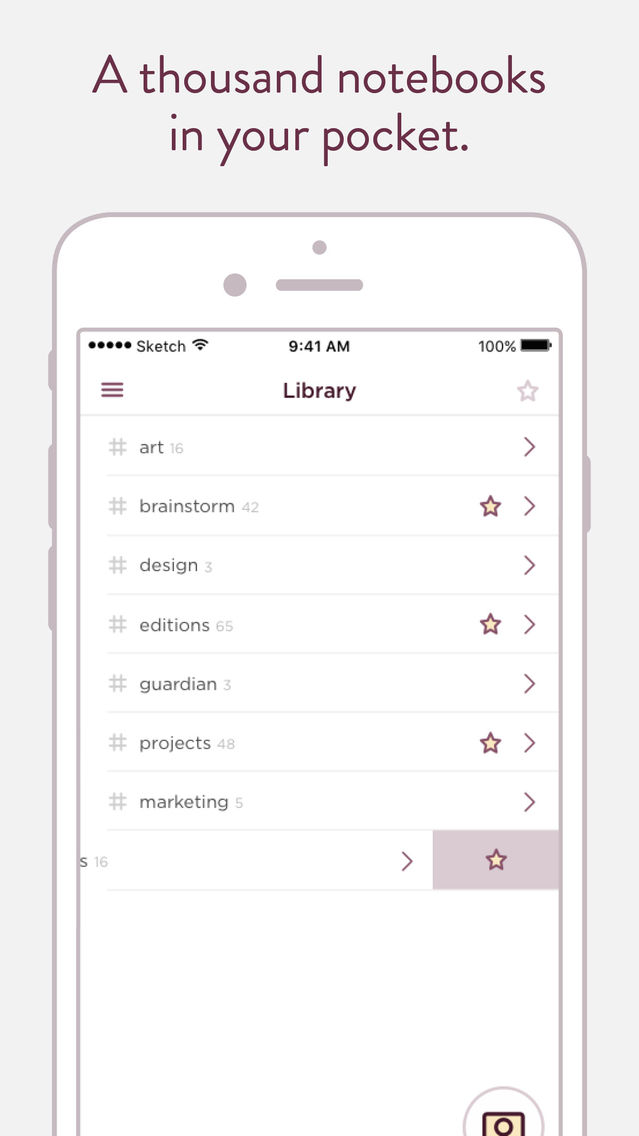
A THOUSAND NOTEBOOKS IN YOUR POCKET
Ever have a project that spans two notebooks? Meetings from six months ago in another notebook? Put it all in once place and never be without.
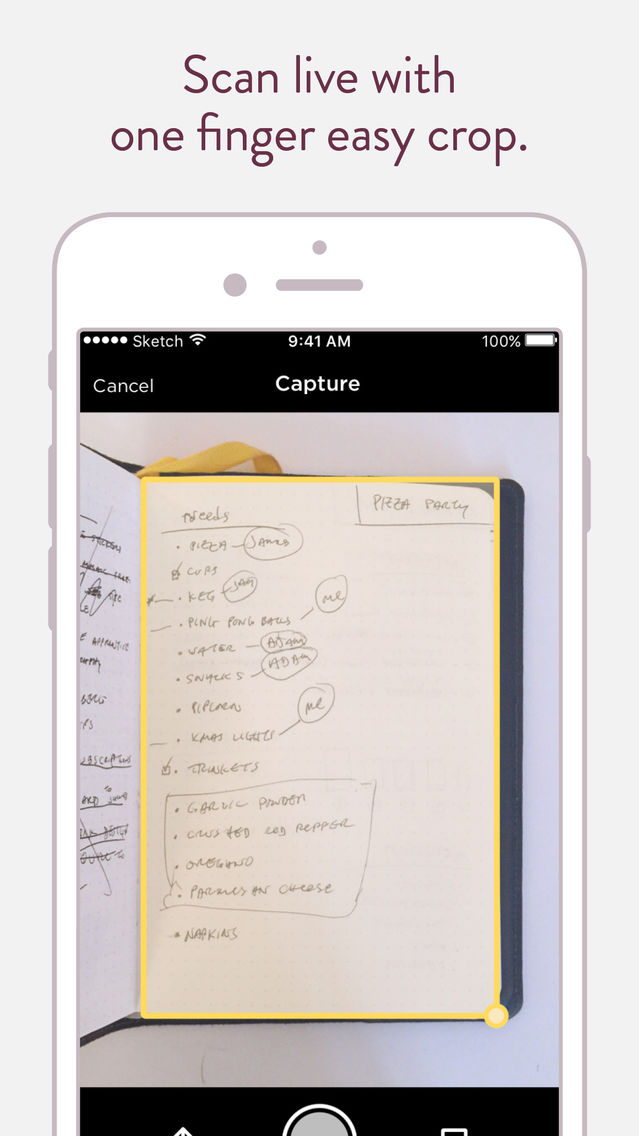
SCAN DOCUMENTS & PAGES WITH EASY CROP
A simple, easy-to-use scanner that lets you crop live with just one finger. Then just point and tap—and you’re done.
UPLOAD AND ORGANIZE YOUR PHOTOS
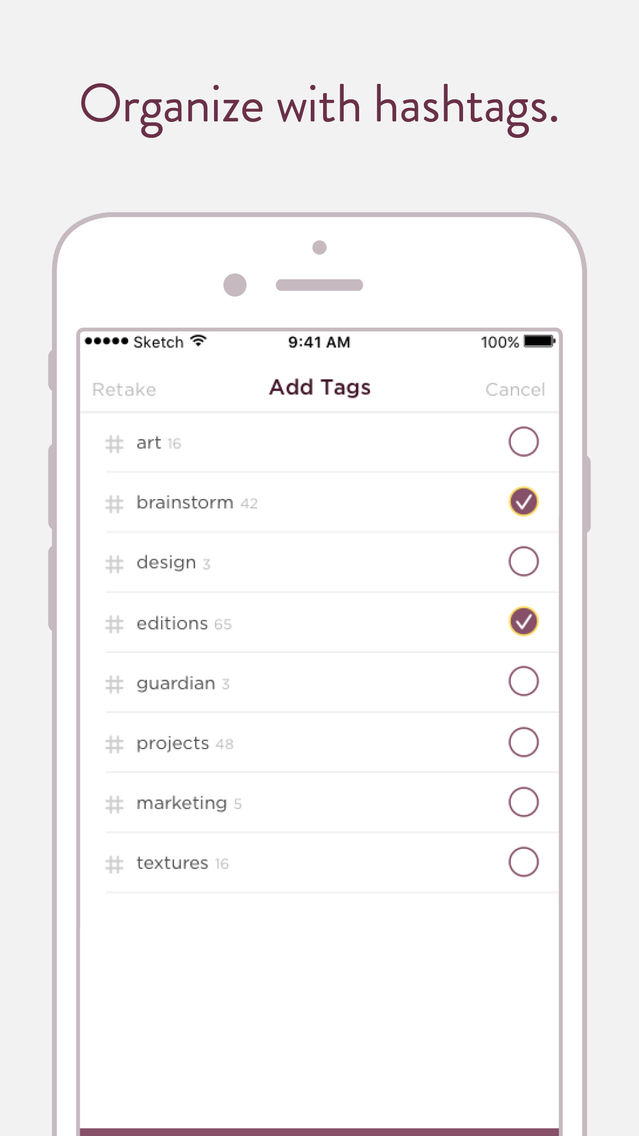
With the option to add multiple hashtags, finding the right photo is easy. No more searching through folders for the right category.
HASHTAGS, NOT FOLDERS
Codex takes a page out of social media’s method of organizing large amounts of data by replacing folders with a hashtag system.
-------
INFINITE. VERSATILE. SHARABLE.
Codex is desinged to be simple and easy for everyday casual use, but also powerful enough for complex organizational tasks.
READY WHEN YOU ARE
Codex is ready to capture photos, documents, and pages, and display your library no matter where you are. Use it to log new ideas or review old ones.
CODEX FEATURES AT A GLANCE
• A thousand notebooks in your pocket
• Scan documents with edge detection
• Multimedia scans: Notebooks, Documents, Photos, Sketches, Diagrams, Whiteboards, and more
• Upload and organize your photos
• Organize with versatility using hashtags
• Cloud backup
• Sync across iOS devices
• PDF export via email
• Sharing via text, email, facebook, and twitter
• Ever evolving
-------
COMMUNITY-DRIVEN SOFTWARE
Like our physical products, Codex is driven by community feedback. Unlike our physical products, which take time to produce, changes in Codex are frequent as we continue to pay attention to your thoughts.
Follow us on Twitter: https://twitter.com/baronfig
Like us on Facebook: https://www.facebook.com/baronfig
Learn more: https://baronfig.com/pages/codex
Get in touch: hello@baronfig.com
A THOUSAND NOTEBOOKS IN YOUR POCKET
Ever have a project that spans two notebooks? Meetings from six months ago in another notebook? Put it all in once place and never be without.
SCAN DOCUMENTS & PAGES WITH EASY CROP
A simple, easy-to-use scanner that lets you crop live with just one finger. Then just point and tap—and you’re done.
UPLOAD AND ORGANIZE YOUR PHOTOS
With the option to add multiple hashtags, finding the right photo is easy. No more searching through folders for the right category.
HASHTAGS, NOT FOLDERS
Codex takes a page out of social media’s method of organizing large amounts of data by replacing folders with a hashtag system.
-------
INFINITE. VERSATILE. SHARABLE.
Codex is desinged to be simple and easy for everyday casual use, but also powerful enough for complex organizational tasks.
READY WHEN YOU ARE
Codex is ready to capture photos, documents, and pages, and display your library no matter where you are. Use it to log new ideas or review old ones.
CODEX FEATURES AT A GLANCE
• A thousand notebooks in your pocket
• Scan documents with edge detection
• Multimedia scans: Notebooks, Documents, Photos, Sketches, Diagrams, Whiteboards, and more
• Upload and organize your photos
• Organize with versatility using hashtags
• Cloud backup
• Sync across iOS devices
• PDF export via email
• Sharing via text, email, facebook, and twitter
• Ever evolving
-------
COMMUNITY-DRIVEN SOFTWARE
Like our physical products, Codex is driven by community feedback. Unlike our physical products, which take time to produce, changes in Codex are frequent as we continue to pay attention to your thoughts.
Follow us on Twitter: https://twitter.com/baronfig
Like us on Facebook: https://www.facebook.com/baronfig
Learn more: https://baronfig.com/pages/codex
Get in touch: hello@baronfig.com
Show More
What's New in the Latest Version 1.3.12
Last updated on Feb 2, 2019
Old Versions
Ability to export your pictures as images and as a PDF.
If you have any questions feel free to email us via hello@baronfig.com. Thanks again for your feedback and support!
—Baron Fig Team
If you have any questions feel free to email us via hello@baronfig.com. Thanks again for your feedback and support!
—Baron Fig Team
Show More
Version History
1.3.12
Feb 2, 2019
Ability to export your pictures as images and as a PDF.
If you have any questions feel free to email us via hello@baronfig.com. Thanks again for your feedback and support!
—Baron Fig Team
If you have any questions feel free to email us via hello@baronfig.com. Thanks again for your feedback and support!
—Baron Fig Team
1.3.11
Aug 1, 2017
Bug fixes, speed and stability improvements.
If you have any questions feel free to email us via hello@baronfig.com. Thanks again for your feedback and support!
—Baron Fig Team
If you have any questions feel free to email us via hello@baronfig.com. Thanks again for your feedback and support!
—Baron Fig Team
1.3.10
Jul 12, 2017
Good News! After listening to your feedback we decided to move to a one-time purchase model. For those of you that have subscribed you're officially on the unlimited plan! Your subscriptions won't renew, you're all set to use Codex as long as you like. Enjoy!
If you have any questions feel free to email us via hello@baronfig.com. Thanks again for your feedback and support!
—Baron Fig Team
If you have any questions feel free to email us via hello@baronfig.com. Thanks again for your feedback and support!
—Baron Fig Team
1.2.10
May 17, 2017
Boom—another requested feature! Introducing Annotations—now you can add a note to any image. Read below for more info.
Here's what's included in this update:
• Simple, easy to use Annotation feature
• Annotations save across all instances of that image
• View/Hide annotations with a single tap
• Sync annotations across devices
• Squashed a few bugs
• Have a feature request? See below.
Feel free to send feedback through Codex via the menu. Visit baronfig.com for more about Codex, our company, and to check out our other products. :)
—Baron Fig Team
Here's what's included in this update:
• Simple, easy to use Annotation feature
• Annotations save across all instances of that image
• View/Hide annotations with a single tap
• Sync annotations across devices
• Squashed a few bugs
• Have a feature request? See below.
Feel free to send feedback through Codex via the menu. Visit baronfig.com for more about Codex, our company, and to check out our other products. :)
—Baron Fig Team
1.2.9
Apr 14, 2017
Ask and you shall receive! Today's update introduces a feature that everyone has been asking about. Check out the notes below to learn more. :)
Here's what's included in this update:
• Rearrange images within a hashtag
• Hold on image tile to drag
• 3D press on image tile to preview
• Behind-the-scenes speed improvements and fixes.
• Have a feature request? See below.
In case you missed it, you can now select multiple images using the check icon in the gallery view. Just tap the icon, select the photos you'd like to export/retag, and hit done!
Feel free to send feedback through Codex via the menu. Visit baronfig.com for more about Codex, our company, and to check out our other products.
—Baron Fig Team, NYC
Here's what's included in this update:
• Rearrange images within a hashtag
• Hold on image tile to drag
• 3D press on image tile to preview
• Behind-the-scenes speed improvements and fixes.
• Have a feature request? See below.
In case you missed it, you can now select multiple images using the check icon in the gallery view. Just tap the icon, select the photos you'd like to export/retag, and hit done!
Feel free to send feedback through Codex via the menu. Visit baronfig.com for more about Codex, our company, and to check out our other products.
—Baron Fig Team, NYC
1.2.8
Mar 12, 2017
Hey there! Today's update is mostly behind the scenes. We're putting some new things in place under the hood in preparation for the next features.
Here's what's included in this update:
• Behind-the-scenes speed improvements and fixes.
• New user sign-up flow improved for clarity.
• Have a feature request? See below.
Feel free to send feedback through Codex via the menu. Visit baronfig.com for more about Codex, our company, and to check out our other products.
—Baron Fig aka Team Figola aka The Fantastic Figs
PS. Our next update brings a much-requested feature. Get excited. ;)
Here's what's included in this update:
• Behind-the-scenes speed improvements and fixes.
• New user sign-up flow improved for clarity.
• Have a feature request? See below.
Feel free to send feedback through Codex via the menu. Visit baronfig.com for more about Codex, our company, and to check out our other products.
—Baron Fig aka Team Figola aka The Fantastic Figs
PS. Our next update brings a much-requested feature. Get excited. ;)
1.2.7
Mar 3, 2017
Another update already? Holy smokes! Our last two updates introduced batches—we added multi-capture and multi-import. As promised, this update adds batch selection. Now you can choose a bunch of images and share, PDF, email, favorite, delete, and move them all at once!
Here's what's included in this update:
• Share multiple images at once via text, email, AirDrop, Twitter, Facebook
• Share a multi-page PDF via text, email, AirDrop, Twitter, Facebook
• Add stars to multiple images at once
• Change hashtags for multiple images at once
• Delete multiple images at once
• Added new animations when selecting and deselecting multiple images to improve the experience
To start multi-selecting just go into any hashtag gallery and tap the checkmark on the top right of the screen. Then tap the images you’d like to select—you’ll see small checkmarks on each one—and hit Next at the top when you’re ready to view the various options at your disposal. Simple!
We also worked on:
• Updated the capture button on the home screen for a little extra oomph
• Behind-the-scenes speed improvements and fixes.
• Have a feature request? See below.
Feel free to send feedback through Codex via the menu. Visit baronfig.com for more about Codex, our company, and to check out our other products.
Enjoy!
—Baron Fig Team in NYC
Here's what's included in this update:
• Share multiple images at once via text, email, AirDrop, Twitter, Facebook
• Share a multi-page PDF via text, email, AirDrop, Twitter, Facebook
• Add stars to multiple images at once
• Change hashtags for multiple images at once
• Delete multiple images at once
• Added new animations when selecting and deselecting multiple images to improve the experience
To start multi-selecting just go into any hashtag gallery and tap the checkmark on the top right of the screen. Then tap the images you’d like to select—you’ll see small checkmarks on each one—and hit Next at the top when you’re ready to view the various options at your disposal. Simple!
We also worked on:
• Updated the capture button on the home screen for a little extra oomph
• Behind-the-scenes speed improvements and fixes.
• Have a feature request? See below.
Feel free to send feedback through Codex via the menu. Visit baronfig.com for more about Codex, our company, and to check out our other products.
Enjoy!
—Baron Fig Team in NYC
1.2.6
Feb 25, 2017
Are you ready for this? In the last update you were upgraded with Multi-Image capturing, now we're adding to that with Multi-Image importing. Not only can you capture several images on the fly, you can now *upload* as many as 25 images at a time from your camera roll—and edit, tag, and save them all at once!
Here's what's included in this update:
• Multi-image camera roll import. Import up to 25 photos at once from your camera roll into Codex.
• The features listed below were introduced last week, but also have been extended to include multi-image imports.
• Multi-image editing. Rotate and black/white all together. Swipe up to remove an image.
• Multi-image hashtagging. Assign multiple photos to hashtags all at once.
• Behind-the-scenes speed improvements and fixes.
• Have a feature request? See below.
Feel free to send feedback through Codex via the menu. Visit baronfig.com for more about Codex, our company, and to check out our other products.
If you're still reading this far, here's a bonus sneak peek at the next release: The past two updates have focused on allowing you to batch capture and import. But what about batch PDFs, sharing, and hashtagging? Stay tuned. ;)
—Much love from the Baron Fig Team in New York City
Here's what's included in this update:
• Multi-image camera roll import. Import up to 25 photos at once from your camera roll into Codex.
• The features listed below were introduced last week, but also have been extended to include multi-image imports.
• Multi-image editing. Rotate and black/white all together. Swipe up to remove an image.
• Multi-image hashtagging. Assign multiple photos to hashtags all at once.
• Behind-the-scenes speed improvements and fixes.
• Have a feature request? See below.
Feel free to send feedback through Codex via the menu. Visit baronfig.com for more about Codex, our company, and to check out our other products.
If you're still reading this far, here's a bonus sneak peek at the next release: The past two updates have focused on allowing you to batch capture and import. But what about batch PDFs, sharing, and hashtagging? Stay tuned. ;)
—Much love from the Baron Fig Team in New York City
1.2.5
Feb 21, 2017
Hello! Get excited, you’re about to download our biggest update yet. It contains—*drum roll*—one of the most requested features: Multi-Page Scanning. Now you can scan in multiple pages, edit, tag, and save them all at once!
Here's what's included in this update:
• Multi-page scanning. Capture multiple photos at a time. Just tap the multi-page icon on the camera screen and start snapping.
• Multi-page editing. Rotate and black/white all together. Swipe up to remove an image.
• Multi-page hashtagging. Assign multiple photos to hashtags all at once.
• Camera capture screen has gotten an upgrade. New buttons, layout, and functionality.
• Switch between camera modes: full screen, easy crop (the user favorite), and auto detect.
• Behind-the-scenes speed improvements and fixes.
• Have a feature request? See below!
Feel free to send feedback through Codex via the menu. Visit baronfig.com for more about Codex, our company, and to check out our other products.
In case you missed it: Codex was featured by Apple in their "New Apps We Love" category. We're excited to continue growing the app and building in new features. Thank you for the support, it means a lot to our small team.
—The Baron Fig Team
Here's what's included in this update:
• Multi-page scanning. Capture multiple photos at a time. Just tap the multi-page icon on the camera screen and start snapping.
• Multi-page editing. Rotate and black/white all together. Swipe up to remove an image.
• Multi-page hashtagging. Assign multiple photos to hashtags all at once.
• Camera capture screen has gotten an upgrade. New buttons, layout, and functionality.
• Switch between camera modes: full screen, easy crop (the user favorite), and auto detect.
• Behind-the-scenes speed improvements and fixes.
• Have a feature request? See below!
Feel free to send feedback through Codex via the menu. Visit baronfig.com for more about Codex, our company, and to check out our other products.
In case you missed it: Codex was featured by Apple in their "New Apps We Love" category. We're excited to continue growing the app and building in new features. Thank you for the support, it means a lot to our small team.
—The Baron Fig Team
1.1.5
Jan 31, 2017
Hello! We hope you're well. Today's update is a calm-before-the-awesome type of update. We fixed a few small things, added a helpful mini-menu, and now we're moving to one of the most requested features. Read below for more info.
Here's what's included in this update:
• New options menu when viewing an image, just tap the three dots on the top right
• Bug fixes and speed improvements
Here's what we're working on next:
• Multi-page scanning. Capture multiple photos at a time and hashtag them all at once.
• Continued behind-the-scenes speed improvements and fixes
• Have a feature request? See below!
Feel free to send feedback through Codex via the menu. Visit baronfig.com for more about Codex, our company, and to check out our other products.
In case you missed it: Codex is featured by Apple in their "New Apps We Love" category. We're excited to continue growing the app and building in new features. Thank you for the support, it means a lot to our small team.
—The Baron Fig Team
"Creativity is allowing yourself to make mistakes. Art is knowing which ones to keep." —Scott Adams
Here's what's included in this update:
• New options menu when viewing an image, just tap the three dots on the top right
• Bug fixes and speed improvements
Here's what we're working on next:
• Multi-page scanning. Capture multiple photos at a time and hashtag them all at once.
• Continued behind-the-scenes speed improvements and fixes
• Have a feature request? See below!
Feel free to send feedback through Codex via the menu. Visit baronfig.com for more about Codex, our company, and to check out our other products.
In case you missed it: Codex is featured by Apple in their "New Apps We Love" category. We're excited to continue growing the app and building in new features. Thank you for the support, it means a lot to our small team.
—The Baron Fig Team
"Creativity is allowing yourself to make mistakes. Art is knowing which ones to keep." —Scott Adams
1.1.4
Jan 19, 2017
Guess what? We're featured in the App Store! Seriously? Yes, seriously! Apple has just put us in their "New Apps We Love" category. Exciting times, for sure. Thank you for sticking with us on this journey, we're working hard to make Codex a phenomenal piece of software.
Here's what's included in this update:
• Easy Crop to capture any part of a page no matter the proportions
• Quick tooltips in Capture to tell you what mode you're in
• Clearer Rotate and B&W buttons in Capture Preview
• Bug fixes and speed improvements
Feel free to send feedback to hello@baronfig.com. You can also send feedback through Codex via the menu. Visit baronfig.com for more about Codex, our company, and to check out our other products.
We'll leave you with some wise words from Jackson Pollock as we build Codex together:
"When I say artist I mean the person who is building things—creating, molding the earth, whether it be the plains of the west or the iron ore of Penn. It's all a big game of construction—some with a brush, some with a shovel, some choose a pen." And some with an iPhone app. ;)
—The Baron Fig Team
Here's what's included in this update:
• Easy Crop to capture any part of a page no matter the proportions
• Quick tooltips in Capture to tell you what mode you're in
• Clearer Rotate and B&W buttons in Capture Preview
• Bug fixes and speed improvements
Feel free to send feedback to hello@baronfig.com. You can also send feedback through Codex via the menu. Visit baronfig.com for more about Codex, our company, and to check out our other products.
We'll leave you with some wise words from Jackson Pollock as we build Codex together:
"When I say artist I mean the person who is building things—creating, molding the earth, whether it be the plains of the west or the iron ore of Penn. It's all a big game of construction—some with a brush, some with a shovel, some choose a pen." And some with an iPhone app. ;)
—The Baron Fig Team
1.0.4
Jan 18, 2017
We're working hard to push regular updates to Codex. Our goal is to provide you with the most up-to-date, simple scanning and storage app possible. This update includes:
• New force press on Codex app icon to launch image capture
• Improved image quality and optimized resolution
• Improved image focus and clarity
• White balance and exposure further optimized
• Bug fixes and speed improvements
Feel free to send feedback to hello@baronfig.com or tweet us via @baronfig. You can also send feedback through Codex via the menu. Visit baronfig.com for more about Codex, our company, and to check out our other products.
—The Baron Fig Team
• New force press on Codex app icon to launch image capture
• Improved image quality and optimized resolution
• Improved image focus and clarity
• White balance and exposure further optimized
• Bug fixes and speed improvements
Feel free to send feedback to hello@baronfig.com or tweet us via @baronfig. You can also send feedback through Codex via the menu. Visit baronfig.com for more about Codex, our company, and to check out our other products.
—The Baron Fig Team
1.0.3
Jan 10, 2017
We're working hard to push regular updates to Codex. Our goal is to provide you with the most up-to-date, simple scanning and storage app possible. This update includes:
• Force Touch integration
• Force press hashtags to preview content
• Force press images to preview
• Bug fixes and speed improvements
Feel free to send feedback to hello@baronfig.com or tweet us via @baronfig. You can also send feedback through Codex via the menu. Visit baronfig.com for more about Codex, our company, and to check out our other products.
Happy new year! —The Baron Fig Team
• Force Touch integration
• Force press hashtags to preview content
• Force press images to preview
• Bug fixes and speed improvements
Feel free to send feedback to hello@baronfig.com or tweet us via @baronfig. You can also send feedback through Codex via the menu. Visit baronfig.com for more about Codex, our company, and to check out our other products.
Happy new year! —The Baron Fig Team
1.0.2
Jan 5, 2017
We're working hard to push regular updates to Codex. Our goal is to provide you with the most up-to-date, simple scanning and storage app possible. This update includes:
• Simplified the sign up process
• Under the hood tweaks for speed
• Fixed a bug that crashed the app during activation
Feel free to send feedback to hello@baronfig.com or tweet us via @baronfig.com. You can also send feedback through Codex via the menu. Visit baronfig.com for more about Codex, our company, and to check out our other products.
Happy new year! —The Baron Fig Team
• Simplified the sign up process
• Under the hood tweaks for speed
• Fixed a bug that crashed the app during activation
Feel free to send feedback to hello@baronfig.com or tweet us via @baronfig.com. You can also send feedback through Codex via the menu. Visit baronfig.com for more about Codex, our company, and to check out our other products.
Happy new year! —The Baron Fig Team
1.0.1
Jan 3, 2017
We regularly update the app with new features and bug fixes.
Big thanks to everyone for the support and feedback!

1.0
Dec 24, 2016
Codex - Scanner Library FAQ
Click here to learn how to download Codex - Scanner Library in restricted country or region.
Check the following list to see the minimum requirements of Codex - Scanner Library.
iPhone
Codex - Scanner Library supports English