CodeNook
Grátis
1.0for iPhone
Age Rating
CodeNook Capturas de tela
About CodeNook
CodeNook is a focused utility toolbox for developers, technical writers, and power users who work with code and text every day. It brings your most common code‑adjacent tasks into a clean, modern iOS experience so you can stay productive even when you are away from your desktop IDE.
Who it’s for
Developers & engineers: Quickly format, inspect, and manipulate code snippets on the go.
DevOps / SRE / scripting users: Tidy up logs, commands, and small scripts copied from terminals and dashboards.
Technical writers & documentation authors: Clean and reshape code examples before publishing.
Power users: Anyone who frequently copies, edits, and reuses text or code fragments across apps.
Key use cases
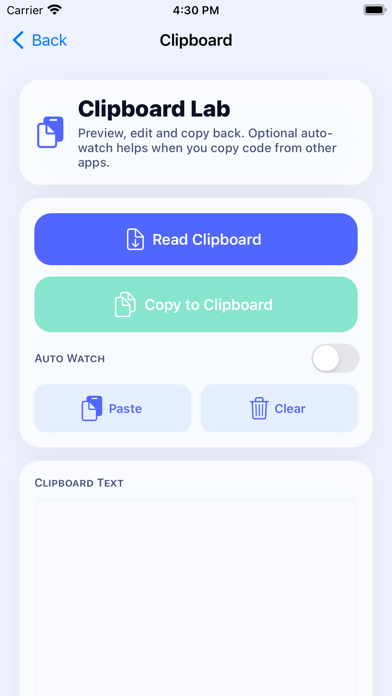
Clipboard lab for code: Preview, edit, and send text back to the clipboard with an intelligent clipboard history that helps you manage multiple snippets at once.
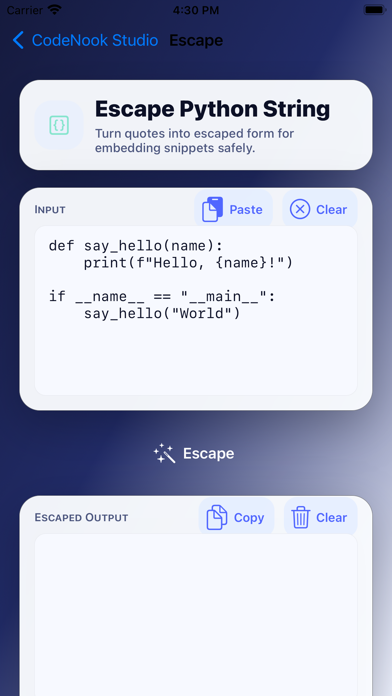
Python utilities: Format, unescape, and transform Python code or string literals without opening a full IDE.
Find & replace lab: Perform fast, precise find/replace operations on text blocks, ideal for refactors and bulk edits.
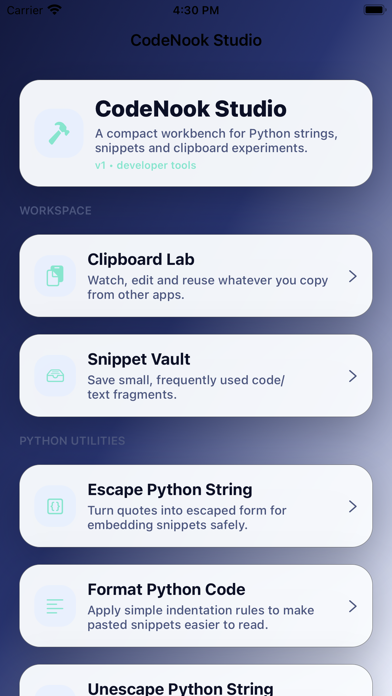
Snippet vault: Save reusable code fragments and text templates, then quickly copy them into any app.
On‑the‑go code cleanup: Fix indentation, adjust formatting, and normalize text before sharing it in chats, emails, or documentation.
CodeNook is designed as a compact, opinionated companion to your main development environment—perfect for quick edits, clipboard workflows, and text utilities whenever you only have your phone or tablet at hand.

Who it’s for
Developers & engineers: Quickly format, inspect, and manipulate code snippets on the go.
DevOps / SRE / scripting users: Tidy up logs, commands, and small scripts copied from terminals and dashboards.
Technical writers & documentation authors: Clean and reshape code examples before publishing.
Power users: Anyone who frequently copies, edits, and reuses text or code fragments across apps.
Key use cases
Clipboard lab for code: Preview, edit, and send text back to the clipboard with an intelligent clipboard history that helps you manage multiple snippets at once.
Python utilities: Format, unescape, and transform Python code or string literals without opening a full IDE.
Find & replace lab: Perform fast, precise find/replace operations on text blocks, ideal for refactors and bulk edits.
Snippet vault: Save reusable code fragments and text templates, then quickly copy them into any app.
On‑the‑go code cleanup: Fix indentation, adjust formatting, and normalize text before sharing it in chats, emails, or documentation.
CodeNook is designed as a compact, opinionated companion to your main development environment—perfect for quick edits, clipboard workflows, and text utilities whenever you only have your phone or tablet at hand.
Show More
Novidades da Última Versão 1.0
Last updated on Jan 29, 2026
Version History
1.0
Jan 29, 2026
CodeNook FAQ
Clique aqui para saber como baixar CodeNook em um país ou região restrita.
Confira a lista a seguir para ver os requisitos mínimos de CodeNook.
iPhone