CrossBox Cloud

CrossBox Cloud


Gratis

0.8.0for iPhone
Age Rating
4+
Apps in this category do not contain restricted content.
9+
Apps in this category may contain mild or occasional cartoon, fantasy or real-life violence, as well as occasional or mild adult, sexually suggestive or horrifying content and may not be suitable for children under 9 years of age.
12+
Apps in this category may contain occasional mild indecent language, frequent or intense cartoon or real-life violence, minor or occasional adult or sexually suggestive material, and simulated gambling, and may be for children under 12 years of age.
17+
You must be at least 17 years old to access this App.
Apps in this category may contain frequent and intense offensive language; Frequent and intense cartoon, fantasy or realistic violence: frequent and intense adult, scary and sexually suggestive subjects: as well as sexual content, nudity, tobacco, alcohol and drugs, may not be suitable for children under 17 years of age.
CrossBox Cloud Screenshots
CrossBox Cloud PlakatCrossBox Cloud PlakatCrossBox Cloud PlakatCrossBox Cloud PlakatCrossBox Cloud PlakatCrossBox Cloud Plakat

About CrossBox Cloud

CrossBox is an all-in-one Communication Suite designed for those who settle only for the best. It is beautiful, dazzlingly fast, and comes with advanced features that provide you and your team with cutting-edge communication technologies.

Features:

- Email Composer (HTML or Plain Text)
- Attachment Previewer (doc(x), odt, pdf, xls(x), ppt(x), odp, .bmp, .gif, .jpg, .png)
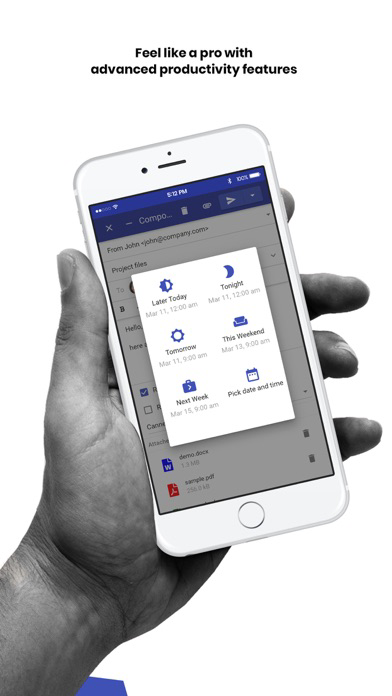
- Email Scheduling
- Email Snoozing
- Send Large Email Attachments
- Email Canned Responses (Predefined replies)
- Email Follow-Ups
- Email Delayed Sending
- Email Health Indicators
- Email Spam Learning
- Undo Button
- Custom Email Folders
- Conditions and Actions (Filters)
- Advanced Search
- Email Import
- Email Autoresponder
- Email Signatures
- Contextual Menu
- Email Settings (Tailor the app behaviour to your reading and writing habbits)
- Email Suspicious Link Warning
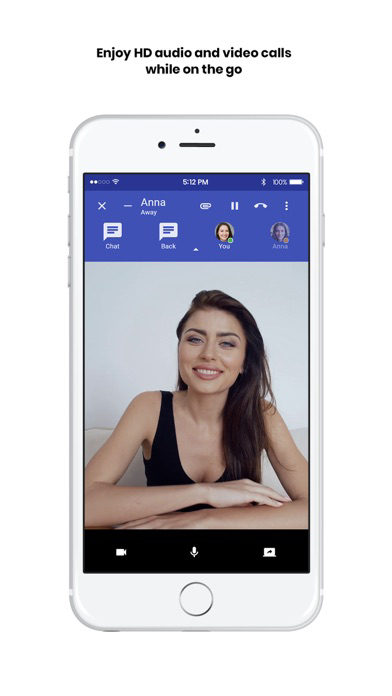
- Text, Audio & Video
- Screen Sharing
- Call/talk to Anyone
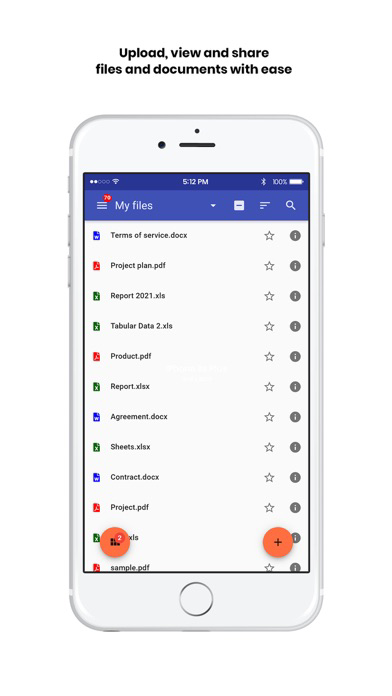
- Super-Fast File Sharing
- Private Files
- Team Folder
- File and Folder Sharing
- Quick Share and Copy Link
- Advanced File Operations
- Contact Collecting
- Contact Card
- Dark Mode
- Two-Factor Authentication
- Multi-Account
- Multitasking
- Internationalization (100+ languages)
- Dashboard

Show More

Was ist neu in der neuesten Version 0.8.0

Last updated on Dec 1, 2022
Alte Versionen
Fixes and improvements:

- Add mail folder subscribe unsubscribe
- Improve mail importer by allowing the ability to set which folders to import before starting importing
- Fix folder close bug
- Add "always save to sent folder" checkbox where each mail that is sent is copied to the sent folder as well, regardless of whether threading is enabled or not
- Add file-rich text editor
- Add an "edit" button for all editable files
- Redesign the dashboard to be customizable, draggable, sortable, etc
- Reorganize user settings pages into a simpler layout
- Fix the previewer loading bug for a specific file type
- Automatically adjust the styling of the email when in dark mode for readability
- Automatically adjust the padding of the email for cleaner readability
- Add zoom ability for images in emails via previewer
- Fix the sent folder "from" name in the list
- Add the ability to tag notes
- Add the ability to customize which categories you want to block for links
- Move the volume button into settings instead of the side nav
- Improve presence check and check for WebSocket crash/timeout more efficiently
- View blocked images details in an email
- Show email size in bytes in the detail view
- Reorganize dropdown menus for the mail module to be consistent in all views
- Add pull to refresh for all lists
- When pasting an email list of an RFC-compatible format, it will be recognized and parsed into to: bcc: cc: fields
- Added Notes module, ability to share, collaborate and create various types of note formats directly from CrossBox
- Dark mode switch fix to persist through temporary logins
- Fix maximize/fullscreen bug that appears in default maximized activities
- Fix special characters being double HTML entity escaped for folder name
- Add sided mail reply, ability to view the email you are replying to when composing the email
- Add the ability to automatically maximize mail reply activity by default
- Add tag system (for notes in this release, planned for mail and other modules)
- Add the ability to clear all notifications (delete)
- Add the ability to set view or edit permissions for a file
- Fix sorting of the email folders (A-Z sorting)
Show More
Version History
0.8.0
Dec 1, 2022
Fixes and improvements:

- Add mail folder subscribe unsubscribe
- Improve mail importer by allowing the ability to set which folders to import before starting importing
- Fix folder close bug
- Add "always save to sent folder" checkbox where each mail that is sent is copied to the sent folder as well, regardless of whether threading is enabled or not
- Add file-rich text editor
- Add an "edit" button for all editable files
- Redesign the dashboard to be customizable, draggable, sortable, etc
- Reorganize user settings pages into a simpler layout
- Fix the previewer loading bug for a specific file type
- Automatically adjust the styling of the email when in dark mode for readability
- Automatically adjust the padding of the email for cleaner readability
- Add zoom ability for images in emails via previewer
- Fix the sent folder "from" name in the list
- Add the ability to tag notes
- Add the ability to customize which categories you want to block for links
- Move the volume button into settings instead of the side nav
- Improve presence check and check for WebSocket crash/timeout more efficiently
- View blocked images details in an email
- Show email size in bytes in the detail view
- Reorganize dropdown menus for the mail module to be consistent in all views
- Add pull to refresh for all lists
- When pasting an email list of an RFC-compatible format, it will be recognized and parsed into to: bcc: cc: fields
- Added Notes module, ability to share, collaborate and create various types of note formats directly from CrossBox
- Dark mode switch fix to persist through temporary logins
- Fix maximize/fullscreen bug that appears in default maximized activities
- Fix special characters being double HTML entity escaped for folder name
- Add sided mail reply, ability to view the email you are replying to when composing the email
- Add the ability to automatically maximize mail reply activity by default
- Add tag system (for notes in this release, planned for mail and other modules)
- Add the ability to clear all notifications (delete)
- Add the ability to set view or edit permissions for a file
- Fix sorting of the email folders (A-Z sorting)

CrossBox Cloud FAQ

Klicken Sie hier, um zu erfahren, wie Sie CrossBox Cloud in eingeschränkten Ländern oder Regionen herunterladen können.
Überprüfen Sie die folgende Liste, um die Mindestanforderungen von CrossBox Cloud zu sehen.
iPhone

CrossBox Cloud Alternative

Das könnte Ihnen auch gefallen