Age Rating
KML Map スクリーンショット
About KML Map
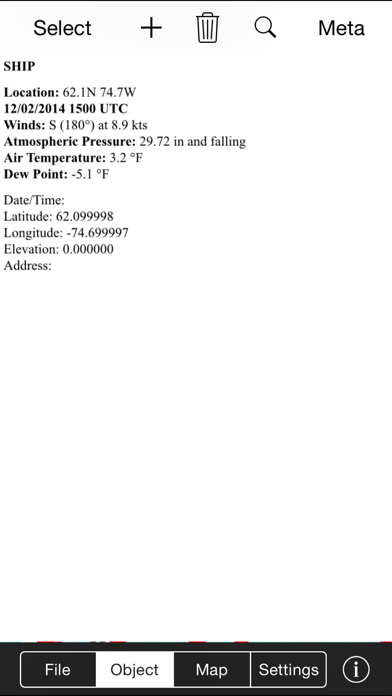
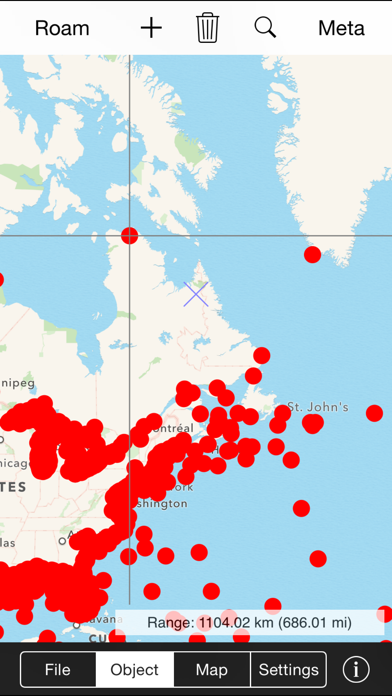
Keyhole markup language (KML) is a standard format used by many other mapping and navigation tools to represent geographical information. KML Map lets you create, display, and store KML map data and attached media content (often called metadata) on the iPhone/iPod Touch. Use KML Map to view photographs on maps from the location and direction they were taken, to create your own custom maps containing point, line, and polygonal data, to display topographic maps and ground overlays on top of map layers, to visualize scientific data and metadata for a variety of applications, and much more.
Here are some of the features of KML Map:
•Display KML point, line, and polygonal features, ground and photo overlays.
•Standard north up or rotating map that points in your look direction.
•Display KML content from Safari or embedded in email. Just click and see the data in KML Map.
•Add new map features.
•Assign address information to new objects using reverse geocoding.
•Elevation data is downloaded from global terrain data server (not GPS) for consistency.
•Display ground overlays (e.g., your own maps and images) over base maps/images
•Photo overlays are rendered on a map from the location and direction they were taken.
•Supports multiple, variable-transparency map layers
•Read compressed KMZ files
•Transfer files between KML Map and your computer using iTunes File Sharing
•Download KML and KMZ content from network URLs
•Supports standard and custom pushpins/placemark icons
•Shows/hides names on map
•Quickly find an object of interest in the current map layer by name
•Display full HTML content contained in CDATA tag (text, pictures, sound files, or movies)
Important Notice
KML Map understands a subset of the KML language, specifically points, line strings, and polygons (without holes). It can display ground overlays (LatLonBox format only) and photo overlays. HTML contained within CDATA tags (including pictures, sound files, and video) are rendered in a web view window. Files containing unsupported tags will not load. File sizes should be limited to 5-7 Mbytes. If the file is too large KML Map will quit. The size of files that can be emailed is limited by the operating system. KML Map also reads compressed KML or KMZ files. However, depending on the internal structure and contents of the file, KML Map may only be able to display one KMZ file at a time.
N.B. Continued use of GPS running in the background can dramatically decrease battery life.

Here are some of the features of KML Map:
•Display KML point, line, and polygonal features, ground and photo overlays.
•Standard north up or rotating map that points in your look direction.
•Display KML content from Safari or embedded in email. Just click and see the data in KML Map.
•Add new map features.
•Assign address information to new objects using reverse geocoding.
•Elevation data is downloaded from global terrain data server (not GPS) for consistency.
•Display ground overlays (e.g., your own maps and images) over base maps/images
•Photo overlays are rendered on a map from the location and direction they were taken.
•Supports multiple, variable-transparency map layers
•Read compressed KMZ files
•Transfer files between KML Map and your computer using iTunes File Sharing
•Download KML and KMZ content from network URLs
•Supports standard and custom pushpins/placemark icons
•Shows/hides names on map
•Quickly find an object of interest in the current map layer by name
•Display full HTML content contained in CDATA tag (text, pictures, sound files, or movies)
Important Notice
KML Map understands a subset of the KML language, specifically points, line strings, and polygons (without holes). It can display ground overlays (LatLonBox format only) and photo overlays. HTML contained within CDATA tags (including pictures, sound files, and video) are rendered in a web view window. Files containing unsupported tags will not load. File sizes should be limited to 5-7 Mbytes. If the file is too large KML Map will quit. The size of files that can be emailed is limited by the operating system. KML Map also reads compressed KML or KMZ files. However, depending on the internal structure and contents of the file, KML Map may only be able to display one KMZ file at a time.
N.B. Continued use of GPS running in the background can dramatically decrease battery life.
Show More
最新バージョン 6.1 の更新情報
Last updated on 2018年05月17日
旧バージョン
This app has been updated by Apple to display the Apple Watch app icon.
Updated for iOS 11.
Updated for iOS 11.
Show More
Version History
6.1
2018年05月17日
This app has been updated by Apple to display the Apple Watch app icon.
Updated for iOS 11.
Updated for iOS 11.
6.0
2014年12月06日
App now runs in background.
5.5
2014年10月08日
Updated for iOS 8.
5.4
2014年03月22日
Major iOS 7 bug fixes.
5.3
2013年09月27日
Fixed iOS 7 bugs.
5.2
2013年04月24日
Fixed bug with MultiGeometry objects.
5.1
2013年01月09日
New layout. Bug fixes.
5.0
2012年04月11日
New look. Easier to use. New features include distance from your location to a point, length of a line (line string), and area of polygon.
4.9
2011年10月27日
Bug fixes.
4.8
2011年10月20日
Fixed iOS 5 bugs.
4.7
2011年10月01日
Bug fixes. Changed window behavior with GPS on/off.
Display current latitude/longitude.
Computes range from current location to points, length of lines, and area of polygons.
Added repeat option for network link update (once or every 10-300 seconds)
Display current latitude/longitude.
Computes range from current location to points, length of lines, and area of polygons.
Added repeat option for network link update (once or every 10-300 seconds)
4.6
2011年09月06日
Fixed problem with stalling after startup.
Fixed bug in parsing embedded HTML content
Updated documentation with links to earthquake, marine, weather, and other global KML data sets.
Fixed bug in parsing embedded HTML content
Updated documentation with links to earthquake, marine, weather, and other global KML data sets.
4.5
2011年08月11日
Bug fixes with ground overlays and KML file parsing
4.4
2011年08月02日
Fixed rotation problem with LatLonBox format ground overlays.
4.3
2011年06月17日
Bug fixes.
4.2
2011年05月03日
• Centers map view and zoom level based on map content.
• Eliminated blinking during map overlay update.
4.1
2011年04月22日
• Now reads gx:Track tags from KML files exported from Garmin and other GPS devices.
• Locks out screen rotation when alert dialogs are exposed.
4.0
2011年03月17日
New improved design! Please tell us what you think.
3.4
2011年02月15日
Displays placemark names
Import KML and KMZ files from Mail and other applications
Notifies user of unsupported tags encountered in file load
Fixed polygon transparency and crash problem with Find command
Import KML and KMZ files from Mail and other applications
Notifies user of unsupported tags encountered in file load
Fixed polygon transparency and crash problem with Find command
3.3
2011年01月06日
•Supports multiple, variable-transparency map layers
•Read compressed KMZ files
•Supports standard and custom pushpins/placemark icons
•Read compressed KMZ files
•Supports standard and custom pushpins/placemark icons
3.2
2010年11月23日
Fixed memory leak. Handles larger files.
Fixed placemark color when adding new features.
Added FIND button to locate specific features in layer by name.
New KML file save assigns unique label to multiple untitled features.
Built-in documentation.
Fixed placemark color when adding new features.
Added FIND button to locate specific features in layer by name.
New KML file save assigns unique label to multiple untitled features.
Built-in documentation.
3.1
2010年10月29日
Correctly displays international characters. Handles larger files with improved memory management.
3.0
2010年10月17日
Easier to use. Now displays KML ground overlays (LatLonBox format). Larger display makes better use of limited screen size of iPhone. Multiple map layers can be turned on/off. New data saved in files with name consisting of date/time string to prevent inadvertent overwrites.
2.1
2010年08月25日
Settings available within app.
2.0
2010年08月13日
Major redesign with several options for importing KML files. Load and save multiple layers. Supports dynamic network links and content stored on network URLs including multimedia data.
KML Map 価格
今日:
¥400
最低価格:
¥400
最高価格:
¥480
KML Map FAQ
ここをクリック!地理的に制限されているアプリのダウンロード方法をご参考ください。
次のリストをチェックして、KML Mapの最低システム要件をご確認ください。
iPhone
iOS 9.1以降が必要です。
iPod touch
iOS 9.1以降が必要です。
KML Mapは次の言語がサポートされています。 英語