LinearSystemsSolver

LinearSystemsSolver


Solve systems effectively


無料

LinearSystemsSolver 1.6.7for iPhone, iPad and more
9.9
1 Ratings
Fernand Tessier
Developer
1.1MB
Size
2024年08月11日
Update Date
Education
Category
4+
Age Rating
Age Rating
4+
Apps in this category do not contain restricted content.
9+
Apps in this category may contain mild or occasional cartoon, fantasy or real-life violence, as well as occasional or mild adult, sexually suggestive or horrifying content and may not be suitable for children under 9 years of age.
12+
Apps in this category may contain occasional mild indecent language, frequent or intense cartoon or real-life violence, minor or occasional adult or sexually suggestive material, and simulated gambling, and may be for children under 12 years of age.
17+
You must be at least 17 years old to access this App.
Apps in this category may contain frequent and intense offensive language; Frequent and intense cartoon, fantasy or realistic violence: frequent and intense adult, scary and sexually suggestive subjects: as well as sexual content, nudity, tobacco, alcohol and drugs, may not be suitable for children under 17 years of age.
LinearSystemsSolver スクリーンショット
LinearSystemsSolver ポスターLinearSystemsSolver ポスター

About LinearSystemsSolver

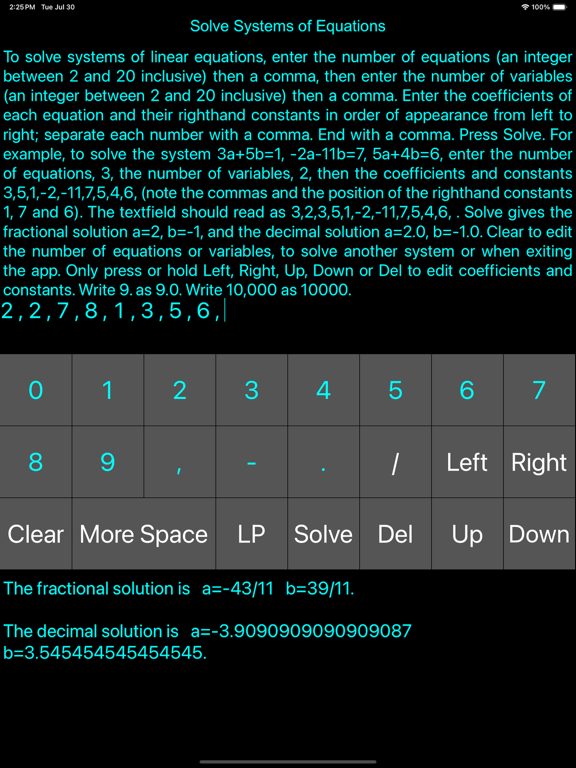
LinearSystemsSolver solves systems of linear equations with 2 to 23 (inclusive) equations and 2 to 23 (inclusive) variables. It uses the Gauss-Jordan elimination method and several conditioning techniques to effectively resolve unique solutions, parametric solutions and inconsistency.

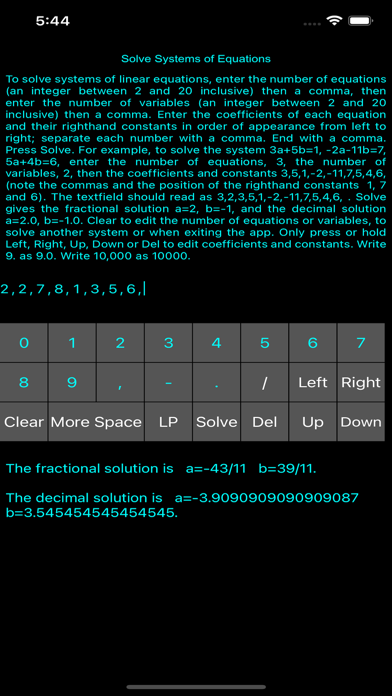
The user is provided with a keypad, a two-line text field for input, a help window briefly describing the app’s operation and a solution box where warnings (in red), messages and solutions appear. Solutions are given in both fractional and decimal form.

The text field and keypad allow the editing of single characters without a touch feature. Scrolling keys Left and Right are fast if held down. The Up and Down keys allow the user to easily switch lines to quickly edit inputs. To edit an entry, use the Left, Right, Up or Down keys to place the cursor to its right, then either add a character, delete the character using Del or replace it.

A scrollable second window for big solutions can be accessed at the press of a button.

To solve systems of linear equations enter the number of equations (an integer between 2 and 23 inclusive) then a comma, then enter the number of variables (an integer between 2 and 23 inclusive) then a comma. Enter the coefficients of each equation and their righthand constants in order of appearance from left to right; separate each coefficient, righhand constant and equation with a comma. End with a comma. Press Solve. For example, to solve the system 3a+5b=1, -2a-11b=7, 5a+4b=6, enter the number of equations, 3, the number of variables, 2, or 3,2, followed by the coefficients and constants 3,5,1,-2,-11,7,5,4,6, (note the commas and the position of the righthand constants 1, 7 and 6). The textfield should read as 3,2,3,5,1,-2,-11,7,5,4,6, . Pressing Solve now gives the fractional solution a=2, b=-1 and the equivalent decimal solution a=2.0, b=-1.0.

To solve the system 4a+3b=1, -2a-9b=2, we enter 2,2,4,3,1,-2,-9,2 in the textfield. After pressing Solve, we get the fractional solution a=1/2, b=-1/3 and the equivalent decimal solution a=0.5, b=-0.3333333333333333.

Press the Clear button to edit the number of equations or variables, to solve another system or when exiting the app. Press or hold the right or left arrows or Del only to edit coefficients and constants. Write 9. as 9.0. Write 10,000 as 10000.

Press More space if the solution is too large for the solution box.

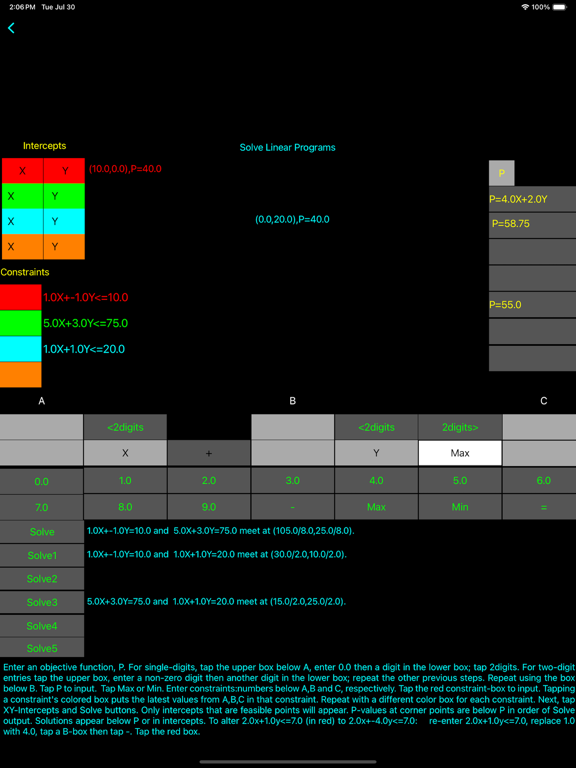
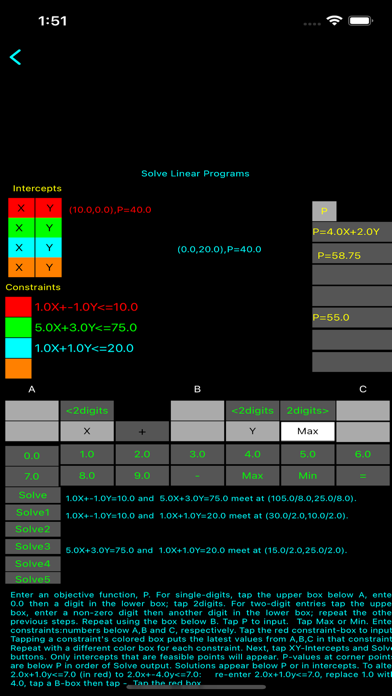
To solve a standard linear programming maximization problem, tap the LP-button in the opening screen. Enter the objective function P: tap the box below A; enter a number using the number pad. Repeat this using the box below B. Tap P to input. Tap the Max-button or the Min-button. Enter constraints:numbers below A, below B and below C, respectively. Tap the red box to input. Repeat these steps for each constraint using a different coloured box for each constraint. To find corner points, tap X and Y in Intercepts for each constraint's coloured box, then tap Solve, Solve1, Solve2 etc. P-values at corner points are below P in order of Solve output or in the constraint boxes. The solution appears in one of the boxes below P or in the constraint boxes. To edit the coefficients of a constraint, enter coefficients and right-hand constants (under A, B, and C), then tap the coloured box for that constraint to input. To negate a coefficient, tap its lower number in the number pad, then tap -. Tap its colour to input.
See the instructions in the LP part of the app. "

Show More

最新バージョン LinearSystemsSolver 1.6.7 の更新情報

Last updated on 2024年08月11日
旧バージョン
New functionality has been added (Max and Min buttons) to the LP (or linear programming) part of this app. Tapping the Max-button turns the linear program into one that maximizes the objective function and the inequalities (in the constraints) will be less than or equal. Tapping the Min-button turns the program into one that minimizes the objective function and the inequalities will be greater than or equal. Unless one of these buttons has been tapped, the app will not display constraints and the Intercepts and Solve buttons will not function. A white button labelled Max or Min will appear if one of the two buttons has been tapped. That white button acts as a reminder of which button, Max or Min, has been tapped. Its label will be the same as the tapped button (Max or Min).
Show More
Version History
LinearSystemsSolver 1.6.7
2024年08月11日
New functionality has been added (Max and Min buttons) to the LP (or linear programming) part of this app. Tapping the Max-button turns the linear program into one that maximizes the objective function and the inequalities (in the constraints) will be less than or equal. Tapping the Min-button turns the program into one that minimizes the objective function and the inequalities will be greater than or equal. Unless one of these buttons has been tapped, the app will not display constraints and the Intercepts and Solve buttons will not function. A white button labelled Max or Min will appear if one of the two buttons has been tapped. That white button acts as a reminder of which button, Max or Min, has been tapped. Its label will be the same as the tapped button (Max or Min).
1.6.4 (1.0.0)
2024年06月01日
Corrected output boxes and their sizes. Adjusted output scheme for 33 devices ( ten iPads and twenty-three iPhones).
1.6.3 (1.0.0)
2024年03月14日
Constraints and objective functions with two-digit coefficients are now allowed; consequently, this app can now solve linear programming maximization problems with larger coefficients. (The help window in the app gives directions on how to enter one-digit coefficients and how to enter two-digit coefficients. ) Also, we give those directions here next.
For example, to enter single-digits in the A-coefficient, tap the upper box below A, enter 0.0 then enter a number in the lower box; tap 2digits. For two-digit entries tap the upper box below A, enter a non-zero number, then tap the lower box below A and enter a number; tap 2digits. Repeat these steps for the B-coefficients and the C-coefficients.
1.6.0
2023年08月26日
Graphing is no longer used in the app. X and Y intercepts are now determined (under Intercepts) and are to be included in the corner points list along with the Solve points. This allows constraints with larger coefficients and solves linear programming problems that have one constraint or that have x and y intercepts as corner points. The help window in the app gives directions on how to find them.
1.5.9
2023年06月06日
LinearSystemsSolver handles solving systems of simultaneous linear equations, this version of the app also solves linear programming problems (maximization) in two nonnegative variables with up to four constraints. It uses the graphical method. Tapping the LP-button brings the user to the linear programming interface. It provides the means of inputting the objective function and the constraints. It graphs the boundary for the feasibility region (which is optional), determines the intersection points and decides which intersection points are feasible (or corner points). Lastly, it evaluates the objective function at each corner point. The results are in boxes that correspond to the corner points. From this, a user can select the optimal solution. This should be easy to carry out.
The 0.0 and 7.0 buttons have been repaired and now operate much better than in previous versions. The reset button, that we refer to in the previous description, has been added. It allows the user to graph vertical lines and prevents coefficients in different constraints from mixing. The user must tap the reset button then a coloured box to input a constraint.
1.3.7
2023年02月08日
The app now allows dimensions of 23 equations in 23 variables. A few bugs have been corrected.
1.3.6
2023年01月22日
A few bugs have been resolved.
1.3.5
2022年08月23日
Systems dimensions have been extended to 22 equations in 22 variables. The extreme case of a zero augmented matrix and other situations have been handled.
1.3.4
2021年10月02日
Aesthetic changes have been made to error warnings. They are now in red, a more appropriate colour. New iPhones have been added to the list of devices this app may be used on i.e. iPhone 13, iPhone 13 pro and iPhone 13 proMax. Some bug fixes have been corrected.
1.3.3
2020年12月09日
This version of LinearSystemsSolver extends this app to several iPads and iPhones. These include the iPad 8th generation, iPad Air 4th generation, iPad 11 Pro 2nd generation, iPad 12.9 4th generation, iPhone 11 Pro Max, iPhone 12, 12 pro, 12 proMax, 12 mini and iPhone SE 2nd generation. Also, some bugs have been fixed
1.3.2
2020年04月02日
This version of LinearSystemsSolver enhances input capability by providing a two-line textfield. This makes it easier for users to detect and correct errors without scrolling, at least for smaller systems such as those with four or fewer equations with four or fewer variables. Left and Right cursor movement is still available but Up and Down keys have been added so users can quickly change lines. Rows of text still scroll left or right by either overfilling the textfield at the left or right end of the field, or by moving the cursor to the left end on the first line, or to the right end on the second line.

In addition, several bugs have been fixed.

1.2.1
2020年01月14日
This version of LinearSystemsSolver gives solutions in both fractional and decimal form. Several bugs have been corrected.
1.1.0
2019年11月26日
The capability of entering and using fractional coefficients and constants has been added via a division button. Users can also use decimal entries as before.
1.0.9
2019年10月08日
A number of bugs have been fixed. Limits to the size of coefficients and constants have been added.
1.0.7
2019年10月01日

LinearSystemsSolver FAQ

ここをクリック!地理的に制限されているアプリのダウンロード方法をご参考ください。
次のリストをチェックして、LinearSystemsSolverの最低システム要件をご確認ください。
iPhone
iOS 13.0以降が必要です。
iPad
iPadOS 13.0以降が必要です。
iPod touch
iOS 13.0以降が必要です。
LinearSystemsSolverは次の言語がサポートされています。 英語

LinearSystemsSolverの類似アプリ

あなたも好きかも