SQLPro for PostgreSQL

SQLPro for PostgreSQL


無料

2026.90for iPhone
Age Rating
4+
Apps in this category do not contain restricted content.
9+
Apps in this category may contain mild or occasional cartoon, fantasy or real-life violence, as well as occasional or mild adult, sexually suggestive or horrifying content and may not be suitable for children under 9 years of age.
12+
Apps in this category may contain occasional mild indecent language, frequent or intense cartoon or real-life violence, minor or occasional adult or sexually suggestive material, and simulated gambling, and may be for children under 12 years of age.
17+
You must be at least 17 years old to access this App.
Apps in this category may contain frequent and intense offensive language; Frequent and intense cartoon, fantasy or realistic violence: frequent and intense adult, scary and sexually suggestive subjects: as well as sexual content, nudity, tobacco, alcohol and drugs, may not be suitable for children under 17 years of age.
SQLPro for PostgreSQL スクリーンショット
SQLPro for PostgreSQL ポスターSQLPro for PostgreSQL ポスターSQLPro for PostgreSQL ポスター

About SQLPro for PostgreSQL

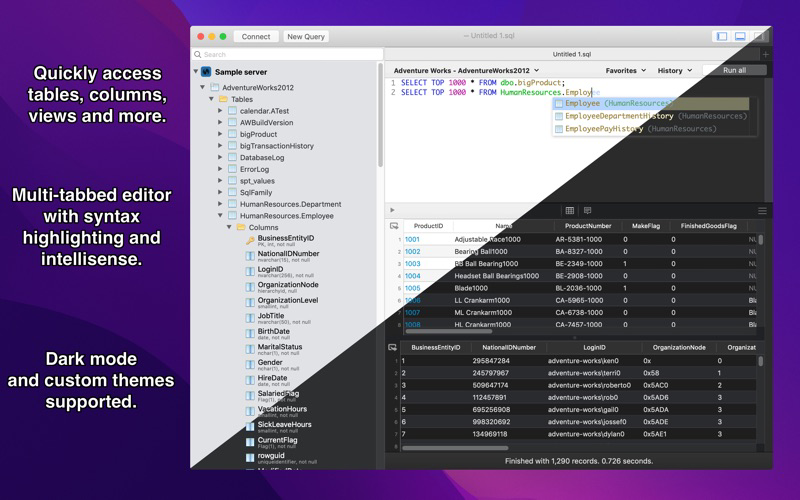
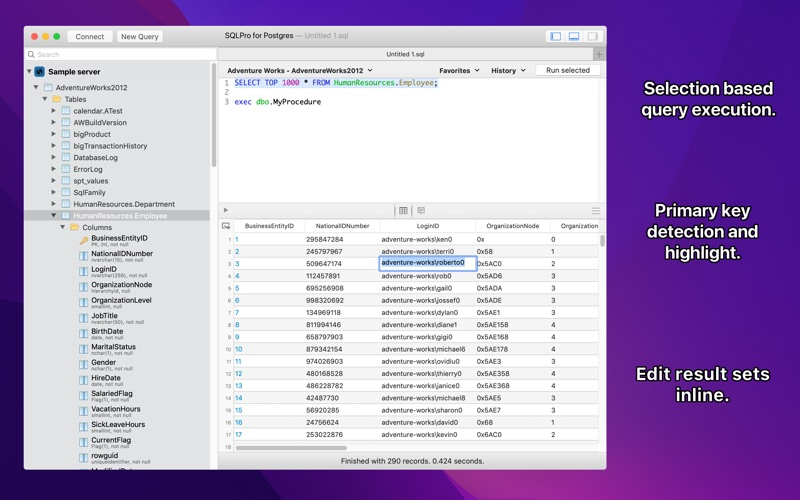
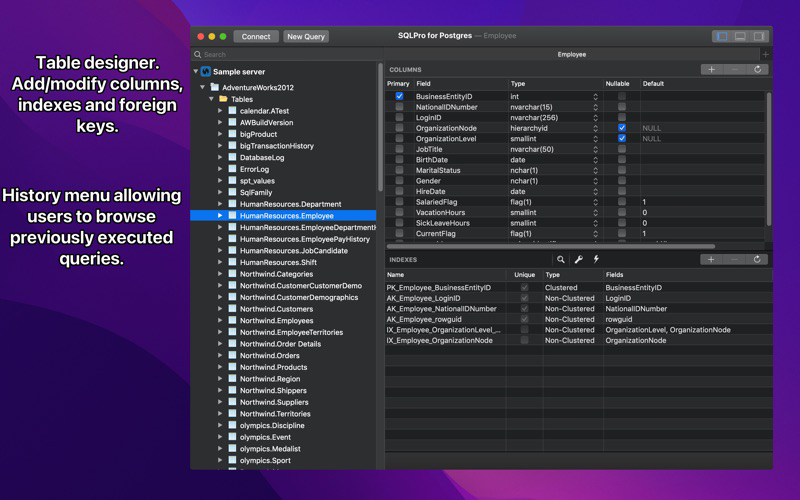
SQLPro for Postgres is a advanced but lightweight PostgresSQL database client, allowing quick and simple access to Postgres servers.

This is not a free app. Please don't download this app assuming it will be free.

Features include:
+ Syntax highlighting.
+ Intellisense.
+ Tabbed based interface.
+ Support for executing multiple queries at once.
+ Quick access to tables, columns and more.

See what others are saying, by checking out these great reviews:
https://www.compose.io/articles/tooltime-sqlpro-for-postgres-and-keylord-for-redis/

Please note:
This SQL Client does NOT work with MySQL or Microsoft SQL Server.

Privacy Policy:
https://hankinsoft.com/privacypolicy.html

Terms of Use:
https://hankinsoft.com/termsofuse.html

Price:
SQLPro requires a Premium upgrade in order to interact with database result sets. Premium is available as either a Lifetime Purchase or through a Subscription with Monthly and Yearly options. Subscriptions auto-renew within 24 hours of the expiration date unless auto-renewal is turned off in the iTunes account settings. Your Account will be charged for renewal (based on your selected plan) within 24-hours prior to the end of the current period. Any unused portion of a free trial period, if offered, will be forfeited when the user purchases a subscription to that publication, where applicable. Payment will be charged to your iTunes Account at confirmation of purchase.

Show More

最新バージョン 2026.90 の更新情報

Last updated on 2026年04月30日
旧バージョン
- Window & Session behavior preferences redesigned. Separate controls for "save state and restore on next launch" vs. "clean shutdown", and independent prompts for "on tab close" and "on window/app close". Save-state users no longer see a misleading "unsaved changes will be lost" warning, and clean-shutdown users can opt out of the prompt entirely. File-backed query tabs are now always autosaved using macOS-native autosave.
- Cmd+Q now correctly dismisses the connection picker and quits the app cleanly. Previously the modal sheet consumed the shortcut and required clicking Cancel first.
- Tab dirty-state tracking moved to a model flag, so the unsaved indicator no longer flickers between titles.
- Database tree state restore on connections with very large schemas is dramatically faster.
- Fixed a hang when opening very large SQL files. The editor's scroller workaround used to force full-document layout and could trip the watchdog on multi-MB files.
- Fixed a crash when "Copy as SQL update" was triggered on certain result sets (column metadata is now fetched off the main thread).
- Fixed alias-aware syntax highlighting after restoring a query from History (and inside the History preview).
Show More
Version History
2026.90
2026年04月30日
- Window & Session behavior preferences redesigned. Separate controls for "save state and restore on next launch" vs. "clean shutdown", and independent prompts for "on tab close" and "on window/app close". Save-state users no longer see a misleading "unsaved changes will be lost" warning, and clean-shutdown users can opt out of the prompt entirely. File-backed query tabs are now always autosaved using macOS-native autosave.
- Cmd+Q now correctly dismisses the connection picker and quits the app cleanly. Previously the modal sheet consumed the shortcut and required clicking Cancel first.
- Tab dirty-state tracking moved to a model flag, so the unsaved indicator no longer flickers between titles.
- Database tree state restore on connections with very large schemas is dramatically faster.
- Fixed a hang when opening very large SQL files. The editor's scroller workaround used to force full-document layout and could trip the watchdog on multi-MB files.
- Fixed a crash when "Copy as SQL update" was triggered on certain result sets (column metadata is now fetched off the main thread).
- Fixed alias-aware syntax highlighting after restoring a query from History (and inside the History preview).

SQLPro for PostgreSQL FAQ

ここをクリック!地理的に制限されているアプリのダウンロード方法をご参考ください。
次のリストをチェックして、SQLPro for PostgreSQLの最低システム要件をご確認ください。
iPhone

SQLPro for PostgreSQLの類似アプリ

あなたも好きかも

Hankinsoft Development Inc からもっと手に入れる