Easy Message for WhatsApp
무료
1.2.28for iPhone
Age Rating
Easy Message for WhatsApp 스크린 샷
About Easy Message for WhatsApp
Are you annoyed of not being able to send WhatsApp message without saving contact?
We have got you covered. Now you can quickly send messages to any phone number which are not in your contact list. Use “Easy Message” App and send direct WhatsApp message to unsaved phone number. Easy Message app is a convenient app for those who do not want to save a phone number to contacts before they send WhatsApp message.
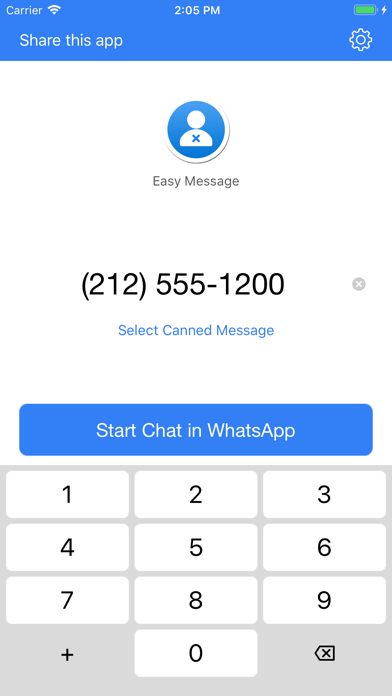
Here is how to use it. Open the app, enter phone number, press start chat in WhatsApp. The app will redirect you to WhatsApp chat. Isn’t it hassle free?
To make it more seamless, this direct WhatsApp message app allows you to simply copy the phone number from anywhere in your clipboard and simply paste it in the app to send WhatsApp message to any phone number.
WhatsApp will notify you if the new phone number does not exist on WhatsApp. Easy Message app makes your life convenient. We know it’s a feels like a daunting task to add a temporary number in order to send WhatsApp message. Your contact list is flooded with lots of unnecessary contacts just because you needed to send WhatsApp message to them once. Now send direct WhatsApp message to any phone number effortlessly.
We all have been in situations where we need to save a phone number temporarily. We were to send WhatsApp message to a cab driver, a handyman, delivery boy, a stranger to whom we forwarded a message or anyone temporarily and we had to save the new phone number in contact list. Isn’t it odd when these temporarily saved contacts starts viewing your WhatsApp statuses? No more unnecessary contacts. Send direct WhatsApp messages to any phone number without saving with Easy Message app.
- User Friendly App
- Send Direct WhatsApp message
- Copy and paste new phone number
- Send WhatsApp message without saving contact
- Get rid of unnecessary phone numbers
- Quick send messages for FREE

We have got you covered. Now you can quickly send messages to any phone number which are not in your contact list. Use “Easy Message” App and send direct WhatsApp message to unsaved phone number. Easy Message app is a convenient app for those who do not want to save a phone number to contacts before they send WhatsApp message.
Here is how to use it. Open the app, enter phone number, press start chat in WhatsApp. The app will redirect you to WhatsApp chat. Isn’t it hassle free?
To make it more seamless, this direct WhatsApp message app allows you to simply copy the phone number from anywhere in your clipboard and simply paste it in the app to send WhatsApp message to any phone number.
WhatsApp will notify you if the new phone number does not exist on WhatsApp. Easy Message app makes your life convenient. We know it’s a feels like a daunting task to add a temporary number in order to send WhatsApp message. Your contact list is flooded with lots of unnecessary contacts just because you needed to send WhatsApp message to them once. Now send direct WhatsApp message to any phone number effortlessly.
We all have been in situations where we need to save a phone number temporarily. We were to send WhatsApp message to a cab driver, a handyman, delivery boy, a stranger to whom we forwarded a message or anyone temporarily and we had to save the new phone number in contact list. Isn’t it odd when these temporarily saved contacts starts viewing your WhatsApp statuses? No more unnecessary contacts. Send direct WhatsApp messages to any phone number without saving with Easy Message app.
- User Friendly App
- Send Direct WhatsApp message
- Copy and paste new phone number
- Send WhatsApp message without saving contact
- Get rid of unnecessary phone numbers
- Quick send messages for FREE
Show More
최신 버전 1.2.28의 새로운 기능
Last updated on Oct 12, 2023
오래된 버전
Send WhatsApp messages to unsaved contact or directly to a phone number, without having to save the contact on your phone.
Show More
Version History
1.2.28
Oct 12, 2023
Send WhatsApp messages to unsaved contact or directly to a phone number, without having to save the contact on your phone.
Easy Message for WhatsApp FAQ
제한된 국가 또는 지역에서 Easy Message for WhatsApp를 다운로드하는 방법을 알아보려면 여기를 클릭하십시오.
Easy Message for WhatsApp의 최소 요구 사항을 보려면 다음 목록을 확인하십시오.
iPhone