FaceTime
$0.99
1.0.5for iPhone
Age Rating
FaceTime 스크린 샷
About FaceTime
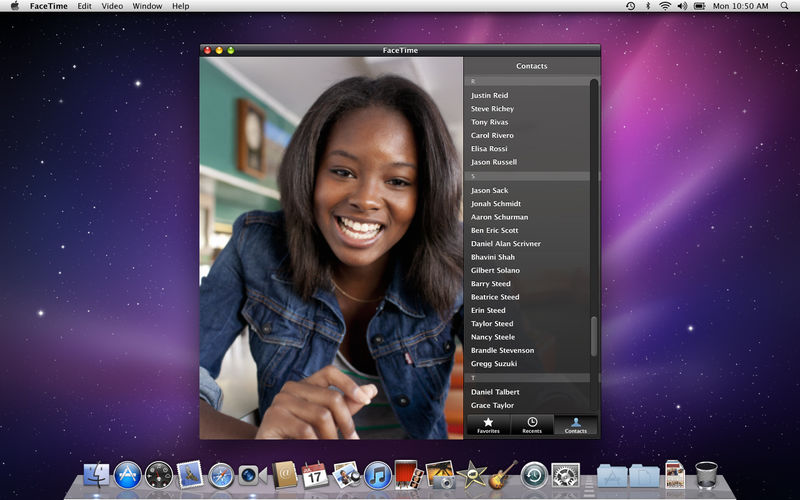
FaceTime for Mac makes it easy to talk, smile and laugh with friends and family on their iPhone 4, iPad 2, iPod touch or Mac. Getting started is quick and easy — simply enter your Apple ID and you're ready to go. Whether you're talking to someone on an iPhone or on another Mac, video calls with FaceTime look great. There's no better way to keep all your favorite faces just a click away.
Simple to Get Started
• Setup is quick and easy – just enter your Apple ID.
• With just one click, you can make a video call to an iPhone 4, iPad 2, iPod touch, or another Mac.
Easy-to-Organize Contacts
• Make calls using your existing Address Book contacts – you don’t have to enter your contacts from scratch.
• Add the people you call most often to your Favorites list.
• Quickly review your past calls with Recents.
High-Definition Video
• Receive HD video calls at up to 720p on supported, Intel-based Macs.*
• A Mac with a standard-definition camera delivers up to VGA-quality video for Mac-to-Mac calls.
Elegant Interface
• Window and playback controls fade away so the focus stays on your conversation.
• View transitions smoothly when an iPhone 4, iPad 2, or iPod touch user switches from front to rear cameras or from portrait to landscape views.
• FaceTime's widescreen aspect ratio makes it easy for families and groups to participate in a call.
• Enjoy your video call full screen, using every inch of your beautiful Mac display.
Ring Anywhere, Any Time
• Incoming calls ring on your Mac, even if FaceTime isn’t running.
• If you have more than one Mac, incoming calls ring on every one so you can answer on the Mac that’s most convenient.
*Video calls require a built-in FaceTime camera, an iSight camera (built-in or external), a USB video class (UVC) camera, or a FireWire DV camcorder; and a 128-Kbps upstream and downstream Internet connection. Making HD video calls requires a built-in FaceTime HD camera and a 1-Mbps upstream and downstream Internet connection. Receiving HD video calls requires a supported Intel-based Mac. (for a complete list, visit http://support.apple.com/kb/HT4534).

Simple to Get Started
• Setup is quick and easy – just enter your Apple ID.
• With just one click, you can make a video call to an iPhone 4, iPad 2, iPod touch, or another Mac.
Easy-to-Organize Contacts
• Make calls using your existing Address Book contacts – you don’t have to enter your contacts from scratch.
• Add the people you call most often to your Favorites list.
• Quickly review your past calls with Recents.
High-Definition Video
• Receive HD video calls at up to 720p on supported, Intel-based Macs.*
• A Mac with a standard-definition camera delivers up to VGA-quality video for Mac-to-Mac calls.
Elegant Interface
• Window and playback controls fade away so the focus stays on your conversation.
• View transitions smoothly when an iPhone 4, iPad 2, or iPod touch user switches from front to rear cameras or from portrait to landscape views.
• FaceTime's widescreen aspect ratio makes it easy for families and groups to participate in a call.
• Enjoy your video call full screen, using every inch of your beautiful Mac display.
Ring Anywhere, Any Time
• Incoming calls ring on your Mac, even if FaceTime isn’t running.
• If you have more than one Mac, incoming calls ring on every one so you can answer on the Mac that’s most convenient.
*Video calls require a built-in FaceTime camera, an iSight camera (built-in or external), a USB video class (UVC) camera, or a FireWire DV camcorder; and a 128-Kbps upstream and downstream Internet connection. Making HD video calls requires a built-in FaceTime HD camera and a 1-Mbps upstream and downstream Internet connection. Receiving HD video calls requires a supported Intel-based Mac. (for a complete list, visit http://support.apple.com/kb/HT4534).
Show More
최신 버전 1.0.5의 새로운 기능
Last updated on Apr 23, 2014
오래된 버전
This update resolves connection issues in FaceTime, and is recommended for all users of FaceTime on OS X 10.6 Snow Leopard.
Show More
Version History
1.0.5
Apr 23, 2014
This update resolves connection issues in FaceTime, and is recommended for all users of FaceTime on OS X 10.6 Snow Leopard.
1.0.4
Apr 11, 2014
This update resolves connection issues in FaceTime, and is recommended for all users of FaceTime on OS X 10.6 Snow Leopard.
1.0.2
Mar 22, 2011
Improves performance when FaceTime is taken full screen.
1.0.1
Mar 2, 2011
This update resolves an issue connecting calls when the system language is German.
1.0
Feb 23, 2011
FaceTime FAQ
제한된 국가 또는 지역에서 FaceTime를 다운로드하는 방법을 알아보려면 여기를 클릭하십시오.
FaceTime의 최소 요구 사항을 보려면 다음 목록을 확인하십시오.
iPhone
FaceTime은 다음 언어를 지원합니다. Chinese, Danish, Dutch, English, Finnish, French, German, Italian, Japanese, Korean, Norwegian, Polish, Portuguese, Russian, Spanish, Swedish