KoolTask
무료
1.2for iPhone, iPod touch
Age Rating
KoolTask 스크린 샷
About KoolTask
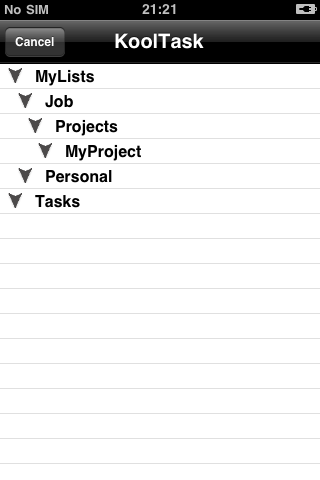
KoolTask offers you one of the simplest, but very powerful ways to organize your daily tasks by using a tree list structure. Forget about the unique flat list containing all your information, now you have various possibilities to organize and access your data.
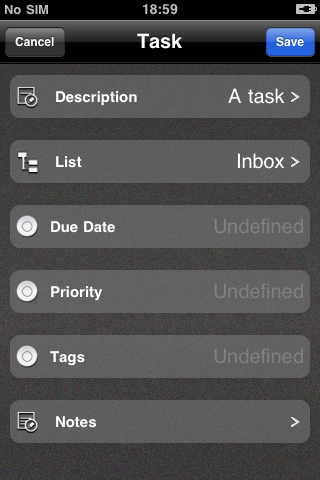
KoolTask can be used to handle either basic to-dos, like a grocery list or more complex tasks, having attributes like due date, due time, priority or repetition and you can even set a due date for an entire list.
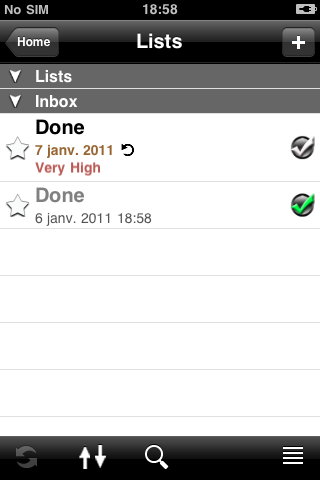
To change the status of a task into “Done” you just have to tap the check button on the right side.
Tap once again and the task will be “Undone”.
You can also set additional information through the Tag attribute for a Task or through the Category attribute for a List.
The “Plus” button is accessible everywhere in the application, allowing you to add a new Task, List or Note.
You can access anytime by a swipe gesture to the item edit toolbar.
This permits you to do the following:
edit the task, note or list
delete the task, note or list
e-mail the task or note
go to the definition of the task
purge the list (delete all the done tasks)
reset the list (put all the tasks to the undone state and clear from favorites also)
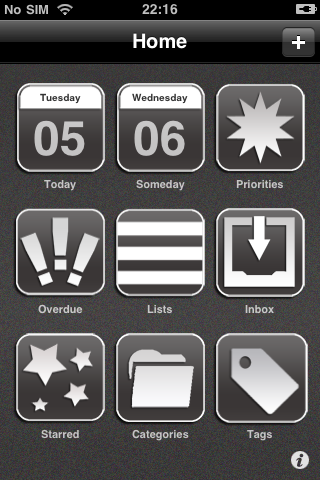
The application dashboard offers you a quick and intuitive way to access the information that you are interested in.
You can immediately see:
the today’s tasks
the tomorrow’s tasks
the task arranged by priority attribute
the task arranged by tag attribute
the overdue tasks
the favorite tasks or lists
the lists
the lists arranged by the category attribute
the Inbox
And if all of these are not enough, then you can use the Find Tool or the List Overview that can be accessed from the lists view toolbar.
For support and help please send a email to task@smartkool.com

KoolTask can be used to handle either basic to-dos, like a grocery list or more complex tasks, having attributes like due date, due time, priority or repetition and you can even set a due date for an entire list.
To change the status of a task into “Done” you just have to tap the check button on the right side.
Tap once again and the task will be “Undone”.
You can also set additional information through the Tag attribute for a Task or through the Category attribute for a List.
The “Plus” button is accessible everywhere in the application, allowing you to add a new Task, List or Note.
You can access anytime by a swipe gesture to the item edit toolbar.
This permits you to do the following:
edit the task, note or list
delete the task, note or list
e-mail the task or note
go to the definition of the task
purge the list (delete all the done tasks)
reset the list (put all the tasks to the undone state and clear from favorites also)
The application dashboard offers you a quick and intuitive way to access the information that you are interested in.
You can immediately see:
the today’s tasks
the tomorrow’s tasks
the task arranged by priority attribute
the task arranged by tag attribute
the overdue tasks
the favorite tasks or lists
the lists
the lists arranged by the category attribute
the Inbox
And if all of these are not enough, then you can use the Find Tool or the List Overview that can be accessed from the lists view toolbar.
For support and help please send a email to task@smartkool.com
Show More
최신 버전 1.2의 새로운 기능
Last updated on Apr 14, 2011
오래된 버전
The new version of KoolTask integrates a calendar control which offers to the user access to any calendar day and see the scheduled task.
Also it offers an alternative look called “Classic” and new Dashboard icons set
Show More
Version History
1.2
Apr 14, 2011
The new version of KoolTask integrates a calendar control which offers to the user access to any calendar day and see the scheduled task.
Also it offers an alternative look called “Classic” and new Dashboard icons set
1.0
Jan 11, 2011
KoolTask FAQ
제한된 국가 또는 지역에서 KoolTask를 다운로드하는 방법을 알아보려면 여기를 클릭하십시오.
KoolTask의 최소 요구 사항을 보려면 다음 목록을 확인하십시오.
iPhone
iOS 3.0 이상 필요
iPod touch
iOS 3.0 이상 필요
KoolTask은 다음 언어를 지원합니다. 영어