NotaioID

NotaioID


무료

1.0.30for iPhone
Age Rating
4+
Apps in this category do not contain restricted content.
9+
Apps in this category may contain mild or occasional cartoon, fantasy or real-life violence, as well as occasional or mild adult, sexually suggestive or horrifying content and may not be suitable for children under 9 years of age.
12+
Apps in this category may contain occasional mild indecent language, frequent or intense cartoon or real-life violence, minor or occasional adult or sexually suggestive material, and simulated gambling, and may be for children under 12 years of age.
17+
You must be at least 17 years old to access this App.
Apps in this category may contain frequent and intense offensive language; Frequent and intense cartoon, fantasy or realistic violence: frequent and intense adult, scary and sexually suggestive subjects: as well as sexual content, nudity, tobacco, alcohol and drugs, may not be suitable for children under 17 years of age.
NotaioID 스크린 샷
NotaioID 포스터NotaioID 포스터

About NotaioID

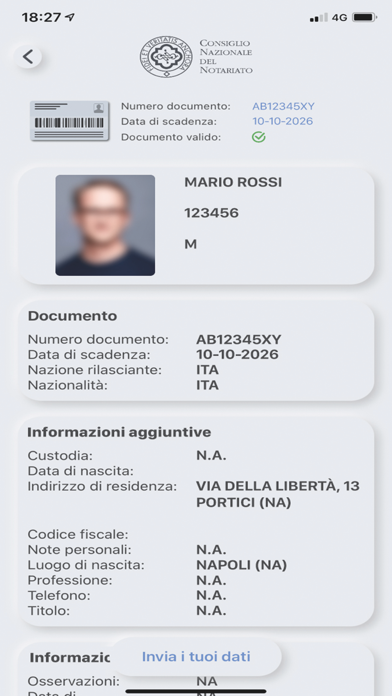
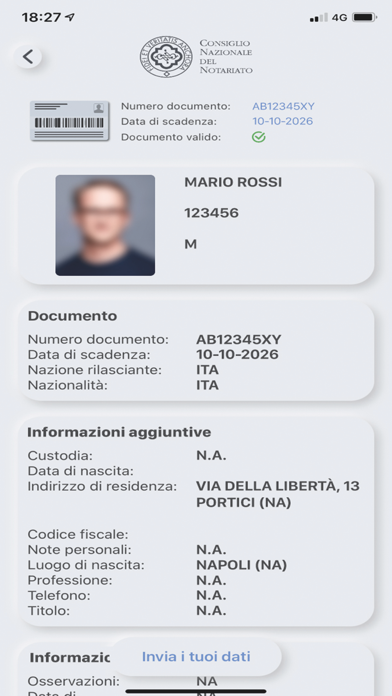
Con NotaioID puoi estrarre, in totale autonomia, i dati anagrafici direttamente dalla Carta d’Identità Elettronica (CIE) o dal Passaporto Elettronico (PE). Tramite una scansione del documento –per mezzo della fotocamera e del lettore NFC dello smartphone – l’app è in grado di acquisire i dati anagrafici contenuti nella CIE e nel PE e inviarli al notaio che li richiede per gli usi consentiti dalla legge.
Per estrarre i dati anagrafici, basta inquadrare con la fotocamera il documento e poi avvicinarlo al retro dello smartphone, in corrispondenza del lettore NFC. Prima dell’invio, è sempre possibile verificare il risultato della scansione e l’esattezza dei dati riportati.
Come usare l’app:
• Verificare nelle Impostazioni dello smartphone che la funzione NFC sia abilitata;
• Lanciare l’app e avviare la scansione;
• Inquadrare con la fotocamera il codice presente sulla Carta d’Identità Elettronica o sul Passaporto Elettronico;
• Avvicinare il documento al retro dello smartphone per qualche secondo. Il lettore NFC potrà così leggere ed estrarre i dati presenti;
• Verificare la correttezza dei dati acquisiti tramite la scansione e cliccare sul pulsante “Invia i tuoi dati”; inserire il codice “ID Richiesta” fornito dal notaio.

Show More

최신 버전 1.0.30의 새로운 기능

Last updated on Jul 23, 2025
오래된 버전
Migliorie nei log di errore
Show More
Version History
1.0.30
Jul 23, 2025
Migliorie nei log di errore

NotaioID FAQ

제한된 국가 또는 지역에서 NotaioID를 다운로드하는 방법을 알아보려면 여기를 클릭하십시오.
NotaioID의 최소 요구 사항을 보려면 다음 목록을 확인하십시오.
iPhone

NotaioID 대안

당신은 또한 좋아할 수도 있습니다

Bit4id s.r.l에서 더 많은 것을 얻기