Age Rating
PracTrak 스크린 샷
About PracTrak
PracTrak provides professional practice patient and client tracking and automated invoicing. Daily, hourly, or reducing rates are supported.
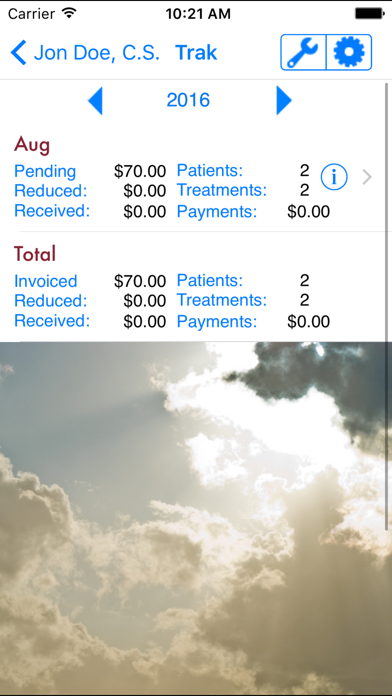
PrakTrak is simple and easy to use! No more calculators, lists, and spreadsheets! Just add patients/clients each day into the Practice List from the iPhone Address Book or add new patients right within the application and PracTrak will automatically generate all monthly invoices and provide monthly reports and yearly totals for amount invoiced and received.
Daily Practice List
• Simple daily practice tracking of all patients
• Add and edit patient contact information by using Apple’s contact address book.
• Calendar-based addition of treatments
• Track your patients progress via patient notes feature.
• ‘Add to Today’ feature to quickly add patients from prior days to today’s Practice List
• Patient notes
Automated Invoicing
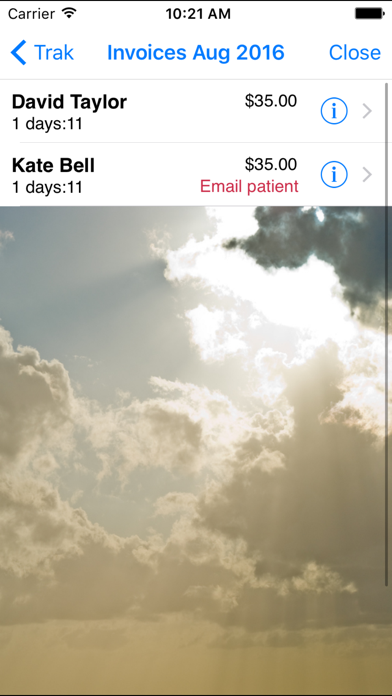
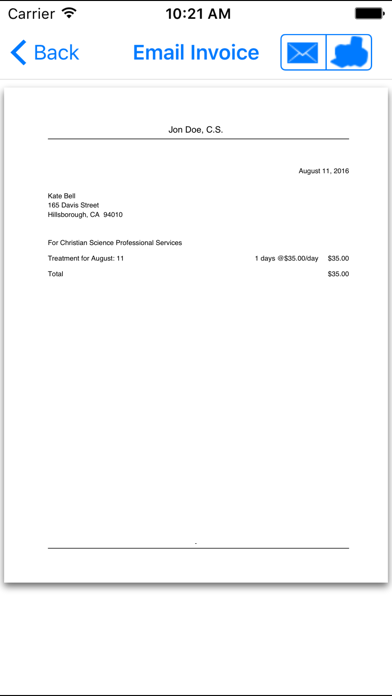
• PracTrak automatically calculates and generates your monthly invoices, allows tracking of payments and can calculate past-due accounts. PracTrak allows you to take control of your billing by allowing you to:
• Support for hourly rate, home or office visit, alternateand reducing rates, mileage, expenses or add new charge types
• PayPal link on invoice email
• Invoice enhancements to adjust reduction by amount ($) or %, include previous outstanding balance, and add a global message on all invoices
• Monthly payments received report
• Choose reduction percentages on a case by case basis
• Choose invoice formatting and email or print settings.
• Allows direct email of invoice to patient
• Monthly billing summary reports and invoice reprints
• Individualize each invoice by allowing you to insert personal notes or quotations on each specific invoice.
• Allow an alternate billing contact and address
General
• Change settings and password within the app
• International currency and date formatting
• Printing Support
• iCloud backup support
• Add and display your own background picture

PrakTrak is simple and easy to use! No more calculators, lists, and spreadsheets! Just add patients/clients each day into the Practice List from the iPhone Address Book or add new patients right within the application and PracTrak will automatically generate all monthly invoices and provide monthly reports and yearly totals for amount invoiced and received.
Daily Practice List
• Simple daily practice tracking of all patients
• Add and edit patient contact information by using Apple’s contact address book.
• Calendar-based addition of treatments
• Track your patients progress via patient notes feature.
• ‘Add to Today’ feature to quickly add patients from prior days to today’s Practice List
• Patient notes
Automated Invoicing
• PracTrak automatically calculates and generates your monthly invoices, allows tracking of payments and can calculate past-due accounts. PracTrak allows you to take control of your billing by allowing you to:
• Support for hourly rate, home or office visit, alternateand reducing rates, mileage, expenses or add new charge types
• PayPal link on invoice email
• Invoice enhancements to adjust reduction by amount ($) or %, include previous outstanding balance, and add a global message on all invoices
• Monthly payments received report
• Choose reduction percentages on a case by case basis
• Choose invoice formatting and email or print settings.
• Allows direct email of invoice to patient
• Monthly billing summary reports and invoice reprints
• Individualize each invoice by allowing you to insert personal notes or quotations on each specific invoice.
• Allow an alternate billing contact and address
General
• Change settings and password within the app
• International currency and date formatting
• Printing Support
• iCloud backup support
• Add and display your own background picture

Show More
최신 버전 4.2.7의 새로운 기능
Last updated on Oct 6, 2022
오래된 버전
Fix for email bote
Show More
Version History
4.2.7
Oct 6, 2022
Fix for email bote
PracTrak 가격
오늘:
₩44,000
최저 가격:
₩44,000
최고 가격:
₩45,000
PracTrak FAQ
제한된 국가 또는 지역에서 PracTrak를 다운로드하는 방법을 알아보려면 여기를 클릭하십시오.
PracTrak의 최소 요구 사항을 보려면 다음 목록을 확인하십시오.
iPhone
iPad