Age Rating
Pythonic 스크린 샷
About Pythonic
Write code very quickly and review your results instantly by using "Pythonic" code runner.
Pythonic gives you the power of Python and macOS within one solution by bringing the python interpreter right into a beautiful and clean user interface. Also be sure to notice that “Pythonic” isn’t the official Python application but a tool to bring Python to macOS users through an user interface.
Features:
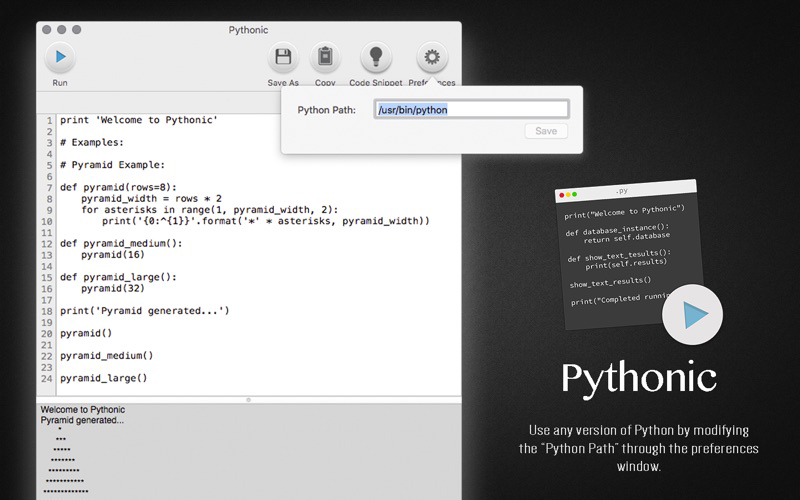
- Ability to use any version of python by modifying the “Python Path” through the preferences window.
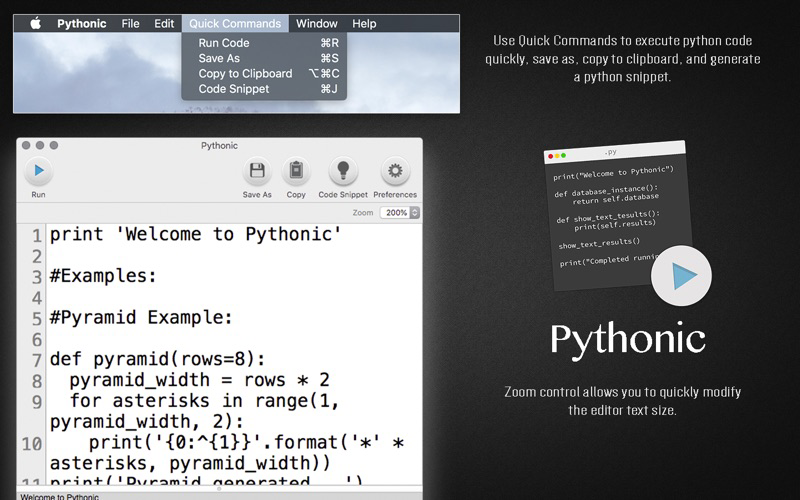
- Ability to use "Quick Commands" to execute python code quickly, save as, copy to clipboard, and generate a python snippet.
- Zoom control allows you to quickly modify the editor text size.
- Editor horizontal ruler including line numbers.
- Editor character count.
- Editor line number total.
- Python errors and execution statuses shown.

Pythonic gives you the power of Python and macOS within one solution by bringing the python interpreter right into a beautiful and clean user interface. Also be sure to notice that “Pythonic” isn’t the official Python application but a tool to bring Python to macOS users through an user interface.
Features:
- Ability to use any version of python by modifying the “Python Path” through the preferences window.
- Ability to use "Quick Commands" to execute python code quickly, save as, copy to clipboard, and generate a python snippet.
- Zoom control allows you to quickly modify the editor text size.
- Editor horizontal ruler including line numbers.
- Editor character count.
- Editor line number total.
- Python errors and execution statuses shown.
Show More
최신 버전 1.0.0의 새로운 기능
Last updated on Jul 25, 2018
Version History
1.0.0
Jul 25, 2018
Pythonic 가격
오늘:
₩6,600
최저 가격:
₩6,600
최고 가격:
₩7,500
Pythonic FAQ
제한된 국가 또는 지역에서 Pythonic를 다운로드하는 방법을 알아보려면 여기를 클릭하십시오.
Pythonic의 최소 요구 사항을 보려면 다음 목록을 확인하십시오.
Mac
macOS 10.13 이상 필요