Stack-it!
Free
1.000for iPhone
Age Rating
Stack-it! 스크린 샷
About Stack-it!
Building blocks aren't just child's play. Beat the timer and align the shapes for a perfect design.
Your task is to stack the colorful blocks to match the master plan provided at the beginning of the levels. Rearrange the scattered blocks before running out of time.
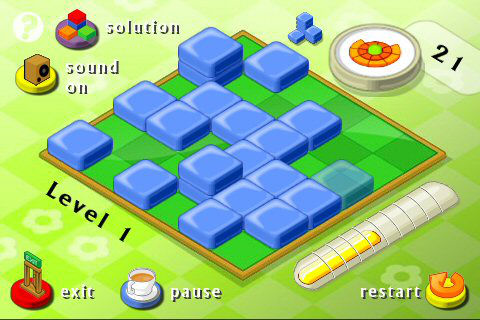
Moving Blocks: Simply tap on the block - this will turn the block transparent - and then clicking on its new destination.
Shapes: The blocks come in different shapes and colors. The dome, the pyramid and the tilted tile can't be built upon.
Modes: There are three game modes: Free Mode, Action and Puzzle. In Action mode you have to stack the blocks as displayed in the solution and the mini-map on the top left corner of the screen. In Puzzle and Free Mode mode you also have to deal with shape and color. Free Mode will also randomize the order of the levels.
Buttons: In the game you will find the following buttons on the left side:
Solution: In order to display the solution again tap the solutions button, but beware - while the solution is being shown your time will be ticking away - better memorize it fast.
Pause: If you need a break, simply tap on the pause button. The blocks will disappear (no cheating possible) and the timer will stop. Tap the screen when you are ready to continue your game.
Sound: Tap this button to turn the background music on and off.
- One player
- 75 different levels
- 3 different game modes
- Sounds and music available
- Free updates

Your task is to stack the colorful blocks to match the master plan provided at the beginning of the levels. Rearrange the scattered blocks before running out of time.
Moving Blocks: Simply tap on the block - this will turn the block transparent - and then clicking on its new destination.
Shapes: The blocks come in different shapes and colors. The dome, the pyramid and the tilted tile can't be built upon.
Modes: There are three game modes: Free Mode, Action and Puzzle. In Action mode you have to stack the blocks as displayed in the solution and the mini-map on the top left corner of the screen. In Puzzle and Free Mode mode you also have to deal with shape and color. Free Mode will also randomize the order of the levels.
Buttons: In the game you will find the following buttons on the left side:
Solution: In order to display the solution again tap the solutions button, but beware - while the solution is being shown your time will be ticking away - better memorize it fast.
Pause: If you need a break, simply tap on the pause button. The blocks will disappear (no cheating possible) and the timer will stop. Tap the screen when you are ready to continue your game.
Sound: Tap this button to turn the background music on and off.
- One player
- 75 different levels
- 3 different game modes
- Sounds and music available
- Free updates
Show More
최신 버전 1.000의 새로운 기능
Last updated on Oct 29, 2008
Version History
1.000
Oct 29, 2008
Stack-it! FAQ
제한된 국가 또는 지역에서 Stack-it!를 다운로드하는 방법을 알아보려면 여기를 클릭하십시오.
Stack-it!의 최소 요구 사항을 보려면 다음 목록을 확인하십시오.
iPhone
Stack-it!은 다음 언어를 지원합니다. English