Task Ticket
무료
3.3.30for iPhone
Age Rating
Task Ticket 스크린 샷
About Task Ticket
Efficient Dashboard
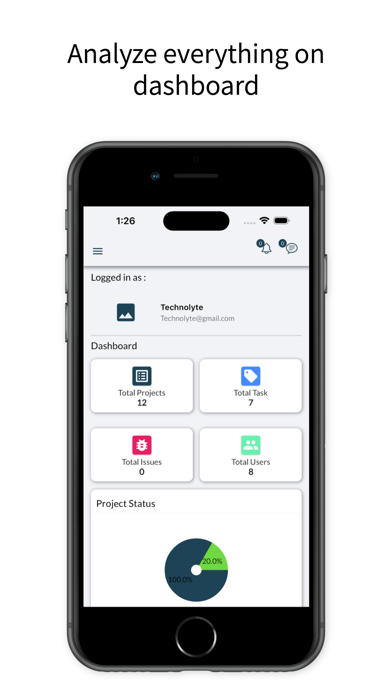
Get an overview of the total number of projects, tasks, bugs, and members. A visual representation of the task overview and project status can help you estimate the progress on each task. Lastly, you can check the top due task.
Multi Workspace
Create multiple workspaces for different projects. You can create an individual workspace or shared workspace by inviting other users.
Project Management
Create new projects and assign teams to each project. Add multiple members to share the projects with clients. You can edit permissions and controls to manage client access. Set a budget and create milestones for projects. Attach cost and summary to milestones and change the status through the drop-down menu. Get a tab on recent activities of a project and also a graph about progress. Along with that, you can check your tasks’ details under project details with the help of the Gantt Chart.
Taskboard
Add a new task to an already existing project and prioritize them according to the need of urgency. Assign the task to team members and set a due date for task completion. Add comments to the task and create a sub-task for ease of completion. Attach necessary files in a required task.
Notes have a sharing option
While creating any of the important notes, one can keep them personally as well as assign or share them with the concerned person.
Multi-User Access
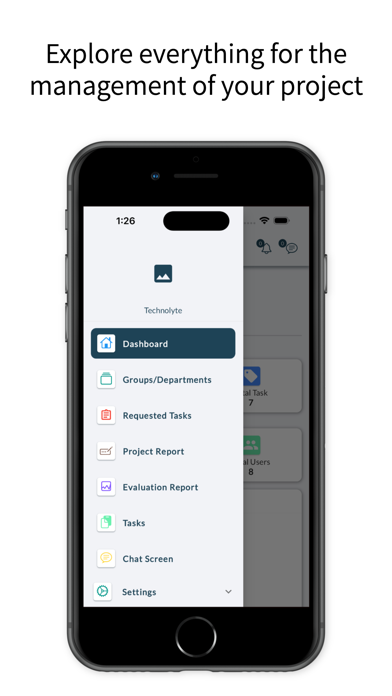
Invite users and give them access to various projects and workspaces. A user tab will give brief information on the projects and tasks of each user. You could always add a new user and remove an unnecessary user as and when required.
Chat
You can chat with users on important project aspects without leaving the tool workspace-wise.
Personalize your notes
Create your personalized notes so that nothing remains forgotten. In the daily ups and downs of business, some things might run out of your mind. Keep a tab on those activities by maintaining notes. Also, you could prioritize the notes based on their urgency.

Get an overview of the total number of projects, tasks, bugs, and members. A visual representation of the task overview and project status can help you estimate the progress on each task. Lastly, you can check the top due task.
Multi Workspace
Create multiple workspaces for different projects. You can create an individual workspace or shared workspace by inviting other users.
Project Management
Create new projects and assign teams to each project. Add multiple members to share the projects with clients. You can edit permissions and controls to manage client access. Set a budget and create milestones for projects. Attach cost and summary to milestones and change the status through the drop-down menu. Get a tab on recent activities of a project and also a graph about progress. Along with that, you can check your tasks’ details under project details with the help of the Gantt Chart.
Taskboard
Add a new task to an already existing project and prioritize them according to the need of urgency. Assign the task to team members and set a due date for task completion. Add comments to the task and create a sub-task for ease of completion. Attach necessary files in a required task.
Notes have a sharing option
While creating any of the important notes, one can keep them personally as well as assign or share them with the concerned person.
Multi-User Access
Invite users and give them access to various projects and workspaces. A user tab will give brief information on the projects and tasks of each user. You could always add a new user and remove an unnecessary user as and when required.
Chat
You can chat with users on important project aspects without leaving the tool workspace-wise.
Personalize your notes
Create your personalized notes so that nothing remains forgotten. In the daily ups and downs of business, some things might run out of your mind. Keep a tab on those activities by maintaining notes. Also, you could prioritize the notes based on their urgency.
Show More
최신 버전 3.3.30의 새로운 기능
Last updated on Jun 3, 2026
오래된 버전
Schedule and planning added.
Some bug fixes and ui enhancements.
Show More
Version History
3.3.30
Jun 3, 2026
Schedule and planning added.
Some bug fixes and ui enhancements.
Task Ticket FAQ
제한된 국가 또는 지역에서 Task Ticket를 다운로드하는 방법을 알아보려면 여기를 클릭하십시오.
Task Ticket의 최소 요구 사항을 보려면 다음 목록을 확인하십시오.
iPhone