Total Notes
$1.99
2.0.0for iPhone
Age Rating
Total Notes 스크린 샷
About Total Notes
Note Taking Goes Visual.
- Want a way of storing all those notes, photos, pictures and websites without losing them in multiple apps?
- Ever had a need to group random stuff together in a way that's easy to remember?
- Just need to gather information now, for later sorting?
- Find staring at lists of text leaves you cold?
- Often take photos of book covers, posters, landmarks, maps and hand written notes for visual reminders?
- Want to make the process of creating and organising notes as painless as possible?
Then Total Notes is your app.
Organise notes, websites and pictures in a fast, visual and simple graphical interface.
Having tried just-about every kind of note taking app out there, and finding them lacking, we decided to build our own.
We wanted something that was simple, visual and useful, yet powerful.
It's Organised
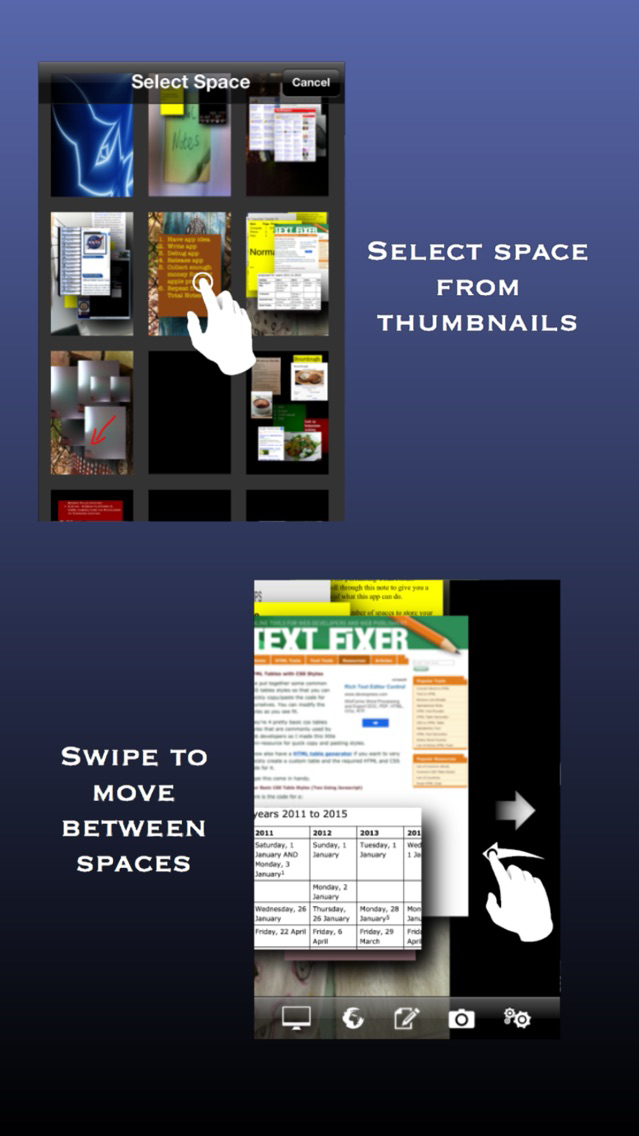
- Multiple screen spaces allow you to organise notes your own way. Work? Home? Project based? Your choice.
- Set your own background for each space to easily identify it.
- Innovative scrap and trash spaces allow you to move notes around easily.
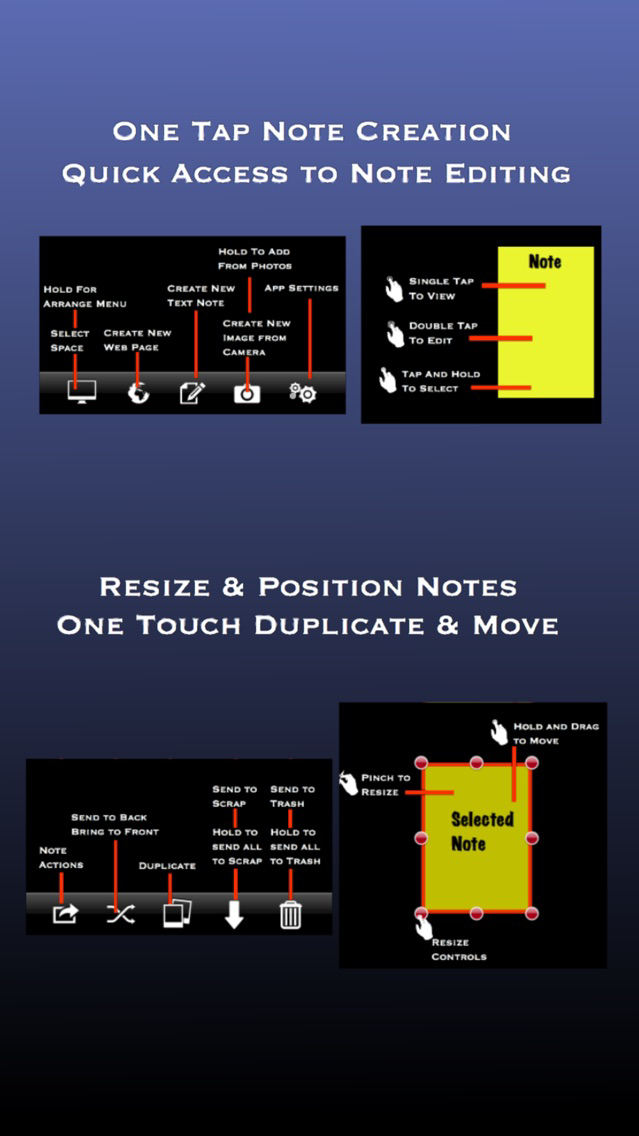
- Notes can be repositioned, resized, layered and tiled with simple gestures.
- Export notes via email, open in other supported apps via "open in", or via clipboard.
- Import from other apps that support "open in"
It's Visual
- Powerful HTML-based style, color and font control allow you to dramatically alter note appearance instantly.
- Notes can be written in any combination of text, HTML and extended markdown, allowing headings, tables, lists and more.
- View notes full screen without distractions.
- Clean, minimalist, modern user interface.
It's Fast
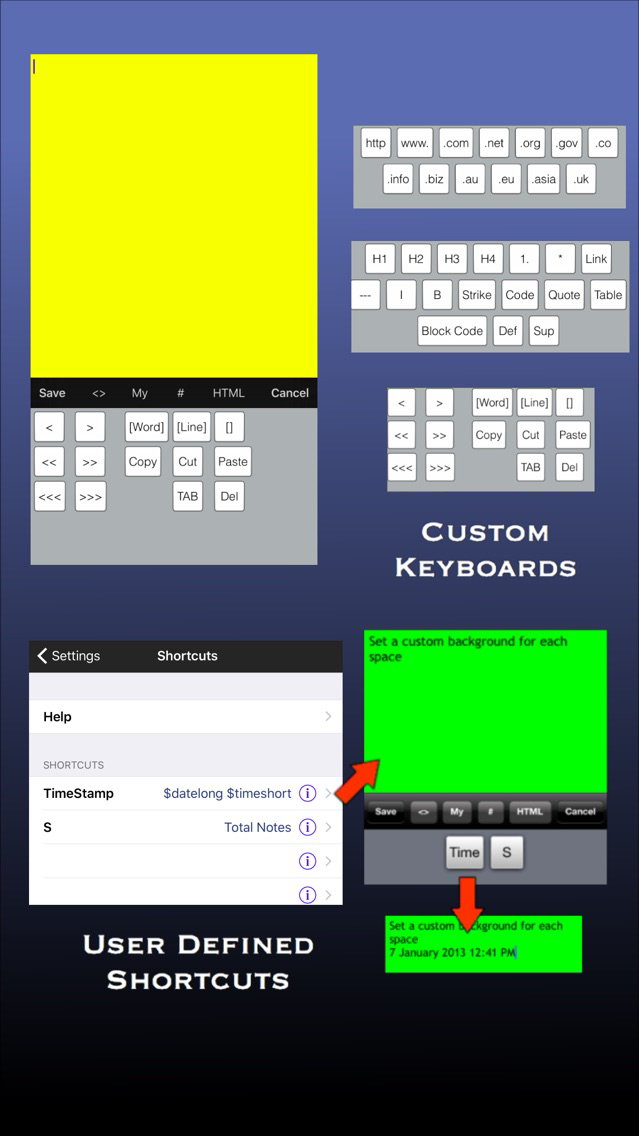
- Additional keyboards allow Markdown and user-defined shortcuts to facilitate faster note taking.
- One tap note creation from keyboard, web, camera and photo roll.
- Streamlined, gesture-based control to cut down on endless menu taps.
- Enter the information you need quickly, organise later.
- Editable web search engines allow quicker access to web content.

- Want a way of storing all those notes, photos, pictures and websites without losing them in multiple apps?
- Ever had a need to group random stuff together in a way that's easy to remember?
- Just need to gather information now, for later sorting?
- Find staring at lists of text leaves you cold?
- Often take photos of book covers, posters, landmarks, maps and hand written notes for visual reminders?
- Want to make the process of creating and organising notes as painless as possible?
Then Total Notes is your app.
Organise notes, websites and pictures in a fast, visual and simple graphical interface.
Having tried just-about every kind of note taking app out there, and finding them lacking, we decided to build our own.
We wanted something that was simple, visual and useful, yet powerful.
It's Organised
- Multiple screen spaces allow you to organise notes your own way. Work? Home? Project based? Your choice.
- Set your own background for each space to easily identify it.
- Innovative scrap and trash spaces allow you to move notes around easily.
- Notes can be repositioned, resized, layered and tiled with simple gestures.
- Export notes via email, open in other supported apps via "open in", or via clipboard.
- Import from other apps that support "open in"
It's Visual
- Powerful HTML-based style, color and font control allow you to dramatically alter note appearance instantly.
- Notes can be written in any combination of text, HTML and extended markdown, allowing headings, tables, lists and more.
- View notes full screen without distractions.
- Clean, minimalist, modern user interface.
It's Fast
- Additional keyboards allow Markdown and user-defined shortcuts to facilitate faster note taking.
- One tap note creation from keyboard, web, camera and photo roll.
- Streamlined, gesture-based control to cut down on endless menu taps.
- Enter the information you need quickly, organise later.
- Editable web search engines allow quicker access to web content.

Show More
최신 버전 2.0.0의 새로운 기능
Last updated on Apr 2, 2016
오래된 버전
Thank you for your patience, it's been a hard slog, but I've finally fixed a big pile of bugs and released a new version for you.
The big changes are bug fixes to do with iOS9, a new image editor to replace the one that's now broken, and access to all web pages again.
Please give the new version a go, and thank you for sticking with it.
- iOS9 compatible.
- iPhone 6/6+ 6s/6s+ compatible.
- Brand new image editor. The previous one has been discontinued and no longer works, so we have sourced a brand new one for you.
- Problems around editing shortcut names have been fixed.
- Extra blank shortcuts have been added so you can now edit your own.
- Various iOS8/9 compatibility problems fixed.
- Accessing most websites (not just https connections) is now fixed.
- Many other small internal fixes.
Show More
Version History
2.0.0
Feb 16, 2013
Thank you for your patience, it's been a hard slog, but I've finally fixed a big pile of bugs and released a new version for you.
The big changes are bug fixes to do with iOS9, a new image editor to replace the one that's now broken, and access to all web pages again.
Please give the new version a go, and thank you for sticking with it.
- iOS9 compatible.
- iPhone 6/6+ 6s/6s+ compatible.
- Brand new image editor. The previous one has been discontinued and no longer works, so we have sourced a brand new one for you.
- Problems around editing shortcut names have been fixed.
- Extra blank shortcuts have been added so you can now edit your own.
- Various iOS8/9 compatibility problems fixed.
- Accessing most websites (not just https connections) is now fixed.
- Many other small internal fixes.
Total Notes FAQ
제한된 국가 또는 지역에서 Total Notes를 다운로드하는 방법을 알아보려면 여기를 클릭하십시오.
Total Notes의 최소 요구 사항을 보려면 다음 목록을 확인하십시오.
iPhone
Total Notes은 다음 언어를 지원합니다. English