Dev Toolkit

Dev Toolkit


免費

1.0for iPhone, iPad
Age Rating
4+
Apps in this category do not contain restricted content.
9+
Apps in this category may contain mild or occasional cartoon, fantasy or real-life violence, as well as occasional or mild adult, sexually suggestive or horrifying content and may not be suitable for children under 9 years of age.
12+
Apps in this category may contain occasional mild indecent language, frequent or intense cartoon or real-life violence, minor or occasional adult or sexually suggestive material, and simulated gambling, and may be for children under 12 years of age.
17+
You must be at least 17 years old to access this App.
Apps in this category may contain frequent and intense offensive language; Frequent and intense cartoon, fantasy or realistic violence: frequent and intense adult, scary and sexually suggestive subjects: as well as sexual content, nudity, tobacco, alcohol and drugs, may not be suitable for children under 17 years of age.
Dev Toolkit 螢幕截圖
Dev Toolkit 海報Dev Toolkit 海報Dev Toolkit 海報Dev Toolkit 海報Dev Toolkit 海報Dev Toolkit 海報Dev Toolkit 海報Dev Toolkit 海報

About Dev Toolkit

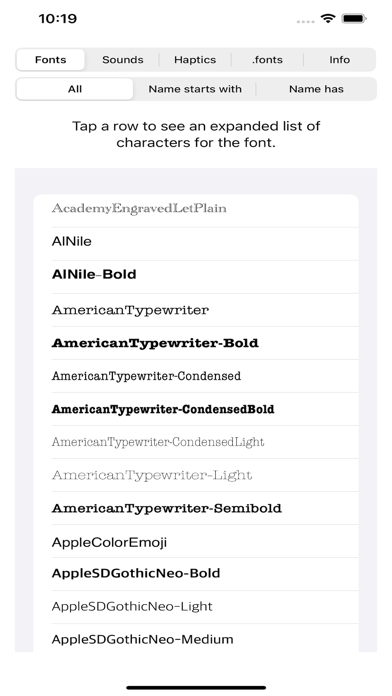
Dev Toolkit 1.0 is a free app that gives you the Xcode developer quick and easy access to the iOS native fonts, sounds, haptics and base .fonts you can use in your next great app.

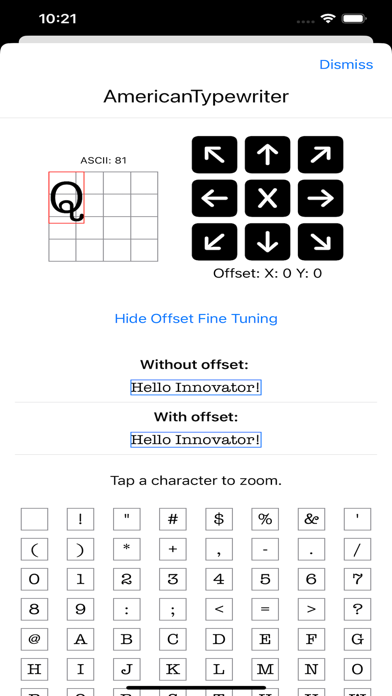
Fonts—Dev Toolkit 1.0 displays all the fonts you can use on iPhones, iPads, and Macs in your app. Tap a font to see a summary of the characters available, and then expand to see a larger view of each individual character. Quickly determine the exact offset CGSize setting you need to position characters perfectly.

Sounds—This is a summary of the system sounds available for your apps. Tap a sound to play it, or scroll through the sounds sequentially to find the perfect one.

Haptics—A summary of the haptic feedback available. Tap a particular haptic to feel it! Note that current iPad models, as well as Macs, do not support haptic feedback.

.fonts—Consistency with the Apple look and feel is key to delivering an intuitive user experience. Using the base .font options is one of the best ways to give a familiar user experience.

Show More

最新版本1.0更新日誌

Last updated on 2024年08月17日
Version History
1.0
2024年08月17日

Dev Toolkit FAQ

點擊此處瞭解如何在受限國家或地區下載Dev Toolkit。
以下為Dev Toolkit的最低配置要求。
iPhone
iPad

Dev Toolkit相關應用

你可能還喜歡

Douglas J Farmer 開發者的更多應用