Google Allo
Smart messaging
Free
27.0for iPhone
Age Rating
Google Allo 螢幕截圖
About Google Allo
Introducing Google Allo, a smart messaging app that helps you say more and do more. Express yourself better with stickers, Smart Reply, and HUGE emojis & text. Allo brings you the Google Assistant.
To learn more about how Allo works with your data, visit https://g.co/allo-privacy
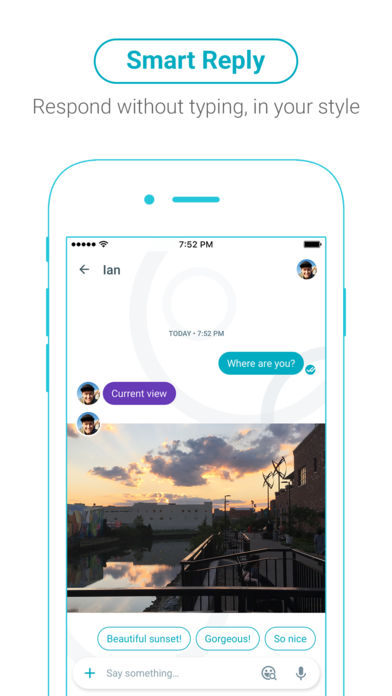
Smart Reply
Respond to messages without typing a single word. Smart Reply learns over time and suggests responses to text and photos, in your style.
Ink
Get creative with the photos you send by doodling on them or adding text.
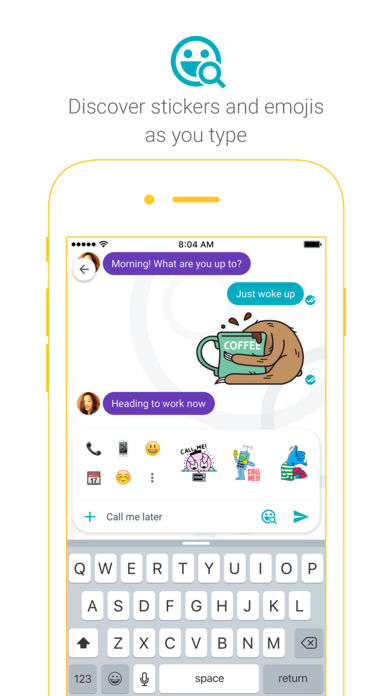
Stickers
Say it all with the perfect sticker. Stickers in Google Allo are designed by independent artists and studios from around the world.
SHOUT or whisper
No more typing in ALL CAPS to get your point across. Say it louder or quieter by changing the size of your text with a quick swipe.
Meet your Google Assistant
Google Allo brings you the Google Assistant. Find restaurants nearby, share videos to watch, and get answers, right in your conversation with friends. Add @google to your group conversation or chat one-on-one with your Assistant. It’s your own personal Google, always ready to help.
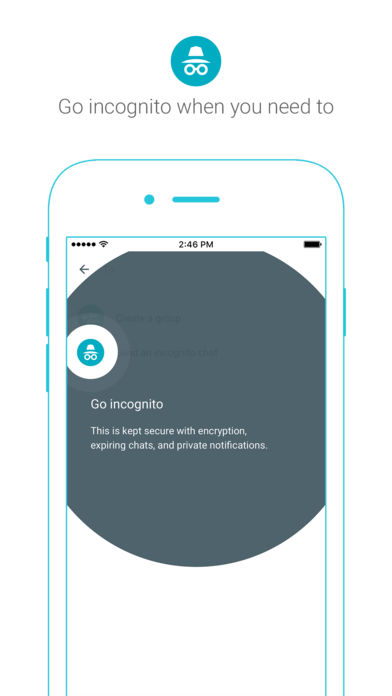
Incognito mode
Send messages with end-to-end encryption, use private notifications to help keep your chats more discreet, and control how long your messages stick around with expiring chats.
* Some features not available in all countries
To learn more about how Allo works with your data, visit https://g.co/allo-privacy
Smart Reply
Respond to messages without typing a single word. Smart Reply learns over time and suggests responses to text and photos, in your style.
Ink
Get creative with the photos you send by doodling on them or adding text.
Stickers
Say it all with the perfect sticker. Stickers in Google Allo are designed by independent artists and studios from around the world.
SHOUT or whisper
No more typing in ALL CAPS to get your point across. Say it louder or quieter by changing the size of your text with a quick swipe.
Meet your Google Assistant
Google Allo brings you the Google Assistant. Find restaurants nearby, share videos to watch, and get answers, right in your conversation with friends. Add @google to your group conversation or chat one-on-one with your Assistant. It’s your own personal Google, always ready to help.
Incognito mode
Send messages with end-to-end encryption, use private notifications to help keep your chats more discreet, and control how long your messages stick around with expiring chats.
* Some features not available in all countries
Show More
最新版本27.0更新日誌
Last updated on 2018年12月06日
歷史版本
• New option to export your chat history.
• Bug fixes: Performance improvements for a better chatting experience.
Show More
Version History
27.0
2018年12月06日
• New option to export your chat history.
• Bug fixes: Performance improvements for a better chatting experience.
26.0
2018年01月23日
• Bug fixes: Performance improvements for a better chatting experience.
25.0
2017年12月19日
• Bug fixes: Performance improvements for a better chatting experience.
24.0
2017年12月05日
• Bug fixes: Performance improvements for a better chatting experience.
23.0
2017年11月28日
• Group chat controls: Turn on admin controls to remove and ban people from group chats, edit the group name and photo, and give others admin rights.
• Bug fixes: Performance improvements for a better chatting experience.
22.0
2017年11月11日
• Bug fixes: Performance improvements for a better chatting experience.
21.0
2017年10月27日
• Bug fixes: Performance improvements for a better chatting experience.
20.0
2017年10月26日
• Allo for web: Keep chatting on your computer with Allo. Visit g.co/alloforweb in your Chrome browser to get started.
• /me messages: Write /me before your message and it will appear in chat as an action. For example, /me loves Allo.
• Bug fixes: Performance improvements for a better chatting experience.
• /me messages: Write /me before your message and it will appear in chat as an action. For example, /me loves Allo.
• Bug fixes: Performance improvements for a better chatting experience.
19.0
2017年09月26日
• Allo for web: Keep chatting on your computer with Allo. Visit g.co/alloforweb in your Chrome browser to get started.
• Bug fixes: Performance improvements for a better chatting experience.
18.0
2017年09月12日
• Bug fixes: Performance improvements for a better chatting experience.
17.0
2017年09月06日
• Bug fixes: Performance improvements for a better chatting experience.
16.0
2017年08月22日
• Sticker and emoji search: Search for the perfect sticker or emoji to add to your photos.
• Customize your selfie stickers: Add emojis and draw on your selfie stickers before sharing.
• Bug fixes: Performance improvements for a better chatting experience.
• Customize your selfie stickers: Add emojis and draw on your selfie stickers before sharing.
• Bug fixes: Performance improvements for a better chatting experience.
15.0
2017年08月10日
• File sharing: You can now share files to any chat. Send MP3s, PDFs, and more.
• Link previews: Get a peek at what's behind a link before opening it.
• Easy sharing: Get creative with your photos, then just tap to share with your friends.
• Bug fixes: Performance improvements for a better chatting experience.
• Link previews: Get a peek at what's behind a link before opening it.
• Easy sharing: Get creative with your photos, then just tap to share with your friends.
• Bug fixes: Performance improvements for a better chatting experience.
13.1
2017年06月29日
Bug fixes and performance improvements
13.0
2017年06月20日
• Video and audio calls: Start a video or audio call with Google Duo. Just tap the Duo icon in the top right corner of your chat to open or install Duo.
• Personal QR codes: Another way to add more friends on Allo!
• Chat backup: Back up your messages to restore them later if you ever switch to another iOS device.
• Bug fixes: Performance improvements for a better chatting experience.
• Personal QR codes: Another way to add more friends on Allo!
• Chat backup: Back up your messages to restore them later if you ever switch to another iOS device.
• Bug fixes: Performance improvements for a better chatting experience.
12.0
2017年06月10日
• Turn a selfie into stickers: Create stickers inspired by you!
• Bug fixes: Performance improvements for a better chatting experience.
11.0
2017年05月13日
• Group links: The more, the merrier. Share a link to add friends to your group chat.
• QR codes: Group chats are even easier to join. Have friends scan a code, and they're in!
• Bug fixes: Performance improvements for a better chatting experience.
• QR codes: Group chats are even easier to join. Have friends scan a code, and they're in!
• Bug fixes: Performance improvements for a better chatting experience.
10.0
2017年05月04日
• Notification settings: Go to one place to manage your notifications. Choose the ones you want, and turn off the ones you don't want to see.
• Incognito chats: Now available for your group conversations.
• Bug fixes: Performance improvements for a better chatting experience.
• Incognito chats: Now available for your group conversations.
• Bug fixes: Performance improvements for a better chatting experience.
9.1
2017年04月20日
Bug fixes: Performance improvements for a better chatting experience.
9.0
2017年04月13日
Bug fixes: Performance improvements for a better chatting experience.
8.0
2017年03月20日
• Play games: Have a few minutes to spare? The Google Assistant will keep you entertained with fun games
• Bug fixes: Performance improvements for a better chatting experience
7.1
2017年03月09日
Bug fixes and performance improvements
7.0
2017年03月03日
Bug fixes and performance improvements
6.0
2017年02月02日
• Pick out your photos faster by viewing them in mini mode
• Select multiple photos to send at one time
• Crop your profile photo & resize it perfectly
• Select multiple photos to send at one time
• Crop your profile photo & resize it perfectly
5.0
2017年01月13日
Performance improvements
Google Allo FAQ
點擊此處瞭解如何在受限國家或地區下載Google Allo。
以下為Google Allo的最低配置要求。
iPhone
Google Allo支持Afrikaans, Amharic, Arabic, Azerbaijani, Bangla, Basque, Bulgarian, Burmese, Catalan, Chinese, Croatian, Czech, Danish, Dutch, English, Estonian, Finnish, French, Galician, Georgian, German, Greek, Gujarati, Hebrew, Hindi, Hungarian, Icelandic, Indonesian, Italian, Japanese, Kannada, Kazakh, Khmer, Korean, Lao, Latvian, Lingala, Lithuanian, Malay, Malayalam, Marathi, Mongolian, Nepali, Norwegian, Norwegian Bokmål, Persian, Polish, Portuguese, Romanian, Russian, Serbian, Sinhala, Slovak, Slovenian, Spanish, Swahili, Swedish, Tagalog, Tamil, Telugu, Thai, Turkish, Ukrainian, Urdu, Vietnamese, Zulu