RainMap
HK$ 8.00
1.1for iPhone, iPad and more
Age Rating
RainMap 螢幕截圖
About RainMap
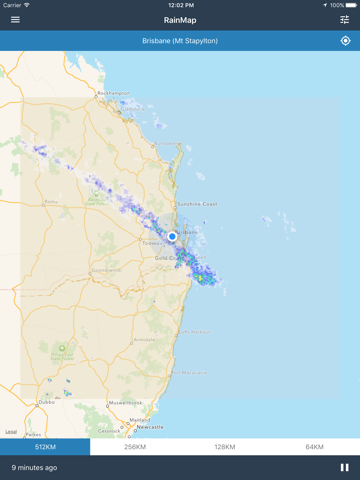
Welcome to RainMap, the quick and easy way to view rain radar images from the Australian Bureau of Meteorology on an interactive map. Simply choose a radar location and the map will take you there or tap the crosshairs to jump to right your nearest radar. Watch the latest rain radar images animating on top of the map. Pinch to zoom in and out or pan around to see the exact area you are interested in. You can even use RainMap to check for rain at your home or office, or to plan your commute to avoid the heavy storm which is approaching.
Key Features:
- Tap the crosshairs button to jump to your nearest radar and show your current location
- Pinch and pan the interactive map to control the detail level of the rain radar images
- Use the radius controls to quickly jump to a specific radar zoom level from 512km down to 64km (where available).
- Pause the rain animation and step backwards or forwards to see frame by frame radar images
- Adjust the opacity of radar image layers or turn them off completely
- Quickly view and interact with your radar in the Today Extension
More exciting features coming soon…
3AVDJRG

Key Features:
- Tap the crosshairs button to jump to your nearest radar and show your current location
- Pinch and pan the interactive map to control the detail level of the rain radar images
- Use the radius controls to quickly jump to a specific radar zoom level from 512km down to 64km (where available).
- Pause the rain animation and step backwards or forwards to see frame by frame radar images
- Adjust the opacity of radar image layers or turn them off completely
- Quickly view and interact with your radar in the Today Extension
More exciting features coming soon…
3AVDJRG
Show More
最新版本1.1更新日誌
Last updated on 2016年02月03日
歷史版本
Your Location
We've added location services to RainMap so that you can:
- Jump to the nearest radar by tapping the crosshairs button.
- See your current location on the map
- Sort the list of radars by distance to your location
Today Extension
We've added a today extension for RainMap so that you can:
- View your current radar at a glance
- Zoom in or out
- Step forward or backward through time
- Quickly open RainMap from the Today Extension
Other Stuff
You can now:
- Toggle the map type between standard, satellite or hybrid
- Tap on the currently selected map radius button to re-zoom and center on that radius
Bug Fixes
- RainMap will now show a message when rain images are unavailable for a radar.
We've added location services to RainMap so that you can:
- Jump to the nearest radar by tapping the crosshairs button.
- See your current location on the map
- Sort the list of radars by distance to your location
Today Extension
We've added a today extension for RainMap so that you can:
- View your current radar at a glance
- Zoom in or out
- Step forward or backward through time
- Quickly open RainMap from the Today Extension
Other Stuff
You can now:
- Toggle the map type between standard, satellite or hybrid
- Tap on the currently selected map radius button to re-zoom and center on that radius
Bug Fixes
- RainMap will now show a message when rain images are unavailable for a radar.
Show More
Version History
1.1
2016年02月03日
Your Location
We've added location services to RainMap so that you can:
- Jump to the nearest radar by tapping the crosshairs button.
- See your current location on the map
- Sort the list of radars by distance to your location
Today Extension
We've added a today extension for RainMap so that you can:
- View your current radar at a glance
- Zoom in or out
- Step forward or backward through time
- Quickly open RainMap from the Today Extension
Other Stuff
You can now:
- Toggle the map type between standard, satellite or hybrid
- Tap on the currently selected map radius button to re-zoom and center on that radius
Bug Fixes
- RainMap will now show a message when rain images are unavailable for a radar.
We've added location services to RainMap so that you can:
- Jump to the nearest radar by tapping the crosshairs button.
- See your current location on the map
- Sort the list of radars by distance to your location
Today Extension
We've added a today extension for RainMap so that you can:
- View your current radar at a glance
- Zoom in or out
- Step forward or backward through time
- Quickly open RainMap from the Today Extension
Other Stuff
You can now:
- Toggle the map type between standard, satellite or hybrid
- Tap on the currently selected map radius button to re-zoom and center on that radius
Bug Fixes
- RainMap will now show a message when rain images are unavailable for a radar.
1.0
2015年12月21日
RainMap FAQ
點擊此處瞭解如何在受限國家或地區下載RainMap。
以下為RainMap的最低配置要求。
iPhone
須使用 iOS 9.0 或以上版本。
iPad
須使用 iPadOS 9.0 或以上版本。
iPod touch
須使用 iOS 9.0 或以上版本。
RainMap支持英文