Simple Project Timer

Simple Project Timer


Work and Hobby Time Tracker


免費Offers In-App Purchases

1.2.0for iPhone, iPad
9.3
3 Ratings
Rylolan Software, LLC
Developer
6.5 MB
Size
2022年10月22日
Update Date
Utilities
Category
4+
Age Rating
Age Rating
4+
Apps in this category do not contain restricted content.
9+
Apps in this category may contain mild or occasional cartoon, fantasy or real-life violence, as well as occasional or mild adult, sexually suggestive or horrifying content and may not be suitable for children under 9 years of age.
12+
Apps in this category may contain occasional mild indecent language, frequent or intense cartoon or real-life violence, minor or occasional adult or sexually suggestive material, and simulated gambling, and may be for children under 12 years of age.
17+
You must be at least 17 years old to access this App.
Apps in this category may contain frequent and intense offensive language; Frequent and intense cartoon, fantasy or realistic violence: frequent and intense adult, scary and sexually suggestive subjects: as well as sexual content, nudity, tobacco, alcohol and drugs, may not be suitable for children under 17 years of age.
Simple Project Timer 螢幕截圖
Simple Project Timer 海報Simple Project Timer 海報Simple Project Timer 海報Simple Project Timer 海報

About Simple Project Timer

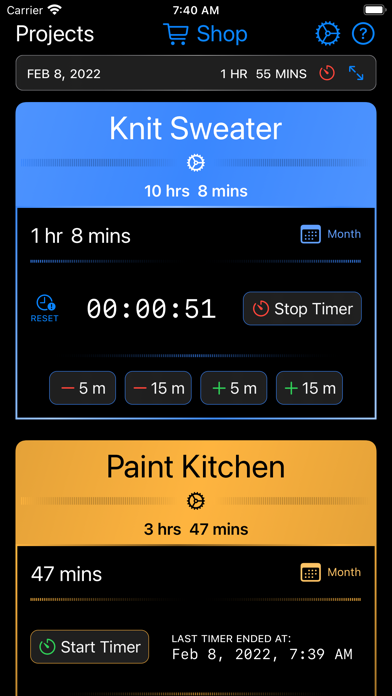
Simple Project Timer is used to track time you spend working on jobs, projects, and hobbies. The app uses a "card" design: each project is represented by a color coded card, and each card is the center of activity for its project.

The project cards contains an on/off timer that can be used to track time like a punch clock. Stopping the timer causes the elapsed time to add to the day's total. Immediately below the timer is a row of adjustment buttons to allow quick time modifications.

Of course, work times can be entered or edited manually either from the project card or the project's month view. In addition to time durations, both of these entry points provide a text field to capture any notes for the day.

Logged time and notes can be exported in Comma-separated Values (CSV) format for use in spreadsheet (or even simple text editing) applications. There is documentation provided to help guide you through the exporting process.

The app is free to download and use with up to two simultaneous projects. And you are free to delete and recreate those two projects. If you need more than two projects at a time, there is an in-app purchase that removes the two-project limit.

There is one other in-app purchase that adds two *weekly* displays to the app. One of these displays is viewable in the project card. The other view is displayed when the device is turned on its side (or via a button tap on larger displays). This view provides a week display that includes all projects.

The app has quite a bit more detail than is provided here in its build-in help documentation. Please check there for more information!

Show More

最新版本1.2.0更新日誌

Last updated on 2022年10月22日
歷史版本
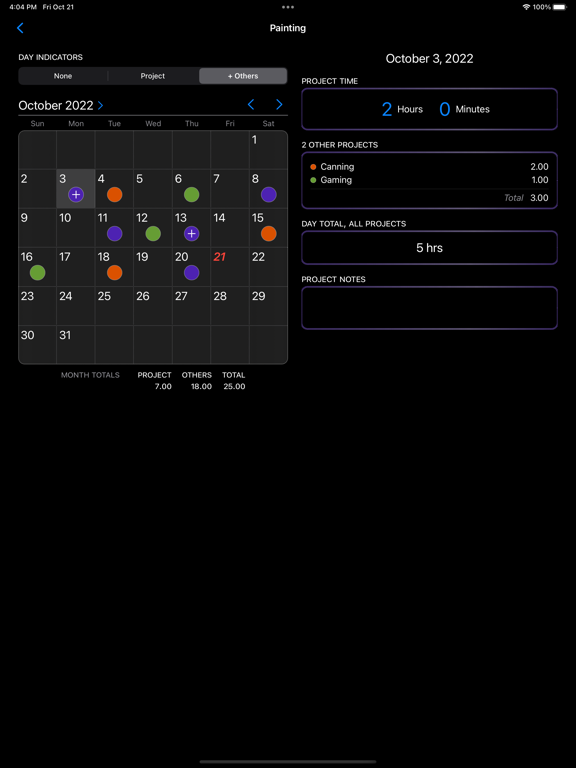
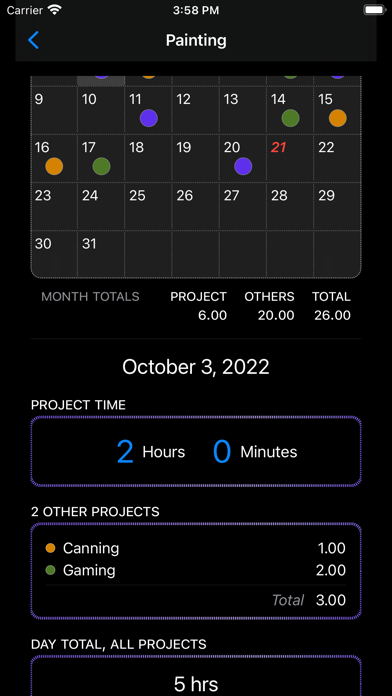
• A big upgrade to the project month view! Now see indicators on the calendar for time logged for the current project and others. Also see daily and monthly summaries across projects. However, the original behavior is readily available if you prefer it. All of this is fully documented in the in-app documentation.

• On sufficiently large displayed (such as iPads) you can now display the "Week Display" from the in-app purchase (of the same name) without the need to rotate your device into landscape orientation. The same goes for showing projects, thus removing the need for device rotation altogether (on larger screens). This change is optional and the original behavior is still available if you prefer it. This is fully documented in the in-app documentation.

• A few more enhancements and features that you can read about in the in-app notifications area!
Show More
Version History
1.2.0
2022年10月22日
• A big upgrade to the project month view! Now see indicators on the calendar for time logged for the current project and others. Also see daily and monthly summaries across projects. However, the original behavior is readily available if you prefer it. All of this is fully documented in the in-app documentation.

• On sufficiently large displayed (such as iPads) you can now display the "Week Display" from the in-app purchase (of the same name) without the need to rotate your device into landscape orientation. The same goes for showing projects, thus removing the need for device rotation altogether (on larger screens). This change is optional and the original behavior is still available if you prefer it. This is fully documented in the in-app documentation.

• A few more enhancements and features that you can read about in the in-app notifications area!
1.1.1
2022年09月09日
• Some minor display corrections (animation, color, and others) to support iOS 16.
• A bug fix related to running a timer across into the next month.
• More details included in the in-app notification section!
1.1.0
2022年04月24日
• Added the ability to export time and note records in Comma-separated Values (CSV) format. This allows the exported data to be read and processed by most spreadsheet applications.

• Added a notification area in-app to display app changes.
1.0.1
2022年02月20日
• Adjusted some displays to account for larger fonts on smaller screens
• Fixed a screen flicker that could occur when redrawing the current day’s logged time on the project card
• Adjusted store functions to refresh their display in place
1.0.0
2022年02月08日

Simple Project Timer FAQ

點擊此處瞭解如何在受限國家或地區下載Simple Project Timer。
以下為Simple Project Timer的最低配置要求。
iPhone
須使用 iOS 16.0 或以上版本。
iPad
須使用 iPadOS 16.0 或以上版本。
Simple Project Timer支持英文
Simple Project Timer包含應用內購買。 以下為Simple Project Timer應用內購買價格清單。
Week Displays
HK$ 18.00
Unlimited Projects
HK$ 18.00

Simple Project Timer相關應用

你可能還喜歡