SYNCING.NET - Sync P2P Private
Free
6.9.5for iPad
Age Rating
SYNCING.NET - Sync P2P Private Screenshots
About SYNCING.NET - Sync P2P Private
Your files. Your contacts. Your calendars. Your devices. No cloud in between.
SYNCING.NET replaces cloud storage with direct, encrypted peer-to-peer synchronization. Every transfer travels straight from device to device: no third-party servers, no cloud accounts, no data harvesting. If you've ever wondered who else can see your files on Dropbox, iCloud, or Google Drive, this is the answer: nobody but you.
WHY PROFESSIONALS SWITCH TO SYNCING.NET
• True Privacy - Data never touches a cloud; transfers are end‑to‑end encrypted between your devices.
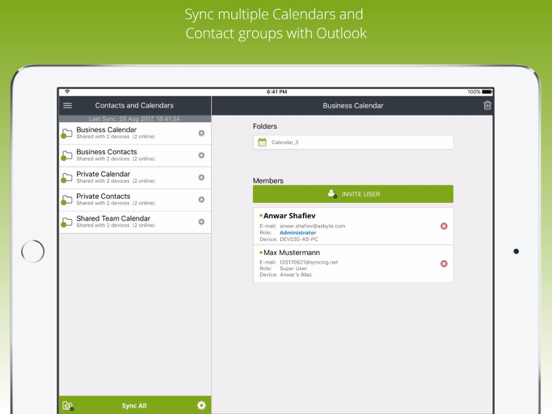
• Real‑Time Sync - Edit on PC and see updates on iPhone in seconds; Outlook contacts and calendars sync automatically.
• Files, Contacts & Calendars - One app syncs folders, contacts and calendars across mobile and desktop devices.
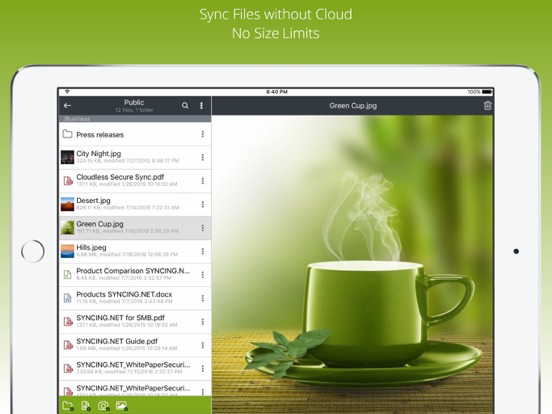
• Smart Download - Browse your full library; download only the files you need to save device storage.
• Edit Anywhere - Open files in external apps; changes sync back to all devices via secure P2P.
• Closed Sync Groups - Private groups for invited members only; ideal for legal, medical, and finance teams.
• Cross‑Platform - Works on mobile devices and desktop computers.
• Local Storage - Your data stays on your devices; full offline access, no cloud storage.
HOW IT WORKS
1. Install SYNCING.NET on two or more devices.
2. Create or join a sync group.
3. Select the folders, contact groups, or calendars you want to sync.
4. Done! Devices discover each other and synchronize directly. No server setup, no cloud sign-up, no IT department required.
WHO IT'S FOR
• Privacy-focused professionals (lawyers, doctors, consultants)
• Small businesses that handle sensitive client data
• Remote teams that need secure file sharing without cloud risk
• Families who want to share photos and calendars privately
• Anyone replacing Dropbox, Google Drive, or OneDrive with a cloudless alternative
FREE EDITION vs. BUSINESS EDITION
FREE EDITION * $0, forever:
• Up to 2 GB of synchronized data
• 1 folder, 1 contacts group, 1 calendar
• Full P2P encryption
• Cross-platform sync
BUSINESS EDITION * Unlock the full toolkit:
• Unlimited synchronized data
• Up to 50 folders, contact groups, and calendars
• Advanced team management and permissions
• Priority support
• Ideal for teams and organizations
We offer in‑app purchases for the SYNCING.NET Business Edition. The amount will be charged to your App Store account and may vary by plan and country. You’ll see the total price before completing payment. SYNCING.NET Business Edition subscriptions purchased in‑app renew automatically monthly or yearly depending on your plan. Plans are priced at $4.49 USD monthly and $32.99 USD yearly (pricing may vary outside the U.S.). To avoid renewal, turn off auto‑renew at least 24 hours before your subscription ends. You can manage or cancel auto‑renew at any time from your App Store account settings.
Terms of Service: https://syncing.net/en/license-agreement
Privacy Policy: https://syncing.net/en/privacy-policy
CLOUD SYNC vs. SYNCING.NET
• Third‑party access? Cloud Services: Yes; SYNCING.NET: No
• Server breaches? Cloud Services: Possible; SYNCING.NET: Impossible (no central servers)
• Limited storage? Cloud Services: Yes; SYNCING.NET: No
• Offline access? Cloud Services: Limited; SYNCING.NET: Full
• Data ownership? Cloud Services: Subject to provider ToS; SYNCING.NET: 100% yours
*No central server exists to breach.
NOTES
• The app may periodically fetch small amounts of data, which can reduce battery life; disable 'Background App Refresh' in device settings to stop this.
• The app may access contact notes to sync them across your devices.

SYNCING.NET replaces cloud storage with direct, encrypted peer-to-peer synchronization. Every transfer travels straight from device to device: no third-party servers, no cloud accounts, no data harvesting. If you've ever wondered who else can see your files on Dropbox, iCloud, or Google Drive, this is the answer: nobody but you.
WHY PROFESSIONALS SWITCH TO SYNCING.NET
• True Privacy - Data never touches a cloud; transfers are end‑to‑end encrypted between your devices.
• Real‑Time Sync - Edit on PC and see updates on iPhone in seconds; Outlook contacts and calendars sync automatically.
• Files, Contacts & Calendars - One app syncs folders, contacts and calendars across mobile and desktop devices.
• Smart Download - Browse your full library; download only the files you need to save device storage.
• Edit Anywhere - Open files in external apps; changes sync back to all devices via secure P2P.
• Closed Sync Groups - Private groups for invited members only; ideal for legal, medical, and finance teams.
• Cross‑Platform - Works on mobile devices and desktop computers.
• Local Storage - Your data stays on your devices; full offline access, no cloud storage.
HOW IT WORKS
1. Install SYNCING.NET on two or more devices.
2. Create or join a sync group.
3. Select the folders, contact groups, or calendars you want to sync.
4. Done! Devices discover each other and synchronize directly. No server setup, no cloud sign-up, no IT department required.
WHO IT'S FOR
• Privacy-focused professionals (lawyers, doctors, consultants)
• Small businesses that handle sensitive client data
• Remote teams that need secure file sharing without cloud risk
• Families who want to share photos and calendars privately
• Anyone replacing Dropbox, Google Drive, or OneDrive with a cloudless alternative
FREE EDITION vs. BUSINESS EDITION
FREE EDITION * $0, forever:
• Up to 2 GB of synchronized data
• 1 folder, 1 contacts group, 1 calendar
• Full P2P encryption
• Cross-platform sync
BUSINESS EDITION * Unlock the full toolkit:
• Unlimited synchronized data
• Up to 50 folders, contact groups, and calendars
• Advanced team management and permissions
• Priority support
• Ideal for teams and organizations
We offer in‑app purchases for the SYNCING.NET Business Edition. The amount will be charged to your App Store account and may vary by plan and country. You’ll see the total price before completing payment. SYNCING.NET Business Edition subscriptions purchased in‑app renew automatically monthly or yearly depending on your plan. Plans are priced at $4.49 USD monthly and $32.99 USD yearly (pricing may vary outside the U.S.). To avoid renewal, turn off auto‑renew at least 24 hours before your subscription ends. You can manage or cancel auto‑renew at any time from your App Store account settings.
Terms of Service: https://syncing.net/en/license-agreement
Privacy Policy: https://syncing.net/en/privacy-policy
CLOUD SYNC vs. SYNCING.NET
• Third‑party access? Cloud Services: Yes; SYNCING.NET: No
• Server breaches? Cloud Services: Possible; SYNCING.NET: Impossible (no central servers)
• Limited storage? Cloud Services: Yes; SYNCING.NET: No
• Offline access? Cloud Services: Limited; SYNCING.NET: Full
• Data ownership? Cloud Services: Subject to provider ToS; SYNCING.NET: 100% yours
*No central server exists to breach.
NOTES
• The app may periodically fetch small amounts of data, which can reduce battery life; disable 'Background App Refresh' in device settings to stop this.
• The app may access contact notes to sync them across your devices.
Show More
What's New in the Latest Version 6.9.5
Last updated on May 5, 2026
Old Versions
• Smart Download: Download files only when needed and free up device storage automatically.
• Open files in external apps: Open Word, Excel, and text files in third‑party apps. Copy the changes back to securely synchronize them via direct P2P ~ no cloud required.
• File sharing: Share synchronized documents with other apps or save them to external drives.
• Performance improvements and bug fixes.
• Open files in external apps: Open Word, Excel, and text files in third‑party apps. Copy the changes back to securely synchronize them via direct P2P ~ no cloud required.
• File sharing: Share synchronized documents with other apps or save them to external drives.
• Performance improvements and bug fixes.
Show More
Version History
6.9.5
May 5, 2026
• Smart Download: Download files only when needed and free up device storage automatically.
• Open files in external apps: Open Word, Excel, and text files in third‑party apps. Copy the changes back to securely synchronize them via direct P2P ~ no cloud required.
• File sharing: Share synchronized documents with other apps or save them to external drives.
• Performance improvements and bug fixes.
• Open files in external apps: Open Word, Excel, and text files in third‑party apps. Copy the changes back to securely synchronize them via direct P2P ~ no cloud required.
• File sharing: Share synchronized documents with other apps or save them to external drives.
• Performance improvements and bug fixes.
SYNCING.NET - Sync P2P Private FAQ
Click here to learn how to download SYNCING.NET - Sync P2P Private in restricted country or region.
Check the following list to see the minimum requirements of SYNCING.NET - Sync P2P Private.
iPad