

AR Complement
FreeOffers In-App Purchases
1.8for iPhone, iPod touch
Age Rating
AR Complement Screenshots
About AR Complement
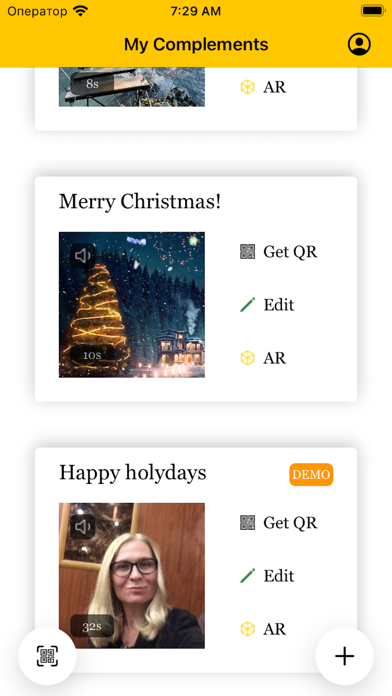
Our application adds more information about the object via augmented reality.
You can complement any item with your compliment using AR technologies. For example, a gift or a picture.
Your video will appear next to the subject in augmented reality.
How to do it?
1) Record video in the app.
2) Print out the QR and stick it on the item.
3) Adjust the size of your AR video to fit the object.
You can complement any item with your compliment using AR technologies. For example, a gift or a picture.
Your video will appear next to the subject in augmented reality.
How to do it?
1) Record video in the app.
2) Print out the QR and stick it on the item.
3) Adjust the size of your AR video to fit the object.
Show More
What's New in the Latest Version 1.8
Last updated on Aug 31, 2023
Old Versions
qr scanning changes
Show More
Version History
1.8
Aug 31, 2023
qr scanning changes
1.7
Jun 19, 2023
qr searching enhancement
1.6
May 19, 2023
Recording improvements
1.5
Apr 28, 2023
minor bug fix
1.4
Apr 11, 2023
support for horizontal/vertical video complements
1.3
Feb 21, 2023
UX improvements
1.2
Dec 28, 2022
Improved complement creation process
1.01
Dec 16, 2022
bug fix
1.0
Dec 9, 2022
AR Complement FAQ
Click here to learn how to download AR Complement in restricted country or region.
Check the following list to see the minimum requirements of AR Complement.
iPhone
Requires iOS 13.0 or later.
iPod touch
Requires iOS 13.0 or later.
AR Complement supports English, Russian
AR Complement contains in-app purchases. Please check the pricing plan as below:
Complement 75% Off
$1.99
Complement 50% Off
$3.99
Complement 25% Off
$5.99
Complement
$7.99



