Avinox
Power Your Ride
Free
1.2.1for iPhone, iPod touch
Age Rating
Avinox Screenshots
About Avinox
[Overview]
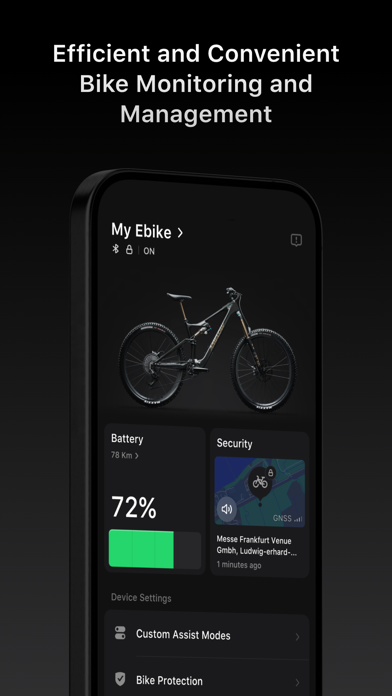
Once the Avinox app is paired with the Avinox Drive System via Bluetooth, it provides intelligent features such as bike protection and anti-theft, data recording and sharing, assist parameter adjustments, and bike status checking.
[Bike Status Monitoring]
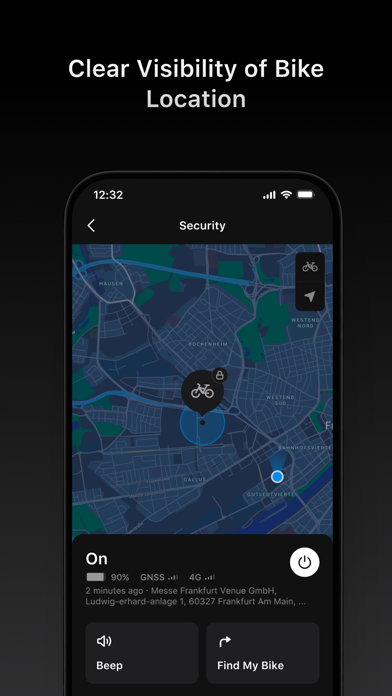
The Avinox app supports connection to the Avinox Drive System via Bluetooth or 4G, allowing you to check bike status, battery level, estimated range, and location, as well as control the bike.
[Assist Mode Settings]
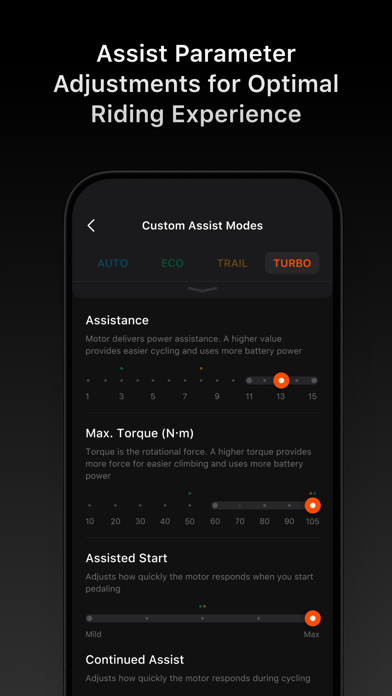
The Avinox app allows customization of assist parameters, including assist level, max torque, start assist, continued assist, and motor overrun, ensuring the Avinox Drive System delivers an excellent riding experience across different preferences and scenarios.
[Bike Protection]
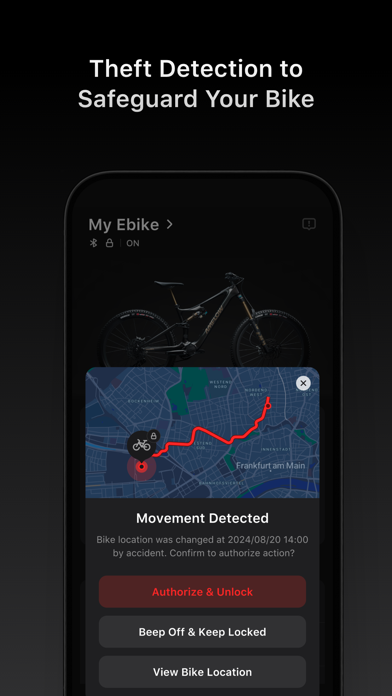
After setting a Control Display password in the Avinox app, you can enable the Phone Key, which will automatically unlock the bike when you approach and power it on. Additionally, the app's theft detection feature can send a push notification in the event of an abnormal bike movement, helping you stay aware of the location and status of your bike and increase security.
[Control Display]
The Avinox app allows you to customize the contents on the Control Display, including parameters like ride time, range, average speed, real-time power output, and more.
[Health Management System (HMS)]
If a malfunction is detected in the Avinox Drive System, the Avinox app will display an error status brief and provide self-diagnosis recommendations to help you troubleshoot the issue.
[Riding Data Recording]
The Avinox Drive System is equipped with an array of sensors that comprehensively record riding data. The data is automatically synced to the Avinox app after your ride. In the Avinox app, you can check a variety of ride data such as speeds, range, cadence, power, torque, gradient, altitude, calories burned, ride times, heart rate (when connected to a heart rate monitor), and more to assess your training performance.
[Third-Party App Riding Data Sync]
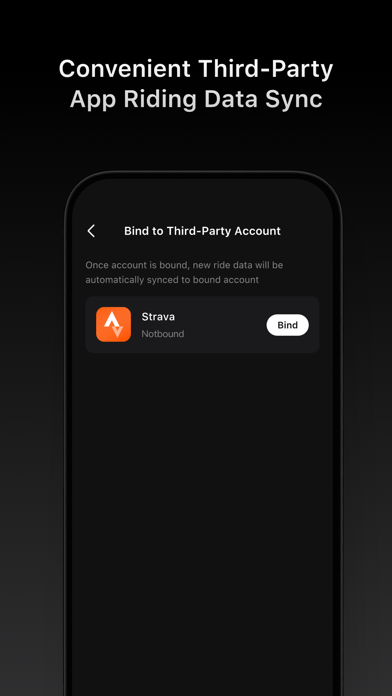
After linking your Strava account with the Avinox app, the riding data synced to the app will automatically be transferred to Strava, making it easy for you to manage and share your cycling activities.

Once the Avinox app is paired with the Avinox Drive System via Bluetooth, it provides intelligent features such as bike protection and anti-theft, data recording and sharing, assist parameter adjustments, and bike status checking.
[Bike Status Monitoring]
The Avinox app supports connection to the Avinox Drive System via Bluetooth or 4G, allowing you to check bike status, battery level, estimated range, and location, as well as control the bike.
[Assist Mode Settings]
The Avinox app allows customization of assist parameters, including assist level, max torque, start assist, continued assist, and motor overrun, ensuring the Avinox Drive System delivers an excellent riding experience across different preferences and scenarios.
[Bike Protection]
After setting a Control Display password in the Avinox app, you can enable the Phone Key, which will automatically unlock the bike when you approach and power it on. Additionally, the app's theft detection feature can send a push notification in the event of an abnormal bike movement, helping you stay aware of the location and status of your bike and increase security.
[Control Display]
The Avinox app allows you to customize the contents on the Control Display, including parameters like ride time, range, average speed, real-time power output, and more.
[Health Management System (HMS)]
If a malfunction is detected in the Avinox Drive System, the Avinox app will display an error status brief and provide self-diagnosis recommendations to help you troubleshoot the issue.
[Riding Data Recording]
The Avinox Drive System is equipped with an array of sensors that comprehensively record riding data. The data is automatically synced to the Avinox app after your ride. In the Avinox app, you can check a variety of ride data such as speeds, range, cadence, power, torque, gradient, altitude, calories burned, ride times, heart rate (when connected to a heart rate monitor), and more to assess your training performance.
[Third-Party App Riding Data Sync]
After linking your Strava account with the Avinox app, the riding data synced to the app will automatically be transferred to Strava, making it easy for you to manage and share your cycling activities.
Show More
What's New in the Latest Version 1.2.1
Last updated on May 9, 2025
Old Versions
Make sure to update the firmware of the app and device to the latest version. Otherwise, they will not be compatible with each other.
- The max power of Turbo mode can be adjusted to 1000 W, with an improvement of 17.6%.
- Added support for adjusting the order of assist modes and hiding/showing the selected modes. Additionally, optimized specific parameters and the display of their explanations.
- Added support for setting the duration of Boost mode.
- Added support for displaying up to 8 items on the data page of the bike screen, with the ability to add a stopwatch and visualize specific data in bar charts or line charts.
- Added support for deleting ride data.
- Added support for viewing historical accident movement notifications.
- Optimized Cloud switch. Reauthorization is required for using Bike Connectivity (SIM) and Ride Data Backup functions.
- Optimized the Sync to Strava function. The app will now prompt to enable Ride Data Backup to ensure ride data is synced to Strava.
- Optimized account display and added support for viewing information of the currently logged-in account.
- Improved the consistency of ride data statistics between the control display and the app.
- Improved the stability of parameter settings for the wheel diameter, chainring, and cassette.
- Fixed app compatibility issues.
- Fixed some known issues.
- The max power of Turbo mode can be adjusted to 1000 W, with an improvement of 17.6%.
- Added support for adjusting the order of assist modes and hiding/showing the selected modes. Additionally, optimized specific parameters and the display of their explanations.
- Added support for setting the duration of Boost mode.
- Added support for displaying up to 8 items on the data page of the bike screen, with the ability to add a stopwatch and visualize specific data in bar charts or line charts.
- Added support for deleting ride data.
- Added support for viewing historical accident movement notifications.
- Optimized Cloud switch. Reauthorization is required for using Bike Connectivity (SIM) and Ride Data Backup functions.
- Optimized the Sync to Strava function. The app will now prompt to enable Ride Data Backup to ensure ride data is synced to Strava.
- Optimized account display and added support for viewing information of the currently logged-in account.
- Improved the consistency of ride data statistics between the control display and the app.
- Improved the stability of parameter settings for the wheel diameter, chainring, and cassette.
- Fixed app compatibility issues.
- Fixed some known issues.
Show More
Version History
1.2.1
May 9, 2025
Make sure to update the firmware of the app and device to the latest version. Otherwise, they will not be compatible with each other.
- The max power of Turbo mode can be adjusted to 1000 W, with an improvement of 17.6%.
- Added support for adjusting the order of assist modes and hiding/showing the selected modes. Additionally, optimized specific parameters and the display of their explanations.
- Added support for setting the duration of Boost mode.
- Added support for displaying up to 8 items on the data page of the bike screen, with the ability to add a stopwatch and visualize specific data in bar charts or line charts.
- Added support for deleting ride data.
- Added support for viewing historical accident movement notifications.
- Optimized Cloud switch. Reauthorization is required for using Bike Connectivity (SIM) and Ride Data Backup functions.
- Optimized the Sync to Strava function. The app will now prompt to enable Ride Data Backup to ensure ride data is synced to Strava.
- Optimized account display and added support for viewing information of the currently logged-in account.
- Improved the consistency of ride data statistics between the control display and the app.
- Improved the stability of parameter settings for the wheel diameter, chainring, and cassette.
- Fixed app compatibility issues.
- Fixed some known issues.
- The max power of Turbo mode can be adjusted to 1000 W, with an improvement of 17.6%.
- Added support for adjusting the order of assist modes and hiding/showing the selected modes. Additionally, optimized specific parameters and the display of their explanations.
- Added support for setting the duration of Boost mode.
- Added support for displaying up to 8 items on the data page of the bike screen, with the ability to add a stopwatch and visualize specific data in bar charts or line charts.
- Added support for deleting ride data.
- Added support for viewing historical accident movement notifications.
- Optimized Cloud switch. Reauthorization is required for using Bike Connectivity (SIM) and Ride Data Backup functions.
- Optimized the Sync to Strava function. The app will now prompt to enable Ride Data Backup to ensure ride data is synced to Strava.
- Optimized account display and added support for viewing information of the currently logged-in account.
- Improved the consistency of ride data statistics between the control display and the app.
- Improved the stability of parameter settings for the wheel diameter, chainring, and cassette.
- Fixed app compatibility issues.
- Fixed some known issues.
1.2.0
May 6, 2025
Make sure to update the firmware of the app and device to the latest version. Otherwise, they will not be compatible with each other.
- The max power of Turbo mode can be adjusted to 1000 W, with an improvement of 17.6%.
- Added support for adjusting the order of assist modes and hiding/showing the selected modes. Additionally, optimized specific parameters and the display of their explanations.
- Added support for setting the duration of Boost mode.
- Added support for displaying up to 8 items on the data page of the bike screen, with the ability to add a stopwatch and visualize specific data in bar charts or line charts.
- Added support for deleting ride data.
- Added support for viewing historical accident movement notifications.
- Optimized Cloud switch. Reauthorization is required for using Bike Connectivity (SIM) and Ride Data Backup functions.
- Optimized the Sync to Strava function. The app will now prompt to enable Ride Data Backup to ensure ride data is synced to Strava.
- Optimized account display and added support for viewing information of the currently logged-in account.
- Improved the consistency of ride data statistics between the control display and the app.
- Improved the stability of parameter settings for the wheel diameter, chainring, and cassette.
- Fixed some known issues.
- The max power of Turbo mode can be adjusted to 1000 W, with an improvement of 17.6%.
- Added support for adjusting the order of assist modes and hiding/showing the selected modes. Additionally, optimized specific parameters and the display of their explanations.
- Added support for setting the duration of Boost mode.
- Added support for displaying up to 8 items on the data page of the bike screen, with the ability to add a stopwatch and visualize specific data in bar charts or line charts.
- Added support for deleting ride data.
- Added support for viewing historical accident movement notifications.
- Optimized Cloud switch. Reauthorization is required for using Bike Connectivity (SIM) and Ride Data Backup functions.
- Optimized the Sync to Strava function. The app will now prompt to enable Ride Data Backup to ensure ride data is synced to Strava.
- Optimized account display and added support for viewing information of the currently logged-in account.
- Improved the consistency of ride data statistics between the control display and the app.
- Improved the stability of parameter settings for the wheel diameter, chainring, and cassette.
- Fixed some known issues.
1.1.1
Apr 26, 2025
Fixed app compatibility issues.
1.1.0
Apr 25, 2025
- The max power of Turbo mode can be adjusted to 1000 W, with an improvement of 17.6%.
- Added support for setting charging limits and charging current.
- Added support for adjusting the order of assist modes and hiding/showing the selected modes. Additionally, optimized specific parameters and the display of their explanations.
- Added support for setting the duration of Boost mode.
- Added support for displaying up to 8 items on the data page of the bike screen, with the ability to add a stopwatch and visualize specific data in bar charts or line charts.
- Added support for deleting ride data.
- Added support for viewing historical accident movement notifications.
- Optimized Cloud switch. Reauthorization is required for using Bike Connectivity (SIM) and Ride Data Backup functions.
- Optimized the Sync to Strava function. The app will now prompt to enable Ride Data Backup to ensure ride data is synced to Strava.
- Optimized account display and added support for viewing information of the currently logged-in account.
- Improved the consistency of ride data statistics between the control display and the app.
- Improved the stability of parameter settings for the wheel diameter, chainring, and cassette.
- Fixed some known issues.
- Added support for setting charging limits and charging current.
- Added support for adjusting the order of assist modes and hiding/showing the selected modes. Additionally, optimized specific parameters and the display of their explanations.
- Added support for setting the duration of Boost mode.
- Added support for displaying up to 8 items on the data page of the bike screen, with the ability to add a stopwatch and visualize specific data in bar charts or line charts.
- Added support for deleting ride data.
- Added support for viewing historical accident movement notifications.
- Optimized Cloud switch. Reauthorization is required for using Bike Connectivity (SIM) and Ride Data Backup functions.
- Optimized the Sync to Strava function. The app will now prompt to enable Ride Data Backup to ensure ride data is synced to Strava.
- Optimized account display and added support for viewing information of the currently logged-in account.
- Improved the consistency of ride data statistics between the control display and the app.
- Improved the stability of parameter settings for the wheel diameter, chainring, and cassette.
- Fixed some known issues.
1.0.45
Jan 2, 2025
- Adds support for configuring additional parameters in assist modes and optimized visual graph. Set parameters will not be affected.
- Adds support for setting bike inclination angle and unit for gradient.
- Fixed certain known issues.
- Adds support for setting bike inclination angle and unit for gradient.
- Fixed certain known issues.
1.0.31
Dec 12, 2024
- Fixed certain known issues.
1.0.30
Oct 25, 2024
- Adds APN Settings for SIM card.
- Adds support for inputting chainring parameters, helping to estimate your gears more precisely.
- Fixed certain known issues.
- Adds support for inputting chainring parameters, helping to estimate your gears more precisely.
- Fixed certain known issues.
1.0.10
Sep 24, 2024
- Optimize the parameter settings of assist modes
- Optimize the management of ride data for different accounts
- Fixed some known issues
- Optimize the management of ride data for different accounts
- Fixed some known issues
1.0.5
Sep 14, 2024
1.0.0
Sep 4, 2024
Avinox FAQ
Click here to learn how to download Avinox in restricted country or region.
Check the following list to see the minimum requirements of Avinox.
iPhone
Requires iOS 12.0 or later.
iPod touch
Requires iOS 12.0 or later.
Avinox supports English, Dutch, French, German, Italian, Japanese, Korean, Portuguese, Russian, Simplified Chinese, Spanish, Traditional Chinese