BatchRename: Smart
Free
3.0for iPhone
Age Rating
BatchRename: Smart Screenshots
About BatchRename: Smart
**THE MOST POWERFUL BATCH FILE RENAMING APP FOR MAC.**
BatchRename transforms hours of manual file renaming into seconds. Whether you're a photographer organizing RAW files, a musician tagging an album library, a developer cleaning up project assets, or anyone who works with files - BatchRename handles it all.
**WHY BATCHRENAME?**
BatchRename 3.0 is a complete native rewrite, built from the ground up for macOS using SwiftUI. Manual renaming is slow, error-prone, and painful - BatchRename gives you a live preview before you commit, full undo with CMD+Z, and a powerful rule engine that handles any renaming scenario imaginable.
**POWERFUL RENAMING METHODS**
17 BUILT-IN METHODS
- Insert - add text at any position, before/after keywords
- Replace - find and replace text in file names
- Remove - strip characters, prefixes, suffixes, or ranges
- Truncate - limit file name length precisely
- Case - UPPERCASE, lowercase, Title Case, camelCase
- Series - sequential numbering, date sequences
- Date/Time - rename by file creation, modification, or EXIF date
- Metadata Tags - embed EXIF, ID3, video, PDF data directly into names
PRO: SMART RENAMING
- Full regular expression support for precise pattern matching
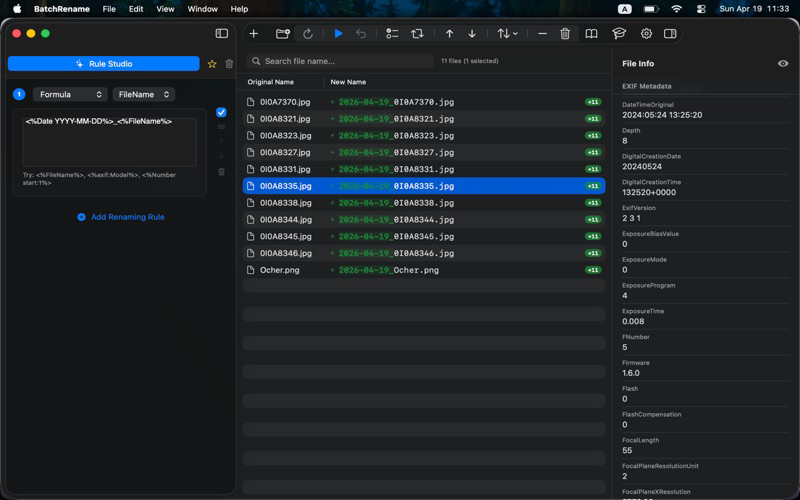
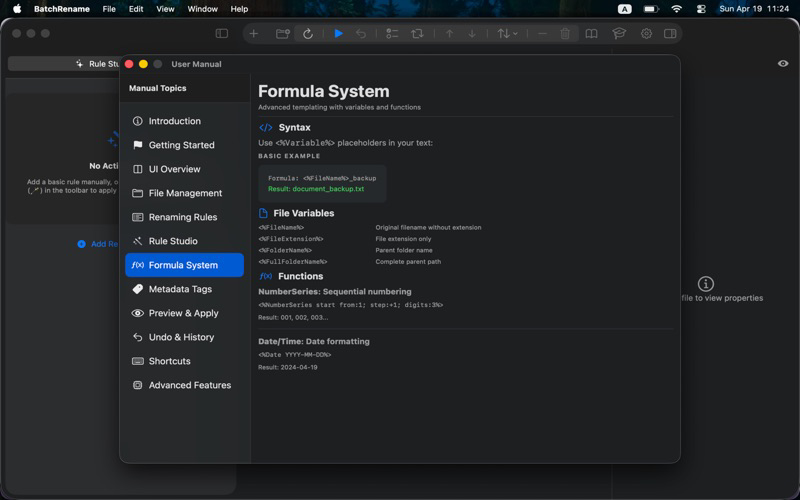
- Formula engine: write powerful templates with variables and functions
Example: {photo:Model}_{Date YYYY-MM-DD} -> iPhone15Pro_2024-06-15.jpg
Example: {music:Artist} - {music:Album} - {music:Title} -> Artist - Album - Title.mp3
PRO: METADATA TAGS
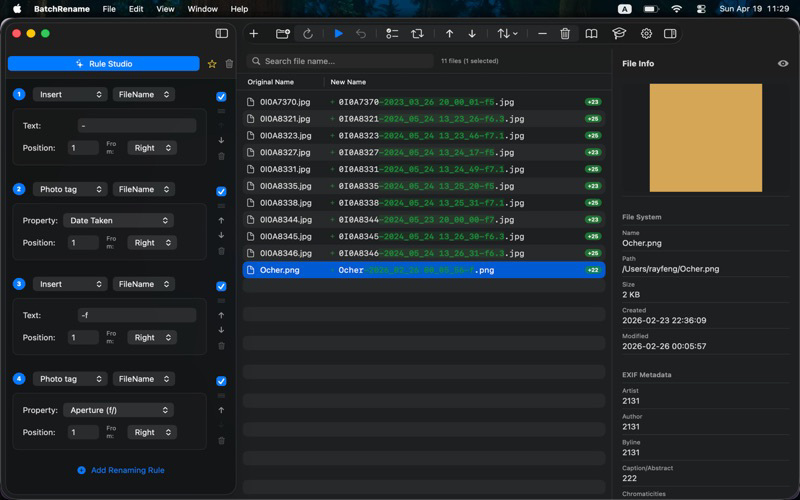
- Photo EXIF: 60+ tags including Camera model, lens specs, shutter, aperture, ISO, GPS, DPI, and Color Space
- Music ID3/iTunes: Artist, album, title, track number, year, genre, BPM, and more
- Video metadata: Duration, resolution, codec, bitrate, frame rate
- PDF properties: Title, author, subject, keywords, creation date
- File system: Size, creation date, modification date, extension, permissions
PRO: ENCODE & ENCRYPT
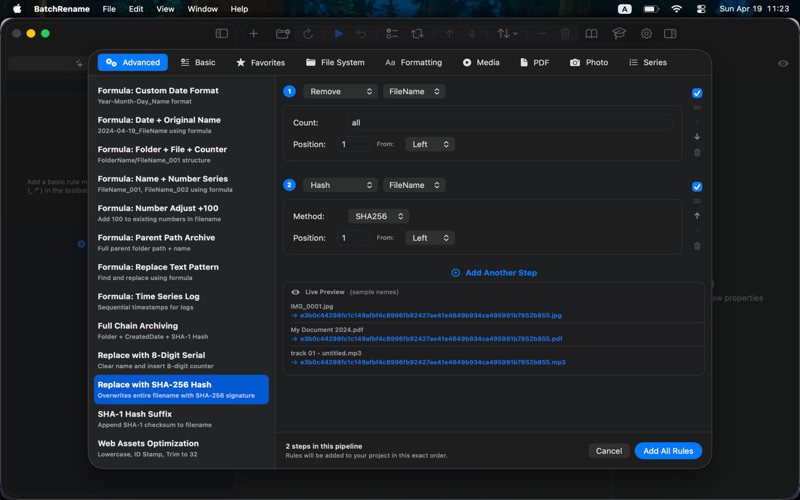
- File integrity: MD5, SHA-1, SHA-256 hashing appended to names
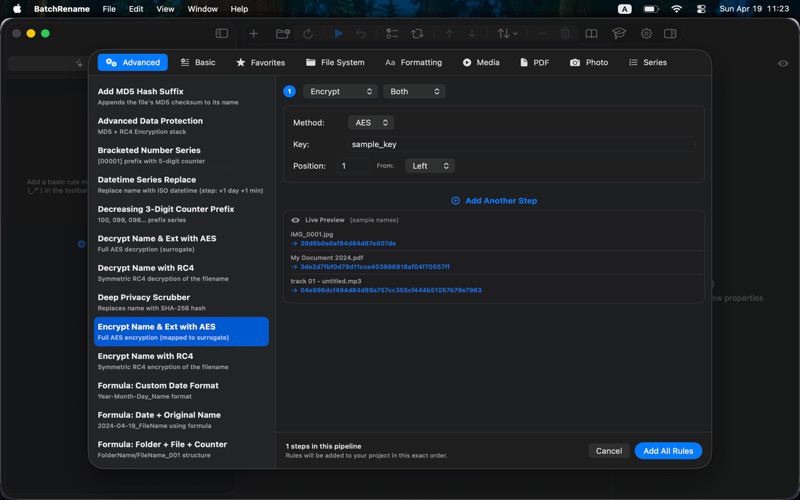
- AES-256 encryption and decryption of file names
- Useful for secure archiving and verification workflows
RULE STUDIO
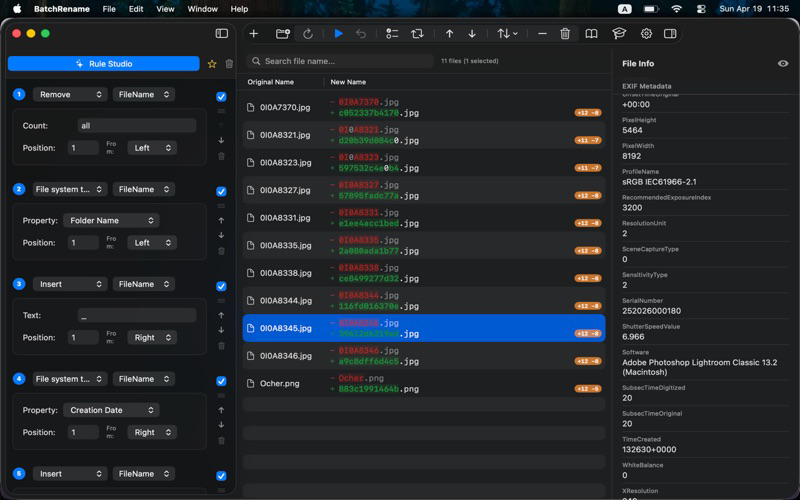
- 40+ professional template stacks, one-click apply
- Categories: Photography, Music, Video, Documents, Development, Formatting
- Live preview of before -> after names before you commit
- Build your own templates, save as Favorites
LIVE PREVIEW & SAFETY
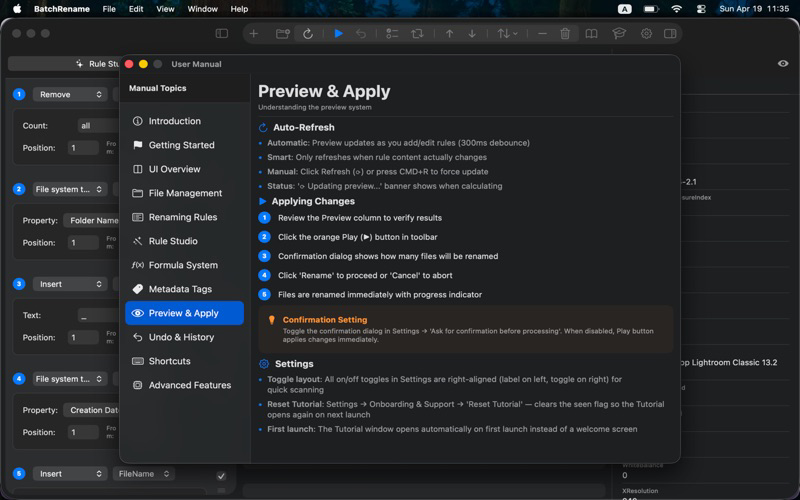
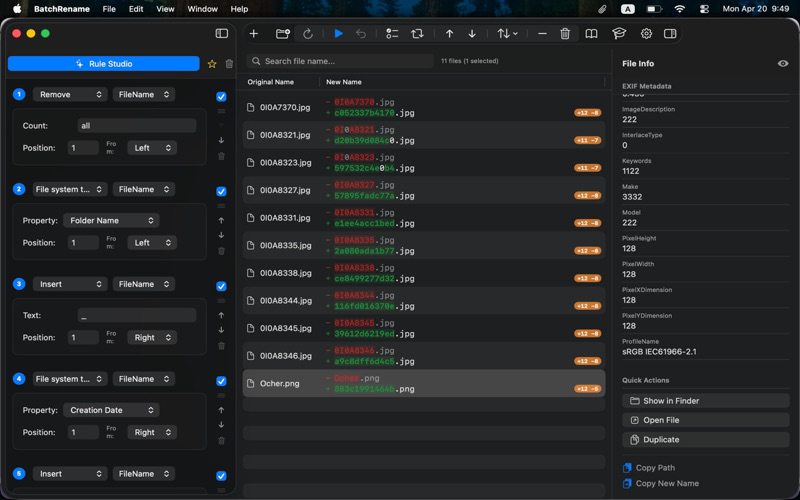
- Real-time diff highlighting - see exactly what changes
- Apply only when you're ready
- Full undo/redo with CMD+Z
- Confirmation dialog before renaming (optional)
- Detailed error logging if any files fail
INSPECTOR PANEL
- Instantly view EXIF, ID3, video, PDF metadata for any selected file
- Quick Actions: copy name, reveal in Finder, rename single file
- Quick Preview thumbnail
ORGANIZE YOUR FILES
- Drag-and-drop file ordering
- Search and filter by file name
- Sort by name, date, size, type
- Folder scanning: flat or recursive
- Select, invert, remove files easily
FREE FEATURES
Get started free:
- All 17 renaming methods (core text operations)
- Rule Studio templates - basic categories
- Live preview with diff highlighting
- Undo / Redo
- Inspector panel
- Drag-and-drop file import
- Recursive folder scanning
PERFECT FOR
- Photographers - rename RAW/JPG by camera, date, lens settings
- Musicians - organize libraries by artist, album, track, year
- Video editors - tag clips by resolution, codec, duration
- Researchers - bulk rename PDFs by title and author
- Developers - normalize asset names, batch hash for integrity
- Anyone with folders full of "IMG_0001.jpg"
PRIVACY FIRST
- 100% local processing - your files never leave your Mac
- No cloud, no analytics, no tracking
- No internet connection required
- GDPR compliant
**REQUIRES macOS 13.0 VENTURA OR LATER**
Support: https://filepropertyedit.com/batchrename/
Privacy: https://filepropertyedit.com/batchrename/privacy.html
Terms: https://filepropertyedit.com/batchrename/terms.html
EULA: https://www.apple.com/legal/internet-services/itunes/dev/stdeula/

BatchRename transforms hours of manual file renaming into seconds. Whether you're a photographer organizing RAW files, a musician tagging an album library, a developer cleaning up project assets, or anyone who works with files - BatchRename handles it all.
**WHY BATCHRENAME?**
BatchRename 3.0 is a complete native rewrite, built from the ground up for macOS using SwiftUI. Manual renaming is slow, error-prone, and painful - BatchRename gives you a live preview before you commit, full undo with CMD+Z, and a powerful rule engine that handles any renaming scenario imaginable.
**POWERFUL RENAMING METHODS**
17 BUILT-IN METHODS
- Insert - add text at any position, before/after keywords
- Replace - find and replace text in file names
- Remove - strip characters, prefixes, suffixes, or ranges
- Truncate - limit file name length precisely
- Case - UPPERCASE, lowercase, Title Case, camelCase
- Series - sequential numbering, date sequences
- Date/Time - rename by file creation, modification, or EXIF date
- Metadata Tags - embed EXIF, ID3, video, PDF data directly into names
PRO: SMART RENAMING
- Full regular expression support for precise pattern matching
- Formula engine: write powerful templates with variables and functions
Example: {photo:Model}_{Date YYYY-MM-DD} -> iPhone15Pro_2024-06-15.jpg
Example: {music:Artist} - {music:Album} - {music:Title} -> Artist - Album - Title.mp3
PRO: METADATA TAGS
- Photo EXIF: 60+ tags including Camera model, lens specs, shutter, aperture, ISO, GPS, DPI, and Color Space
- Music ID3/iTunes: Artist, album, title, track number, year, genre, BPM, and more
- Video metadata: Duration, resolution, codec, bitrate, frame rate
- PDF properties: Title, author, subject, keywords, creation date
- File system: Size, creation date, modification date, extension, permissions
PRO: ENCODE & ENCRYPT
- File integrity: MD5, SHA-1, SHA-256 hashing appended to names
- AES-256 encryption and decryption of file names
- Useful for secure archiving and verification workflows
RULE STUDIO
- 40+ professional template stacks, one-click apply
- Categories: Photography, Music, Video, Documents, Development, Formatting
- Live preview of before -> after names before you commit
- Build your own templates, save as Favorites
LIVE PREVIEW & SAFETY
- Real-time diff highlighting - see exactly what changes
- Apply only when you're ready
- Full undo/redo with CMD+Z
- Confirmation dialog before renaming (optional)
- Detailed error logging if any files fail
INSPECTOR PANEL
- Instantly view EXIF, ID3, video, PDF metadata for any selected file
- Quick Actions: copy name, reveal in Finder, rename single file
- Quick Preview thumbnail
ORGANIZE YOUR FILES
- Drag-and-drop file ordering
- Search and filter by file name
- Sort by name, date, size, type
- Folder scanning: flat or recursive
- Select, invert, remove files easily
FREE FEATURES
Get started free:
- All 17 renaming methods (core text operations)
- Rule Studio templates - basic categories
- Live preview with diff highlighting
- Undo / Redo
- Inspector panel
- Drag-and-drop file import
- Recursive folder scanning
PERFECT FOR
- Photographers - rename RAW/JPG by camera, date, lens settings
- Musicians - organize libraries by artist, album, track, year
- Video editors - tag clips by resolution, codec, duration
- Researchers - bulk rename PDFs by title and author
- Developers - normalize asset names, batch hash for integrity
- Anyone with folders full of "IMG_0001.jpg"
PRIVACY FIRST
- 100% local processing - your files never leave your Mac
- No cloud, no analytics, no tracking
- No internet connection required
- GDPR compliant
**REQUIRES macOS 13.0 VENTURA OR LATER**
Support: https://filepropertyedit.com/batchrename/
Privacy: https://filepropertyedit.com/batchrename/privacy.html
Terms: https://filepropertyedit.com/batchrename/terms.html
EULA: https://www.apple.com/legal/internet-services/itunes/dev/stdeula/
Show More
What's New in the Latest Version 3.0
Last updated on Apr 22, 2026
Old Versions
### Version 3.0
- New: Complete Native Rewrite - Built from the ground up with SwiftUI for a modern, fluid macOS experience.
- New: Expanded Photography Engine - support for 30+ new EXIF tags (DPI, Color Space, Brightness, Lens Specs, etc.)
- New: Tactile Rule Builder - advanced reordering with "grab" cursor and high-visibility drag feedback.
- New: Pro Photo Templates - 5 new professional stacks for print, studio, and archival workflows.
- New: Rename Summary Report - interactive dialog showing detailed success/failure metrics after every operation.
- New: Hover Tooltips - long filenames in the file list can now be fully inspected with a hover hint.
- Improved: Permission Management - centralized settings view for managing and revoking sandbox folder access.
- Improved: MakerNotes Filter - automatically hide proprietary numeric tags for a cleaner metadata view.
- fixed: StoreKit pricing now displays local currency correctly on first launch.
- New: Rule Studio live preview - see before/after file names with your actual files
- New: Recursive folder scanning - toggle flat or deep scan when adding folders
- New: Inspector metadata loads instantly on first file selection
- New: Inspector section reordered - metadata on top, Quick Actions at bottom
- New: Tutorial window replaces welcome screen for new users
- Improved: Settings toggles aligned for consistency
- Improved: Default window size 1200x800 for better workspace
- Fixed: Metadata not appearing on first file selection
- Fixed: Sample file previews now show accurate EXIF, PDF, and music metadata
- New: Complete Native Rewrite - Built from the ground up with SwiftUI for a modern, fluid macOS experience.
- New: Expanded Photography Engine - support for 30+ new EXIF tags (DPI, Color Space, Brightness, Lens Specs, etc.)
- New: Tactile Rule Builder - advanced reordering with "grab" cursor and high-visibility drag feedback.
- New: Pro Photo Templates - 5 new professional stacks for print, studio, and archival workflows.
- New: Rename Summary Report - interactive dialog showing detailed success/failure metrics after every operation.
- New: Hover Tooltips - long filenames in the file list can now be fully inspected with a hover hint.
- Improved: Permission Management - centralized settings view for managing and revoking sandbox folder access.
- Improved: MakerNotes Filter - automatically hide proprietary numeric tags for a cleaner metadata view.
- fixed: StoreKit pricing now displays local currency correctly on first launch.
- New: Rule Studio live preview - see before/after file names with your actual files
- New: Recursive folder scanning - toggle flat or deep scan when adding folders
- New: Inspector metadata loads instantly on first file selection
- New: Inspector section reordered - metadata on top, Quick Actions at bottom
- New: Tutorial window replaces welcome screen for new users
- Improved: Settings toggles aligned for consistency
- Improved: Default window size 1200x800 for better workspace
- Fixed: Metadata not appearing on first file selection
- Fixed: Sample file previews now show accurate EXIF, PDF, and music metadata
Show More
Version History
3.0
Apr 22, 2026
### Version 3.0
- New: Complete Native Rewrite - Built from the ground up with SwiftUI for a modern, fluid macOS experience.
- New: Expanded Photography Engine - support for 30+ new EXIF tags (DPI, Color Space, Brightness, Lens Specs, etc.)
- New: Tactile Rule Builder - advanced reordering with "grab" cursor and high-visibility drag feedback.
- New: Pro Photo Templates - 5 new professional stacks for print, studio, and archival workflows.
- New: Rename Summary Report - interactive dialog showing detailed success/failure metrics after every operation.
- New: Hover Tooltips - long filenames in the file list can now be fully inspected with a hover hint.
- Improved: Permission Management - centralized settings view for managing and revoking sandbox folder access.
- Improved: MakerNotes Filter - automatically hide proprietary numeric tags for a cleaner metadata view.
- fixed: StoreKit pricing now displays local currency correctly on first launch.
- New: Rule Studio live preview - see before/after file names with your actual files
- New: Recursive folder scanning - toggle flat or deep scan when adding folders
- New: Inspector metadata loads instantly on first file selection
- New: Inspector section reordered - metadata on top, Quick Actions at bottom
- New: Tutorial window replaces welcome screen for new users
- Improved: Settings toggles aligned for consistency
- Improved: Default window size 1200x800 for better workspace
- Fixed: Metadata not appearing on first file selection
- Fixed: Sample file previews now show accurate EXIF, PDF, and music metadata
- New: Complete Native Rewrite - Built from the ground up with SwiftUI for a modern, fluid macOS experience.
- New: Expanded Photography Engine - support for 30+ new EXIF tags (DPI, Color Space, Brightness, Lens Specs, etc.)
- New: Tactile Rule Builder - advanced reordering with "grab" cursor and high-visibility drag feedback.
- New: Pro Photo Templates - 5 new professional stacks for print, studio, and archival workflows.
- New: Rename Summary Report - interactive dialog showing detailed success/failure metrics after every operation.
- New: Hover Tooltips - long filenames in the file list can now be fully inspected with a hover hint.
- Improved: Permission Management - centralized settings view for managing and revoking sandbox folder access.
- Improved: MakerNotes Filter - automatically hide proprietary numeric tags for a cleaner metadata view.
- fixed: StoreKit pricing now displays local currency correctly on first launch.
- New: Rule Studio live preview - see before/after file names with your actual files
- New: Recursive folder scanning - toggle flat or deep scan when adding folders
- New: Inspector metadata loads instantly on first file selection
- New: Inspector section reordered - metadata on top, Quick Actions at bottom
- New: Tutorial window replaces welcome screen for new users
- Improved: Settings toggles aligned for consistency
- Improved: Default window size 1200x800 for better workspace
- Fixed: Metadata not appearing on first file selection
- Fixed: Sample file previews now show accurate EXIF, PDF, and music metadata
BatchRename: Smart FAQ
Click here to learn how to download BatchRename: Smart in restricted country or region.
Check the following list to see the minimum requirements of BatchRename: Smart.
iPhone