CrateAxis
Free
1.0for iPhone
Age Rating
CrateAxis Screenshots
About CrateAxis
CrateAxis helps users plan and evaluate packed boxes, crates, luggage, storage bins, and transport containers by analyzing item weight, position, fragility, stacking pressure, and movement risk.
How to Use:
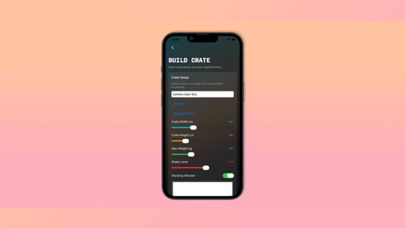
- Create a new crate plan by entering a title, crate type, travel mode, crate size, maximum weight, shake level, and stacking option.
- Add multiple load items into the crate plan.
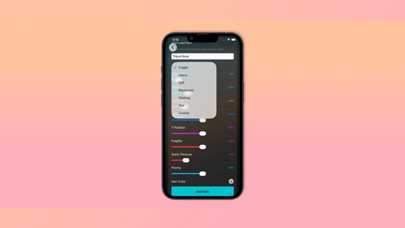
- For each item, enter its name, category, weight, size percentage, X position, Y position, fragility, stack pressure, priority, and color.
- Save the crate plan after adding at least two items.
- Open Balance Map to see item placement and the calculated center of weight.
- Open Tilt Risk Lab to review overload, crush pressure, tilt risk, and safety warnings.
- Use Crate Vault to revisit saved crate plans.
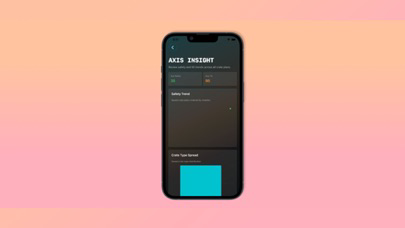
- Use Axis Insight to review safety trends and crate type patterns across saved plans.
Features:
- Detailed crate setup inputs for container type, travel mode, size, weight limit, shake level, and stacking.
- Multiple item input system with position, size, weight, fragility, and pressure controls.
- Visual crate map showing item placement inside the container.
- Automatic center-of-weight calculation using item positions and weights.
- Calculated Balance Score, Tilt Risk, Crush Risk, Overload Risk, Packing Efficiency, and Safety Index.
- Charts for weight spread, risk profile, safety trend, crate type distribution, and saved plan summaries.
- Validation for required title, valid weight, and minimum item count.
Why It Is Useful
CrateAxis helps users understand whether a packed container is balanced, overloaded, or at risk during movement. It is useful for organizing camera gear, tools, luggage, moving boxes, storage bins, and fragile items. By converting item placement and weight data into visual safety results, the app helps users make better packing decisions before transport or storage.

How to Use:
- Create a new crate plan by entering a title, crate type, travel mode, crate size, maximum weight, shake level, and stacking option.
- Add multiple load items into the crate plan.
- For each item, enter its name, category, weight, size percentage, X position, Y position, fragility, stack pressure, priority, and color.
- Save the crate plan after adding at least two items.
- Open Balance Map to see item placement and the calculated center of weight.
- Open Tilt Risk Lab to review overload, crush pressure, tilt risk, and safety warnings.
- Use Crate Vault to revisit saved crate plans.
- Use Axis Insight to review safety trends and crate type patterns across saved plans.
Features:
- Detailed crate setup inputs for container type, travel mode, size, weight limit, shake level, and stacking.
- Multiple item input system with position, size, weight, fragility, and pressure controls.
- Visual crate map showing item placement inside the container.
- Automatic center-of-weight calculation using item positions and weights.
- Calculated Balance Score, Tilt Risk, Crush Risk, Overload Risk, Packing Efficiency, and Safety Index.
- Charts for weight spread, risk profile, safety trend, crate type distribution, and saved plan summaries.
- Validation for required title, valid weight, and minimum item count.
Why It Is Useful
CrateAxis helps users understand whether a packed container is balanced, overloaded, or at risk during movement. It is useful for organizing camera gear, tools, luggage, moving boxes, storage bins, and fragile items. By converting item placement and weight data into visual safety results, the app helps users make better packing decisions before transport or storage.
Show More
What's New in the Latest Version 1.0
Last updated on May 11, 2026
Version History
1.0
May 11, 2026
CrateAxis FAQ
Click here to learn how to download CrateAxis in restricted country or region.
Check the following list to see the minimum requirements of CrateAxis.
iPhone