EA257 REMOTE CONTROLLER
Free
15for iPhone
Age Rating
EA257 REMOTE CONTROLLER Screenshots
About EA257 REMOTE CONTROLLER
This app is designed to work together with the EA257 interface, which is a modern alternative to the old and often no longer working 257 model steppers.
Now, you can easy select and play any of the 104 music from your 104 selection Jukeboxes
First of all you need to connect the app to the interface as follow: (please be sure your Bluetooth interface is enabled)
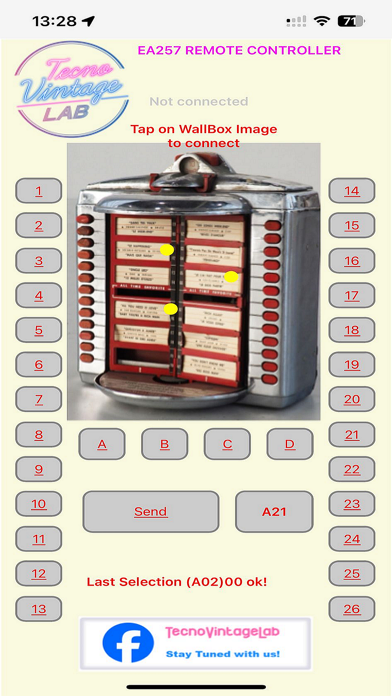
1) tap on wallbox image. The searching procedure will be started showing a yellow ball rotating
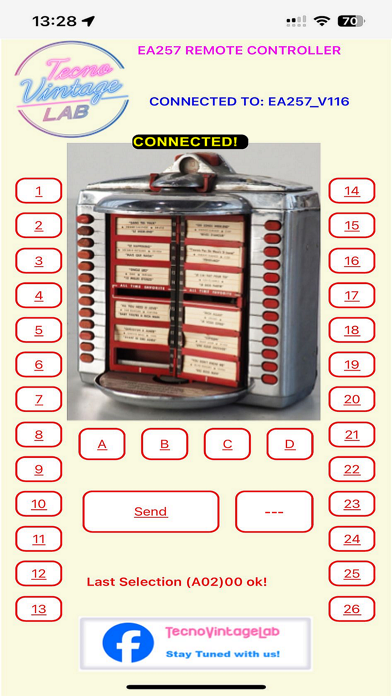
2) wheen connected the blu message "CONNECTED TO: EA257" will appear
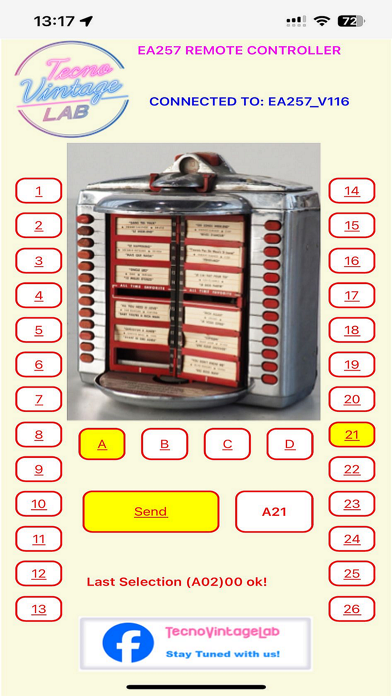
3) now you can choose A,B,C or D letter and one of 1 to 26 disk tapping on app button
4) The SEND button will be yellow when ready to send the selection to the interface
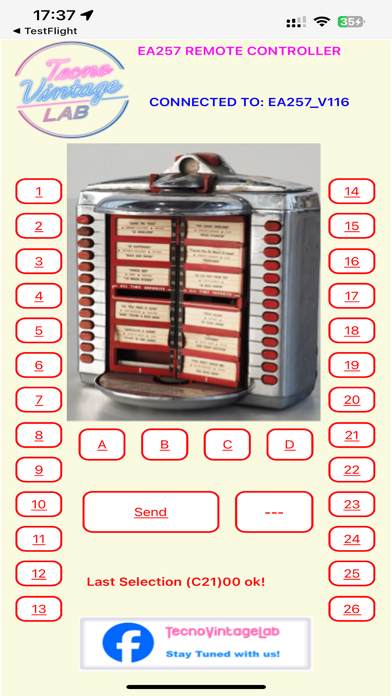
5) Tapping on yellow SEND button you will made by the EA257 interface the selection on Jukebox
Questa app è stata progettata per funzionare insieme alla interfaccia EA257 che è una versione moderna del famoso stepper 257 ormai introvabile.
Adesso è possibile selezionare da remoto uno qualsiasi dei brani musicali del tuo Jukebox.
L'interfaccia funziona solo con i Jukebox da 104 selezioni
Prima di tutto è necessario connettre l'app ala interfaccia come segue: (assicurarsi di avere l'interfaccia Bluetooh attiva)
1) tap sull'immagine del wallbox. 3 palline gialli inizieranno a ruotare indicando l'avvio della ricerca.
2) A connessione avvenuta il messagio blu "CONNECTED TO: EA257" sarà visualizzato
3) Adesso sarete pronti a selezionare una delle 4 lettere A,B,C or D letter e uno dei numeri tra 1 e 26 semplicemente cliccando sul pulsante
4) Il bottone SEND diventerà giallo quando sarete pronti ad inviare il comando
5) Cliccando sul pulsante giallo SEND si effettuerà tramite l'interfaccia la selezione sul Jukebox.

Now, you can easy select and play any of the 104 music from your 104 selection Jukeboxes
First of all you need to connect the app to the interface as follow: (please be sure your Bluetooth interface is enabled)
1) tap on wallbox image. The searching procedure will be started showing a yellow ball rotating
2) wheen connected the blu message "CONNECTED TO: EA257" will appear
3) now you can choose A,B,C or D letter and one of 1 to 26 disk tapping on app button
4) The SEND button will be yellow when ready to send the selection to the interface
5) Tapping on yellow SEND button you will made by the EA257 interface the selection on Jukebox
Questa app è stata progettata per funzionare insieme alla interfaccia EA257 che è una versione moderna del famoso stepper 257 ormai introvabile.
Adesso è possibile selezionare da remoto uno qualsiasi dei brani musicali del tuo Jukebox.
L'interfaccia funziona solo con i Jukebox da 104 selezioni
Prima di tutto è necessario connettre l'app ala interfaccia come segue: (assicurarsi di avere l'interfaccia Bluetooh attiva)
1) tap sull'immagine del wallbox. 3 palline gialli inizieranno a ruotare indicando l'avvio della ricerca.
2) A connessione avvenuta il messagio blu "CONNECTED TO: EA257" sarà visualizzato
3) Adesso sarete pronti a selezionare una delle 4 lettere A,B,C or D letter e uno dei numeri tra 1 e 26 semplicemente cliccando sul pulsante
4) Il bottone SEND diventerà giallo quando sarete pronti ad inviare il comando
5) Cliccando sul pulsante giallo SEND si effettuerà tramite l'interfaccia la selezione sul Jukebox.
Show More
What's New in the Latest Version 15
Last updated on Feb 2, 2026
Old Versions
Login change
Show More
Version History
15
Feb 2, 2026
Login change
EA257 REMOTE CONTROLLER FAQ
Click here to learn how to download EA257 REMOTE CONTROLLER in restricted country or region.
Check the following list to see the minimum requirements of EA257 REMOTE CONTROLLER.
iPhone