GEOCRM.com
位置情報サービスを活用した営業日報SFA
Free
1.5.0.5for iPhone, iPod touch
Age Rating
GEOCRM.com Screenshots
About GEOCRM.com
For all you mobile professionals who work actively outside the office!
Look at all the information in town that can be used for your company.
Knowledge Suite presents a smartphone-only application for “GEOCRM”, which provides mobile work assistance service using GPS location information.
A “memory aid device for the brain” is the concept for this service, which equips the salesperson who works outside the office visiting customers with a map as a base and information to populate it with. It is the next generation SFA for the route sales representative.
* This application is a free viewer for “GEOCRM”.
■The application’s “three features”■
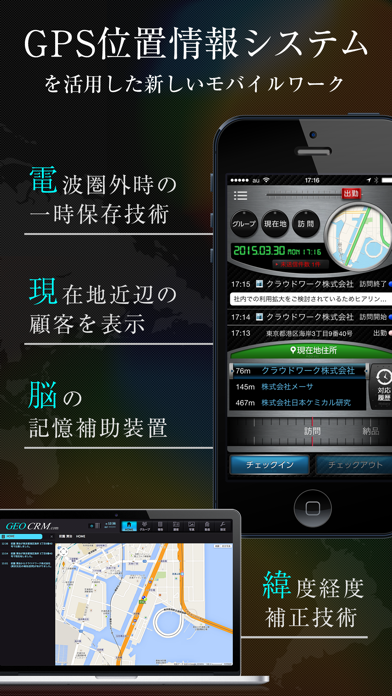
[01] Simple three-step reporting! The ultimate interface doesn’t add to your daily burden.
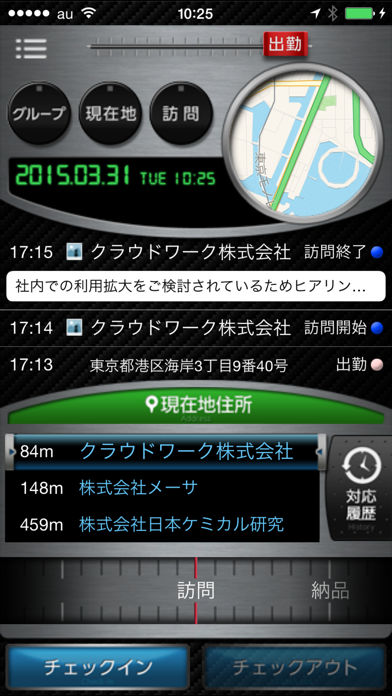
As a user, you only need to use your smartphone to (1) select location (customers in vicinity of current location) and report content (purpose and any photographs), (2) check in, and (3) document and share reports of visits to customers. It’s possible to create reports wherever you are because you can save location information and photographs even where there is no reception.
[02] “Concierge service” using map and location information
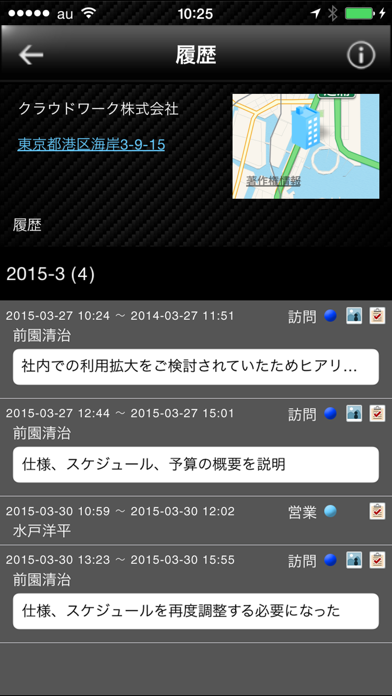
Once you figure out your current location using GPS, a list of customers who are in the vicinity is displayed with a simple push on the screen. This “concierge service” guides you to your customers and lets you use your spare time productively. There is also a function to share records of past visits, allowing you to make the most of your business opportunities.
[03] “Memory aid device for the brain”
The map forms a basis for you to store information on the cloud regarding partner company locations, business contacts, and accomplishments from past visits. As a salesperson, you don’t need to carry around all the documents. Instead you can rely on your smartphone as a trustworthy memory assistant to keep track of customer information and sales activity.
□List of functions□
Smartphone application functions
・tracks current location with function to limit access to customer information
・maintains customer database
・creates business reports with photo attachments and location information
・makes list of customers in the vicinity
・customizes report content
・temporarily saves report when out of reception
・indicates current location
PC functions
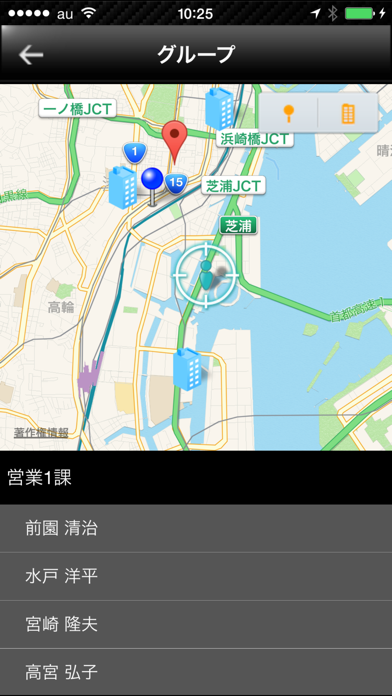
・shows groups
・enables registration of business contacts
・adjusts for latitude and longitude
・enables bulk registration of customer information
・equipped with various import and export functions
・available in English and Japanese
-Caution - Continued use of GPS running in the background can dramatically decrease battery life.
■ Operating environment ■
In order to use this application, users need to have contract with "GEOCRM".

Look at all the information in town that can be used for your company.
Knowledge Suite presents a smartphone-only application for “GEOCRM”, which provides mobile work assistance service using GPS location information.
A “memory aid device for the brain” is the concept for this service, which equips the salesperson who works outside the office visiting customers with a map as a base and information to populate it with. It is the next generation SFA for the route sales representative.
* This application is a free viewer for “GEOCRM”.
■The application’s “three features”■
[01] Simple three-step reporting! The ultimate interface doesn’t add to your daily burden.
As a user, you only need to use your smartphone to (1) select location (customers in vicinity of current location) and report content (purpose and any photographs), (2) check in, and (3) document and share reports of visits to customers. It’s possible to create reports wherever you are because you can save location information and photographs even where there is no reception.
[02] “Concierge service” using map and location information
Once you figure out your current location using GPS, a list of customers who are in the vicinity is displayed with a simple push on the screen. This “concierge service” guides you to your customers and lets you use your spare time productively. There is also a function to share records of past visits, allowing you to make the most of your business opportunities.
[03] “Memory aid device for the brain”
The map forms a basis for you to store information on the cloud regarding partner company locations, business contacts, and accomplishments from past visits. As a salesperson, you don’t need to carry around all the documents. Instead you can rely on your smartphone as a trustworthy memory assistant to keep track of customer information and sales activity.
□List of functions□
Smartphone application functions
・tracks current location with function to limit access to customer information
・maintains customer database
・creates business reports with photo attachments and location information
・makes list of customers in the vicinity
・customizes report content
・temporarily saves report when out of reception
・indicates current location
PC functions
・shows groups
・enables registration of business contacts
・adjusts for latitude and longitude
・enables bulk registration of customer information
・equipped with various import and export functions
・available in English and Japanese
-Caution - Continued use of GPS running in the background can dramatically decrease battery life.
■ Operating environment ■
In order to use this application, users need to have contract with "GEOCRM".
Show More
What's New in the Latest Version 1.5.0.5
Last updated on Feb 14, 2019
Old Versions
・Minor bugfixes.
Show More
Version History
1.5.0.5
Feb 14, 2019
・Minor bugfixes.
1.5.0.4
Dec 19, 2018
Minor bugfixes
1.5.0.3
Jul 5, 2018
Miner bugfixes
1.5.0.2
May 11, 2018
・Minor bugfixes.
1.5.0.1
May 9, 2018
・Minor bugfixes.
1.5.0.0
May 9, 2018
・Added "Business Card" feature in check-out operation.
・Specification change of "Customer Select".
1.4.9.2
Jan 5, 2018
・Minor bugfixes.
1.4.9.1
Dec 19, 2017
・Corresponded to SSO(SAML2.0).
1.4.4.2
Aug 4, 2017
・Bug fixes.
1.4.4.1
Feb 2, 2017
· Added "Schedule" to menu.
· Added function to delete a schedule.
· Added new link function from the visit schedule details screen to the company detail screen.
· Modified report editing screen.
· Added function to delete a schedule.
· Added new link function from the visit schedule details screen to the company detail screen.
· Modified report editing screen.
1.4.3.0
Aug 31, 2016
・Add the customer branch maximum display number setting.
・Bug fixes.
・Bug fixes.
1.4.2.0
Jul 13, 2016
・Strengthen the server access restriction function.
1.4.1.1
Jun 27, 2016
・Improve the display speed of the home screen.
・Add the customer registration function to the report detail screen.
・Add the customer registration function to the customer branch office map screen.
・Add check-in and check-out function to the customer branch office detail screen.
・Add check-in and check-out function to the customer branch office list screen.
・Bug fixes.
・Add the customer registration function to the report detail screen.
・Add the customer registration function to the customer branch office map screen.
・Add check-in and check-out function to the customer branch office detail screen.
・Add check-in and check-out function to the customer branch office list screen.
・Bug fixes.
1.4.0.0
Apr 27, 2016
・Addition of the visit schedule function.
・Addition of the customer indication area distance setting function.
・Bug fixes.
・Addition of the customer indication area distance setting function.
・Bug fixes.
1.3.2.0
Jan 13, 2016
・Separated Setting feature.
・Supported cache function for Report Format.
・Supported best GPS accuracy configuration.
・Supported editing feature of Report.
・Supported Auto-Login feature.
・Changed progress dialog on Top feature.
・Minor bugfixes.
・Supported cache function for Report Format.
・Supported best GPS accuracy configuration.
・Supported editing feature of Report.
・Supported Auto-Login feature.
・Changed progress dialog on Top feature.
・Minor bugfixes.
1.3.1.1
Sep 30, 2015
・Minor bugfixes.
1.3.1.0
Sep 14, 2015
・Supported editing feature of Customer Branch and Customer.
・Minor bugfixes.
・Minor bugfixes.
1.3.0.1
Aug 27, 2015
・Minor bugfixes.
1.3.0.0
Aug 17, 2015
・Added Help feature.
・Added "Mark Slide" feature on Customer Map section.
・changed layout on Setting section.
・Added "completed" for Task on Report Detail section.
・Minor bugfixes.
・Added "Mark Slide" feature on Customer Map section.
・changed layout on Setting section.
・Added "completed" for Task on Report Detail section.
・Minor bugfixes.
1.2.2.1
Jun 26, 2015
・Corresponded to Color settings for Customer Icons (buildings)
・Added Customer-In-Charge Search Condition on Customer Search Section
・Cooperated with External Map-Applications
・Added Version-Display Function
・Added Time-Out Value Settings from Users
・Added Update-Navigating Function
・Minor bugfixes
・Added Customer-In-Charge Search Condition on Customer Search Section
・Cooperated with External Map-Applications
・Added Version-Display Function
・Added Time-Out Value Settings from Users
・Added Update-Navigating Function
・Minor bugfixes
1.1.9.0
May 28, 2015
・Added Customer Relations Registration function.
・Added Report function.
・Added Crash Report function.
・Changed mandatory requirement on Customer Search function.
・Minor bugfixes.
・Added Report function.
・Added Crash Report function.
・Changed mandatory requirement on Customer Search function.
・Minor bugfixes.
1.1.5.0
Jan 22, 2015
・Added the advanced-search function for the Customer-Company Search section.
・Added new Map function for the Customer-Company section.
・Added the user-select function for the History List & Map section.
・Added the reminder function for the missing check-out operation.
・Minor bugfixes.
・Added new Map function for the Customer-Company section.
・Added the user-select function for the History List & Map section.
・Added the reminder function for the missing check-out operation.
・Minor bugfixes.
1.1.2.2
Dec 12, 2014
・Added Resend request list function.
・Added a configuration of using report time and location in check-out.
1.1.1
Nov 5, 2014
・Minor bugfixes.
1.1.0
Oct 12, 2014
・Added Custom Items functions.
・Minor bugfixes.
・Minor bugfixes.
GEOCRM.com FAQ
Click here to learn how to download GEOCRM.com in restricted country or region.
Check the following list to see the minimum requirements of GEOCRM.com.
iPhone
Requires iOS 9.0 or later.
iPod touch
Requires iOS 9.0 or later.
GEOCRM.com supports English, Japanese