Age Rating
4+
Apps in this category do not contain restricted content.
9+
Apps in this category may contain mild or occasional cartoon, fantasy or real-life violence, as well as occasional or mild adult, sexually suggestive or horrifying content and may not be suitable for children under 9 years of age.
12+
Apps in this category may contain occasional mild indecent language, frequent or intense cartoon or real-life violence, minor or occasional adult or sexually suggestive material, and simulated gambling, and may be for children under 12 years of age.
17+
You must be at least 17 years old to access this App.
Apps in this category may contain frequent and intense offensive language; Frequent and intense cartoon, fantasy or realistic violence: frequent and intense adult, scary and sexually suggestive subjects: as well as sexual content, nudity, tobacco, alcohol and drugs, may not be suitable for children under 17 years of age.
Gotcha App Screenshots
Gotcha App posterGotcha App posterGotcha App posterGotcha App posterGotcha App poster

About Gotcha App

Tired of taking down phone numbers, misspelling names and email addresses?

Gotcha with anyone you meet to get their contact information spontaneously through your phone's camera and their Gotcha code.

Features:

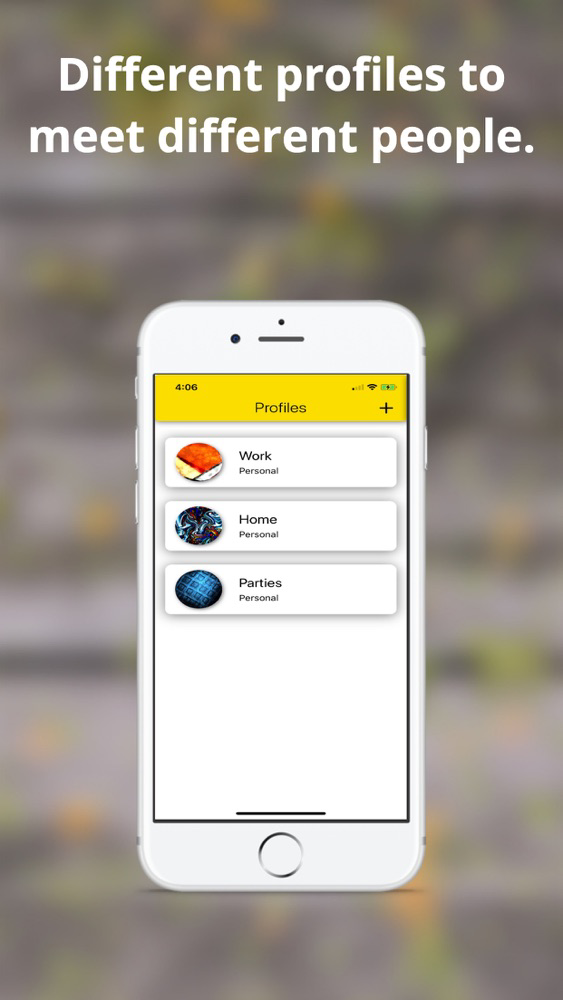
- Create multiple profiles for different uses. For example a Business profile for Work, Meetings, & Events, or a Personal profile for Home, Parties, & Social Gatherings.

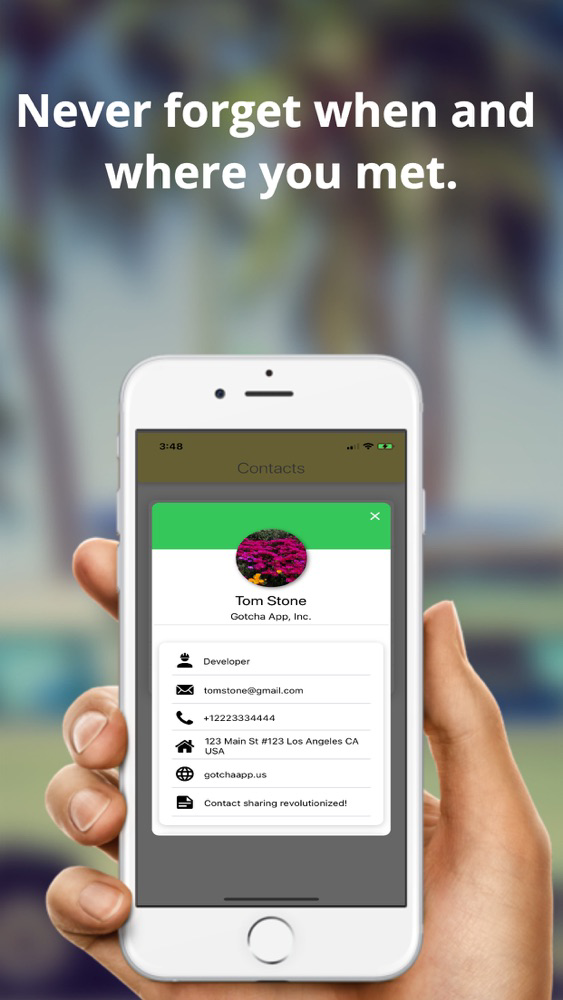
- Attach your Social Media accounts to your profile and share them all at once when you Gotcha.

- For each profile, Gotcha generates a QR code that can be scanned by other users to instantly get your contact information.

- You can then add your Gotcha contacts directly to your iOS Contacts!

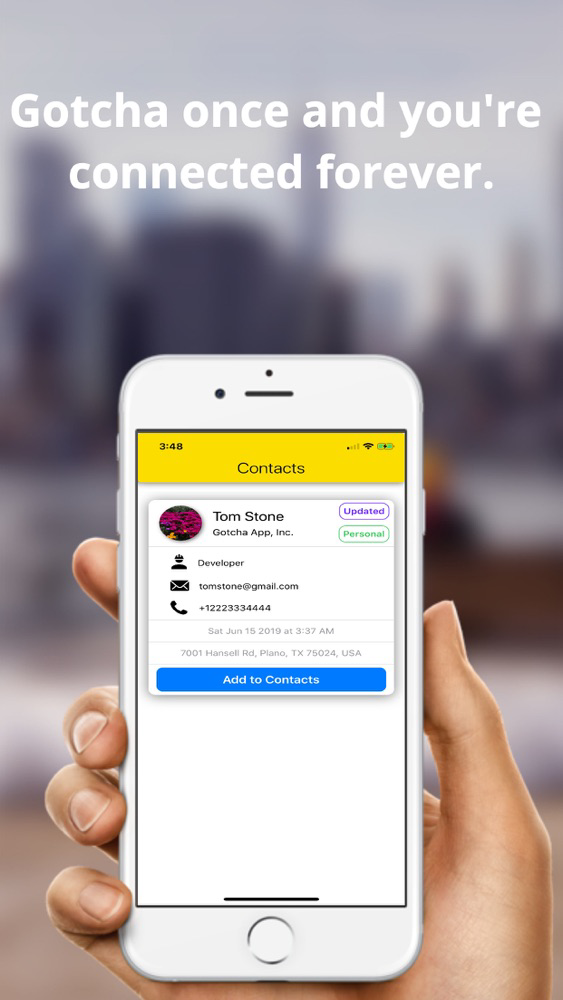
- Gotcha once and you're connected forever! Contacts shared with Gotcha are dynamic. Even if you change the information in your profile it will be automatically updated on everyone's phones who you've Gotcha'd with.
Show More

What's New in the Latest Version 2.45

Last updated on Jul 30, 2019
Old Versions
Here at Gotcha we ensure our app is constantly updated with new features, bug fixes and performance improvements. We're excited to announce that we have added the following new features with this release:

- Added support for allowing Camera access at a later time. The app will display a ‘No Camera Access’ message instead of the Camera and users can tap it to allow access when needed.
- Fixed several bugs with existing features like uploading a profile picture during sign up, display bugs when logging in with LinkedIn, and crashes throughout the app.
- Link your Social Media profiles with Gotcha, supports Facebook, Whatsapp, LinkedIn, Twitter, Snapchat, Instagram, Skype, WeChat and custom Social Media profiles. 

- Upload PDFs to your Gotcha profiles for documents such as resumes, pitch decks, corporate presentations, forms, and any other documents. 

- Fixed several bugs and improved UI / UX for various iOS device sizes.

- You can now Login and Sign Up with Gotcha.

- Profiles and Contacts will be restored when you log in from another device or switch devices.

- Every time you Gotcha with someone, the exact date and time of your Gotcha is stored as well as the street address of where you first met.
- An animated splash screen with our logo.

- A welcome page that appears when a new user opens the app for the first time.
- Users can now Login with Facebook, LinkedIn and Google.

- Dynamic updates, when your update your profile, it will automatically be updated on everyone else's phones that you've Gotcha'd with.
- UI improvements to the Contact Cards on the Contacts page, including Updated tags, and Profile Type tags.
- Added Offline capability, you can now save your profiles without an Internet connection, and your Profiles will automatically be updated once you have connectivity.

- Added the Pull-to-Refresh feature on the Contacts Page scroll view.
- Added icons to the Create profile and Edit profile screens for every piece of information you enter.
- Added buttons to navigate to the Profiles and Contacts screen. You can simply swipe to navigate between them too.

Stay tuned for future updates!

Show More
Version History
2.45
Jul 30, 2019
Here at Gotcha we ensure our app is constantly updated with new features, bug fixes and performance improvements. We're excited to announce that we have added the following new features with this release:

- Added support for allowing Camera access at a later time. The app will display a ‘No Camera Access’ message instead of the Camera and users can tap it to allow access when needed.
- Fixed several bugs with existing features like uploading a profile picture during sign up, display bugs when logging in with LinkedIn, and crashes throughout the app.
- Link your Social Media profiles with Gotcha, supports Facebook, Whatsapp, LinkedIn, Twitter, Snapchat, Instagram, Skype, WeChat and custom Social Media profiles. 

- Upload PDFs to your Gotcha profiles for documents such as resumes, pitch decks, corporate presentations, forms, and any other documents. 

- Fixed several bugs and improved UI / UX for various iOS device sizes.

- You can now Login and Sign Up with Gotcha.

- Profiles and Contacts will be restored when you log in from another device or switch devices.

- Every time you Gotcha with someone, the exact date and time of your Gotcha is stored as well as the street address of where you first met.
- An animated splash screen with our logo.

- A welcome page that appears when a new user opens the app for the first time.
- Users can now Login with Facebook, LinkedIn and Google.

- Dynamic updates, when your update your profile, it will automatically be updated on everyone else's phones that you've Gotcha'd with.
- UI improvements to the Contact Cards on the Contacts page, including Updated tags, and Profile Type tags.
- Added Offline capability, you can now save your profiles without an Internet connection, and your Profiles will automatically be updated once you have connectivity.

- Added the Pull-to-Refresh feature on the Contacts Page scroll view.
- Added icons to the Create profile and Edit profile screens for every piece of information you enter.
- Added buttons to navigate to the Profiles and Contacts screen. You can simply swipe to navigate between them too.

Stay tuned for future updates!

Gotcha App FAQ

Click here to learn how to download Gotcha App in restricted country or region.
Check the following list to see the minimum requirements of Gotcha App.
iPhone
Gotcha App supports English

Gotcha App Alternative

You May Also Like

Get more from Sunil Gupta