Keep Browser: Tree-Format Tabs
Free
1.26for iPhone, iPad
Age Rating
Keep Browser: Tree-Format Tabs Screenshots
About Keep Browser: Tree-Format Tabs
**Keep Browser: Elevate Your Browsing Experience**
Keep Browser is a tree-style tab management browser designed to make information gathering and daily browsing more efficient.
Whether comparing restaurants and cafes, exploring lunch spots, planning trips, searching for trading cards, used cars,
comparing apartments, electronics, gadgets, collecting favorite comics or game info, or watching videos,
it's the perfect browser for organizing information and quickly accessing what you need in any situation.
**More Convenient Search with the Browser**
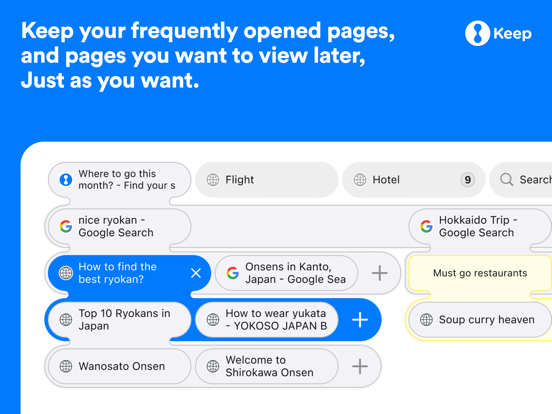
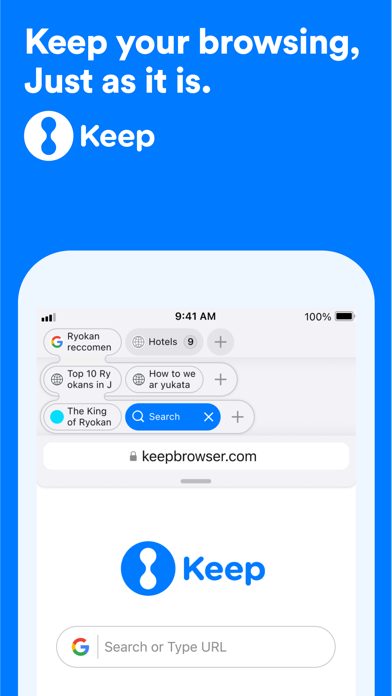
When searching for information on search engines like Google, the results are opened in a tab group,
automatically linking them to the search page. This efficient management of search origin and results makes browsing smoother.
**Supporting Information Gathering and Comparison for Better Choices in Daily Life**
- Comparison of restaurants and cafes: Search for local restaurants and cafes, open them in tabs to compare ratings, menus, and prices.
- Travel planning: Search for accommodations, tourist spots, and restaurants at your destination, managing each in tab groups.
- Used car search: Compare various car models and sales sites in tabs.
- Comparison of trading cards: Open each card's details in tab groups to compare value and rarity when comparing different trading cards.
- Product comparison: Compare multiple products and reviews in tabs when shopping online.
- Ease of use: Keep Browser is useful for all your browsing activities, from daily information gathering to pursuing hobbies, work, or study, making it easy to organize and access information in any situation.
**Privacy and Security**
Browse in a private mode without leaving a search history or access history. Ad blocking also supports more comfortable browsing.
**Main Features:**
- Smart tab management: Organize search results and important pages by managing the tab bar in a tree-style format.
- Tab management with labels: Customize tabs with labels to quickly find pages without getting lost.
- Easy link opening: Long-press links to open them in new tabs.
- Tab copying and management: Long-press to copy tabs and efficiently manage them, including their history.
- Private mode: A secure mode that allows you to browse while protecting your privacy.
- Locking tabs: Lock important pages for quick access.
- Organizing in the management screen: Easily organize and edit tabs in the management screen.
- Restoring closed tabs: Restore closed tab groups all at once.
- Ad blocking: Block annoying ads for a more comfortable browsing experience.
**Other Features:**
- Sharing and collaboration: Easily share and collaborate on web pages.
- Restoring the last session: Easily restore pages opened during the last use.
- Organizing bookmarks: Store your favorite pages by organizing bookmarks in folders.
- Choosing a search engine: Use your preferred search engine.
- Managing downloaded files: Easily manage files you've downloaded.
- Managing browsing history: Record and delete your browsing history.
- Copying and sharing URLs: Easily copy URLs and share them with other apps.
- Page translation: Translate the page you're viewing into a specified language.

Keep Browser is a tree-style tab management browser designed to make information gathering and daily browsing more efficient.
Whether comparing restaurants and cafes, exploring lunch spots, planning trips, searching for trading cards, used cars,
comparing apartments, electronics, gadgets, collecting favorite comics or game info, or watching videos,
it's the perfect browser for organizing information and quickly accessing what you need in any situation.
**More Convenient Search with the Browser**
When searching for information on search engines like Google, the results are opened in a tab group,
automatically linking them to the search page. This efficient management of search origin and results makes browsing smoother.
**Supporting Information Gathering and Comparison for Better Choices in Daily Life**
- Comparison of restaurants and cafes: Search for local restaurants and cafes, open them in tabs to compare ratings, menus, and prices.
- Travel planning: Search for accommodations, tourist spots, and restaurants at your destination, managing each in tab groups.
- Used car search: Compare various car models and sales sites in tabs.
- Comparison of trading cards: Open each card's details in tab groups to compare value and rarity when comparing different trading cards.
- Product comparison: Compare multiple products and reviews in tabs when shopping online.
- Ease of use: Keep Browser is useful for all your browsing activities, from daily information gathering to pursuing hobbies, work, or study, making it easy to organize and access information in any situation.
**Privacy and Security**
Browse in a private mode without leaving a search history or access history. Ad blocking also supports more comfortable browsing.
**Main Features:**
- Smart tab management: Organize search results and important pages by managing the tab bar in a tree-style format.
- Tab management with labels: Customize tabs with labels to quickly find pages without getting lost.
- Easy link opening: Long-press links to open them in new tabs.
- Tab copying and management: Long-press to copy tabs and efficiently manage them, including their history.
- Private mode: A secure mode that allows you to browse while protecting your privacy.
- Locking tabs: Lock important pages for quick access.
- Organizing in the management screen: Easily organize and edit tabs in the management screen.
- Restoring closed tabs: Restore closed tab groups all at once.
- Ad blocking: Block annoying ads for a more comfortable browsing experience.
**Other Features:**
- Sharing and collaboration: Easily share and collaborate on web pages.
- Restoring the last session: Easily restore pages opened during the last use.
- Organizing bookmarks: Store your favorite pages by organizing bookmarks in folders.
- Choosing a search engine: Use your preferred search engine.
- Managing downloaded files: Easily manage files you've downloaded.
- Managing browsing history: Record and delete your browsing history.
- Copying and sharing URLs: Easily copy URLs and share them with other apps.
- Page translation: Translate the page you're viewing into a specified language.
Show More
What's New in the Latest Version 1.26
Last updated on May 24, 2026
Old Versions
• New Features and Improvements
We added fast scrolling to the browser screen and Tab list. You can now swipe the scroll bar to quickly move to any position in a page or list.
We improved ad blocking. In Settings, you can choose the ad-blocking strength from “OFF / Light / Standard / Strong.” You can also change ad-blocking settings for each site from the ad-block icon on the left side of the address bar or from the More menu. The Standard setting has been tuned to be less aggressive to help prevent layout issues.
We added a bug report form. If you encounter issues such as buttons not responding, please contact us from the bottom of the site-specific ad-block settings page, or from “Report a Bug” in Settings.
We improved the behavior when tapping the top of the screen to return to the top of the current view.
We updated the ad-blocking configuration file.
• Bug Fixes and Stability Improvements
We made minor improvements, including revisions to inquiry text, and improved overall usability and stability.
Keep Browser is always working to improve performance and stability. If you have feedback or requests, please let us know in a review.
We added fast scrolling to the browser screen and Tab list. You can now swipe the scroll bar to quickly move to any position in a page or list.
We improved ad blocking. In Settings, you can choose the ad-blocking strength from “OFF / Light / Standard / Strong.” You can also change ad-blocking settings for each site from the ad-block icon on the left side of the address bar or from the More menu. The Standard setting has been tuned to be less aggressive to help prevent layout issues.
We added a bug report form. If you encounter issues such as buttons not responding, please contact us from the bottom of the site-specific ad-block settings page, or from “Report a Bug” in Settings.
We improved the behavior when tapping the top of the screen to return to the top of the current view.
We updated the ad-blocking configuration file.
• Bug Fixes and Stability Improvements
We made minor improvements, including revisions to inquiry text, and improved overall usability and stability.
Keep Browser is always working to improve performance and stability. If you have feedback or requests, please let us know in a review.
Show More
Version History
1.26
May 24, 2026
• New Features and Improvements
We added fast scrolling to the browser screen and Tab list. You can now swipe the scroll bar to quickly move to any position in a page or list.
We improved ad blocking. In Settings, you can choose the ad-blocking strength from “OFF / Light / Standard / Strong.” You can also change ad-blocking settings for each site from the ad-block icon on the left side of the address bar or from the More menu. The Standard setting has been tuned to be less aggressive to help prevent layout issues.
We added a bug report form. If you encounter issues such as buttons not responding, please contact us from the bottom of the site-specific ad-block settings page, or from “Report a Bug” in Settings.
We improved the behavior when tapping the top of the screen to return to the top of the current view.
We updated the ad-blocking configuration file.
• Bug Fixes and Stability Improvements
We made minor improvements, including revisions to inquiry text, and improved overall usability and stability.
Keep Browser is always working to improve performance and stability. If you have feedback or requests, please let us know in a review.
We added fast scrolling to the browser screen and Tab list. You can now swipe the scroll bar to quickly move to any position in a page or list.
We improved ad blocking. In Settings, you can choose the ad-blocking strength from “OFF / Light / Standard / Strong.” You can also change ad-blocking settings for each site from the ad-block icon on the left side of the address bar or from the More menu. The Standard setting has been tuned to be less aggressive to help prevent layout issues.
We added a bug report form. If you encounter issues such as buttons not responding, please contact us from the bottom of the site-specific ad-block settings page, or from “Report a Bug” in Settings.
We improved the behavior when tapping the top of the screen to return to the top of the current view.
We updated the ad-blocking configuration file.
• Bug Fixes and Stability Improvements
We made minor improvements, including revisions to inquiry text, and improved overall usability and stability.
Keep Browser is always working to improve performance and stability. If you have feedback or requests, please let us know in a review.
Keep Browser: Tree-Format Tabs FAQ
Click here to learn how to download Keep Browser: Tree-Format Tabs in restricted country or region.
Check the following list to see the minimum requirements of Keep Browser: Tree-Format Tabs.
iPhone
iPad
Related Videos
Latest introduction video of Keep Browser: Tree-Format Tabs on iPhone