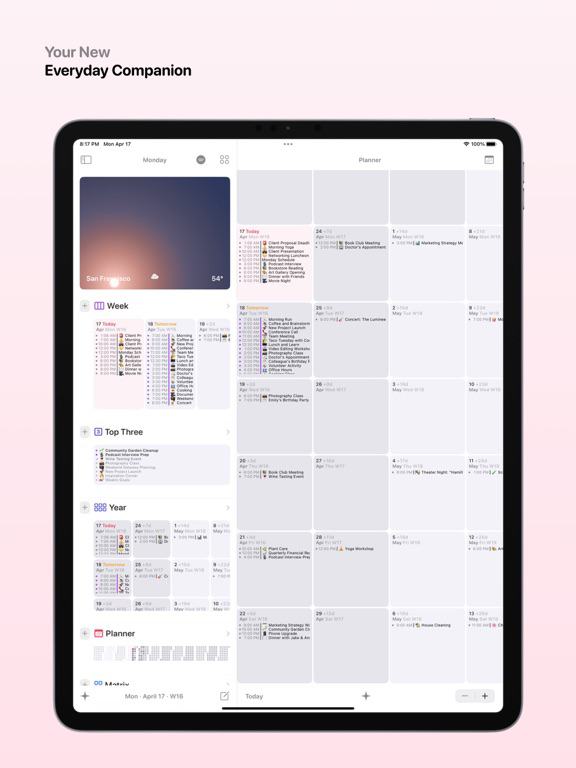
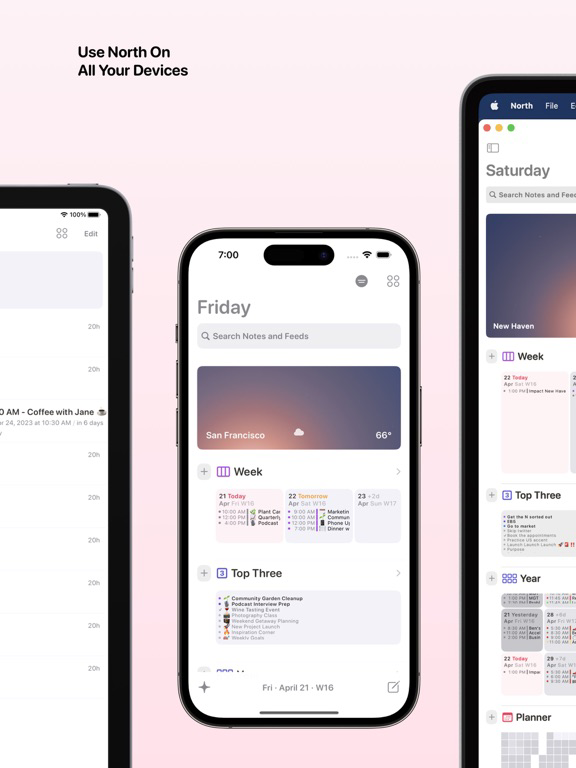
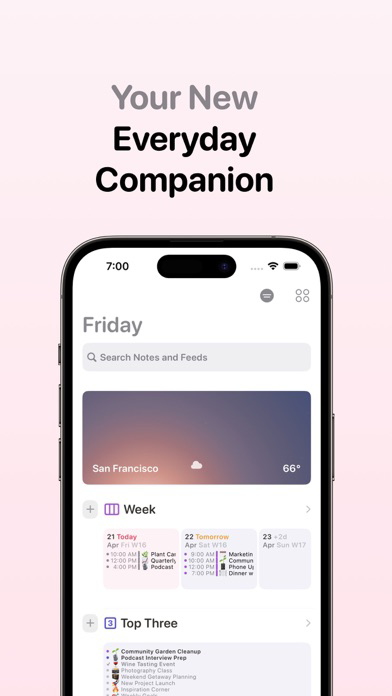
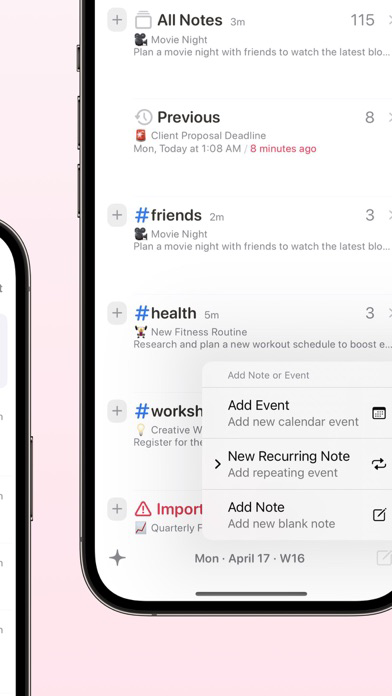
7-Day Overview: Stay organized and informed with a comprehensive view of your week's events and tasks using our 7-Day Overview.
Annual Snapshot: Plan ahead and visualize your entire year with our Annual Snapshot, designed to help you stay on top of long-term goals and appointments.
Today & Tomorrow Panels: Quickly glimpse what's on your calendar today and what awaits you tomorrow with these handy new panels. Stay in-the-know with just a glance!
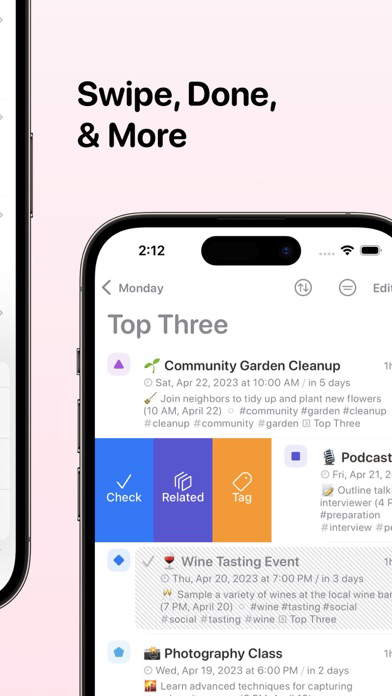
Top Three Panel: Struggling to prioritize tasks? Don't sweat it. With the new Top Three Panel, focus on the most important tasks for the day, and take your productivity to the next level!
Matrix Panel: Introducing the Eisenhower Matrix Panel to help you better organize your tasks. Sort them into Important-Now, Important-Later, Not-Important-But-Now, and Not-Important-And-Later (skip it/eliminate) quadrants. Tackle those tasks like a pro!
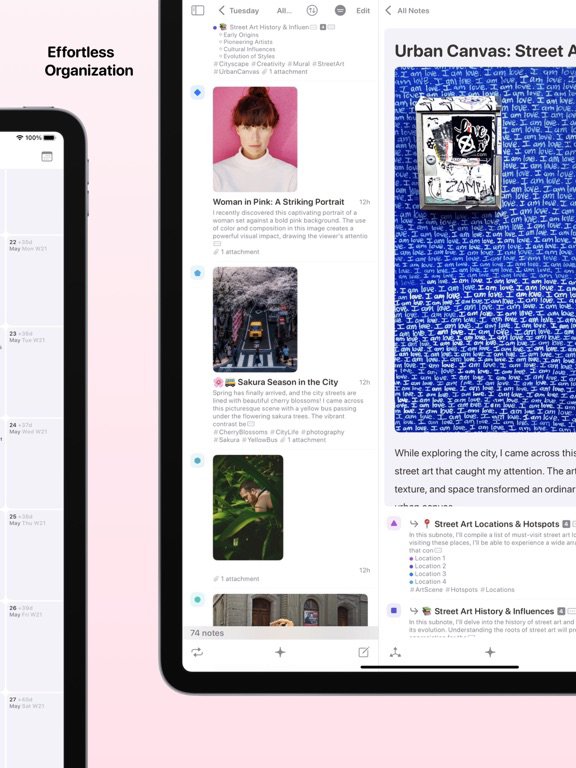
Drag & Drop: Effortlessly drag and drop your notes into panels or other tags on your feed. Organizing has never been this fun and easy!
Long Press: Unlock additional actions with a simple long press on panels. Discover a world of possibilities with just one touch!
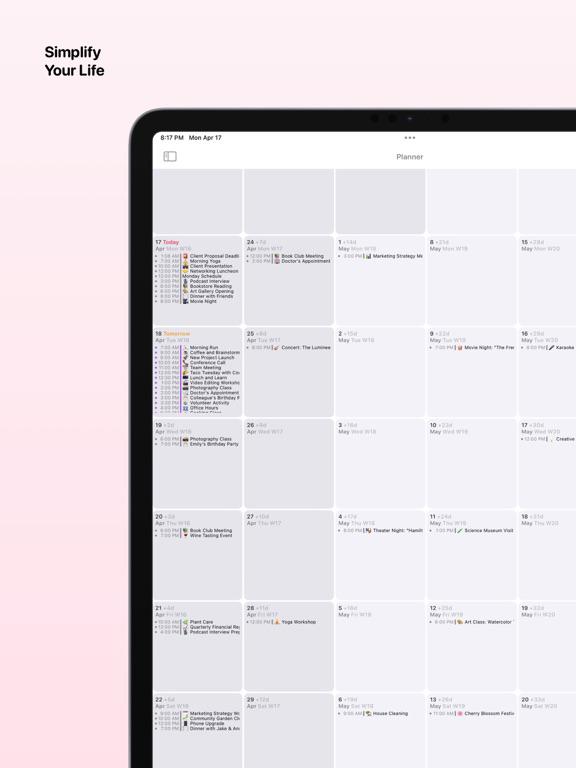
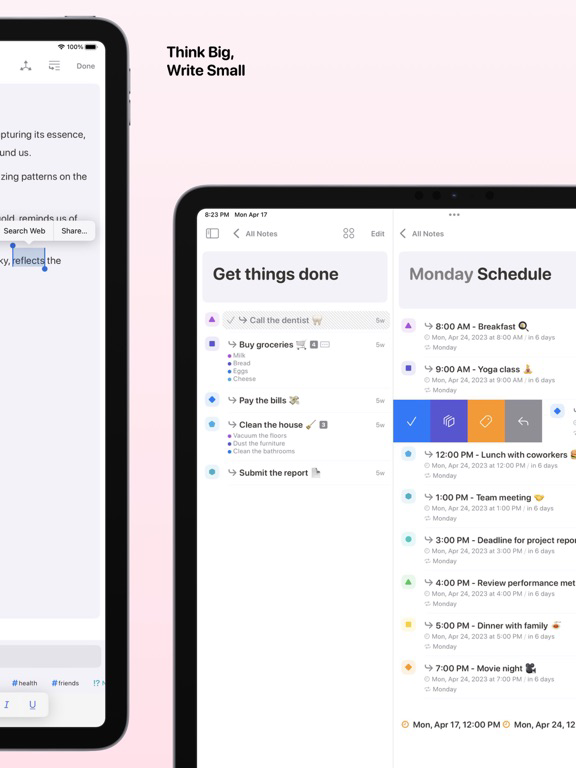
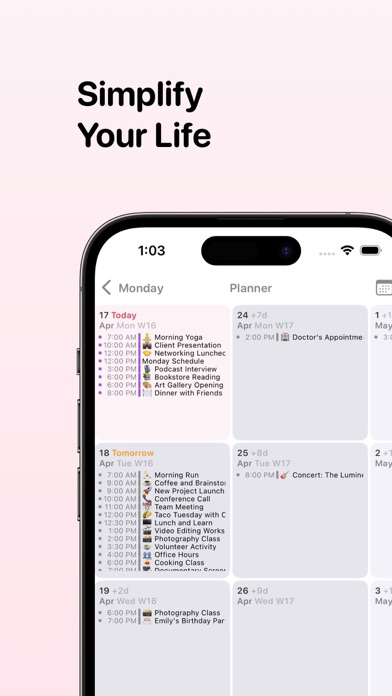
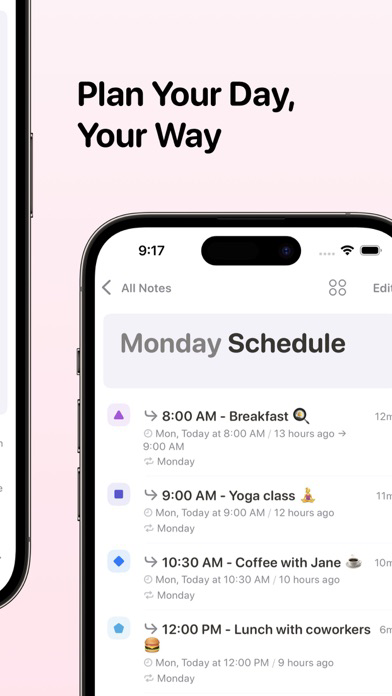
Planner Improvements: We've also made your note-taking experience smoother, and introduced a new Planner section for your events. Planner integrates both your iOS/macOS calendars and notes tagged to dates or repeating tags for a seamless scheduling experience.
7-Day Overview: Stay organized and informed with a comprehensive view of your week's events and tasks using our 7-Day Overview.
Annual Snapshot: Plan ahead and visualize your entire year with our Annual Snapshot, designed to help you stay on top of long-term goals and appointments.
Today & Tomorrow Panels: Quickly glimpse what's on your calendar today and what awaits you tomorrow with these handy new panels. Stay in-the-know with just a glance!
Top Three Panel: Struggling to prioritize tasks? Don't sweat it. With the new Top Three Panel, focus on the most important tasks for the day, and take your productivity to the next level!
Matrix Panel: Introducing the Eisenhower Matrix Panel to help you better organize your tasks. Sort them into Important-Now, Important-Later, Not-Important-But-Now, and Not-Important-And-Later (skip it/eliminate) quadrants. Tackle those tasks like a pro!
Drag & Drop: Effortlessly drag and drop your notes into panels or other tags on your feed. Organizing has never been this fun and easy!
Long Press: Unlock additional actions with a simple long press on panels. Discover a world of possibilities with just one touch!
Planner Improvements: We've also made your note-taking experience smoother, and introduced a new Planner section for your events. Planner integrates both your iOS/macOS calendars and notes tagged to dates or repeating tags for a seamless scheduling experience.
You can now sort your notes lists in cool, new ways! Also, bug fixes!
Fresh coat of paint for your daily driver.
• If you’re using North daily to record your notes and coordinate with a global team, we’re now helping you get a snapshot of your current location and locations of your peers. That is, you can now tap on the weather button in your Add Feed toolbar. More timezone and weather awareness for you, more collaboration for all.
• You can now export full-database backups right within North. Add some archives on your chosen backup storage location. NOTE Restoring backups will overwrite your existing data in North.
INTRODUCING SOL FOR NORTH
• Sol brings the brilliance of dawn and dusk into your pocket. It shimmers at night to the twinkles of stars and glows just before sunrise. Sol introduces the sky outside from the comfort of your palm. Keep track of the position of the sun, the moon and its phases throughout your week.
• Sol is a sky simulator that shows you the altitude and position of both the sun and the moon in any location in the world. With the unique circular gesture on the Sol View, you can interactively move the sun and the moon forward and backwards in time (Time Travel) - All the while transitioning a spectrum of solar hues that change and simulate the opacity of the sky during different parts of your day. Time Travel also shows you future weather information for your selected point of time.
• Sol lets us interact with the sky and the time of day, to explore other locations and to gain an appreciation of the solar and lunar cycles that occur silently above our roofs.
• Sol also works great as a visual-assist to counter time-blindness, particularly when under extended lockdown or when working nights.
LOCATIONS AND TIMEZONES
• Sol also features a Timezones view that displays your favorite locations. Each location tile displays its time, timezone offset to your location, and window into the sky at that location at present. You can even check out Antarctica and its perpetual dusk!
BEAUTIFUL SKY ANIMATIONS
• Sol's animation lets you see the path of the sun and the moon: how it moved in the past, and where it’s going in the future at any location in the world. You can also track the moon phases visually and view the progression of the moon from waning to waxing, from full moon to a new moon.
YOUR WEATHER, ANYWHERE IN THE WORLD
• Sol gives you a beautiful 3-hourly forecast for five days for your precise location. For US and select other cities, Sol also features a hyperlocal, minute-by-minute forecast of rain or snow, when weather conditions apply. You can monitor the weather for an unlimited number of locations. Each weather tile captures specific weather information for a window of time and gives you a peek into the sky at that point.
ALL NEW WIDGETS FROM SOL
• You can add multiple cities to your home screen and choose from three different widget sizes and configure each widget to a unique city.
Sol supports for multiple languages including Spanish, Chinese, Japanese, French, German and Russian
• If you’re using North daily to record your notes and coordinate with a global team, we’re now helping you get a snapshot of your current location and locations of your peers. That is, you can now tap on the weather button in your Add Feed toolbar. More timezone and weather awareness for you, more collaboration for all.
• You can now export full-database backups right within North. Add some archives on your chosen backup storage location. NOTE Restoring backups will overwrite your existing data in North.
INTRODUCING SOL FOR NORTH
• Sol brings the brilliance of dawn and dusk into your pocket. It shimmers at night to the twinkles of stars and glows just before sunrise. Sol introduces the sky outside from the comfort of your palm. Keep track of the position of the sun, the moon and its phases throughout your week.
• Sol is a sky simulator that shows you the altitude and position of both the sun and the moon in any location in the world. With the unique circular gesture on the Sol View, you can interactively move the sun and the moon forward and backwards in time (Time Travel) - All the while transitioning a spectrum of solar hues that change and simulate the opacity of the sky during different parts of your day. Time Travel also shows you future weather information for your selected point of time.
• Sol lets us interact with the sky and the time of day, to explore other locations and to gain an appreciation of the solar and lunar cycles that occur silently above our roofs.
• Sol also works great as a visual-assist to counter time-blindness, particularly when under extended lockdown or when working nights.
LOCATIONS AND TIMEZONES
• Sol also features a Timezones view that displays your favorite locations. Each location tile displays its time, timezone offset to your location, and window into the sky at that location at present. You can even check out Antarctica and its perpetual dusk!
BEAUTIFUL SKY ANIMATIONS
• Sol's animation lets you see the path of the sun and the moon: how it moved in the past, and where it’s going in the future at any location in the world. You can also track the moon phases visually and view the progression of the moon from waning to waxing, from full moon to a new moon.
YOUR WEATHER, ANYWHERE IN THE WORLD
• Sol gives you a beautiful 3-hourly forecast for five days for your precise location. For US and select other cities, Sol also features a hyperlocal, minute-by-minute forecast of rain or snow, when weather conditions apply. You can monitor the weather for an unlimited number of locations. Each weather tile captures specific weather information for a window of time and gives you a peek into the sky at that point.
ALL NEW WIDGETS FROM SOL
• You can add multiple cities to your home screen and choose from three different widget sizes and configure each widget to a unique city.
Sol supports for multiple languages including Spanish, Chinese, Japanese, French, German and Russian
New features
- INTRODUCING Search Operators: Use "+" or " AND " between your keywords to get results that contain all of your keywords. Use "|" or " OR " to get results that contain any one or more of your keywords. Exclude operators to get results which contain your full search text.
- Combine multiple tag names with "+" or " AND " in search to get a filtered feed with your chosen tags
- INTRODUCING Universal Attachments: Add any type of file into your notes. Preview all supported files in-app including PDF, Word, Excel, PowerPoint, videos, images, text files, and RTF. Zoom into your images in Preview, edit your video clips and even annotate your PDFs; do all of this while viewing a note in North.
- Zero loss of quality when attaching images with Universal Attachments
- Duplicate swipe action
- Drag-and-drop into other notes
- Drag-and-drop from macOS Finder or iPad Files App onto any of your Note Previews or onto your Note's toolbar
- Annotate PDFs that are saved in your notes
- NEW Attachment Bullets and Attachment Tags in your Note Previews
- Access Universal Attachments by tapping the More Actions button on the top left of your Navigation Bar in your Notes Editor or simply drag-and-drop files on macOS and iPad
- INTRODUCING State Preservation and Auto-Resume: North now loads your app into your last closed view stack whenever relaunched. You can Force Quit to reset Auto-Resume.
- "Tag" Swipe Action now supports custom labels. Just type-in your new label into your search-bar and get your newly added Tags
- Split-view navigation has improved consistency
- Pinned Tags are now retained when not tagged to any notes
- Checked notes are restored to Unchecked when rescheduled by a Repeat Tag
- ALL-NEW Quick Access Panel for jumping to notes from any part of your navigation stack
- Save notes in a temporary #pasteboard Feed by adding a hashtag, pin the #pasteboard Feed to the top of your Add Feed, and use Quick Access to bring your tagged notes into your content from anywhere in the app
- Launch a new note inside of Quick Access and get back to your prior work when done
- With Quick Access, you can filter your note library as needed, drag and drop notes to pull in content to your active note, tap to launch notes, access your swipe and bulk actions and when done, close Quick Access with a simple swipe down to get back to where you were
- With Quick Access, you can perform a global search to find any of your notes while editing
- ADDED "Detach" Swipe Action to remove nested notes from the parent note - available as a leading-edge swipe for Nested Notes
- ADDED "Tag" Swipe Action to tag a note into any of your Feeds or Filter Feeds - available as a leading-edge swipe for Nested Notes
- ADDED "Related" Swipe Action - Use this to jump into a Filtered Feed that matches the tags of your chosen note and add more content under this Filter with a tap - available as a leading-edge swipe for tagged notes
- EXPANDED Bulk Actions including Detach, Tag and Untag
- IMPROVED toolbar drop zone tips during drag and drop sessions
- Previous Feed to track your elapsed events
- Filter Stacks
- Narrow down your lists with multiple filters
- You can now filter your feeds with multiple tags or by Upcoming and Archived - better yet, you can stack all of these filters together in one go
- Swipe from the trailing edge of your Add Feed items to jump into Filters or tap on the Filter button at the bottom-left of your Feed View toolbar
- Contact details are now supported by 3D Links and Auto-Detect
- Supported contact types include Postal Addresses, Telephone Numbers and Hyperlinked Email Addresses
- Introducing Color Tags with custom labels
- Add new Color Tags by typing your label text into the Tag Bar ー Scroll through the tag list to see more tags with your text
- Visual improvements to tags in note previews, Tag Bar and Notes Editor
- ALL NEW Calendar Widget
- Scan your day with Event Dots at the top right of your widget
New features
- INTRODUCING Search Operators: Use "+" or " AND " between your keywords to get results that contain all of your keywords. Use "|" or " OR " to get results that contain any one or more of your keywords. Exclude operators to get results which contain your full search text.
- Combine multiple tag names with "+" or " AND " in search to get a filtered feed with your chosen tags
- INTRODUCING Universal Attachments: Add any type of file into your notes. Preview all supported files in-app including PDF, Word, Excel, PowerPoint, videos, images, text files, and RTF. Zoom into your images in Preview, edit your video clips and even annotate your PDFs; do all of this while viewing a note in North.
- Zero loss of quality when attaching images with Universal Attachments
- Duplicate swipe action
- Drag-and-drop into other notes
- Drag-and-drop from macOS Finder or iPad Files App onto any of your Note Previews or onto your Note's toolbar
- Annotate PDFs that are saved in your notes
- NEW Attachment Bullets and Attachment Tags in your Note Previews
- Access Universal Attachments by tapping the More Actions button on the top left of your Navigation Bar in your Notes Editor or simply drag-and-drop files on macOS and iPad
- INTRODUCING State Preservation and Auto-Resume: North now loads your app into your last closed view stack whenever relaunched. You can Force Quit to reset Auto-Resume.
- "Tag" Swipe Action now supports custom labels. Just type-in your new label into your search-bar and get your newly added Tags
- Split-view navigation has improved consistency
- Pinned Tags are now retained when not tagged to any notes
- Checked notes are restored to Unchecked when rescheduled by a Repeat Tag
- ALL-NEW Quick Access Panel for jumping to notes from any part of your navigation stack
- Save notes in a temporary #pasteboard Feed by adding a hashtag, pin the #pasteboard Feed to the top of your Add Feed, and use Quick Access to bring your tagged notes into your content from anywhere in the app
- Launch a new note inside of Quick Access and get back to your prior work when done
- With Quick Access, you can filter your note library as needed, drag and drop notes to pull in content to your active note, tap to launch notes, access your swipe and bulk actions and when done, close Quick Access with a simple swipe down to get back to where you were
- With Quick Access, you can perform a global search to find any of your notes while editing
- ADDED "Detach" Swipe Action to remove nested notes from the parent note - available as a leading-edge swipe for Nested Notes
- ADDED "Tag" Swipe Action to tag a note into any of your Feeds or Filter Feeds - available as a leading-edge swipe for Nested Notes
- ADDED "Related" Swipe Action - Use this to jump into a Filtered Feed that matches the tags of your chosen note and add more content under this Filter with a tap - available as a leading-edge swipe for tagged notes
- EXPANDED Bulk Actions including Detach, Tag and Untag
- IMPROVED toolbar drop zone tips during drag and drop sessions
- Previous Feed to track your elapsed events
- Filter Stacks
- Narrow down your lists with multiple filters
- You can now filter your feeds with multiple tags or by Upcoming and Archived - better yet, you can stack all of these filters together in one go
- Swipe from the trailing edge of your Add Feed items to jump into Filters or tap on the Filter button at the bottom-left of your Feed View toolbar
- Contact details are now supported by 3D Links and Auto-Detect
- Supported contact types include Postal Addresses, Telephone Numbers and Hyperlinked Email Addresses
- Introducing Color Tags with custom labels
- Add new Color Tags by typing your label text into the Tag Bar ー Scroll through the tag list to see more tags with your text
- Visual improvements to tags in note previews, Tag Bar and Notes Editor
- ALL NEW Calendar Widget
- Scan your day with Event Dots at the top right of your widget
New features
- INTRODUCING Search Operators: Use "+" or " AND " between your keywords to get results that contain all of your keywords. Use "|" or " OR " to get results that contain any one or more of your keywords. Exclude operators to get results which contain your full search text.
- Combine multiple tag names with "+" or " AND " in search to get a filtered feed with your chosen tags
- INTRODUCING Universal Attachments: Add any type of file into your notes. Preview all supported files in-app including PDF, Word, Excel, PowerPoint, videos, images, text files, and RTF. Zoom into your images in Preview, edit your video clips and even annotate your PDFs; do all of this while viewing a note in North.
- Zero loss of quality when attaching images with Universal Attachments
- Duplicate swipe action
- Drag-and-drop into other notes
- Drag-and-drop from macOS Finder or iPad Files App onto any of your Note Previews or onto your Note's toolbar
- Annotate PDFs that are saved in your notes
- NEW Attachment Bullets and Attachment Tags in your Note Previews
- Access Universal Attachments by tapping the More Actions button on the top left of your Navigation Bar in your Notes Editor or simply drag-and-drop files on macOS and iPad
- INTRODUCING State Preservation and Auto-Resume: North now loads your app into your last closed view stack whenever relaunched. You can Force Quit to reset Auto-Resume.
- "Tag" Swipe Action now supports custom labels. Just type-in your new label into your search-bar and get your newly added Tags
- Split-view navigation has improved consistency
- Pinned Tags are now retained when not tagged to any notes
- Checked notes are restored to Unchecked when rescheduled by a Repeat Tag
- ALL-NEW Quick Access Panel for jumping to notes from any part of your navigation stack
- Save notes in a temporary #pasteboard Feed by adding a hashtag, pin the #pasteboard Feed to the top of your Add Feed, and use Quick Access to bring your tagged notes into your content from anywhere in the app
- Launch a new note inside of Quick Access and get back to your prior work when done
- With Quick Access, you can filter your note library as needed, drag and drop notes to pull in content to your active note, tap to launch notes, access your swipe and bulk actions and when done, close Quick Access with a simple swipe down to get back to where you were
- With Quick Access, you can perform a global search to find any of your notes while editing
- ADDED "Detach" Swipe Action to remove nested notes from the parent note - available as a leading-edge swipe for Nested Notes
- ADDED "Tag" Swipe Action to tag a note into any of your Feeds or Filter Feeds - available as a leading-edge swipe for Nested Notes
- ADDED "Related" Swipe Action - Use this to jump into a Filtered Feed that matches the tags of your chosen note and add more content under this Filter with a tap - available as a leading-edge swipe for tagged notes
- EXPANDED Bulk Actions including Detach, Tag and Untag
- IMPROVED toolbar drop zone tips during drag and drop sessions
- Previous Feed to track your elapsed events
- Filter Stacks
- Narrow down your lists with multiple filters
- You can now filter your feeds with multiple tags or by Upcoming and Archived - better yet, you can stack all of these filters together in one go
- Swipe from the trailing edge of your Add Feed items to jump into Filters or tap on the Filter button at the bottom-left of your Feed View toolbar
- Contact details are now supported by 3D Links and Auto-Detect
- Supported contact types include Postal Addresses, Telephone Numbers and Hyperlinked Email Addresses
- Introducing Color Tags with custom labels
- Add new Color Tags by typing your label text into the Tag Bar ー Scroll through the tag list to see more tags with your text
- Visual improvements to tags in note previews, Tag Bar and Notes Editor
- ALL NEW Calendar Widget
- Scan your day with Event Dots at the top right of your widget
New features
- INTRODUCING Search Operators: Use "+" or " AND " between your keywords to get results that contain all of your keywords. Use "|" or " OR " to get results that contain any one or more of your keywords. Exclude operators to get results which contain your full search text.
- Combine multiple tag names with "+" or " AND " in search to get a filtered feed with your chosen tags
- INTRODUCING Universal Attachments: Add any type of file into your notes. Preview all supported files in-app including PDF, Word, Excel, PowerPoint, videos, images, text files, and RTF. Zoom into your images in Preview, edit your video clips and even annotate your PDFs; do all of this while viewing a note in North.
- Zero loss of quality when attaching images with Universal Attachments
- Duplicate swipe action
- Drag-and-drop into other notes
- Drag-and-drop from macOS Finder or iPad Files App onto any of your Note Previews or onto your Note's toolbar
- Annotate PDFs that are saved in your notes
- NEW Attachment Bullets and Attachment Tags in your Note Previews
- Access Universal Attachments by tapping the More Actions button on the top left of your Navigation Bar in your Notes Editor or simply drag-and-drop files on macOS and iPad
- INTRODUCING State Preservation and Auto-Resume: North now loads your app into your last closed view stack whenever relaunched. You can Force Quit to reset Auto-Resume.
- "Tag" Swipe Action now supports custom labels. Just type-in your new label into your search-bar and get your newly added Tags
- Split-view navigation has improved consistency
- Pinned Tags are now retained when not tagged to any notes
- Checked notes are restored to Unchecked when rescheduled by a Repeat Tag
- ALL-NEW Quick Access Panel for jumping to notes from any part of your navigation stack
- Save notes in a temporary #pasteboard Feed by adding a hashtag, pin the #pasteboard Feed to the top of your Add Feed, and use Quick Access to bring your tagged notes into your content from anywhere in the app
- Launch a new note inside of Quick Access and get back to your prior work when done
- With Quick Access, you can filter your note library as needed, drag and drop notes to pull in content to your active note, tap to launch notes, access your swipe and bulk actions and when done, close Quick Access with a simple swipe down to get back to where you were
- With Quick Access, you can perform a global search to find any of your notes while editing
- ADDED "Detach" Swipe Action to remove nested notes from the parent note - available as a leading-edge swipe for Nested Notes
- ADDED "Tag" Swipe Action to tag a note into any of your Feeds or Filter Feeds - available as a leading-edge swipe for Nested Notes
- ADDED "Related" Swipe Action - Use this to jump into a Filtered Feed that matches the tags of your chosen note and add more content under this Filter with a tap - available as a leading-edge swipe for tagged notes
- EXPANDED Bulk Actions including Detach, Tag and Untag
- IMPROVED toolbar drop zone tips during drag and drop sessions
- Previous Feed to track your elapsed events
- Filter Stacks
- Narrow down your lists with multiple filters
- You can now filter your feeds with multiple tags or by Upcoming and Archived - better yet, you can stack all of these filters together in one go
- Swipe from the trailing edge of your Add Feed items to jump into Filters or tap on the Filter button at the bottom-left of your Feed View toolbar
- Contact details are now supported by 3D Links and Auto-Detect
- Supported contact types include Postal Addresses, Telephone Numbers and Hyperlinked Email Addresses
- Introducing Color Tags with custom labels
- Add new Color Tags by typing your label text into the Tag Bar ー Scroll through the tag list to see more tags with your text
- Visual improvements to tags in note previews, Tag Bar and Notes Editor
- ALL NEW Calendar Widget
- Scan your day with Event Dots at the top right of your widget
New features
- INTRODUCING Search Operators: Use "+" or " AND " between your keywords to get results that contain all of your keywords. Use "|" or " OR " to get results that contain any one or more of your keywords. Exclude operators to get results which contain your full search text.
- Combine multiple tag names with "+" or " AND " in search to get a filtered feed with your chosen tags
- INTRODUCING Universal Attachments: Add any type of file into your notes. Preview all supported files in-app including PDF, Word, Excel, PowerPoint, videos, images, text files, and RTF. Zoom into your images in Preview, edit your video clips and even annotate your PDFs; do all of this while viewing a note in North.
- Zero loss of quality when attaching images with Universal Attachments
- Duplicate swipe action
- Drag-and-drop into other notes
- Drag-and-drop from macOS Finder or iPad Files App onto any of your Note Previews or onto your Note's toolbar
- Annotate PDFs that are saved in your notes
- NEW Attachment Bullets and Attachment Tags in your Note Previews
- Access Universal Attachments by tapping the More Actions button on the top left of your Navigation Bar in your Notes Editor or simply drag-and-drop files on macOS and iPad
- INTRODUCING State Preservation and Auto-Resume: North now loads your app into your last closed view stack whenever relaunched. You can Force Quit to reset Auto-Resume.
- "Tag" Swipe Action now supports custom labels. Just type-in your new label into your search-bar and get your newly added Tags
- Split-view navigation has improved consistency
- Pinned Tags are now retained when not tagged to any notes
- Checked notes are restored to Unchecked when rescheduled by a Repeat Tag
- ALL-NEW Quick Access Panel for jumping to notes from any part of your navigation stack
- Save notes in a temporary #pasteboard Feed by adding a hashtag, pin the #pasteboard Feed to the top of your Add Feed, and use Quick Access to bring your tagged notes into your content from anywhere in the app
- Launch a new note inside of Quick Access and get back to your prior work when done
- With Quick Access, you can filter your note library as needed, drag and drop notes to pull in content to your active note, tap to launch notes, access your swipe and bulk actions and when done, close Quick Access with a simple swipe down to get back to where you were
- With Quick Access, you can perform a global search to find any of your notes while editing
- ADDED "Detach" Swipe Action to remove nested notes from the parent note - available as a leading-edge swipe for Nested Notes
- ADDED "Tag" Swipe Action to tag a note into any of your Feeds or Filter Feeds - available as a leading-edge swipe for Nested Notes
- ADDED "Related" Swipe Action - Use this to jump into a Filtered Feed that matches the tags of your chosen note and add more content under this Filter with a tap - available as a leading-edge swipe for tagged notes
- EXPANDED Bulk Actions including Detach, Tag and Untag
- IMPROVED toolbar drop zone tips during drag and drop sessions
- Previous Feed to track your elapsed events
- Filter Stacks
- Narrow down your lists with multiple filters
- You can now filter your feeds with multiple tags or by Upcoming and Archived - better yet, you can stack all of these filters together in one go
- Swipe from the trailing edge of your Add Feed items to jump into Filters or tap on the Filter button at the bottom-left of your Feed View toolbar
- Contact details are now supported by 3D Links and Auto-Detect
- Supported contact types include Postal Addresses, Telephone Numbers and Hyperlinked Email Addresses
- Introducing Color Tags with custom labels
- Add new Color Tags by typing your label text into the Tag Bar ー Scroll through the tag list to see more tags with your text
- Visual improvements to tags in note previews, Tag Bar and Notes Editor
- ALL NEW Calendar Widget
- Scan your day with Event Dots at the top right of your widget
New features
- INTRODUCING Search Operators: Use "+" or " AND " between your keywords to get results that contain all of your keywords. Use "|" or " OR " to get results that contain any one or more of your keywords. Exclude operators to get results which contain your full search text.
- Combine multiple tag names with "+" or " AND " in search to get a filtered feed with your chosen tags
- INTRODUCING Universal Attachments: Add any type of file into your notes. Preview all supported files in-app including PDF, Word, Excel, PowerPoint, videos, images, text files, and RTF. Zoom into your images in Preview, edit your video clips and even annotate your PDFs; do all of this while viewing a note in North.
- Zero loss of quality when attaching images with Universal Attachments
- Duplicate swipe action
- Drag-and-drop into other notes
- Drag-and-drop from macOS Finder or iPad Files App onto any of your Note Previews or onto your Note's toolbar
- Annotate PDFs that are saved in your notes
- NEW Attachment Bullets and Attachment Tags in your Note Previews
- Access Universal Attachments by tapping the More Actions button on the top left of your Navigation Bar in your Notes Editor or simply drag-and-drop files on macOS and iPad
- INTRODUCING State Preservation and Auto-Resume: North now loads your app into your last closed view stack whenever relaunched. You can Force Quit to reset Auto-Resume.
- "Tag" Swipe Action now supports custom labels. Just type-in your new label into your search-bar and get your newly added Tags
- Split-view navigation has improved consistency
- Pinned Tags are now retained when not tagged to any notes
- Checked notes are restored to Unchecked when rescheduled by a Repeat Tag
- ALL-NEW Quick Access Panel for jumping to notes from any part of your navigation stack
- Save notes in a temporary #pasteboard Feed by adding a hashtag, pin the #pasteboard Feed to the top of your Add Feed, and use Quick Access to bring your tagged notes into your content from anywhere in the app
- Launch a new note inside of Quick Access and get back to your prior work when done
- With Quick Access, you can filter your note library as needed, drag and drop notes to pull in content to your active note, tap to launch notes, access your swipe and bulk actions and when done, close Quick Access with a simple swipe down to get back to where you were
- With Quick Access, you can perform a global search to find any of your notes while editing
- ADDED "Detach" Swipe Action to remove nested notes from the parent note - available as a leading-edge swipe for Nested Notes
- ADDED "Tag" Swipe Action to tag a note into any of your Feeds or Filter Feeds - available as a leading-edge swipe for Nested Notes
- ADDED "Related" Swipe Action - Use this to jump into a Filtered Feed that matches the tags of your chosen note and add more content under this Filter with a tap - available as a leading-edge swipe for tagged notes
- EXPANDED Bulk Actions including Detach, Tag and Untag
- IMPROVED toolbar drop zone tips during drag and drop sessions
- Previous Feed to track your elapsed events
- Filter Stacks
- Narrow down your lists with multiple filters
- You can now filter your feeds with multiple tags or by Upcoming and Archived - better yet, you can stack all of these filters together in one go
- Swipe from the trailing edge of your Add Feed items to jump into Filters or tap on the Filter button at the bottom-left of your Feed View toolbar
- Contact details are now supported by 3D Links and Auto-Detect
- Supported contact types include Postal Addresses, Telephone Numbers and Hyperlinked Email Addresses
- Introducing Color Tags with custom labels
- Add new Color Tags by typing your label text into the Tag Bar ー Scroll through the tag list to see more tags with your text
- Visual improvements to tags in note previews, Tag Bar and Notes Editor
- ALL NEW Calendar Widget
- Scan your day with Event Dots at the top right of your widget
New features
- INTRODUCING Search Operators: Use "+" or " AND " between your keywords to get results that contain all of your keywords. Use "|" or " OR " to get results that contain any one or more of your keywords. Exclude operators to get results which contain your full search text.
- Combine multiple tag names with "+" or " AND " in search to get a filtered feed with your chosen tags
- INTRODUCING Universal Attachments: Add any type of file into your notes. Preview all supported files in-app including PDF, Word, Excel, PowerPoint, videos, images, text files, and RTF. Zoom into your images in Preview, edit your video clips and even annotate your PDFs; do all of this while viewing a note in North.
- Zero loss of quality when attaching images with Universal Attachments
- Duplicate swipe action
- Drag-and-drop into other notes
- Drag-and-drop from macOS Finder or iPad Files App onto any of your Note Previews or onto your Note's toolbar
- Annotate PDFs that are saved in your notes
- NEW Attachment Bullets and Attachment Tags in your Note Previews
- Access Universal Attachments by tapping the More Actions button on the top left of your Navigation Bar in your Notes Editor or simply drag-and-drop files on macOS and iPad
- INTRODUCING State Preservation and Auto-Resume: North now loads your app into your last closed view stack whenever relaunched. You can Force Quit to reset Auto-Resume.
- "Tag" Swipe Action now supports custom labels. Just type-in your new label into your search-bar and get your newly added Tags
- Split-view navigation has improved consistency
- Pinned Tags are now retained when not tagged to any notes
- Checked notes are restored to Unchecked when rescheduled by a Repeat Tag
- ALL-NEW Quick Access Panel for jumping to notes from any part of your navigation stack
- Save notes in a temporary #pasteboard Feed by adding a hashtag, pin the #pasteboard Feed to the top of your Add Feed, and use Quick Access to bring your tagged notes into your content from anywhere in the app
- Launch a new note inside of Quick Access and get back to your prior work when done
- With Quick Access, you can filter your note library as needed, drag and drop notes to pull in content to your active note, tap to launch notes, access your swipe and bulk actions and when done, close Quick Access with a simple swipe down to get back to where you were
- With Quick Access, you can perform a global search to find any of your notes while editing
- ADDED "Detach" Swipe Action to remove nested notes from the parent note - available as a leading-edge swipe for Nested Notes
- ADDED "Tag" Swipe Action to tag a note into any of your Feeds or Filter Feeds - available as a leading-edge swipe for Nested Notes
- ADDED "Related" Swipe Action - Use this to jump into a Filtered Feed that matches the tags of your chosen note and add more content under this Filter with a tap - available as a leading-edge swipe for tagged notes
- EXPANDED Bulk Actions including Detach, Tag and Untag
- IMPROVED toolbar drop zone tips during drag and drop sessions
- Previous Feed to track your elapsed events
- Filter Stacks
- Narrow down your lists with multiple filters
- You can now filter your feeds with multiple tags or by Upcoming and Archived - better yet, you can stack all of these filters together in one go
- Swipe from the trailing edge of your Add Feed items to jump into Filters or tap on the Filter button at the bottom-left of your Feed View toolbar
- Contact details are now supported by 3D Links and Auto-Detect
- Supported contact types include Postal Addresses, Telephone Numbers and Hyperlinked Email Addresses
- Introducing Color Tags with custom labels
- Add new Color Tags by typing your label text into the Tag Bar ー Scroll through the tag list to see more tags with your text
- Visual improvements to tags in note previews, Tag Bar and Notes Editor
- ALL NEW Calendar Widget
- Scan your day with Event Dots at the top right of your widget
New features
- INTRODUCING Search Operators: Use "+" or " AND " between your keywords to get results that contain all of your keywords. Use "|" or " OR " to get results that contain any one or more of your keywords. Exclude operators to get results which contain your full search text.
- Combine multiple tag names with "+" or " AND " in search to get a filtered feed with your chosen tags
- INTRODUCING Universal Attachments: Add any type of file into your notes. Preview all supported files in-app including PDF, Word, Excel, PowerPoint, videos, images, text files, and RTF. Zoom into your images in Preview, edit your video clips and even annotate your PDFs; do all of this while viewing a note in North.
- Zero loss of quality when attaching images with Universal Attachments
- Duplicate swipe action
- Drag-and-drop into other notes
- Drag-and-drop from macOS Finder or iPad Files App onto any of your Note Previews or onto your Note's toolbar
- Annotate PDFs that are saved in your notes
- NEW Attachment Bullets and Attachment Tags in your Note Previews
- Access Universal Attachments by tapping the More Actions button on the top left of your Navigation Bar in your Notes Editor or simply drag-and-drop files on macOS and iPad
- INTRODUCING State Preservation and Auto-Resume: North now loads your app into your last closed view stack whenever relaunched. You can Force Quit to reset Auto-Resume.
- "Tag" Swipe Action now supports custom labels. Just type-in your new label into your search-bar and get your newly added Tags
- Split-view navigation has improved consistency
- Pinned Tags are now retained when not tagged to any notes
- Checked notes are restored to Unchecked when rescheduled by a Repeat Tag
- ALL-NEW Quick Access Panel for jumping to notes from any part of your navigation stack
- Save notes in a temporary #pasteboard Feed by adding a hashtag, pin the #pasteboard Feed to the top of your Add Feed, and use Quick Access to bring your tagged notes into your content from anywhere in the app
- Launch a new note inside of Quick Access and get back to your prior work when done
- With Quick Access, you can filter your note library as needed, drag and drop notes to pull in content to your active note, tap to launch notes, access your swipe and bulk actions and when done, close Quick Access with a simple swipe down to get back to where you were
- With Quick Access, you can perform a global search to find any of your notes while editing
- ADDED "Detach" Swipe Action to remove nested notes from the parent note - available as a leading-edge swipe for Nested Notes
- ADDED "Tag" Swipe Action to tag a note into any of your Feeds or Filter Feeds - available as a leading-edge swipe for Nested Notes
- ADDED "Related" Swipe Action - Use this to jump into a Filtered Feed that matches the tags of your chosen note and add more content under this Filter with a tap - available as a leading-edge swipe for tagged notes
- EXPANDED Bulk Actions including Detach, Tag and Untag
- IMPROVED toolbar drop zone tips during drag and drop sessions
- Previous Feed to track your elapsed events
- Filter Stacks
- Narrow down your lists with multiple filters
- You can now filter your feeds with multiple tags or by Upcoming and Archived - better yet, you can stack all of these filters together in one go
- Swipe from the trailing edge of your Add Feed items to jump into Filters or tap on the Filter button at the bottom-left of your Feed View toolbar
- Contact details are now supported by 3D Links and Auto-Detect
- Supported contact types include Postal Addresses, Telephone Numbers and Hyperlinked Email Addresses
- Introducing Color Tags with custom labels
- Add new Color Tags by typing your label text into the Tag Bar ー Scroll through the tag list to see more tags with your text
- Visual improvements to tags in note previews, Tag Bar and Notes Editor
- ALL NEW Calendar Widget
- Scan your day with Event Dots at the top right of your widget
New features
- INTRODUCING Search Operators: Use "+" or " AND " between your keywords to get results that contain all of your keywords. Use "|" or " OR " to get results that contain any one or more of your keywords. Exclude operators to get results which contain your full search text.
- Combine multiple tag names with "+" or " AND " in search to get a filtered feed with your chosen tags
- INTRODUCING Universal Attachments: Add any type of file into your notes. Preview all supported files in-app including PDF, Word, Excel, PowerPoint, videos, images, text files, and RTF. Zoom into your images in Preview, edit your video clips and even annotate your PDFs; do all of this while viewing a note in North.
- Zero loss of quality when attaching images with Universal Attachments
- Duplicate swipe action
- Drag-and-drop into other notes
- Drag-and-drop from macOS Finder or iPad Files App onto any of your Note Previews or onto your Note's toolbar
- Annotate PDFs that are saved in your notes
- NEW Attachment Bullets and Attachment Tags in your Note Previews
- Access Universal Attachments by tapping the More Actions button on the top left of your Navigation Bar in your Notes Editor or simply drag-and-drop files on macOS and iPad
- INTRODUCING State Preservation and Auto-Resume: North now loads your app into your last closed view stack whenever relaunched. You can Force Quit to reset Auto-Resume.
- "Tag" Swipe Action now supports custom labels. Just type-in your new label into your search-bar and get your newly added Tags
- Split-view navigation has improved consistency
- Pinned Tags are now retained when not tagged to any notes
- Checked notes are restored to Unchecked when rescheduled by a Repeat Tag
- ALL-NEW Quick Access Panel for jumping to notes from any part of your navigation stack
- Save notes in a temporary #pasteboard Feed by adding a hashtag, pin the #pasteboard Feed to the top of your Add Feed, and use Quick Access to bring your tagged notes into your content from anywhere in the app
- Launch a new note inside of Quick Access and get back to your prior work when done
- With Quick Access, you can filter your note library as needed, drag and drop notes to pull in content to your active note, tap to launch notes, access your swipe and bulk actions and when done, close Quick Access with a simple swipe down to get back to where you were
- With Quick Access, you can perform a global search to find any of your notes while editing
- ADDED "Detach" Swipe Action to remove nested notes from the parent note - available as a leading-edge swipe for Nested Notes
- ADDED "Tag" Swipe Action to tag a note into any of your Feeds or Filter Feeds - available as a leading-edge swipe for Nested Notes
- ADDED "Related" Swipe Action - Use this to jump into a Filtered Feed that matches the tags of your chosen note and add more content under this Filter with a tap - available as a leading-edge swipe for tagged notes
- EXPANDED Bulk Actions including Detach, Tag and Untag
- IMPROVED toolbar drop zone tips during drag and drop sessions
- Previous Feed to track your elapsed events
- Filter Stacks
- Narrow down your lists with multiple filters
- You can now filter your feeds with multiple tags or by Upcoming and Archived - better yet, you can stack all of these filters together in one go
- Swipe from the trailing edge of your Add Feed items to jump into Filters or tap on the Filter button at the bottom-left of your Feed View toolbar
- Contact details are now supported by 3D Links and Auto-Detect
- Supported contact types include Postal Addresses, Telephone Numbers and Hyperlinked Email Addresses
- Introducing Color Tags with custom labels
- Add new Color Tags by typing your label text into the Tag Bar ー Scroll through the tag list to see more tags with your text
- Visual improvements to tags in note previews, Tag Bar and Notes Editor
- ALL NEW Calendar Widget
- Scan your day with Event Dots at the top right of your widget
New features
- INTRODUCING Search Operators: Use "+" or " AND " between your keywords to get results that contain all of your keywords. Use "|" or " OR " to get results that contain any one or more of your keywords. Exclude operators to get results which contain your full search text.
- Combine multiple tag names with "+" or " AND " in search to get a filtered feed with your chosen tags
- INTRODUCING Universal Attachments: Add any type of file into your notes. Preview all supported files in-app including PDF, Word, Excel, PowerPoint, videos, images, text files, and RTF. Zoom into your images in Preview, edit your video clips and even annotate your PDFs; do all of this while viewing a note in North.
- Zero loss of quality when attaching images with Universal Attachments
- Duplicate swipe action
- Drag-and-drop into other notes
- Drag-and-drop from macOS Finder or iPad Files App onto any of your Note Previews or onto your Note's toolbar
- Annotate PDFs that are saved in your notes
- NEW Attachment Bullets and Attachment Tags in your Note Previews
- Access Universal Attachments by tapping the More Actions button on the top left of your Navigation Bar in your Notes Editor or simply drag-and-drop files on macOS and iPad
- INTRODUCING State Preservation and Auto-Resume: North now loads your app into your last closed view stack whenever relaunched. You can Force Quit to reset Auto-Resume.
- "Tag" Swipe Action now supports custom labels. Just type-in your new label into your search-bar and get your newly added Tags
- Split-view navigation has improved consistency
- Pinned Tags are now retained when not tagged to any notes
- Checked notes are restored to Unchecked when rescheduled by a Repeat Tag
- ALL-NEW Quick Access Panel for jumping to notes from any part of your navigation stack
- Save notes in a temporary #pasteboard Feed by adding a hashtag, pin the #pasteboard Feed to the top of your Add Feed, and use Quick Access to bring your tagged notes into your content from anywhere in the app
- Launch a new note inside of Quick Access and get back to your prior work when done
- With Quick Access, you can filter your note library as needed, drag and drop notes to pull in content to your active note, tap to launch notes, access your swipe and bulk actions and when done, close Quick Access with a simple swipe down to get back to where you were
- With Quick Access, you can perform a global search to find any of your notes while editing
- ADDED "Detach" Swipe Action to remove nested notes from the parent note - available as a leading-edge swipe for Nested Notes
- ADDED "Tag" Swipe Action to tag a note into any of your Feeds or Filter Feeds - available as a leading-edge swipe for Nested Notes
- ADDED "Related" Swipe Action - Use this to jump into a Filtered Feed that matches the tags of your chosen note and add more content under this Filter with a tap - available as a leading-edge swipe for tagged notes
- EXPANDED Bulk Actions including Detach, Tag and Untag
- IMPROVED toolbar drop zone tips during drag and drop sessions
- Previous Feed to track your elapsed events
- Filter Stacks
- Narrow down your lists with multiple filters
- You can now filter your feeds with multiple tags or by Upcoming and Archived - better yet, you can stack all of these filters together in one go
- Swipe from the trailing edge of your Add Feed items to jump into Filters or tap on the Filter button at the bottom-left of your Feed View toolbar
- Contact details are now supported by 3D Links and Auto-Detect
- Supported contact types include Postal Addresses, Telephone Numbers and Hyperlinked Email Addresses
- Introducing Color Tags with custom labels
- Add new Color Tags by typing your label text into the Tag Bar ー Scroll through the tag list to see more tags with your text
- Visual improvements to tags in note previews, Tag Bar and Notes Editor
- ALL NEW Calendar Widget
- Scan your day with Event Dots at the top right of your widget
New features
- INTRODUCING Universal Attachments: Add any type of file into your notes. Preview all supported files in-app including PDF, Word, Excel, PowerPoint, videos, images, text files, and RTF. Zoom into your images in Preview, edit your video clips and even annotate your PDFs; do all of this while viewing a note in North.
- Zero loss of quality when attaching images with Universal Attachments
- Duplicate swipe action
- Drag-and-drop into other notes
- Drag-and-drop from macOS Finder or iPad Files App onto any of your Note Previews or onto your Note's toolbar
- Annotate PDFs that are saved in your notes
- NEW Attachment Bullets and Attachment Tags in your Note Previews
- Access Universal Attachments by tapping the More Actions button on the top left of your Navigation Bar in your Notes Editor or simply drag-and-drop files on macOS and iPad
- INTRODUCING State Preservation and Auto-Resume: North now loads your app into your last closed view stack whenever relaunched. You can Force Quit to reset the Auto-Resume.
- "Tag" Swipe Action now supports custom labels. Just type-in your new label into your search-bar and get your newly added Tags
- Split-view navigation has improved consistency
- Pinned Tags are now retained when not tagged to any notes
- Checked notes are restored to Unchecked when rescheduled by a Repeat Tag
- ALL-NEW Quick Access Panel for jumping to notes from any part of your navigation stack
- Save notes in a temporary #pasteboard Feed by adding a hashtag, pin the #pasteboard Feed to the top of your Add Feed, and use Quick Access to bring your tagged notes into your content from anywhere in the app
- Launch a new note inside of Quick Access and get back to your prior work when done
- With Quick Access, you can filter your note library as needed, drag and drop notes to pull in content to your active note, tap to launch notes, access your swipe and bulk actions and when done, close Quick Access with a simple swipe down to get back to where you were
- With Quick Access, you can perform a global search to find any of your notes while editing
- ADDED "Detach" Swipe Action to remove nested notes from the parent note - available as a leading-edge swipe for Nested Notes
- ADDED "Tag" Swipe Action to tag a note into any of your Feeds or Filter Feeds - available as a leading-edge swipe for Nested Notes
- ADDED "Related" Swipe Action - Use this to jump into a Filtered Feed that matches the tags of your chosen note and add more content under this Filter with a tap - available as a leading-edge swipe for tagged notes
- EXPANDED Bulk Actions including Detach, Tag and Untag
- IMPROVED toolbar drop zone tips during drag and drop sessions
- Previous Feed to track your elapsed events
- Filter Stacks
- Narrow down your lists with multiple filters
- You can now filter your feeds with multiple tags or by Upcoming and Archived - better yet, you can stack all of these filters together in one go
- Swipe from the trailing edge of your Add Feed items to jump into Filters or tap on the Filter button at the bottom-left of your Feed View toolbar
- Contact details are now supported by 3D Links and Auto-Detect
- Supported contact types include Postal Addresses, Telephone Numbers and Hyperlinked Email Addresses
- Introducing Color Tags with custom labels
- Add new Color Tags by typing your label text into the Tag Bar ー Scroll through the tag list to see more tags with your text
- Visual improvements to tags in note previews, Tag Bar and Notes Editor
- ALL NEW Calendar Widget
- Scan your day with Event Dots at the top right of your widget
- Find future events with highlighted dates in yellow
- Track your journaling with activity shadows in past dates
- 3DLinks
- Discover what real linking looks like with 3DLinks on North
- Link any note, anywhere inside North and pull interactive content from the web with Link Previews included in this update
Support North by rating it on the App Store! Have feedback? Share your experience in the Contact Link below.
New features
- "Tag" Swipe Action now supports custom labels. Just type-in your new label into your search-bar and get your newly added Tags
- Split-view navigation has improved consistency
- Pinned Tags are now retained when not tagged to any notes
- Checked notes are restored to Unchecked when rescheduled by a Repeat Tag
- ALL-NEW Quick Access Panel for jumping to notes from any part of your navigation stack
- Save notes in a temporary #pasteboard Feed by adding a hashtag, pin the #pasteboard Feed to the top of your Add Feed, and use Quick Access to bring your tagged notes into your content from anywhere in the app
- Launch a new note inside of Quick Access and get back to your prior work when done
- With Quick Access, you can filter your note library as needed, drag and drop notes to pull in content to your active note, tap to launch notes, access your swipe and bulk actions and when done, close Quick Access with a simple swipe down to get back to where you were
- With Quick Access, you can perform a global search to find any of your notes while editing
- ADDED "Detach" Swipe Action to remove nested notes from the parent note - available as a leading-edge swipe for Nested Notes
- ADDED "Tag" Swipe Action to tag a note into any of your Feeds or Filter Feeds - available as a leading-edge swipe for Nested Notes
- ADDED "Related" Swipe Action - Use this to jump into a Filtered Feed that matches the tags of your chosen note and add more content under this Filter with a tap - available as a leading-edge swipe for tagged notes
- EXPANDED Bulk Actions including Detach, Tag and Untag
- IMPROVED toolbar drop zone tips during drag and drop sessions
- Previous Feed to track your elapsed events
- Filter Stacks
- Narrow down your lists with multiple filters
- You can now filter your feeds with multiple tags or by Upcoming and Archived - better yet, you can stack all of these filters together in one go
- Swipe from the trailing edge of your Add Feed items to jump into Filters or tap on the Filter button at the bottom-left of your Feed View toolbar
- Contact details are now supported by 3D Links and Auto-Detect
- Supported contact types include Postal Addresses, Telephone Numbers and Hyperlinked Email Addresses
- Introducing Color Tags with custom labels
- Add new Color Tags by typing your label text into the Tag Bar ー Scroll through the tag list to see more tags with your text
- Visual improvements to tags in note previews, Tag Bar and Notes Editor
- ALL NEW Calendar Widget
- Scan your day with Event Dots at the top right of your widget
- Find future events with highlighted dates in yellow
- Track your journaling with activity shadows in past dates
- 3DLinks
- Discover what real linking looks like with 3DLinks on North
- Link any note, anywhere inside North and pull interactive content from the web with Link Previews included in this update
- Drag and drop links, duplicate links and embed links in any part of your note text
- Save bookmarks like never before with 3DLinks and Link Previews on North
- Untag a note from a feed with a swipe from the trailing edge
- Pin a feed to the top of your Start Screen (Add) by swiping from the leading edge
Support North by rating it on the App Store! Have feedback? Share your experience in the Contact Link below.
New features
- "Tag" Swipe Action now supports custom labels. Just type-in your new label into your search-bar and get your newly added Tags
- Split-view navigation has improved consistency
- Pinned Tags are now retained when not tagged to any notes
- Checked notes are restored to Unchecked when rescheduled by a Repeat Tag
- ALL-NEW Quick Access Panel for jumping to notes from any part of your navigation stack
- Save notes in a temporary #pasteboard Feed by adding a hashtag, pin the #pasteboard Feed to the top of your Add Feed, and use Quick Access to bring your tagged notes into your content from anywhere in the app
- Launch a new note inside of Quick Access and get back to your prior work when done
- With Quick Access, you can filter your note library as needed, drag and drop notes to pull in content to your active note, tap to launch notes, access your swipe and bulk actions and when done, close Quick Access with a simple swipe down to get back to where you were
- With Quick Access, you can perform a global search to find any of your notes while editing
- ADDED "Detach" Swipe Action to remove nested notes from the parent note - available as a leading-edge swipe for Nested Notes
- ADDED "Tag" Swipe Action to tag a note into any of your Feeds or Filter Feeds - available as a leading-edge swipe for Nested Notes
- ADDED "Related" Swipe Action - Use this to jump into a Filtered Feed that matches the tags of your chosen note and add more content under this Filter with a tap - available as a leading-edge swipe for tagged notes
- EXPANDED Bulk Actions including Detach, Tag and Untag
- IMPROVED toolbar drop zone tips during drag and drop sessions
- Previous Feed to track your elapsed events
- Filter Stacks
- Narrow down your lists with multiple filters
- You can now filter your feeds with multiple tags or by Upcoming and Archived - better yet, you can stack all of these filters together in one go
- Swipe from the trailing edge of your Add Feed items to jump into Filters or tap on the Filter button at the bottom-left of your Feed View toolbar
- Contact details are now supported by 3D Links and Auto-Detect
- Supported contact types include Postal Addresses, Telephone Numbers and Hyperlinked Email Addresses
- Introducing Color Tags with custom labels
- Add new Color Tags by typing your label text into the Tag Bar ー Scroll through the tag list to see more tags with your text
- Visual improvements to tags in note previews, Tag Bar and Notes Editor
- ALL NEW Calendar Widget
- Scan your day with Event Dots at the top right of your widget
- Find future events with highlighted dates in yellow
- Track your journaling with activity shadows in past dates
- 3DLinks
- Discover what real linking looks like with 3DLinks on North
- Link any note, anywhere inside North and pull interactive content from the web with Link Previews included in this update
- Drag and drop links, duplicate links and embed links in any part of your note text
- Save bookmarks like never before with 3DLinks and Link Previews on North
- Untag a note from a feed with a swipe from the trailing edge
- Pin a feed to the top of your Start Screen (Add) by swiping from the leading edge
Support North by rating it on the App Store! Have feedback? Share your experience in the Contact Link below.
New features
- "Tag" Swipe Action now supports custom labels. Just type-in your new label into your search-bar and get your newly added Tags
- Split-view navigation has improved consistency
- Pinned Tags are now retained when not tagged to any notes
- Checked notes are restored to Unchecked when rescheduled by a Repeat Tag
- ALL-NEW Quick Access Panel for jumping to notes from any part of your navigation stack
- Save notes in a temporary #pasteboard Feed by adding a hashtag, pin the #pasteboard Feed to the top of your Add Feed, and use Quick Access to bring your tagged notes into your content from anywhere in the app
- Launch a new note inside of Quick Access and get back to your prior work when done
- With Quick Access, you can filter your note library as needed, drag and drop notes to pull in content to your active note, tap to launch notes, access your swipe and bulk actions and when done, close Quick Access with a simple swipe down to get back to where you were
- With Quick Access, you can perform a global search to find any of your notes while editing
- ADDED "Detach" Swipe Action to remove nested notes from the parent note - available as a leading-edge swipe for Nested Notes
- ADDED "Tag" Swipe Action to tag a note into any of your Feeds or Filter Feeds - available as a leading-edge swipe for Nested Notes
- ADDED "Related" Swipe Action - Use this to jump into a Filtered Feed that matches the tags of your chosen note and add more content under this Filter with a tap - available as a leading-edge swipe for tagged notes
- EXPANDED Bulk Actions including Detach, Tag and Untag
- IMPROVED toolbar drop zone tips during drag and drop sessions
- Previous Feed to track your elapsed events
- Filter Stacks
- Narrow down your lists with multiple filters
- You can now filter your feeds with multiple tags or by Upcoming and Archived - better yet, you can stack all of these filters together in one go
- Swipe from the trailing edge of your Add Feed items to jump into Filters or tap on the Filter button at the bottom-left of your Feed View toolbar
- Contact details are now supported by 3D Links and Auto-Detect
- Supported contact types include Postal Addresses, Telephone Numbers and Hyperlinked Email Addresses
- Introducing Color Tags with custom labels
- Add new Color Tags by typing your label text into the Tag Bar ー Scroll through the tag list to see more tags with your text
- Visual improvements to tags in note previews, Tag Bar and Notes Editor
- ALL NEW Calendar Widget
- Scan your day with Event Dots at the top right of your widget
- Find future events with highlighted dates in yellow
- Track your journaling with activity shadows in past dates
- 3DLinks
- Discover what real linking looks like with 3DLinks on North
- Link any note, anywhere inside North and pull interactive content from the web with Link Previews included in this update
- Drag and drop links, duplicate links and embed links in any part of your note text
- Save bookmarks like never before with 3DLinks and Link Previews on North
- Untag a note from a feed with a swipe from the trailing edge
- Pin a feed to the top of your Start Screen (Add) by swiping from the leading edge
Support North by rating it on the App Store! Have feedback? Share your experience in the Contact Link below.
New features
- "Tag" Swipe Action now supports custom labels. Just type-in your new label into your search-bar and get your newly added Tags
- Split-view navigation has improved consistency
- Pinned Tags are now retained when not tagged to any notes
- Checked notes are restored to Unchecked when rescheduled by a Repeat Tag
- ALL-NEW Quick Access Panel for jumping to notes from any part of your navigation stack
- Save notes in a temporary #pasteboard Feed by adding a hashtag, pin the #pasteboard Feed to the top of your Add Feed, and use Quick Access to bring your tagged notes into your content from anywhere in the app
- Launch a new note inside of Quick Access and get back to your prior work when done
- With Quick Access, you can filter your note library as needed, drag and drop notes to pull in content to your active note, tap to launch notes, access your swipe and bulk actions and when done, close Quick Access with a simple swipe down to get back to where you were
- With Quick Access, you can perform a global search to find any of your notes while editing
- ADDED "Detach" Swipe Action to remove nested notes from the parent note - available as a leading-edge swipe for Nested Notes
- ADDED "Tag" Swipe Action to tag a note into any of your Feeds or Filter Feeds - available as a leading-edge swipe for Nested Notes
- ADDED "Related" Swipe Action - Use this to jump into a Filtered Feed that matches the tags of your chosen note and add more content under this Filter with a tap - available as a leading-edge swipe for tagged notes
- EXPANDED Bulk Actions including Detach, Tag and Untag
- IMPROVED toolbar drop zone tips during drag and drop sessions
- Previous Feed to track your elapsed events
- Filter Stacks
- Narrow down your lists with multiple filters
- You can now filter your feeds with multiple tags or by Upcoming and Archived - better yet, you can stack all of these filters together in one go
- Swipe from the trailing edge of your Add Feed items to jump into Filters or tap on the Filter button at the bottom-left of your Feed View toolbar
- Contact details are now supported by 3D Links and Auto-Detect
- Supported contact types include Postal Addresses, Telephone Numbers and Hyperlinked Email Addresses
- Introducing Color Tags with custom labels
- Add new Color Tags by typing your label text into the Tag Bar ー Scroll through the tag list to see more tags with your text
- Visual improvements to tags in note previews, Tag Bar and Notes Editor
- ALL NEW Calendar Widget
- Scan your day with Event Dots at the top right of your widget
- Find future events with highlighted dates in yellow
- Track your journaling with activity shadows in past dates
- 3DLinks
- Discover what real linking looks like with 3DLinks on North
- Link any note, anywhere inside North and pull interactive content from the web with Link Previews included in this update
- Drag and drop links, duplicate links and embed links in any part of your note text
- Save bookmarks like never before with 3DLinks and Link Previews on North
- Untag a note from a feed with a swipe from the trailing edge
- Pin a feed to the top of your Start Screen (Add) by swiping from the leading edge
New features
- "Tag" Swipe Action now supports custom labels. Just type-in your new label into your search-bar and get your newly added Tags
- Split-view navigation has improved consistency
- Pinned Tags are now retained when not tagged to any notes
- Checked notes are restored to Unchecked when rescheduled by a Repeat Tag
- ALL-NEW Quick Access Panel for jumping to notes from any part of your navigation stack
- Save notes in a temporary #pasteboard Feed by adding a hashtag, pin the #pasteboard Feed to the top of your Add Feed, and use Quick Access to bring your tagged notes into your content from anywhere in the app
- Launch a new note inside of Quick Access and get back to your prior work when done
- With Quick Access, you can filter your note library as needed, drag and drop notes to pull in content to your active note, tap to launch notes, access your swipe and bulk actions and when done, close Quick Access with a simple swipe down to get back to where you were
- With Quick Access, you can perform a global search to find any of your notes while editing
- ADDED "Detach" Swipe Action to remove nested notes from the parent note - available as a leading-edge swipe for Nested Notes
- ADDED "Tag" Swipe Action to tag a note into any of your Feeds or Filter Feeds - available as a leading-edge swipe for Nested Notes
- ADDED "Related" Swipe Action - Use this to jump into a Filtered Feed that matches the tags of your chosen note and add more content under this Filter with a tap - available as a leading-edge swipe for tagged notes
- EXPANDED Bulk Actions including Detach, Tag and Untag
- IMPROVED toolbar drop zone tips during drag and drop sessions
- Previous Feed to track your elapsed events
- Filter Stacks
- Narrow down your lists with multiple filters
- You can now filter your feeds with multiple tags or by Upcoming and Archived - better yet, you can stack all of these filters together in one go
- Swipe from the trailing edge of your Add Feed items to jump into Filters or tap on the Filter button at the bottom-left of your Feed View toolbar
- Contact details are now supported by 3D Links and Auto-Detect
- Supported contact types include Postal Addresses, Telephone Numbers and Hyperlinked Email Addresses
- Introducing Color Tags with custom labels
- Add new Color Tags by typing your label text into the Tag Bar ー Scroll through the tag list to see more tags with your text
- Visual improvements to tags in note previews, Tag Bar and Notes Editor
- ALL NEW Calendar Widget
- Scan your day with Event Dots at the top right of your widget
- Find future events with highlighted dates in yellow
- Track your journaling with activity shadows in past dates
- 3DLinks
- Discover what real linking looks like with 3DLinks on North
- Link any note, anywhere inside North and pull interactive content from the web with Link Previews included in this update
- Drag and drop links, duplicate links and embed links in any part of your note text
- Save bookmarks like never before with 3DLinks and Link Previews on North
- Untag a note from a feed with a swipe from the trailing edge
- Pin a feed to the top of your Start Screen (Add) by swiping from the leading edge
New features
- "Tag" Swipe Action now supports custom labels. Just type-in your new label into your search-bar and get your newly added Tags
- Split-view navigation has improved consistency
- Pinned Tags are now retained when not tagged to any notes
- Checked notes are restored to Unchecked when rescheduled by a Repeat Tag
- ALL-NEW Quick Access Panel for jumping to notes from any part of your navigation stack
- Save notes in a temporary #pasteboard Feed by adding a hashtag, pin the #pasteboard Feed to the top of your Add Feed, and use Quick Access to bring your tagged notes into your content from anywhere in the app
- Launch a new note inside of Quick Access and get back to your prior work when done
- With Quick Access, you can filter your note library as needed, drag and drop notes to pull in content to your active note, tap to launch notes, access your swipe and bulk actions and when done, close Quick Access with a simple swipe down to get back to where you were
- With Quick Access, you can perform a global search to find any of your notes while editing
- ADDED "Detach" Swipe Action to remove nested notes from the parent note - available as a leading-edge swipe for Nested Notes
- ADDED "Tag" Swipe Action to tag a note into any of your Feeds or Filter Feeds - available as a leading-edge swipe for Nested Notes
- ADDED "Related" Swipe Action - Use this to jump into a Filtered Feed that matches the tags of your chosen note and add more content under this Filter with a tap - available as a leading-edge swipe for tagged notes
- EXPANDED Bulk Actions including Detach, Tag and Untag
- IMPROVED toolbar drop zone tips during drag and drop sessions
- Previous Feed to track your elapsed events
- Filter Stacks
- Narrow down your lists with multiple filters
- You can now filter your feeds with multiple tags or by Upcoming and Archived - better yet, you can stack all of these filters together in one go
- Swipe from the trailing edge of your Add Feed items to jump into Filters or tap on the Filter button at the bottom-left of your Feed View toolbar
- Contact details are now supported by 3D Links and Auto-Detect
- Supported contact types include Postal Addresses, Telephone Numbers and Hyperlinked Email Addresses
- Introducing Color Tags with custom labels
- Add new Color Tags by typing your label text into the Tag Bar ー Scroll through the tag list to see more tags with your text
- Visual improvements to tags in note previews, Tag Bar and Notes Editor
- ALL NEW Calendar Widget
- Scan your day with Event Dots at the top right of your widget
- Find future events with highlighted dates in yellow
- Track your journaling with activity shadows in past dates
- 3DLinks
- Discover what real linking looks like with 3DLinks on North
- Link any note, anywhere inside North and pull interactive content from the web with Link Previews included in this update
- Drag and drop links, duplicate links and embed links in any part of your note text
- Save bookmarks like never before with 3DLinks and Link Previews on North
- Untag a note from a feed with a swipe from the trailing edge
- Pin a feed to the top of your Start Screen (Add) by swiping from the leading edge
New features
- UPDATED: "Tag" Swipe Action now supports custom labels. Just type-in your new label into your search-bar and get your newly added Tags
- UPDATED: Split-view navigation has improved consistency
- UPDATED: Pinned Tags are now retained when not tagged to any notes
- UPDATED: Checked notes are restored to Unchecked when rescheduled by a Repeat Tag
- ALL-NEW Quick Access Panel for jumping to notes from any part of your navigation stack
- Save notes in a temporary #pasteboard Feed by adding a hashtag, pin the #pasteboard Feed to the top of your Add Feed, and use Quick Access to bring your tagged notes into your content from anywhere in the app
- Launch a new note inside of Quick Access and get back to your prior work when done
- With Quick Access, you can filter your note library as needed, drag and drop notes to pull in content to your active note, tap to launch notes, access your swipe and bulk actions and when done, close Quick Access with a simple swipe down to get back to where you were
- With Quick Access, you can perform a global search to find any of your notes while editing
- ADDED "Detach" Swipe Action to remove nested notes from the parent note - available as a leading-edge swipe for Nested Notes
- ADDED "Tag" Swipe Action to tag a note into any of your Feeds or Filter Feeds - available as a leading-edge swipe for Nested Notes
- ADDED "Related" Swipe Action - Use this to jump into a Filtered Feed that matches the tags of your chosen note and add more content under this Filter with a tap - available as a leading-edge swipe for tagged notes
- EXPANDED Bulk Actions including Detach, Tag and Untag
- IMPROVED toolbar drop zone tips during drag and drop sessions
- Previous Feed to track your elapsed events
- Filter Stacks
- Narrow down your lists with multiple filters
- You can now filter your feeds with multiple tags or by Upcoming and Archived - better yet, you can stack all of these filters together in one go
- Swipe from the trailing edge of your Add Feed items to jump into Filters or tap on the Filter button at the bottom-left of your Feed View toolbar
- Contact details are now supported by 3D Links and Auto-Detect
- Supported contact types include Postal Addresses, Telephone Numbers and Hyperlinked Email Addresses
- Introducing Color Tags with custom labels
- Add new Color Tags by typing your label text into the Tag Bar ー Scroll through the tag list to see more tags with your text
- Visual improvements to tags in note previews, Tag Bar and Notes Editor
- ALL NEW Calendar Widget
- Scan your day with Event Dots at the top right of your widget
- Find future events with highlighted dates in yellow
- Track your journaling with activity shadows in past dates
- 3DLinks
- Discover what real linking looks like with 3DLinks on North
- Link any note, anywhere inside North and pull interactive content from the web with Link Previews included in this update
- Drag and drop links, duplicate links and embed links in any part of your note text
- Save bookmarks like never before with 3DLinks and Link Previews on North
- Untag a note from a feed with a swipe from the trailing edge
- Pin a feed to the top of your Start Screen (Add) by swiping from the leading edge
New features
- UPDATED: "Tag" Swipe Action now supports custom labels. Just type-in your new label into your search-bar and get your newly added Tags
- UPDATED: Split-view navigation has improved consistency
- UPDATED: Pinned Tags are now retained when not tagged to any notes
- UPDATED: Checked notes are restored to Unchecked when rescheduled by a Repeat Tag
- ALL-NEW Quick Access Panel for jumping to notes from any part of your navigation stack
- Save notes in a temporary #pasteboard Feed by adding a hashtag, pin the #pasteboard Feed to the top of your Add Feed, and use Quick Access to bring your tagged notes into your content from anywhere in the app
- Launch a new note inside of Quick Access and get back to your prior work when done
- With Quick Access, you can filter your note library as needed, drag and drop notes to pull in content to your active note, tap to launch notes, access your swipe and bulk actions and when done, close Quick Access with a simple swipe down to get back to where you were
- With Quick Access, you can perform a global search to find any of your notes while editing
- ADDED "Detach" Swipe Action to remove nested notes from the parent note - available as a leading-edge swipe for Nested Notes
- ADDED "Tag" Swipe Action to tag a note into any of your Feeds or Filter Feeds - available as a leading-edge swipe for Nested Notes
- ADDED "Related" Swipe Action - Use this to jump into a Filtered Feed that matches the tags of your chosen note and add more content under this Filter with a tap - available as a leading-edge swipe for tagged notes
- EXPANDED Bulk Actions including Detach, Tag and Untag
- IMPROVED toolbar drop zone tips during drag and drop sessions
- Previous Feed to track your elapsed events
- Filter Stacks
- Narrow down your lists with multiple filters
- You can now filter your feeds with multiple tags or by Upcoming and Archived - better yet, you can stack all of these filters together in one go
- Swipe from the trailing edge of your Add Feed items to jump into Filters or tap on the Filter button at the bottom-left of your Feed View toolbar
- Contact details are now supported by 3D Links and Auto-Detect
- Supported contact types include Postal Addresses, Telephone Numbers and Hyperlinked Email Addresses
- Introducing Color Tags with custom labels
- Add new Color Tags by typing your label text into the Tag Bar ー Scroll through the tag list to see more tags with your text
- Visual improvements to tags in note previews, Tag Bar and Notes Editor
- ALL NEW Calendar Widget
- Scan your day with Event Dots at the top right of your widget
- Find future events with highlighted dates in yellow
- Track your journaling with activity shadows in past dates
- 3DLinks
- Discover what real linking looks like with 3DLinks on North
- Link any note, anywhere inside North and pull interactive content from the web with Link Previews included in this update
- Drag and drop links, duplicate links and embed links in any part of your note text
- Save bookmarks like never before with 3DLinks and Link Previews on North
- Untag a note from a feed with a swipe from the trailing edge
- Pin a feed to the top of your Start Screen (Add) by swiping from the leading edge