Percentage Calc - QuickDiff
Free
1.0.2for iPhone, iPad
Age Rating
Percentage Calc - QuickDiff Screenshots
About Percentage Calc - QuickDiff
QuickDiff: Instant Percentage Calculator
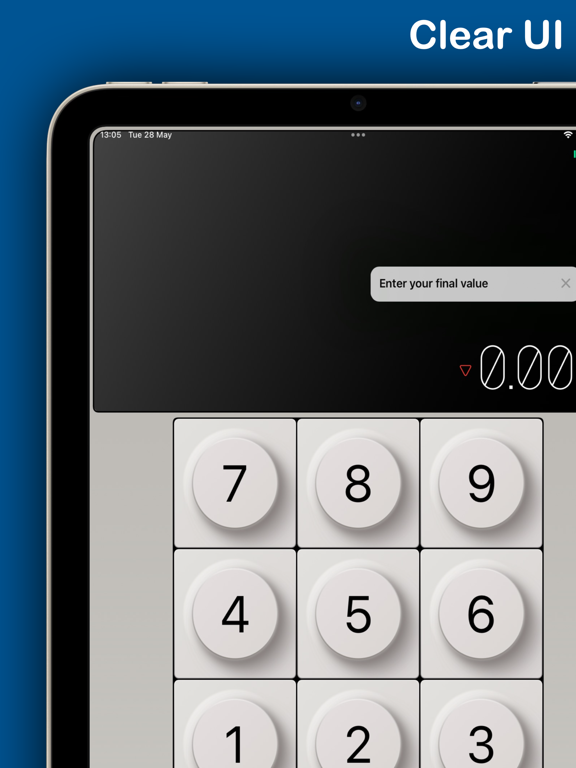
QuickDiff simplifies number comparison, providing an intuitive and efficient way to calculate percentage differences between two numbers. Designed for professionals and everyday users alike, QuickDiff offers a seamless and straightforward experience for anyone needing quick calculations.
Key Features:
• Effortless Input: Enter any two numbers using our user-friendly numeric keypad; QuickDiff does the rest.
• Instant Calculations: See percentage increases or decreases instantly. Perfect for financial analysis, shopping discounts, or statistical data review.
• Clean Interface: Enjoy a minimalistic design that eliminates clutter and focuses on functionality.
• Versatile Use Cases: Ideal for budget tracking, shopping comparisons, educational purposes, and more.
• Great user experience: Just double tap the value to clear it.
How QuickDiff Works:
1. Input Your Numbers: Simply tap into two fields to enter the values you’re comparing.
2. View the Difference: QuickDiff immediately calculates and displays the percentage difference.
3. Quick clear: Just double tap input value to clear it.
Whether you’re adjusting budgets, comparing product prices, or analysing data changes over time, QuickDiff makes it easier than ever. Its precise calculations and easy-to-navigate interface ensure that you spend less time crunching numbers and more time making informed decisions.
Download QuickDiff today and experience the simplicity of percentage calculations at your fingertips!

QuickDiff simplifies number comparison, providing an intuitive and efficient way to calculate percentage differences between two numbers. Designed for professionals and everyday users alike, QuickDiff offers a seamless and straightforward experience for anyone needing quick calculations.
Key Features:
• Effortless Input: Enter any two numbers using our user-friendly numeric keypad; QuickDiff does the rest.
• Instant Calculations: See percentage increases or decreases instantly. Perfect for financial analysis, shopping discounts, or statistical data review.
• Clean Interface: Enjoy a minimalistic design that eliminates clutter and focuses on functionality.
• Versatile Use Cases: Ideal for budget tracking, shopping comparisons, educational purposes, and more.
• Great user experience: Just double tap the value to clear it.
How QuickDiff Works:
1. Input Your Numbers: Simply tap into two fields to enter the values you’re comparing.
2. View the Difference: QuickDiff immediately calculates and displays the percentage difference.
3. Quick clear: Just double tap input value to clear it.
Whether you’re adjusting budgets, comparing product prices, or analysing data changes over time, QuickDiff makes it easier than ever. Its precise calculations and easy-to-navigate interface ensure that you spend less time crunching numbers and more time making informed decisions.
Download QuickDiff today and experience the simplicity of percentage calculations at your fingertips!
Show More
What's New in the Latest Version 1.0.2
Last updated on Apr 25, 2025
Old Versions
What's New in Version 1.0.2:
Sound Control
• Added a sound toggle button to control button click sounds
• Sound preference is now saved between app launches
• Smooth icon transitions when toggling sound
We're constantly working to improve your experience with Quick Diff. If you're enjoying the app, please consider leaving a review!
Sound Control
• Added a sound toggle button to control button click sounds
• Sound preference is now saved between app launches
• Smooth icon transitions when toggling sound
We're constantly working to improve your experience with Quick Diff. If you're enjoying the app, please consider leaving a review!
Show More
Version History
1.0.2
Apr 25, 2025
What's New in Version 1.0.2:
Sound Control
• Added a sound toggle button to control button click sounds
• Sound preference is now saved between app launches
• Smooth icon transitions when toggling sound
We're constantly working to improve your experience with Quick Diff. If you're enjoying the app, please consider leaving a review!
Sound Control
• Added a sound toggle button to control button click sounds
• Sound preference is now saved between app launches
• Smooth icon transitions when toggling sound
We're constantly working to improve your experience with Quick Diff. If you're enjoying the app, please consider leaving a review!
Percentage Calc - QuickDiff FAQ
Click here to learn how to download Percentage Calc - QuickDiff in restricted country or region.
Check the following list to see the minimum requirements of Percentage Calc - QuickDiff.
iPhone
iPad