TempoMee

TempoMee


Free

2.1for iPhone, iPod touch
Dmitrii Vokuev
Developer
7.8 MB
Size
Apr 3, 2021
Update Date
Productivity
Category
4+
Age Rating
Age Rating
4+
Apps in this category do not contain restricted content.
9+
Apps in this category may contain mild or occasional cartoon, fantasy or real-life violence, as well as occasional or mild adult, sexually suggestive or horrifying content and may not be suitable for children under 9 years of age.
12+
Apps in this category may contain occasional mild indecent language, frequent or intense cartoon or real-life violence, minor or occasional adult or sexually suggestive material, and simulated gambling, and may be for children under 12 years of age.
17+
You must be at least 17 years old to access this App.
Apps in this category may contain frequent and intense offensive language; Frequent and intense cartoon, fantasy or realistic violence: frequent and intense adult, scary and sexually suggestive subjects: as well as sexual content, nudity, tobacco, alcohol and drugs, may not be suitable for children under 17 years of age.
TempoMee Screenshots
TempoMee posterTempoMee posterTempoMee poster

About TempoMee

Feel your time.
There are 168 hours in a week and 53 weeks in a year. You can use this resource effectively to transform your life for good, whatever your goals may be. How many hours a week do you devote to self-development or your favorite activity?


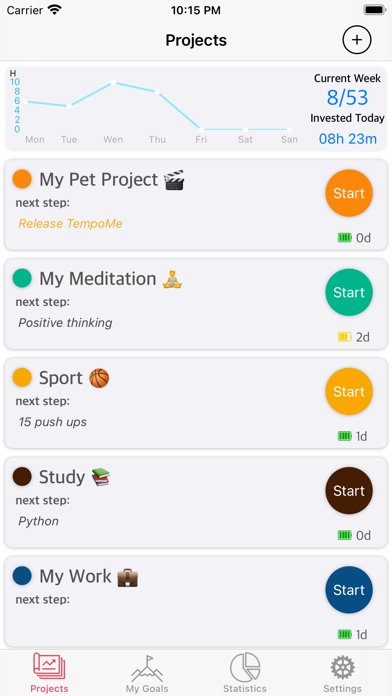
In the age of the attention economy getting harder and harder to focus on yourself and what you really want. Get a gut feeling of your time, where it goes, what amount of work or to-do's you manage to do. The app allows you to track various activities with a timer feature, gathers statistics, and shows you the week-to-week progress.

Feel the Tempo
Some people live by wishes and some live by goals. A way to a big goal is like a marathon and any marathon participant will tell you that you can't run it without Tempo. Tempo is all about consistency and striving for the ultimate goal. Think about how much time you want and can allocate to achieve your personal or career goals. The app will help you reach your goals step by step, represent your progress to achieve the goals by graphic and statistics.

Be Organised.
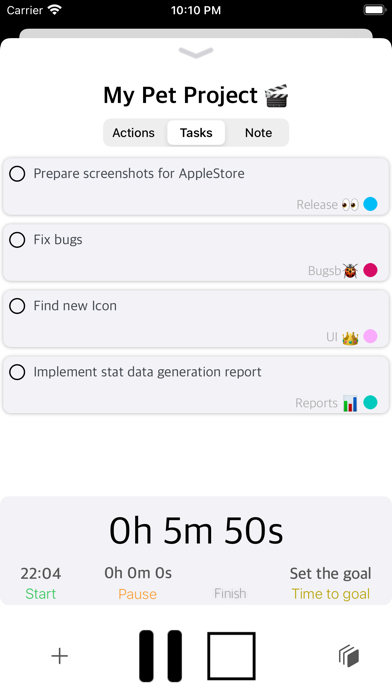
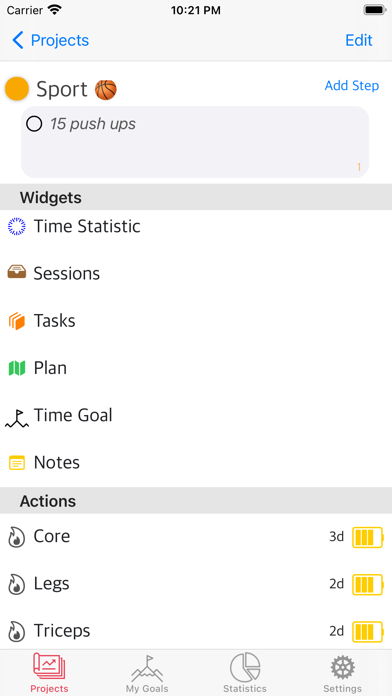
You can not achieve much only by counting on accidental attempts, you need a system, where you clearly see your goal and have a realistic plan to achieve it. Each project has a task widget, a planning widget, a step by step widget, and a habits builder for this purpose. All your projects are separated by folders, so your plans, tasks, and steps do not overlap. This allows you to create separate dashboards and quickly switch from project to project by getting into the current context of the project and understanding the workload.

Show More

What's New in the Latest Version 2.1

Last updated on Apr 3, 2021
Old Versions
- A user is able to create the aim. The aim is the central entity of the app. The user is able to connect the session (invested time) to the aim.
Think about what is important for you and try to reach your aim.
- In the app added Post summary session screen. All necessary data on the one screen. A super fast and convenient way to edit your activity add a new step for your aim and look how much time you are invested on the current week
Show More
Version History
2.1
Apr 3, 2021
- A user is able to create the aim. The aim is the central entity of the app. The user is able to connect the session (invested time) to the aim.
Think about what is important for you and try to reach your aim.
- In the app added Post summary session screen. All necessary data on the one screen. A super fast and convenient way to edit your activity add a new step for your aim and look how much time you are invested on the current week
2.0
Mar 9, 2021
- aims and steps. A new concept of timer usage. You are able to create aims inner project. It's very important to know your final Aim if you want to achieve a great result.
- Repeated actions statistic. Now you are able to see how many actions you have done.
- Week Review screen can show not only the number of your activities but and what exactly have you done. Just tap on task, actions, or aims, and you see all your activities for the current week.
- Now you are able to open your plan right from the timer screen and see the progress
- new icon
1.0
Feb 19, 2021

TempoMee FAQ

Click here to learn how to download TempoMee in restricted country or region.
Check the following list to see the minimum requirements of TempoMee.
iPhone
Requires iOS 13.0 or later.
iPod touch
Requires iOS 13.0 or later.
TempoMee supports English

TempoMee Alternative

You May Also Like