TouchCab
DCC Model Railway Control
$9.99
1.8.4for iPhone, iPod touch
Age Rating
TouchCab Screenshots
About TouchCab
You have a model railroad. You have an ECoS or ECoS2 digital command station from ESU, a Central Station from Märklin or a Lenz v3.6 command station. You also have an iPhone or an iPod touch from Apple and a wireless network connected to the command station.
Would you like to run your model railroad from the iPhone or iPod? You can - with TouchCab.
So what is TouchCab?
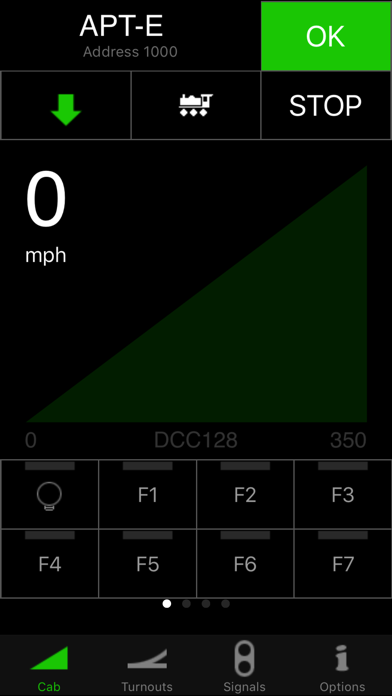
TouchCab is a handheld controller for your DCC (Digital Command Control) model railroad / railway / train set. With TouchCab you can follow your trains around your layout without having to worry about plugging and unplugging a wired device. You can throw switches/turnouts and set train routes as you move along.
Features:
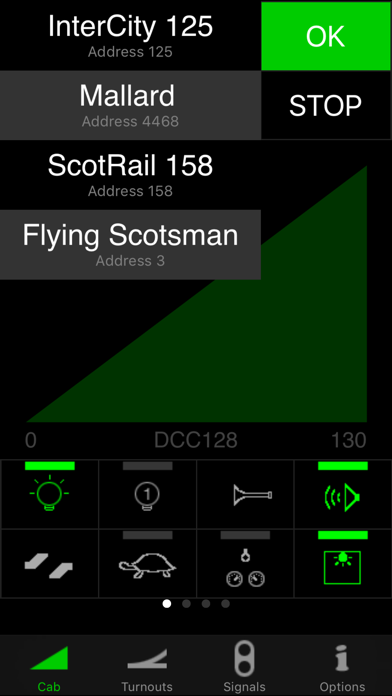
- Control all the locomotives defined in the command station.
- Access up to 29 functions of each locomotive.
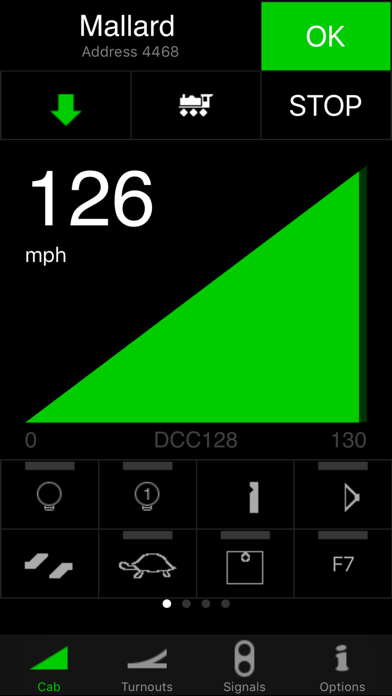
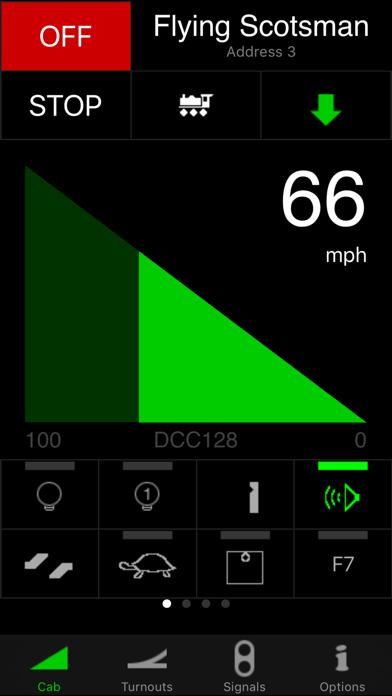
- Clear overview of the locomotive’s speed and state.
- Easily change the throttle from left- to right handed operation.
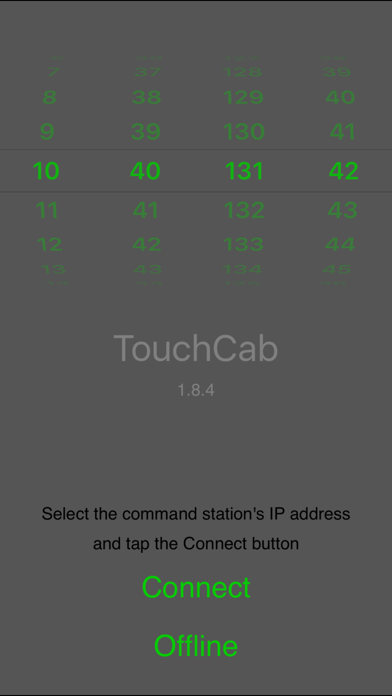
- Wireless network connection to the command station.
- Control all switches/turnouts and signals defined in the command station.
- Locomotives and accessories are listed alphabetically, regardless of their order in the command station lists.
Supported DCC command stations:
ECoS 50000 by ESU (v1.1.3 or higher)
ECoS 2 50200 by ESU (v3.2.0 or higher)
Central Station 60212 by Märklin (v2.0.4 or higher)
Lenz 23151 XpressNet Interface with Lenz v3.6 command stations LZV100 or LZ100
Requirements:
-Digital Model Railway with a compatible DCC Command Station
- Network connection to the command station
- Wireless connection to the iPhone or iPod Touch
Instructions:
- Tap the speed wedge in either side to speed up and slow down your trains
- Change speed gradually by dragging across the speed wedge
- Double-tap the halt button to halt all trains.
- Swipe the function buttons sideways to access locomotive functions above F7
- Switch between left and right hand operation from the options tab
- Control routes and turnouts from the turnouts tab
- Control signals and other accessories from the signals tab
Want to try before your buy?
Try TouchCab Free - a feature limited free version that is built on the same code base as TouchCab.

Would you like to run your model railroad from the iPhone or iPod? You can - with TouchCab.
So what is TouchCab?
TouchCab is a handheld controller for your DCC (Digital Command Control) model railroad / railway / train set. With TouchCab you can follow your trains around your layout without having to worry about plugging and unplugging a wired device. You can throw switches/turnouts and set train routes as you move along.
Features:
- Control all the locomotives defined in the command station.
- Access up to 29 functions of each locomotive.
- Clear overview of the locomotive’s speed and state.
- Easily change the throttle from left- to right handed operation.
- Wireless network connection to the command station.
- Control all switches/turnouts and signals defined in the command station.
- Locomotives and accessories are listed alphabetically, regardless of their order in the command station lists.
Supported DCC command stations:
ECoS 50000 by ESU (v1.1.3 or higher)
ECoS 2 50200 by ESU (v3.2.0 or higher)
Central Station 60212 by Märklin (v2.0.4 or higher)
Lenz 23151 XpressNet Interface with Lenz v3.6 command stations LZV100 or LZ100
Requirements:
-Digital Model Railway with a compatible DCC Command Station
- Network connection to the command station
- Wireless connection to the iPhone or iPod Touch
Instructions:
- Tap the speed wedge in either side to speed up and slow down your trains
- Change speed gradually by dragging across the speed wedge
- Double-tap the halt button to halt all trains.
- Swipe the function buttons sideways to access locomotive functions above F7
- Switch between left and right hand operation from the options tab
- Control routes and turnouts from the turnouts tab
- Control signals and other accessories from the signals tab
Want to try before your buy?
Try TouchCab Free - a feature limited free version that is built on the same code base as TouchCab.
Show More
What's New in the Latest Version 1.8.4
Last updated on Sep 12, 2017
Old Versions
This app has been updated by Apple to display the Apple Watch app icon.
Updated UI to be more inline with the current iOS.
Built for 64 Bit.
ECoS Auto Discovery.
Various other bugs were squished.
Updated UI to be more inline with the current iOS.
Built for 64 Bit.
ECoS Auto Discovery.
Various other bugs were squished.
Show More
Version History
1.8.4
Sep 12, 2017
This app has been updated by Apple to display the Apple Watch app icon.
Updated UI to be more inline with the current iOS.
Built for 64 Bit.
ECoS Auto Discovery.
Various other bugs were squished.
Updated UI to be more inline with the current iOS.
Built for 64 Bit.
ECoS Auto Discovery.
Various other bugs were squished.
1.8.3
Jan 30, 2014
Fixed the "missing data" bug
1.8.2
Jan 17, 2014
Various minor bug fixes
1.8.1
Oct 28, 2013
Bug fixes:
- Momentary locomotive functions were not stored (Lenz)
- Locomotives in ECoS display could not be controlled
- Some accessories did not display correctly
- Accessory states were not loaded correctly (Lenz)
- Consists and doubleheaders are now stopped before dissolving (Lenz)
- Crash when changing the protocol of a new locomotive (Lenz)
- Momentary locomotive functions were not stored (Lenz)
- Locomotives in ECoS display could not be controlled
- Some accessories did not display correctly
- Accessory states were not loaded correctly (Lenz)
- Consists and doubleheaders are now stopped before dissolving (Lenz)
- Crash when changing the protocol of a new locomotive (Lenz)
1.8
Sep 20, 2013
Lenz:
- Doubleheaders and consists
- Locomotive names now up to 24 characters
- Configuration management, incl. transfer from device to device
- Stack management
- New turnouts/points: single and double crossovers
Support for Märklin Central Station 2:
- 60213 v3.0.1
- 60214 v3.0.1
- 60215 v3.0.1
Various changes to the user interface
Various bug fixes
- Doubleheaders and consists
- Locomotive names now up to 24 characters
- Configuration management, incl. transfer from device to device
- Stack management
- New turnouts/points: single and double crossovers
Support for Märklin Central Station 2:
- 60213 v3.0.1
- 60214 v3.0.1
- 60215 v3.0.1
Various changes to the user interface
Various bug fixes
1.7.1
Feb 23, 2012
Bugfixes:
- Added placeholder for locomotive name
- Fixed missing train route symbol for CS1 v2.0.4
- Fixed momentary functions
- Fixed character encoding for special language characters
- Accessories now have default 100ms pulse time instead of Fixed output (Lenz)
- Fixed configuration backup to iTunes
- Fixed a situation where setting the drives of a 3-way turnout in the wrong order would cause a short circuit
- Added placeholder for locomotive name
- Fixed missing train route symbol for CS1 v2.0.4
- Fixed momentary functions
- Fixed character encoding for special language characters
- Accessories now have default 100ms pulse time instead of Fixed output (Lenz)
- Fixed configuration backup to iTunes
- Fixed a situation where setting the drives of a 3-way turnout in the wrong order would cause a short circuit
1.7
Feb 4, 2012
Improved support for Lenz 23151 Interface and Lenz command stations.
Improved reconnection after suspension (instant control).
Many bug fixes and improvements to the code.
Various cosmetic changes.
Improved reconnection after suspension (instant control).
Many bug fixes and improvements to the code.
Various cosmetic changes.
1.6
Aug 24, 2011
- Revised track power scheme
- Improvements to the UI
- Indexed loco list (for large lists)
- Removed "shake to stop"
- Landscape mode removed
- Functions F8+ accessible by swiping
- Max 29 locomotive functions
- iOS4 suspend/background mode
- Improved reconnect handling
- Improved left/right hand modes
- Stop all trains at exit removed
- Last used locomotives moved to cab view
- New function symbols for ECoS v3.4.0
- Improved handling of special characters in loco names
- Bugfix: Improved handling of 1 or 2 locos in the command station
- Bugfix: Improved network handling
- Many minor bugfixes and improvements to the code
- Improvements to the UI
- Indexed loco list (for large lists)
- Removed "shake to stop"
- Landscape mode removed
- Functions F8+ accessible by swiping
- Max 29 locomotive functions
- iOS4 suspend/background mode
- Improved reconnect handling
- Improved left/right hand modes
- Stop all trains at exit removed
- Last used locomotives moved to cab view
- New function symbols for ECoS v3.4.0
- Improved handling of special characters in loco names
- Bugfix: Improved handling of 1 or 2 locos in the command station
- Bugfix: Improved network handling
- Many minor bugfixes and improvements to the code
1.5
Jun 11, 2010
New languages:
- Dansk (Danish)
- Svensk (Swedish)
- Deutsch (German)
- Espanol (Spanish)
- Francais (French)
Full support for ECoS 2 (50200 v3.2.0)
Support for RailCom feedback for accessories.
Option to show last used turnouts at the top of the list.
It is again possible to operate single locomotives that are part of a consist.
When selecting a locomotive that is already controlled by the command station, text turns red as a warning. Tap once more to take over. This feature does not work when taking over from another cab. This is due to a bug in the command station firmware.
Rearranged the options list so that most frequently used options are at the top.
"Shake to stop" feature added.
Improved code execution.
Minor cosmetic changes
Improved stability against:
- Command station reboot.
- Loss of network connection.
BUGFIX: Stop all locos at exit now works.
BUGFIX: Locomotive list could be corrupted when changing command stations.
Lots of minor bug fixes.
- Dansk (Danish)
- Svensk (Swedish)
- Deutsch (German)
- Espanol (Spanish)
- Francais (French)
Full support for ECoS 2 (50200 v3.2.0)
Support for RailCom feedback for accessories.
Option to show last used turnouts at the top of the list.
It is again possible to operate single locomotives that are part of a consist.
When selecting a locomotive that is already controlled by the command station, text turns red as a warning. Tap once more to take over. This feature does not work when taking over from another cab. This is due to a bug in the command station firmware.
Rearranged the options list so that most frequently used options are at the top.
"Shake to stop" feature added.
Improved code execution.
Minor cosmetic changes
Improved stability against:
- Command station reboot.
- Loss of network connection.
BUGFIX: Stop all locos at exit now works.
BUGFIX: Locomotive list could be corrupted when changing command stations.
Lots of minor bug fixes.
1.3
Dec 8, 2009
- Network connection no longer shuts down after 30 minutes inactivity.
- Indication of command station heartbeat in cab screens.
- Locomotives are now taken over without warning (losing cab gets a message).
- Option to lock cab in portrait mode.
- Option to let halt button stop immediately or slow to 0.
- Option to stop immediately or slow stop when reversing.
- Option to pick up speed again after reversing.
- Much improved consist handling. Individual locomotives in consists are greyed out and not selectable in list.
- Option to run mfx locomotives with 28 speed steps (all locomotives or none).
- Indication of command station heartbeat in cab screens.
- Locomotives are now taken over without warning (losing cab gets a message).
- Option to lock cab in portrait mode.
- Option to let halt button stop immediately or slow to 0.
- Option to stop immediately or slow stop when reversing.
- Option to pick up speed again after reversing.
- Much improved consist handling. Individual locomotives in consists are greyed out and not selectable in list.
- Option to run mfx locomotives with 28 speed steps (all locomotives or none).
1.2.1
Oct 10, 2009
Bugfixes:
- Accessories in the command station are no longer locked when using TouchCab
- TouchCab no longer crashes when connecting without accessories defined in the command station
- Changing the locomotive list in the command station could corrupt the list of last used locomotives
- TouchCab now updates the list on the fly when adding accessories in the command station
Workaround:
- TouchCab now handles deleting locomotives using ECoS Version 3.0.1
- Accessories in the command station are no longer locked when using TouchCab
- TouchCab no longer crashes when connecting without accessories defined in the command station
- Changing the locomotive list in the command station could corrupt the list of last used locomotives
- TouchCab now updates the list on the fly when adding accessories in the command station
Workaround:
- TouchCab now handles deleting locomotives using ECoS Version 3.0.1
1.2
Aug 27, 2009
New features:
- Option to use locomotive function symbols
- Option to show last used locomotives
- Double-tapping the halt button immediately stops all locomotives
- Option to halt all locomotives when app guits
- Minor cosmetical changes to the options screen
Bugfixes:
- Network issue on iPhone OS 3.0
- Display offset issue after rotating
- Signals in command station now released when app quits
- Display state was not remembered at all times
- Option to use locomotive function symbols
- Option to show last used locomotives
- Double-tapping the halt button immediately stops all locomotives
- Option to halt all locomotives when app guits
- Minor cosmetical changes to the options screen
Bugfixes:
- Network issue on iPhone OS 3.0
- Display offset issue after rotating
- Signals in command station now released when app quits
- Display state was not remembered at all times
1.1
May 18, 2009
Support for mfx/M4 locomotives
Auto connect to last known command station
Shows speed in km/h if set by the command station
Option to take over a locomotive without alerts
Control of signals
Option to change command stations
Various cosmetic changes
Auto connect to last known command station
Shows speed in km/h if set by the command station
Option to take over a locomotive without alerts
Control of signals
Option to change command stations
Various cosmetic changes
1.0.2
Mar 28, 2009
1.0.1
Mar 8, 2009
1.0
Feb 28, 2009
TouchCab FAQ
Click here to learn how to download TouchCab in restricted country or region.
Check the following list to see the minimum requirements of TouchCab.
iPhone
Requires iOS 8.0 or later.
iPod touch
Requires iOS 8.0 or later.
TouchCab supports English, Danish, French, German, Spanish, Swedish