Trunkit
Trunk Sharing
Free
2.6for iPhone, iPod touch
9.9
1 Ratings
Trunkit iOS App
Developer
42.1 MB
Size
Feb 19, 2024
Update Date
Productivity
Category
4+
Age Rating
Age Rating
Trunkit Screenshots
About Trunkit
Trunkit is an app where drivers can post trips they’re planning to take with an empty trunk or any kind of empty space in their vehicle or trailer. Other users who have something to ship can agree on a price with the driver, pay, and use a chat option to sort out the pickup and delivery details.
If you need to get something somewhere, Trunkit enables you to quickly find someone with an empty trunk, truck or trailer that is going your way and can take your item for you.
Using Trunkit is easy - here’s how it works:
- Just open the app, enter your origin and your destination and search for people already traveling in your direction.
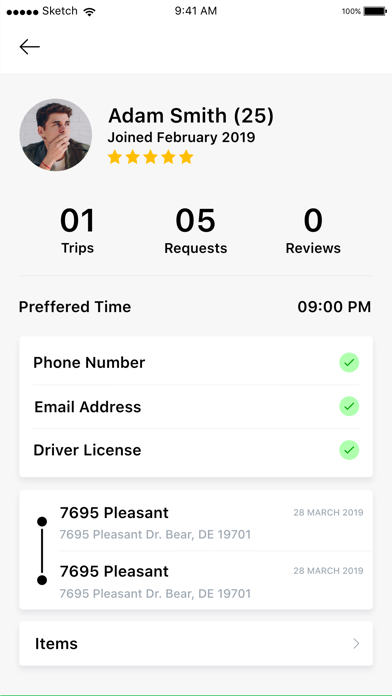
- Select the trip and you’ll see a profile of the driver, how they are verified, their rating, their vehicle, how much room they have in their vehicle and much they would like to charge for your item(s). Then you can enter the amount you would like to pay.
-The driver will be notified of your request to book and they can either accept or decline. You will be notified of their decision. If they accept, you will be able to pay with a credit card and a chat option will become available so you can discuss specific pick-up and drop off details. Trunkit holds your payment until you tell us it has been delivered, then we pay the driver.
- Once they start their travel with your item(s) you will be notified and when they arrive you press ‘delivered’ to confirm its arrival.
- After the trip you can rate the driver and even tip them if you wish.
If you’re traveling and want to off set the cost of your commute, here’s how it works:
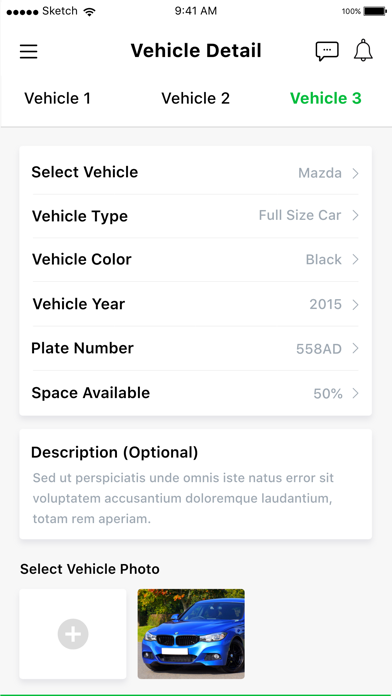
- On your first trip, enter your profile, vehicle, notification preferences and payout information so we can pay you. The more information you include such a your cell# and a picture of your driver’s licence, the more you become verified. Your profile will list all the ways you have been verified. Trunkit will never release any of your information to anyone and we delete the picture of your license once we’ve had a look.
- post your travel or your commute by entering your origin, destination, how much room you have or if you can tow. Trunkit will provide a suggested price based on the size of the item and the distance but you can also add what you want to charge. Also post the dates of travel. You can select a specific date or re-occurring dates.
- you will be notified when someone wants to book with you and how much they want to pay. You can accept or decline the request. If you accept, you will be notified once the user has paid and a chat option will become available to arrange specific details of the trip such as drop off instructions.
- Select ‘start the trip’ when you start to drive and the user will be notified. When you arrive, let the user know in the chat option and ask them to select ‘delivered’.
- the users will then be given the option to rate you AND provide a tip if they wish. Remember, nobody works for Trunkit - you’re just posting your trip.
Have a question or an issue - e-mail us at info@trunkit.com - we’re here for you!

If you need to get something somewhere, Trunkit enables you to quickly find someone with an empty trunk, truck or trailer that is going your way and can take your item for you.
Using Trunkit is easy - here’s how it works:
- Just open the app, enter your origin and your destination and search for people already traveling in your direction.
- Select the trip and you’ll see a profile of the driver, how they are verified, their rating, their vehicle, how much room they have in their vehicle and much they would like to charge for your item(s). Then you can enter the amount you would like to pay.
-The driver will be notified of your request to book and they can either accept or decline. You will be notified of their decision. If they accept, you will be able to pay with a credit card and a chat option will become available so you can discuss specific pick-up and drop off details. Trunkit holds your payment until you tell us it has been delivered, then we pay the driver.
- Once they start their travel with your item(s) you will be notified and when they arrive you press ‘delivered’ to confirm its arrival.
- After the trip you can rate the driver and even tip them if you wish.
If you’re traveling and want to off set the cost of your commute, here’s how it works:
- On your first trip, enter your profile, vehicle, notification preferences and payout information so we can pay you. The more information you include such a your cell# and a picture of your driver’s licence, the more you become verified. Your profile will list all the ways you have been verified. Trunkit will never release any of your information to anyone and we delete the picture of your license once we’ve had a look.
- post your travel or your commute by entering your origin, destination, how much room you have or if you can tow. Trunkit will provide a suggested price based on the size of the item and the distance but you can also add what you want to charge. Also post the dates of travel. You can select a specific date or re-occurring dates.
- you will be notified when someone wants to book with you and how much they want to pay. You can accept or decline the request. If you accept, you will be notified once the user has paid and a chat option will become available to arrange specific details of the trip such as drop off instructions.
- Select ‘start the trip’ when you start to drive and the user will be notified. When you arrive, let the user know in the chat option and ask them to select ‘delivered’.
- the users will then be given the option to rate you AND provide a tip if they wish. Remember, nobody works for Trunkit - you’re just posting your trip.
Have a question or an issue - e-mail us at info@trunkit.com - we’re here for you!

Show More
What's New in the Latest Version 2.6
Last updated on Feb 19, 2024
Old Versions
- Bug fixes
Show More
Version History
2.6
Feb 19, 2024
- Bug fixes
2.5
May 3, 2023
Bug fixing.
2.4
Nov 11, 2021
Fixed bugs
2.3
May 12, 2021
Bug fixes and improvements
2.2
Jan 8, 2021
Bug fixing.
2.1
Dec 2, 2020
Bug Fixes.
2.0
Nov 24, 2020
Bug fixes.
1.9
Oct 1, 2020
Bug fixes.
1.8
Jul 2, 2020
Updated build.
1.7
May 11, 2020
New updated build with bug fixing.
1.6
May 5, 2020
New updated build with bug fixing.
1.5
Jan 21, 2020
We have added a new custom notification feature, where the administrator can send a push notification to all the users of the application using the admin panel of the application, which could be a news alert, any new promotional information regarding the application.
1.4
Dec 13, 2019
We have updated a new feature in the mobile application, whenever the user will make a payment, the mobile application will ask the user to select the country Canada or USA while making a payment.
1.3
Nov 30, 2019
when the user selects a state or city, we have re-arranged it in alphabetical order, which makes it user-friendly for the users to select their state and city.
1.2
Nov 25, 2019
This is a revised updated build with better performance.
1.1
Nov 13, 2019
this is a revised updated build with better performance.
1.0
Nov 7, 2019
Trunkit FAQ
Click here to learn how to download Trunkit in restricted country or region.
Check the following list to see the minimum requirements of Trunkit.
iPhone
Requires iOS 13.4 or later.
iPod touch
Requires iOS 13.4 or later.
Trunkit supports English