WorkforceTime
Free
2.2.13for iPhone
Age Rating
WorkforceTime Screenshots
About WorkforceTime
WorkforceTime is designed to help organizations improve employee productivity in a smart and efficient way. Following are the key functionalities.
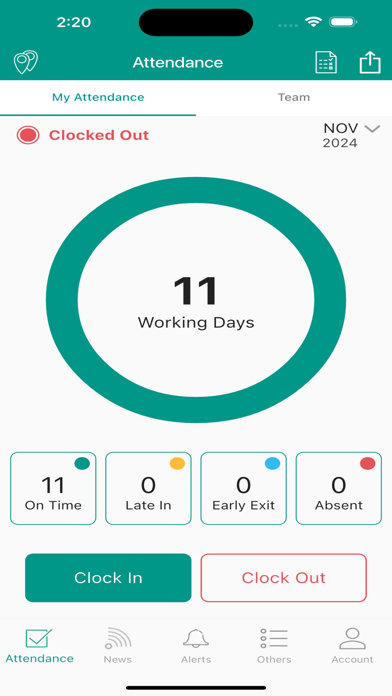
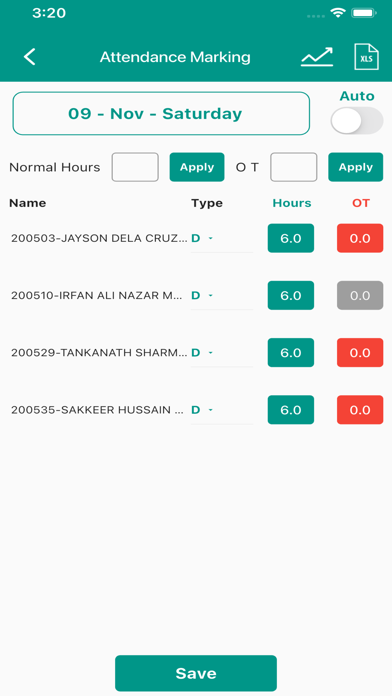
Attendance: Auto Clock In/Clock Out By GPS, Clock in/Clock Out By Controlled QR Code, Supervisor Can Mark Attendance for His or Her Team Members.
Auto Clock In/Clock Out By WiFi,Manual Clock In/Clock Out With/Without GPS Or Wi-Fi,Multiple Shift Management.
News and Alerts: Company News/Announcements, Public Or Personalized Alerts, Public News Feeds Or Useful Links, Personalized Document Alerts.
Statistics: Employee Productivity, Employee Status Report, Weekly Actual Hours, Daily Punch In/Out,Absenteeism,Employee Profiles.
Team Management: like My Profile & Team, Working Schedule, View Attendance of Team, and Share options.
NOTE: Continuous usage of GPS will makes the battery to dry

Attendance: Auto Clock In/Clock Out By GPS, Clock in/Clock Out By Controlled QR Code, Supervisor Can Mark Attendance for His or Her Team Members.
Auto Clock In/Clock Out By WiFi,Manual Clock In/Clock Out With/Without GPS Or Wi-Fi,Multiple Shift Management.
News and Alerts: Company News/Announcements, Public Or Personalized Alerts, Public News Feeds Or Useful Links, Personalized Document Alerts.
Statistics: Employee Productivity, Employee Status Report, Weekly Actual Hours, Daily Punch In/Out,Absenteeism,Employee Profiles.
Team Management: like My Profile & Team, Working Schedule, View Attendance of Team, and Share options.
NOTE: Continuous usage of GPS will makes the battery to dry
Show More
What's New in the Latest Version 2.2.13
Last updated on Oct 24, 2025
Old Versions
bug fixes
Show More
Version History
2.2.13
Oct 24, 2025
bug fixes
WorkforceTime FAQ
Click here to learn how to download WorkforceTime in restricted country or region.
Check the following list to see the minimum requirements of WorkforceTime.
iPhone