BehaviorFlow
Gratis
1.4.116for iPad
Age Rating
لقطات الشاشة لـ BehaviorFlow
About BehaviorFlow
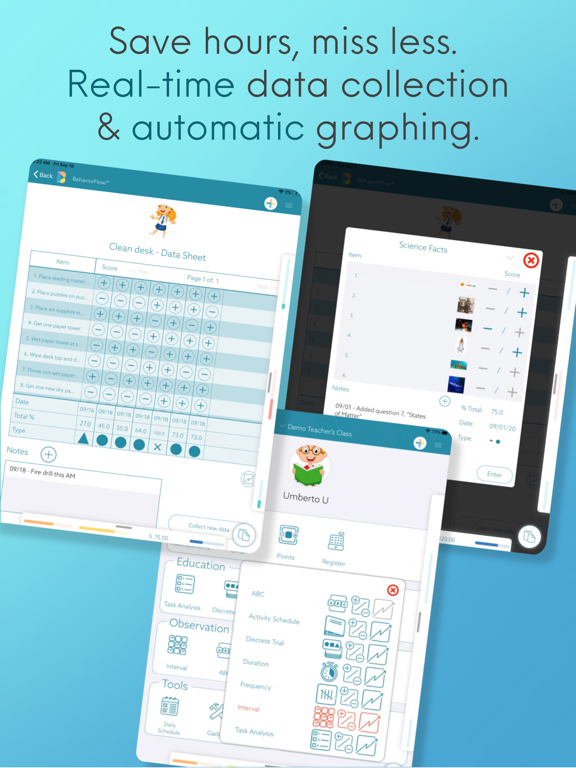
BehaviorFlow is ABA made simple. We’ve taken all - and we mean ALL - of the ABA tools that teachers, students, and families use every day and put them into one app. Then for good measure we added in automation for efficiency, made it cloud-based to keep your whole team connected, and wrapped it in a modern and intuitive user interface. The proven science of ABA meets the best of modern technology - that’s BehaviorFlow.
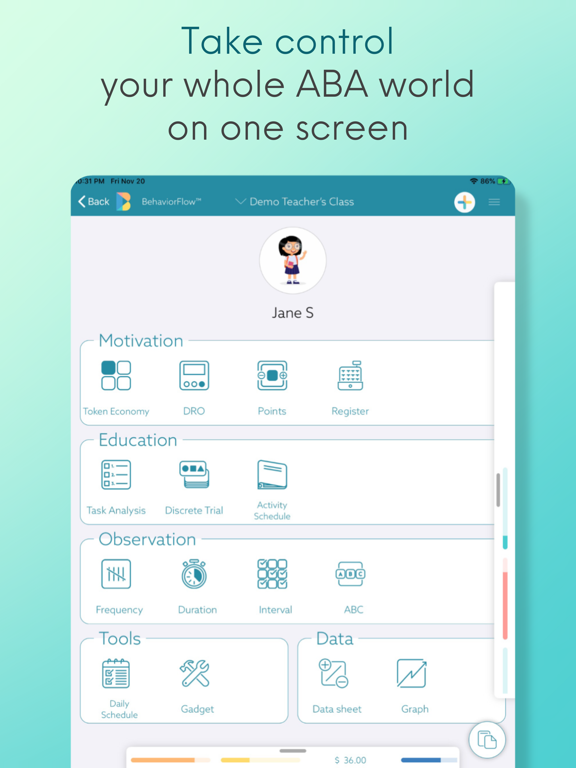
We’re not here to knock other apps that offer data collection and graphing - that’s a great start. But ABA is so much more than that. What about Reinforcement? What about Task Analyses and Activity Schedules? What about Daily Schedules, Timers, VI Timers, and Counters? Yea… we’ve got all of that, and so much more. In BehaviorFlow you can customize from any of our 17 different ABA functions including:
MOTIVATION SYSTEMS - Teacher AND Student facing to increase independence
- Token Economy
- DRO
- Points system
- Register
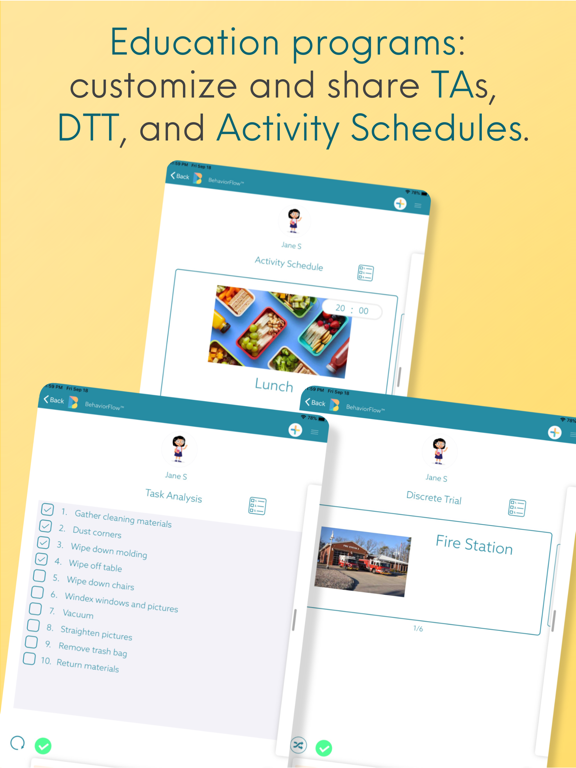
EDUCATION PROGRAMS - enable REMOTE LEARNING with real time sharing
- Task Analysis
- Discrete Trial
- Activity Schedule
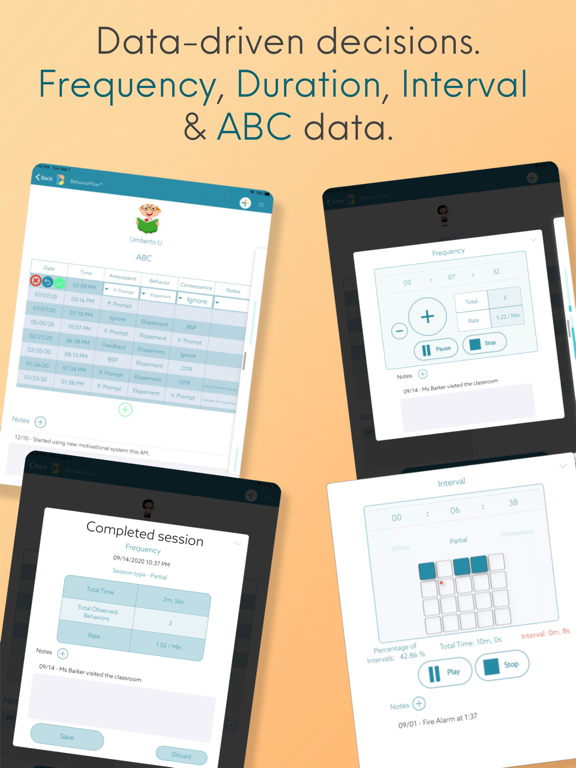
OBSERVATION DATA - take data in REAL TIME, miss less
- Frequency
- Duration
- Interval
- ABC
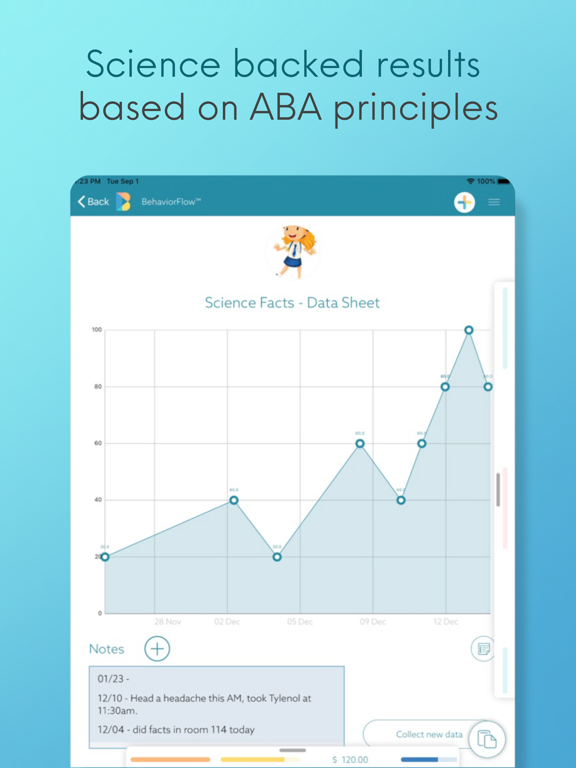
DATA - generated AUTOMATICALLY any time you create a new program
- Data Sheets
- Graphing
TOOLS - never again lose, break, or pay to replace ANY of these
- Customizable Daily Schedules
- Timers
- VI Timers
- Counters
Not only are all of these ABA tools now available on one screen, but you can access them from anywhere in the world, at any time. BehaviorFlow’s cloud-based platform means that (secure) sharing and instant access makes the whole support team more efficient and more connected. BCBAs no longer need to waste hours driving from classroom to classroom to see data. Teachers can instantly update and share materials for their students from the classroom, home, or the office. Families can be fully integrated into the teaching process like never before, empowered with all of their student’s learning materials.
The final cherry on top of the BehaviorFlow sundae is the teacher dashboard view; designed to give teachers control of their classroom in a way they never have before. We’ve put all of your students, and all of their tools, onto a single page. Once more, for emphasis: this is ALL of your students, and ALL of their tools, on one screen. This means that you can reward one student, then start another student’s timer, then track another student’s behavior data in mere seconds, from anywhere in the classroom. We’re maximizing teacher efficiency and increasing student independence.
BehaviorFlow was born from decades of experience in ABA instruction, and a passion to improve and modernize this life-changing practice. We designed this app with input from BCBAs, BCBA-Ds, and M.Eds, spoke with autistic students and families, and tested with public school teachers and administrators. This is an ABA tool of and for the community. We know that everything you do boils down to one thing - helping students improve outcomes and achieve their dreams. We know that because we are driven by the same goal.
Welcome to BehaviorFlow. We can’t wait to see the amazing things that we achieve together.
This app uses the standard Apple Terms of Use (EULA), found here: https://www.apple.com/legal/internet-services/itunes/dev/stdeula/

We’re not here to knock other apps that offer data collection and graphing - that’s a great start. But ABA is so much more than that. What about Reinforcement? What about Task Analyses and Activity Schedules? What about Daily Schedules, Timers, VI Timers, and Counters? Yea… we’ve got all of that, and so much more. In BehaviorFlow you can customize from any of our 17 different ABA functions including:
MOTIVATION SYSTEMS - Teacher AND Student facing to increase independence
- Token Economy
- DRO
- Points system
- Register
EDUCATION PROGRAMS - enable REMOTE LEARNING with real time sharing
- Task Analysis
- Discrete Trial
- Activity Schedule
OBSERVATION DATA - take data in REAL TIME, miss less
- Frequency
- Duration
- Interval
- ABC
DATA - generated AUTOMATICALLY any time you create a new program
- Data Sheets
- Graphing
TOOLS - never again lose, break, or pay to replace ANY of these
- Customizable Daily Schedules
- Timers
- VI Timers
- Counters
Not only are all of these ABA tools now available on one screen, but you can access them from anywhere in the world, at any time. BehaviorFlow’s cloud-based platform means that (secure) sharing and instant access makes the whole support team more efficient and more connected. BCBAs no longer need to waste hours driving from classroom to classroom to see data. Teachers can instantly update and share materials for their students from the classroom, home, or the office. Families can be fully integrated into the teaching process like never before, empowered with all of their student’s learning materials.
The final cherry on top of the BehaviorFlow sundae is the teacher dashboard view; designed to give teachers control of their classroom in a way they never have before. We’ve put all of your students, and all of their tools, onto a single page. Once more, for emphasis: this is ALL of your students, and ALL of their tools, on one screen. This means that you can reward one student, then start another student’s timer, then track another student’s behavior data in mere seconds, from anywhere in the classroom. We’re maximizing teacher efficiency and increasing student independence.
BehaviorFlow was born from decades of experience in ABA instruction, and a passion to improve and modernize this life-changing practice. We designed this app with input from BCBAs, BCBA-Ds, and M.Eds, spoke with autistic students and families, and tested with public school teachers and administrators. This is an ABA tool of and for the community. We know that everything you do boils down to one thing - helping students improve outcomes and achieve their dreams. We know that because we are driven by the same goal.
Welcome to BehaviorFlow. We can’t wait to see the amazing things that we achieve together.
This app uses the standard Apple Terms of Use (EULA), found here: https://www.apple.com/legal/internet-services/itunes/dev/stdeula/
Show More
تحديث لأحدث إصدار 1.4.116
Last updated on 04/06/2026
الإصدارات القديمة
Version 1.4.116, Build 116, June 4, 2026
This release contains new features and bug fixes:
Features:
1. For Education functions with multiple sets, added the set name to the data collection screen so the user will know the set for which data is being collected.
2. Updated multidata view so that the focus shifts to the active section when a function is started from a different section.
Bug fixes:
1. Fixed an issue in the Interval function. When an interval session was stopped before the session Times Out, and there are Intervals marked as Unobserved, the Red highlight in the Interval display was on the incorrect interval. The correct interval is now highlighted.
2. Fixed an issue where the details of a data point were not displayed when tapped on the graph for multibehavior Duration and Frequency
3. For education function graph display, changed pulldown label from “Rate” to “Percent”. Changed y-axis scaling to 100% when “Percent” is selected.
4. Fixed a crash that occurred when a DIPR entry was deleted.
5. Fixed a crash that occurred when adding a written program to a function.
6. Fixed an issue where single behavior duration was not working as expected in the multidata view.
7. Fixed an issue where frequency function observations were able to be added while in Pause state.
This release contains new features and bug fixes:
Features:
1. For Education functions with multiple sets, added the set name to the data collection screen so the user will know the set for which data is being collected.
2. Updated multidata view so that the focus shifts to the active section when a function is started from a different section.
Bug fixes:
1. Fixed an issue in the Interval function. When an interval session was stopped before the session Times Out, and there are Intervals marked as Unobserved, the Red highlight in the Interval display was on the incorrect interval. The correct interval is now highlighted.
2. Fixed an issue where the details of a data point were not displayed when tapped on the graph for multibehavior Duration and Frequency
3. For education function graph display, changed pulldown label from “Rate” to “Percent”. Changed y-axis scaling to 100% when “Percent” is selected.
4. Fixed a crash that occurred when a DIPR entry was deleted.
5. Fixed a crash that occurred when adding a written program to a function.
6. Fixed an issue where single behavior duration was not working as expected in the multidata view.
7. Fixed an issue where frequency function observations were able to be added while in Pause state.
Show More
Version History
1.4.116
04/06/2026
Version 1.4.116, Build 116, June 4, 2026
This release contains new features and bug fixes:
Features:
1. For Education functions with multiple sets, added the set name to the data collection screen so the user will know the set for which data is being collected.
2. Updated multidata view so that the focus shifts to the active section when a function is started from a different section.
Bug fixes:
1. Fixed an issue in the Interval function. When an interval session was stopped before the session Times Out, and there are Intervals marked as Unobserved, the Red highlight in the Interval display was on the incorrect interval. The correct interval is now highlighted.
2. Fixed an issue where the details of a data point were not displayed when tapped on the graph for multibehavior Duration and Frequency
3. For education function graph display, changed pulldown label from “Rate” to “Percent”. Changed y-axis scaling to 100% when “Percent” is selected.
4. Fixed a crash that occurred when a DIPR entry was deleted.
5. Fixed a crash that occurred when adding a written program to a function.
6. Fixed an issue where single behavior duration was not working as expected in the multidata view.
7. Fixed an issue where frequency function observations were able to be added while in Pause state.
This release contains new features and bug fixes:
Features:
1. For Education functions with multiple sets, added the set name to the data collection screen so the user will know the set for which data is being collected.
2. Updated multidata view so that the focus shifts to the active section when a function is started from a different section.
Bug fixes:
1. Fixed an issue in the Interval function. When an interval session was stopped before the session Times Out, and there are Intervals marked as Unobserved, the Red highlight in the Interval display was on the incorrect interval. The correct interval is now highlighted.
2. Fixed an issue where the details of a data point were not displayed when tapped on the graph for multibehavior Duration and Frequency
3. For education function graph display, changed pulldown label from “Rate” to “Percent”. Changed y-axis scaling to 100% when “Percent” is selected.
4. Fixed a crash that occurred when a DIPR entry was deleted.
5. Fixed a crash that occurred when adding a written program to a function.
6. Fixed an issue where single behavior duration was not working as expected in the multidata view.
7. Fixed an issue where frequency function observations were able to be added while in Pause state.
BehaviorFlow FAQ
انقر هنا لمعرفة كيفية تنزيل BehaviorFlow في بلد أو منطقة محظورة.
تحقق من القائمة التالية لمعرفة الحد الأدنى من المتطلبات BehaviorFlow.
iPad