Paletti

Paletti


Gratis

1.0.3for iPhone
Age Rating
4+
Apps in this category do not contain restricted content.
9+
Apps in this category may contain mild or occasional cartoon, fantasy or real-life violence, as well as occasional or mild adult, sexually suggestive or horrifying content and may not be suitable for children under 9 years of age.
12+
Apps in this category may contain occasional mild indecent language, frequent or intense cartoon or real-life violence, minor or occasional adult or sexually suggestive material, and simulated gambling, and may be for children under 12 years of age.
17+
You must be at least 17 years old to access this App.
Apps in this category may contain frequent and intense offensive language; Frequent and intense cartoon, fantasy or realistic violence: frequent and intense adult, scary and sexually suggestive subjects: as well as sexual content, nudity, tobacco, alcohol and drugs, may not be suitable for children under 17 years of age.
لقطات الشاشة لـ Paletti
Paletti الملصقPaletti الملصقPaletti الملصقPaletti الملصقPaletti الملصقPaletti الملصقPaletti الملصقPaletti الملصق

About Paletti

With Paletti you can:
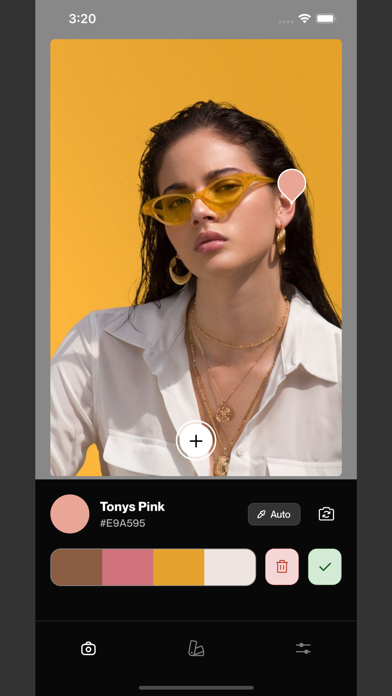
- Scan your surroundings to create palettes from colors around you.
- Generate palettes from your saved images.
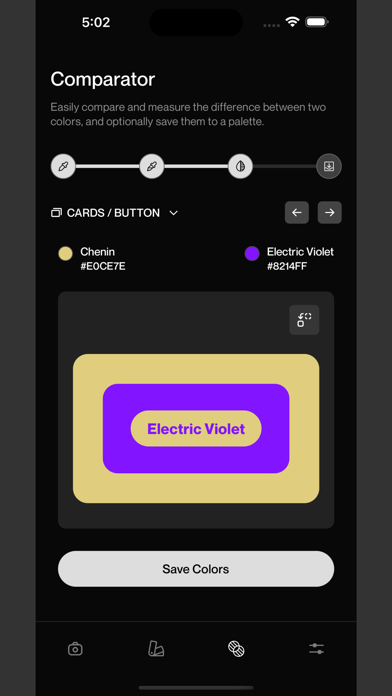
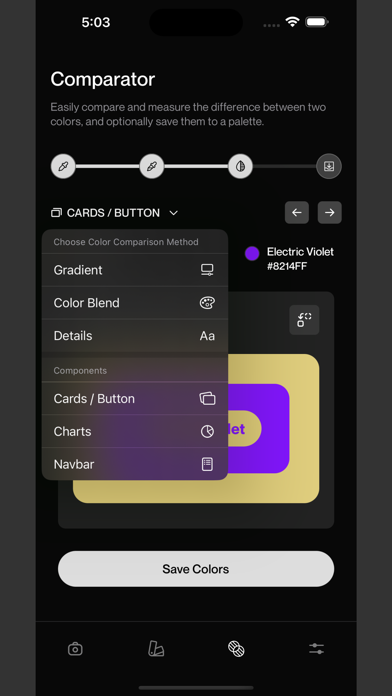
- Compare two colors using various components such as charts, navbar, cards, and buttons.
- Organize colors by creating multiple palettes.
- Sync your palette collection across all your devices using your iCloud account.
- Capture and save screenshots of your palettes and palette collection.
- Share color collection with others on various social media and messaging apps.
- Access Paletti's features through a simple and intuitive interface.
Show More

تحديث لأحدث إصدار 1.0.3

Last updated on 20/06/2023
الإصدارات القديمة
Here are the new features in the latest version of the Paletti app:

• Comparator screen: The app now includes a dedicated comparator screen where you can compare two colors side by side.
• Color selection options: You can select colors for comparison using four different methods:
- Camera: Capture a color directly using your device's camera.
- Image: Select a color from an existing image in your gallery.
- Color picker: Manually pick a color from a color wheel.
- Input: Manually type in a hex code.
• Comparison components: The comparator screen offers various components to compare the selected colors:
- Charts: Visualize the colors in the form of charts, allowing you to compare their distributions and values.
- Navbar: See how the colors appear in a navigation bar layout, helping you assess their compatibility in a website or app design.
- Cards and buttons: View the colors applied to cards and buttons, enabling you to evaluate their visual impact and harmony.
- Gradient: Create a gradient using the two selected colors to see how they blend together.
- Blended color: Display a color that is a result of combining the two selected colors, allowing you to preview the outcome of their addition or subtraction.
- Details: Obtain information about the percentage difference between the two colors and their contrast ratio, helping you assess their similarity or contrast.

These new features enhance the functionality of the Paletti app, enabling you to compare colors comprehensively and make informed decisions in your design process.

Show More
Version History
1.0.3
20/06/2023
Here are the new features in the latest version of the Paletti app:

• Comparator screen: The app now includes a dedicated comparator screen where you can compare two colors side by side.
• Color selection options: You can select colors for comparison using four different methods:
- Camera: Capture a color directly using your device's camera.
- Image: Select a color from an existing image in your gallery.
- Color picker: Manually pick a color from a color wheel.
- Input: Manually type in a hex code.
• Comparison components: The comparator screen offers various components to compare the selected colors:
- Charts: Visualize the colors in the form of charts, allowing you to compare their distributions and values.
- Navbar: See how the colors appear in a navigation bar layout, helping you assess their compatibility in a website or app design.
- Cards and buttons: View the colors applied to cards and buttons, enabling you to evaluate their visual impact and harmony.
- Gradient: Create a gradient using the two selected colors to see how they blend together.
- Blended color: Display a color that is a result of combining the two selected colors, allowing you to preview the outcome of their addition or subtraction.
- Details: Obtain information about the percentage difference between the two colors and their contrast ratio, helping you assess their similarity or contrast.

These new features enhance the functionality of the Paletti app, enabling you to compare colors comprehensively and make informed decisions in your design process.

Paletti FAQ

انقر هنا لمعرفة كيفية تنزيل Paletti في بلد أو منطقة محظورة.
تحقق من القائمة التالية لمعرفة الحد الأدنى من المتطلبات Paletti.
iPhone

بدائل لـ Paletti

ربما يعجبك أيضا