LoopUp
Premium remote meetings
Gratis
4.2.0for iPhone, iPad and more
Age Rating
LoopUp Screenshots
About LoopUp
LoopUp ist eine erstklassige Lösung für virtuelle Meetings, die die Zusammenarbeit erleichtert.
Mit der LoopUp-App stehen Ihnen auf Ihrem iPhone oder iPad zahlreiche Funktionen zur Verfügung: Sie können Meeting-Einladungen erstellen, Benachrichtigungen über den Anrufbeginn erhalten, Ihren eigenen Meetings beitreten und die Telefonkonferenz steuern.
Mit der LoopUp-App sind folgende Aktionen möglich:
EINLADUNGEN ERSTELLEN
Erstellen Sie auf Ihrem Mobilgerät in der E-Mail- oder Kalender-App Einladungen für LoopUp-Meetings.
BENACHRICHTIGUNGEN ÜBER DEN ANRUFBEGINN ERHALTEN
Benachrichtigungen über den Anrufbeginn informieren Sie, wenn der erste Gast Ihrem Meeting beigetreten ist. So müssen Sie nicht auf Teilnehmer warten und sind nie zu spät in Ihren eigenen Meetings.
EIGENEN MEETINGS BEITRETEN
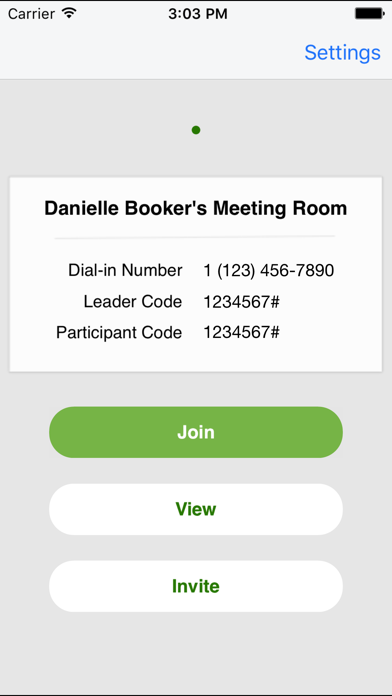
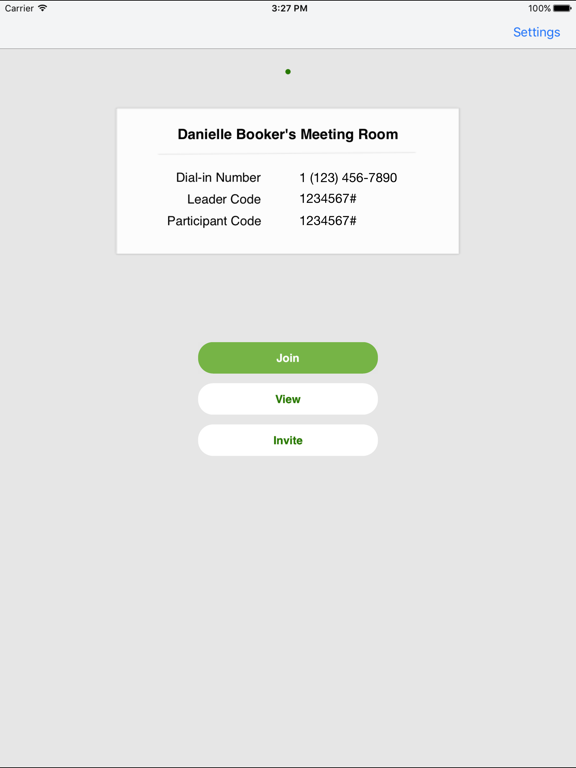
Klicken Sie einfach auf „Auf mein Meeting zugreifen“, um Ihren eigenen Meetings beizutreten. LoopUp ruft Sie unter der von Ihnen angegebenen Rufnummer an, sodass Sie keine Einwahlnummern oder Zugangscodes mehr benötigen.
EIGENE MEETINGS STEUERN
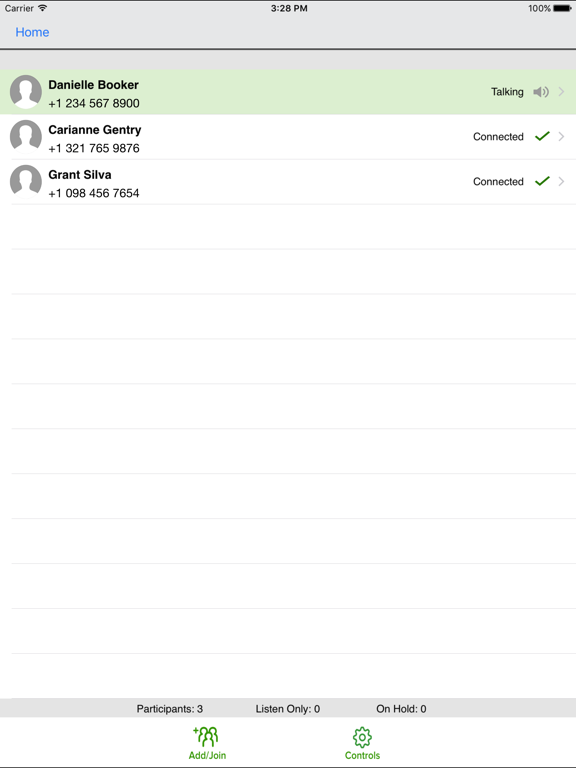
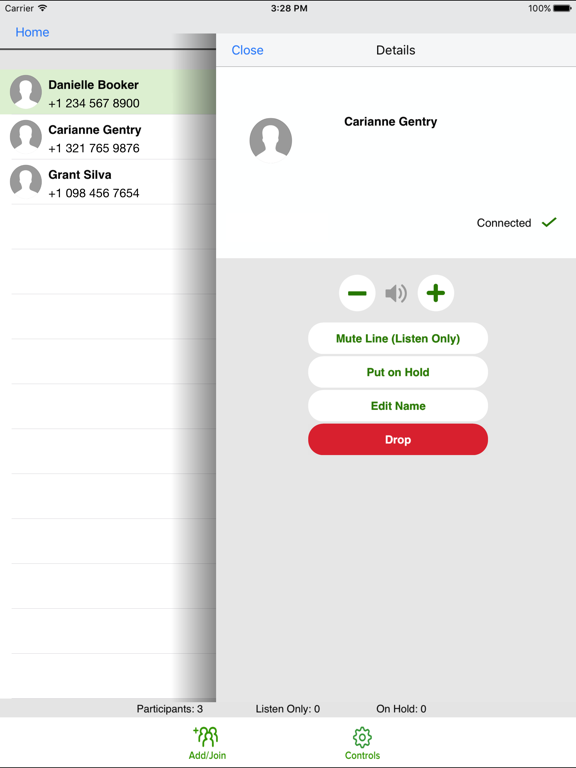
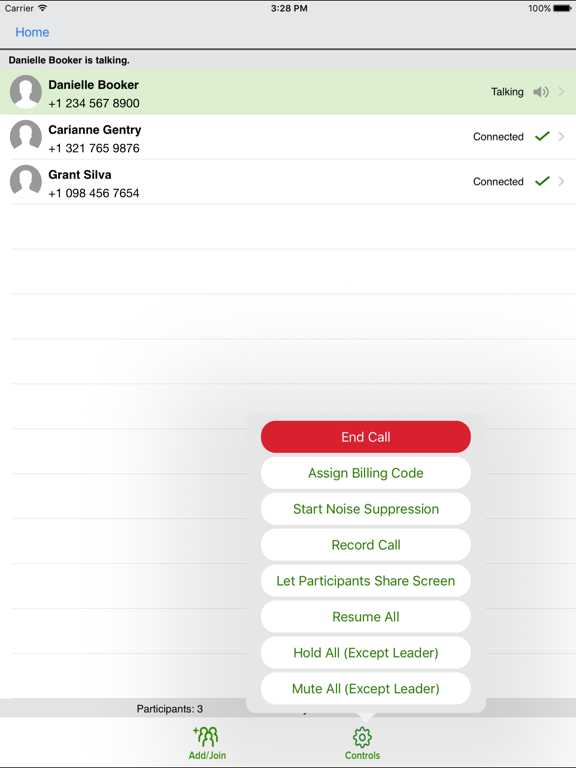
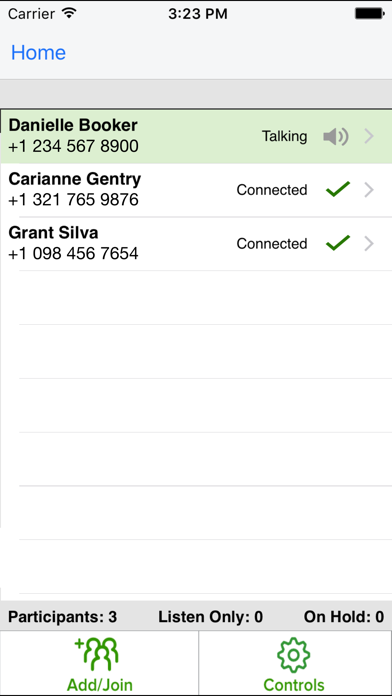
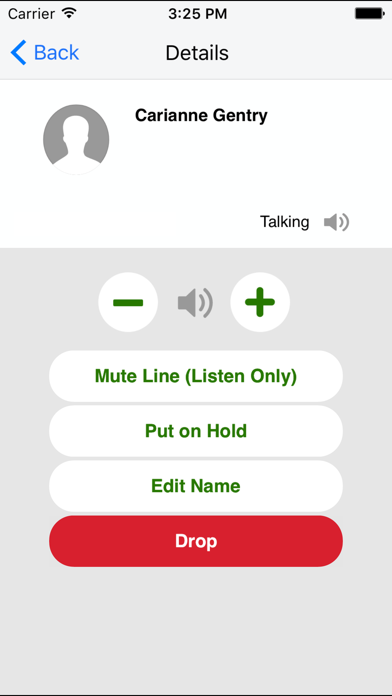
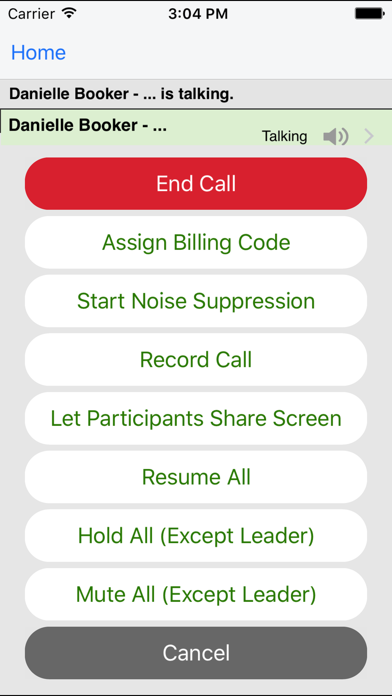
Sie können Ihr Meeting nicht nur steuern, wenn Sie selbst im Konferenzraum sind, sondern auch von unterwegs aus. Sie behalten stets den Überblick, wer an der Konferenz teilnimmt und wer gerade spricht. Entfernen Sie außerdem Hintergrundgeräusche, fügen Sie fehlende Gäste hinzu und halten oder beenden Sie die Anrufe von Teilnehmern.
LoopUp hat sich dem Ziel verschrieben, Telefonkonferenzen zu bieten, die die Erwartungen übertreffen und auf die Sie sich verlassen können – immer und überall.
Hinweis: Damit Sie ein LoopUp-Meeting organisieren können, benötigen Sie ein LoopUp-Konto. Unter der folgenden URL können Sie ein kostenloses Testkonto erstellen: http://bit.ly/2Dh82zn.

Mit der LoopUp-App stehen Ihnen auf Ihrem iPhone oder iPad zahlreiche Funktionen zur Verfügung: Sie können Meeting-Einladungen erstellen, Benachrichtigungen über den Anrufbeginn erhalten, Ihren eigenen Meetings beitreten und die Telefonkonferenz steuern.
Mit der LoopUp-App sind folgende Aktionen möglich:
EINLADUNGEN ERSTELLEN
Erstellen Sie auf Ihrem Mobilgerät in der E-Mail- oder Kalender-App Einladungen für LoopUp-Meetings.
BENACHRICHTIGUNGEN ÜBER DEN ANRUFBEGINN ERHALTEN
Benachrichtigungen über den Anrufbeginn informieren Sie, wenn der erste Gast Ihrem Meeting beigetreten ist. So müssen Sie nicht auf Teilnehmer warten und sind nie zu spät in Ihren eigenen Meetings.
EIGENEN MEETINGS BEITRETEN
Klicken Sie einfach auf „Auf mein Meeting zugreifen“, um Ihren eigenen Meetings beizutreten. LoopUp ruft Sie unter der von Ihnen angegebenen Rufnummer an, sodass Sie keine Einwahlnummern oder Zugangscodes mehr benötigen.
EIGENE MEETINGS STEUERN
Sie können Ihr Meeting nicht nur steuern, wenn Sie selbst im Konferenzraum sind, sondern auch von unterwegs aus. Sie behalten stets den Überblick, wer an der Konferenz teilnimmt und wer gerade spricht. Entfernen Sie außerdem Hintergrundgeräusche, fügen Sie fehlende Gäste hinzu und halten oder beenden Sie die Anrufe von Teilnehmern.
LoopUp hat sich dem Ziel verschrieben, Telefonkonferenzen zu bieten, die die Erwartungen übertreffen und auf die Sie sich verlassen können – immer und überall.
Hinweis: Damit Sie ein LoopUp-Meeting organisieren können, benötigen Sie ein LoopUp-Konto. Unter der folgenden URL können Sie ein kostenloses Testkonto erstellen: http://bit.ly/2Dh82zn.
Show More
Was ist neu in der neuesten Version 4.2.0
Last updated on Dec 10, 2019
Alte Versionen
In this version of LoopUp for iOS:
We now support Danish
We've fixed an issue caused by dark mode which would make some text disappear
We've fixed some translation issues in Spanish & German
We now support Danish
We've fixed an issue caused by dark mode which would make some text disappear
We've fixed some translation issues in Spanish & German
Show More
Version History
4.2.0
Dec 10, 2019
In this version of LoopUp for iOS:
We now support Danish
We've fixed an issue caused by dark mode which would make some text disappear
We've fixed some translation issues in Spanish & German
We now support Danish
We've fixed an issue caused by dark mode which would make some text disappear
We've fixed some translation issues in Spanish & German
4.1.0
Oct 17, 2019
Fixed an issue that caused new users on iOS 13 to not be able to sign in.
4.0.1
Jul 2, 2019
Minor bug fixes
4.0.0
Jun 28, 2019
LoopUp for iOS is now supported in English, French, German, Spanish, Swedish and Chinese (Simplified and Traditional).
3.4.0
Apr 5, 2019
Minor bug fixes on the application
3.3.0
Nov 8, 2018
- Supports dialing out to phone numbers with extensions
3.2.0
Jul 2, 2018
We've updated the invite flow so that you can now copy either the full invite details or meeting link only and paste them anywhere – be it a calendar app, body of an email or text message.
If you have any questions or comments, don't hesitate to contact us at support@loopup.com.
3.1.0
Oct 21, 2017
Our original mobile app has been updated to include support for Single Sign-on (SSO).
If you have any questions or comments, don’t hesitate to contact us at support@loopup.com.
3.0.0
Sep 11, 2017
Back by popular demand! We’re excited to make available a new version of our original mobile app which includes an updated look and feel and a new app icon.
If you have any questions or comments, don’t hesitate to contact us at support@loopup.com.
2.0.1
Jul 28, 2017
We’re delighted to unveil this major app update! Here’s what’s new:
• The app has been given a brand new look and feel, including a new app icon
• Creating a meeting invite is now easier:
- You can now edit which dial-in numbers are included in your invites (or hide them completely)
- You can now copy your invite and paste it in any email or calendar application
• Now when you enter your meeting you'll have the same web experience, including being able to view screen sharing
• Added support for users who manage meetings on behalf of others (delegates)
• Added support for sign in via Single Sign-on
• Added support for custom invites
We hope you enjoy these updates! If you have any questions or comments, don’t hesitate to contact us at support@loopup.com.
• The app has been given a brand new look and feel, including a new app icon
• Creating a meeting invite is now easier:
- You can now edit which dial-in numbers are included in your invites (or hide them completely)
- You can now copy your invite and paste it in any email or calendar application
• Now when you enter your meeting you'll have the same web experience, including being able to view screen sharing
• Added support for users who manage meetings on behalf of others (delegates)
• Added support for sign in via Single Sign-on
• Added support for custom invites
We hope you enjoy these updates! If you have any questions or comments, don’t hesitate to contact us at support@loopup.com.
2.0.0
Jul 26, 2017
We’re delighted to unveil this major app update! Here’s what’s new:
• The app has been given a brand new look and feel, including a new app icon
• Creating a meeting invite is now easier:
- You can now edit which dial-in numbers are included in your invites (or hide them completely)
- You can now copy your invite and paste it in any email or calendar application
• Now when you enter your meeting you'll have the same web experience, including being able to view screen sharing
• Added support for users who manage meetings on behalf of others (delegates)
• Added support for sign in via Single Sign-on
We hope you enjoy these updates! If you have any questions or comments, don’t hesitate to contact us at support@loopup.com.
• The app has been given a brand new look and feel, including a new app icon
• Creating a meeting invite is now easier:
- You can now edit which dial-in numbers are included in your invites (or hide them completely)
- You can now copy your invite and paste it in any email or calendar application
• Now when you enter your meeting you'll have the same web experience, including being able to view screen sharing
• Added support for users who manage meetings on behalf of others (delegates)
• Added support for sign in via Single Sign-on
We hope you enjoy these updates! If you have any questions or comments, don’t hesitate to contact us at support@loopup.com.
1.1406.1601
Jul 14, 2014
- Work with iOS7
- Bug fixes on clients
13.05.15.01
Jun 5, 2013
- Some bug fixes
13.04.25.01
May 5, 2013
Join link uses new shorter code.
Small bug fixes.
Small bug fixes.
1.1211.0701
Nov 19, 2012
- Optimized for iPad
- Minor bug fixes
- Minor bug fixes
1.1209.2102
Oct 17, 2012
- Fixed some buttons to make sure it works on iOS6.
- Reconnect to server silently if there is a sudden data interruption.
1.1208.2701
Sep 11, 2012
- Graphics updated to higher resolutions.
- User can join as leader via fast-join link if that is his own conference.
1.1207.1701
Aug 8, 2012
- Minor bug fixes
1.1206.2601
Jul 11, 2012
- Minor bug fixes.
1.1206.0101
Jun 27, 2012
-Minor bug fixes.
1.1203.2103
Mar 27, 2012
-Ring2 is now rebranded to LoopUp.
-New app icons and new look
-Participants can join via FastJoin links in invites.
-Participants can see who's on the call, who's talking and control their lines.
-Minor bug fixes.
-New app icons and new look
-Participants can join via FastJoin links in invites.
-Participants can see who's on the call, who's talking and control their lines.
-Minor bug fixes.
1.1202.2701
Mar 21, 2012
- User will be able to send invitation via Calendar.
- Minor bug fixes
- Minor bug fixes
1.1107.2801
Aug 9, 2011
-Minor bug fixes
1.1107.2001
Jul 31, 2011
-Minor bug fixes.
-User can select which dial-in number to show on the card.
1.1103.0101
Mar 8, 2011
Minor bug fixes.
LoopUp FAQ
Klicken Sie hier, um zu erfahren, wie Sie LoopUp in eingeschränkten Ländern oder Regionen herunterladen können.
Überprüfen Sie die folgende Liste, um die Mindestanforderungen von LoopUp zu sehen.
iPhone
Erfordert iOS 8.0 oder neuer.
iPad
Erfordert iPadOS 8.0 oder neuer.
iPod touch
Erfordert iOS 8.0 oder neuer.
LoopUp unterstützt Deutsch, Dänisch, Englisch, Französisch, Schwedisch, Spanisch, Tradit. Chinesisch, Vereinf. Chinesisch