StudyOrbit
Free
1.0for iPhone, iPod touch
Age Rating
StudyOrbit Screenshots
About StudyOrbit
StudyOrbit is an interactive study companion that helps students transform their daily learning sessions into meaningful insights. By entering study inputs such as hours, focus, energy, assignments, and subjects, students can instantly visualize their progress through colorful charts and balanced dashboards.
How to Use
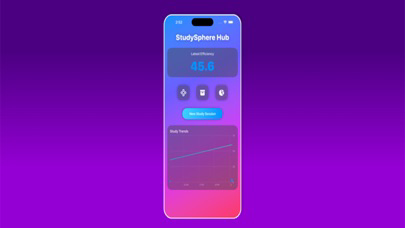
Open the Dashboard to see your latest study efficiency score and quick access to other sections.
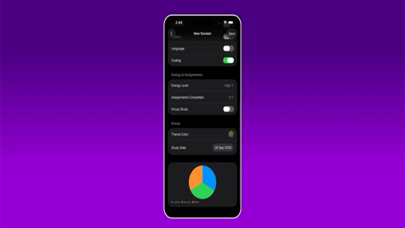
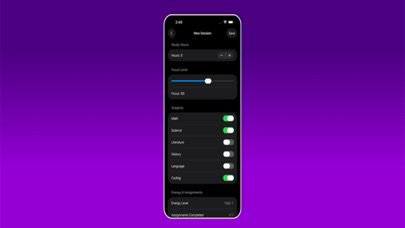
Create a new Study Session on the Input screen using interactive controls such as sliders, steppers, toggles, pickers, and color pickers.
Preview your session in the Balance Visualizer, where a radial chart shows how your study factors align.
Save your sessions in the Vault to build a personal study history with quick summaries and mini charts.
Explore the Insights screen to view line charts, pie charts, and comparisons that reveal long-term patterns in focus, efficiency, and subject balance.
Key Features
• Wide range of inputs: hours, focus level, subjects, assignments, energy, group study, and custom colors.
• Dynamic visualizations: radial charts, line charts, bar charts, and pie charts.
• Dashboard hub with quick access icons and live study trends.
• Vault for saved sessions with grid-style cards and chart previews.
• Insights with efficiency tracking and subject distribution analysis.
• Local storage using secure persistence so your data stays private.
• Colorful, modern, and student-friendly design with empty state handling.
StudyOrbit is designed to make study reflection engaging. Instead of just logging hours, you build a clear picture of your learning patterns and progress.

How to Use
Open the Dashboard to see your latest study efficiency score and quick access to other sections.
Create a new Study Session on the Input screen using interactive controls such as sliders, steppers, toggles, pickers, and color pickers.
Preview your session in the Balance Visualizer, where a radial chart shows how your study factors align.
Save your sessions in the Vault to build a personal study history with quick summaries and mini charts.
Explore the Insights screen to view line charts, pie charts, and comparisons that reveal long-term patterns in focus, efficiency, and subject balance.
Key Features
• Wide range of inputs: hours, focus level, subjects, assignments, energy, group study, and custom colors.
• Dynamic visualizations: radial charts, line charts, bar charts, and pie charts.
• Dashboard hub with quick access icons and live study trends.
• Vault for saved sessions with grid-style cards and chart previews.
• Insights with efficiency tracking and subject distribution analysis.
• Local storage using secure persistence so your data stays private.
• Colorful, modern, and student-friendly design with empty state handling.
StudyOrbit is designed to make study reflection engaging. Instead of just logging hours, you build a clear picture of your learning patterns and progress.
Show More
Was ist neu in der neuesten Version 1.0
Last updated on Sep 24, 2025
Version History
1.0
Sep 24, 2025
StudyOrbit FAQ
Klicken Sie hier, um zu erfahren, wie Sie StudyOrbit in eingeschränkten Ländern oder Regionen herunterladen können.
Überprüfen Sie die folgende Liste, um die Mindestanforderungen von StudyOrbit zu sehen.
iPhone
Requires iOS 13.0 or later.
iPod touch
Requires iOS 13.0 or later.
StudyOrbit unterstützt English