

Servo Remote
Gratuit
1.24for iPhone, iPod touch
Age Rating
Servo Remote Captures d'écran
About Servo Remote
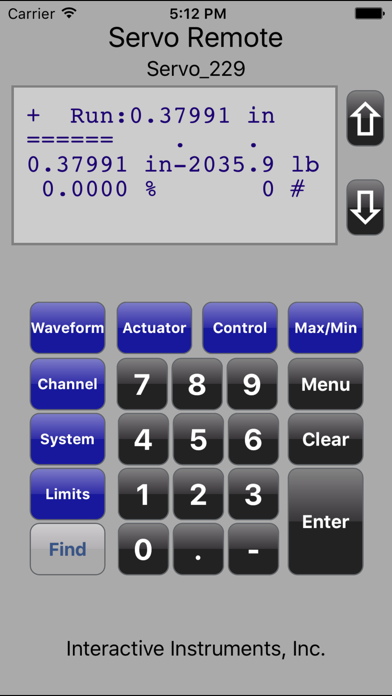
The Servo Remote application can remotely access Interactive Instruments servo creep controllers over a network connection as though the operator is controlling the system manually with the keypad.
As keys are pressed on the iPhone application, commands are directed to the servo controller and the controllers LCD information is fed back to the iPhone application. Both the remote keypad and the servo controller panel keypad can be manipulated at the same time, pressing a key on the control panel will update both the LCD along with any applications monitoring the same servo system on the network.
More than one iPhone application can remotely access and control a single controller at the same time. Pressing the Find button will attempt to identify any servo systems on your local networks subnet. If the system is not on the local subnet, manually enter the IP address and press Select to establish connect. Manual IP connections allow access beyond a local subnet such as over a VPN connection or a separate WiFi subnet. The operator would need to know the physical IP of the servo controller since auto-detection beyond the subnet is not available. Use the standard IP address format with decimal point separators (eg. 192.168.0.100).
For more information about or products, be sure to visit our WEB site at www.interactiveinstruments.com.
As keys are pressed on the iPhone application, commands are directed to the servo controller and the controllers LCD information is fed back to the iPhone application. Both the remote keypad and the servo controller panel keypad can be manipulated at the same time, pressing a key on the control panel will update both the LCD along with any applications monitoring the same servo system on the network.
More than one iPhone application can remotely access and control a single controller at the same time. Pressing the Find button will attempt to identify any servo systems on your local networks subnet. If the system is not on the local subnet, manually enter the IP address and press Select to establish connect. Manual IP connections allow access beyond a local subnet such as over a VPN connection or a separate WiFi subnet. The operator would need to know the physical IP of the servo controller since auto-detection beyond the subnet is not available. Use the standard IP address format with decimal point separators (eg. 192.168.0.100).
For more information about or products, be sure to visit our WEB site at www.interactiveinstruments.com.
Show More
Quoi de neuf dans la dernière version 1.24
Last updated on Feb 9, 2017
Vieilles Versions
Updated for IOS10
Show More
Version History
1.24
Feb 9, 2017
Updated for IOS10
1.11
Sep 19, 2015
Servo Remote application was modified to support both character based LCD servo controllers along with new and future graphcal based LCD's. The application will recognize the type of controller selected and automatically switch the display area appropriately. Modifications were also made to support larger iPhone displays and handle newer iOS systems.
1.10
Feb 27, 2013
- Enhanced keypad for easy access to popular features.
- Ability to change the display refresh rate to suit the network speed.
- iPhone 5 and iOS 6 support
- Ability to change the display refresh rate to suit the network speed.
- iPhone 5 and iOS 6 support
1.01
Sep 26, 2012
Servo Remote FAQ
Cliquez ici pour savoir comment télécharger Servo Remote dans un pays ou une région restreints.
Consultez la liste suivante pour voir les exigences minimales de Servo Remote.
iPhone
Nécessite iOS 10.0 ou version ultérieure.
iPod touch
Nécessite iOS 10.0 ou version ultérieure.
Servo Remote prend en charge Anglais


