Morse Decoder Pro

Morse Decoder Pro


¥1,500Best Deal Ever
2.5.5for iPhone, iPad
Age Rating
4+
Apps in this category do not contain restricted content.
9+
Apps in this category may contain mild or occasional cartoon, fantasy or real-life violence, as well as occasional or mild adult, sexually suggestive or horrifying content and may not be suitable for children under 9 years of age.
12+
Apps in this category may contain occasional mild indecent language, frequent or intense cartoon or real-life violence, minor or occasional adult or sexually suggestive material, and simulated gambling, and may be for children under 12 years of age.
17+
You must be at least 17 years old to access this App.
Apps in this category may contain frequent and intense offensive language; Frequent and intense cartoon, fantasy or realistic violence: frequent and intense adult, scary and sexually suggestive subjects: as well as sexual content, nudity, tobacco, alcohol and drugs, may not be suitable for children under 17 years of age.
Morse Decoder Pro スクリーンショット
Morse Decoder Pro ポスター

About Morse Decoder Pro

Translate Morse Code or CW audio to text.

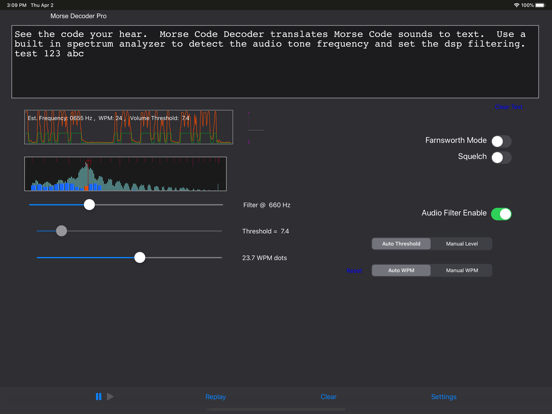
The HotPaw Morse Code Decoder takes audio input from the microphone or headset input on your iPhone or iPad, decodes Morse Code, and displays the results in text form. It includes both automatic decoding of longer clean signals and manual controls to allow the decoding of more difficult signals in QRM. Decoding parameters that can be manually adjusted include the audio frequency of an optional narrow-band DSP filter, the WPM dot/dash speed used for detecting characters, the threshold level of background noise, and whether Farnsworth timing is to be used for detecting spaces between individual characters.

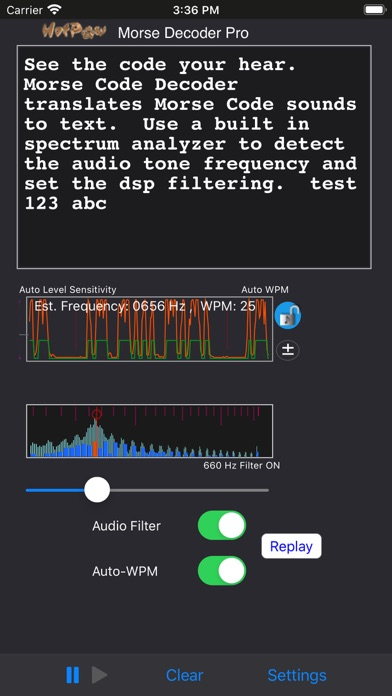
The Morse Code Decoder includes a built-in spectrogram to help determine the audio frequency of the Morse Code tones. You can then use the optional narrow-band audio filter to help filter out background noise. If the audio filter is enabled (frequency lock icon locked), it can be set for frequencies in the range of 400 to 1400 Hz. The filter can also be left off in a wide-band mode (frequency lock icon unlocked). Tap the spectrogram to set the audio filter to the frequency of a selected frequency peak. On the iPhone, tap the lock button to the right of the spectrum graph to toggle the filter off and on.

The Morse code WPM (words per minute) detection speed is automatically adaptive from about 8 to 40 WPM, and can be locked to the current estimated WPM dot speed (WPM lock icon locked). One the iPhone, tap the lock button to the right of the waveform graph to lock and unlock automatic WPM detection. You can also manually set the WPM code speed using the plus and minus symbols that appear in the waveform graph, or the slider control on an iPad. There is a QRQ High Speed WPM Mode which will work better for code speeds in the range of 30 to 80 WPM. (QRQ mode also supports higher frequency dot-dash tones.)

Please note that it is easy to mis-aim an iPhone's microphone so that its noise cancelling microphone will cancel out any Morse Code tones. So make sure to aim your iPhone so the the tones show up in the spectrum display. Also, please use the manual settings if automatic decoding does not adjust to the frequency, WPM or background noise threshold level.

By default, the threshold (the signal level above any background noise required to detect a dot or dash) is set automatically by the AGC. But you can also manually control the threshold setting. On the iPhone or iPod Touch, tap to the left of the waveform graph to switch the manual threshold slider on and off. The iPad version also includes a switch to enable manual threshold control. A Histogram of the tone signal levels with a marker for the detection threshold level are displayed next to the waveform graph.

In addition to the features of the regular HotPaw Morse Code Decoder, this Pro vesion of the HotPaw Morse Code Decoder also includes a RePlay function, which pauses recording and re-decodes tha previous 1 minute of audio input using the current manual settings. This is useful if you miss some code because the settings (audio frequency, WPM, and level) were not yet set for the signal you desire to decode.

This Pro version also includes support for some International alphabet characters.
Show More

最新バージョン 2.5.5 の更新情報

Last updated on 2021年05月30日
旧バージョン
Bug fixes.
Show More
Version History
2.5.5
2021年05月30日
Bug fixes.

Morse Decoder Pro 価格

今日:
¥1,500
最低価格:
¥1,500
最高価格:
¥5,000

Morse Decoder Pro FAQ

Morse Decoder Proは、以下の国または地域では利用できません。
Cameroon,Papua New Guinea,Kosovo,Nigeria,Nicaragua,Rwanda,Suriname,Ghana,Liberia,Poland,Cote Divoire,Malawi,Nauru,Bulgaria,Montenegro,Mali,Russia,Senegal,Uganda,Sierra Leone,Congo, Democratic Republic,Armenia,China,Bhutan,Tajikistan,Algeria,Kazakhstan,Niger,Mozambique,Pakistan,Serbia,Tonga,Lao Peoples Democratic Republic,Kyrgyzstan,Chad,Turkmenistan,Gabon,Swaziland,Uzbekistan,South Korea,Bahrain,Mongolia,Morocco,Benin,Guyana,Bosnia & Herzegovina,Cambodia,Georgia,Gambia,Albania,Angola,Sao Tome & Principe,Guinea-bissau,Iraq,Myanmar,Yemen,Namibia,Zambia,Cape Verde,Congo,Burkina Faso,Sri Lanka,Vanuatu,Libya,Maldives,Azerbaijan,Belarus,Botswana,Palau,Venezuela,Zimbabwe,Afghanistan

次のリストをチェックして、Morse Decoder Proの最低システム要件をご確認ください。
iPhone
iPad
ここをクリック!地理的に制限されているアプリのダウンロード方法をご参考ください。

Morse Decoder Proの類似アプリ

あなたも好きかも

HotPaw Productions からもっと手に入れる