Between Dates Calendar Math

Between Dates Calendar Math


₩1,100Best Deal Ever
6.9for iPad
Age Rating
4+
Apps in this category do not contain restricted content.
9+
Apps in this category may contain mild or occasional cartoon, fantasy or real-life violence, as well as occasional or mild adult, sexually suggestive or horrifying content and may not be suitable for children under 9 years of age.
12+
Apps in this category may contain occasional mild indecent language, frequent or intense cartoon or real-life violence, minor or occasional adult or sexually suggestive material, and simulated gambling, and may be for children under 12 years of age.
17+
You must be at least 17 years old to access this App.
Apps in this category may contain frequent and intense offensive language; Frequent and intense cartoon, fantasy or realistic violence: frequent and intense adult, scary and sexually suggestive subjects: as well as sexual content, nudity, tobacco, alcohol and drugs, may not be suitable for children under 17 years of age.
Between Dates Calendar Math 스크린 샷
Between Dates Calendar Math 포스터Between Dates Calendar Math 포스터Between Dates Calendar Math 포스터Between Dates Calendar Math 포스터Between Dates Calendar Math 포스터

About Between Dates Calendar Math

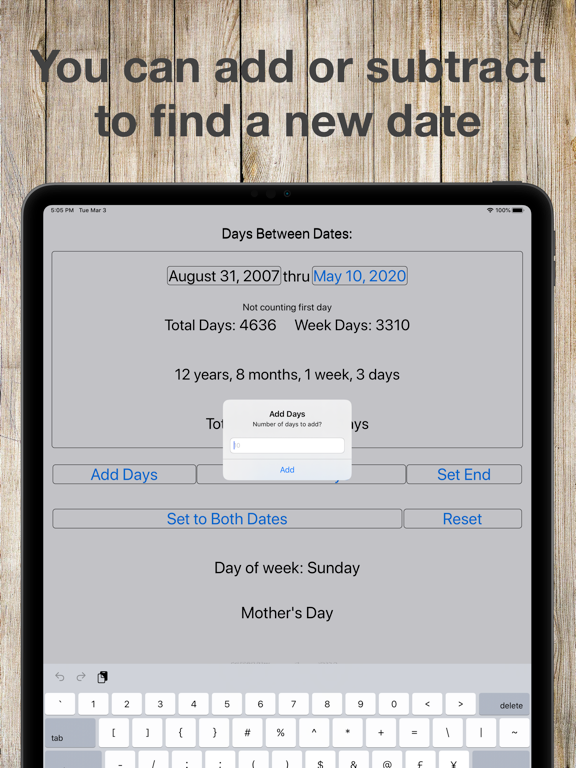
Between Days was written to quickly tell how many days are between two dates. It uses a simple interface to get these answers in the quickest way possible. Underneath the simplicity, Between Days is one of the most feature rich date apps in the app store. Don’t let the simple interface fool you, this app does show a lot of information in a clean and easy to use format.

To use the app simply set the start date and end date and it will display the number of days between those two dates. To select which date to edit you can either touch the date you want to change, or press the setting start date/ setting end date button. The selector will automatically change to display the date selected. It will also display the current day of the week showing on the calendar selector.

If you would like to save the date for later, simply press the save button on the bottom. To recall a date, or to view saved dates press the view dates button on the bottom. Once you are at the list of dates you can sort or remove them. You can also press on a date to use it as the current date, or press done to return to your previous dates.

There are also add and subtract buttons. This is useful if you need to find what the date is before or after a certain number of days, month or years.

The copy to end date/copy to start date button will set both the start date and end date to the selected date.

The reset button will set the beginning and end date to the current date, but will leave your saved dates alone.

I hope you enjoy this app and find it useful! If you have any questions or comments send me an e-mail at Don.Espe@gmail.com

Please rate this app so I know if there is enough interest to develop new features for it.

Show More

최신 버전 6.9의 새로운 기능

Last updated on Apr 20, 2026
오래된 버전
Fixed some issues with the add/subtract dialogue box - including an issue with the iPad keyboard not showing up correctly.
Show More
Version History
6.9
Apr 20, 2026
Fixed some issues with the add/subtract dialogue box - including an issue with the iPad keyboard not showing up correctly.

Between Dates Calendar Math 가격

오늘:
₩1,100
최저 가격:
₩1,100
최고 가격:
₩4,400

Between Dates Calendar Math FAQ

제한된 국가 또는 지역에서 Between Dates Calendar Math를 다운로드하는 방법을 알아보려면 여기를 클릭하십시오.
Between Dates Calendar Math의 최소 요구 사항을 보려면 다음 목록을 확인하십시오.
iPad

Between Dates Calendar Math 대안

당신은 또한 좋아할 수도 있습니다

Ducky Planet LLC에서 더 많은 것을 얻기