Age Rating
لقطات الشاشة لـ Between Dates Calendar Math
About Between Dates Calendar Math
Between Days was written to quickly tell how many days are between two dates. It uses a simple interface to get these answers in the quickest way possible. Underneath the simplicity, Between Days is one of the most feature rich date apps in the app store. Don’t let the simple interface fool you, this app does show a lot of information in a clean and easy to use format.
To use the app simply set the start date and end date and it will display the number of days between those two dates. To select which date to edit you can either touch the date you want to change, or press the setting start date/ setting end date button. The selector will automatically change to display the date selected. It will also display the current day of the week showing on the calendar selector.
If you would like to save the date for later, simply press the save button on the bottom. To recall a date, or to view saved dates press the view dates button on the bottom. Once you are at the list of dates you can sort or remove them. You can also press on a date to use it as the current date, or press done to return to your previous dates.
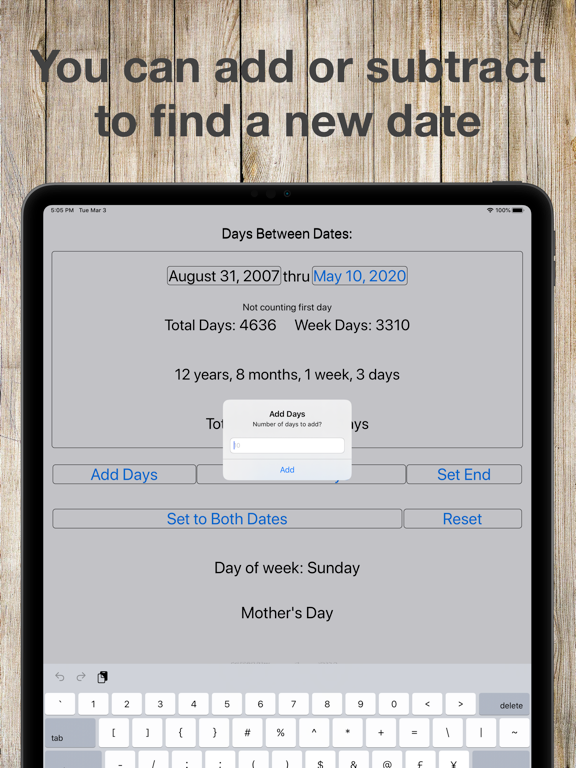
There are also add and subtract buttons. This is useful if you need to find what the date is before or after a certain number of days, month or years.
The copy to end date/copy to start date button will set both the start date and end date to the selected date.
The reset button will set the beginning and end date to the current date, but will leave your saved dates alone.
I hope you enjoy this app and find it useful! If you have any questions or comments send me an e-mail at Don.Espe@gmail.com
Please rate this app so I know if there is enough interest to develop new features for it.

To use the app simply set the start date and end date and it will display the number of days between those two dates. To select which date to edit you can either touch the date you want to change, or press the setting start date/ setting end date button. The selector will automatically change to display the date selected. It will also display the current day of the week showing on the calendar selector.
If you would like to save the date for later, simply press the save button on the bottom. To recall a date, or to view saved dates press the view dates button on the bottom. Once you are at the list of dates you can sort or remove them. You can also press on a date to use it as the current date, or press done to return to your previous dates.
There are also add and subtract buttons. This is useful if you need to find what the date is before or after a certain number of days, month or years.
The copy to end date/copy to start date button will set both the start date and end date to the selected date.
The reset button will set the beginning and end date to the current date, but will leave your saved dates alone.
I hope you enjoy this app and find it useful! If you have any questions or comments send me an e-mail at Don.Espe@gmail.com
Please rate this app so I know if there is enough interest to develop new features for it.
Show More
تحديث لأحدث إصدار 6.9
Last updated on 20/04/2026
الإصدارات القديمة
Fixed some issues with the add/subtract dialogue box - including an issue with the iPad keyboard not showing up correctly.
Show More
Version History
6.9
20/04/2026
Fixed some issues with the add/subtract dialogue box - including an issue with the iPad keyboard not showing up correctly.
سعر Between Dates Calendar Math
اليوم:
USD 0.99
أقل سعر:
USD 0.99
أعلى سعر:
USD 2.99
Between Dates Calendar Math FAQ
انقر هنا لمعرفة كيفية تنزيل Between Dates Calendar Math في بلد أو منطقة محظورة.
تحقق من القائمة التالية لمعرفة الحد الأدنى من المتطلبات Between Dates Calendar Math.
iPad