Work Items
Manage tasks and agile boards
HK$ 8.00
1.5.0for iPhone, iPad and more
Age Rating
Work Items 螢幕截圖
About Work Items
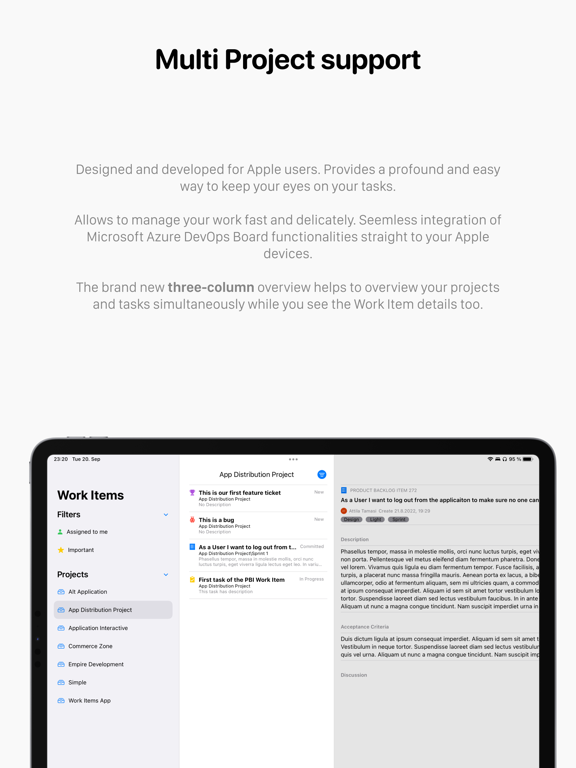
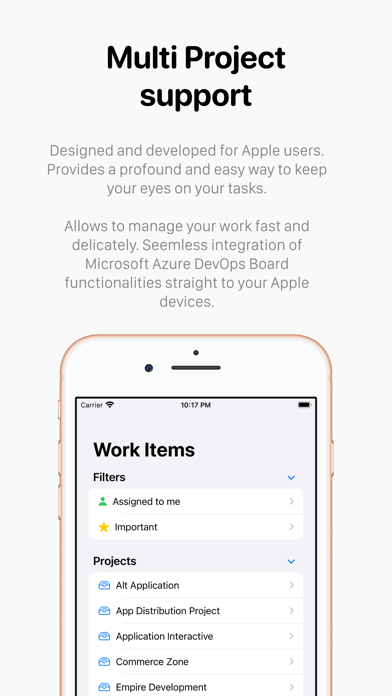
Introducing Work Items, the meticulously crafted app exclusively designed for Apple users. This intuitive and efficient solution empowers you to effortlessly manage tickets with the utmost precision. Seamlessly integrating Microsoft Azure DevOps Board functionalities, it streamlines your work management process like never before.
Discover the Backlog View, a powerful tool for managing your Work Item list, and embrace the Board Views for both Agile and non-Agile projects. Work Items Lite grants you read-only access to most features, ensuring a seamless and immersive experience, free from distractions like advertisements.
Unlock a world of possibilities by connecting to your Azure organization with a Personal Access Token. Utilize the convenient quick filters to effortlessly locate tickets, and gain comprehensive insights into Work Items with detailed overviews. Seamlessly incorporate tags and fundamental properties to create tickets with ease, all on your beloved MacOS. Stay up to date with the latest 100 items, keeping your focus sharp and your workflow efficient.
For any inquiries or assistance, our dedicated team is here to help. Reach out to us at info@workitem.app or visit our website at https://workitems.app/. Experience the future of ticket management with Work Items Lite, where efficiency meets simplicity.
We are always happy to assist you.
Features
- Filtering iterations supported in Backlog and Board views.
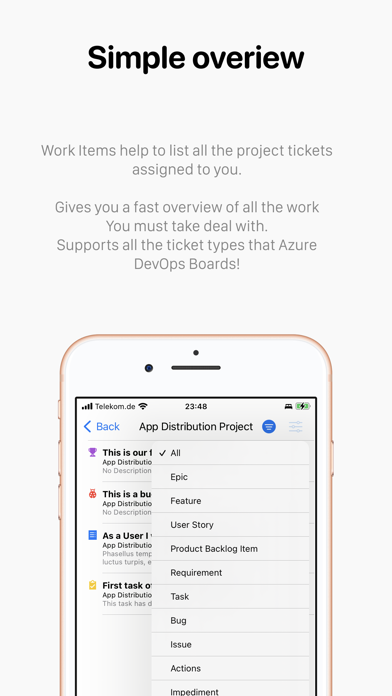
- Filtering Work Items by States and Types
- Show Related Items in the Board View (iPad and MacOS)
- Seamlessly create tickets with Quick Entry, providing a hassle-free ticket creation experience (exclusive to the full version).
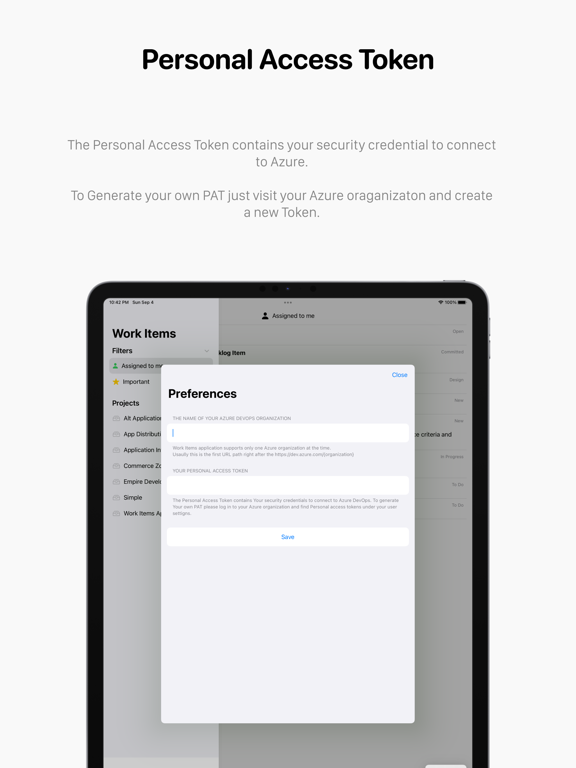
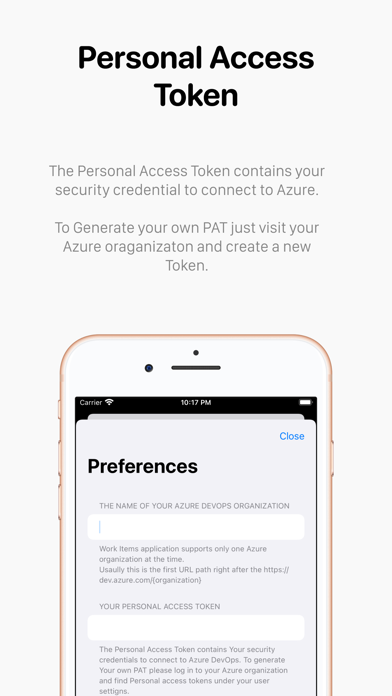
- Effortlessly connect to Your Azure organization using a Personal Access Token, ensuring a secure and seamless integration.
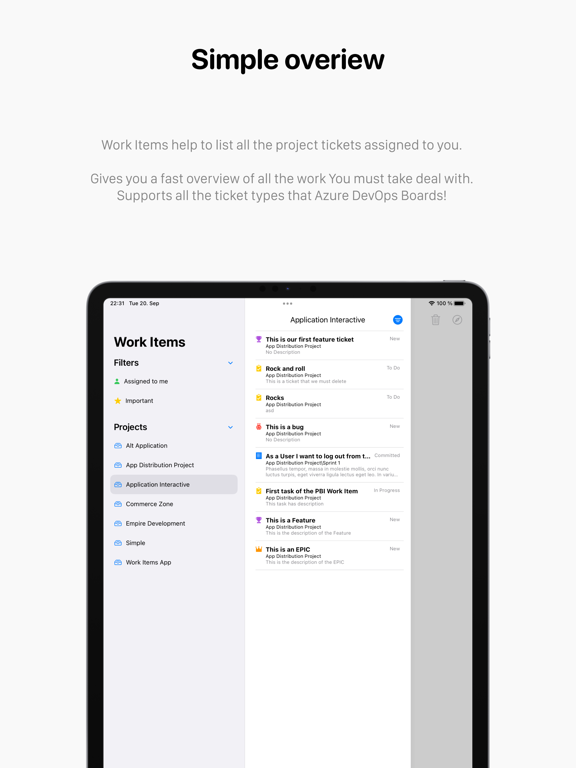
- Discover the power of Quick filters, enabling you to swiftly locate your desired tickets with ease.
- Embrace the efficiency of the Backlog view, offering a comprehensive tool for managing your Work Items effortlessly.
- Immerse yourself in the Azure DevOps Board view, providing a visual and intuitive interface for agile project management.
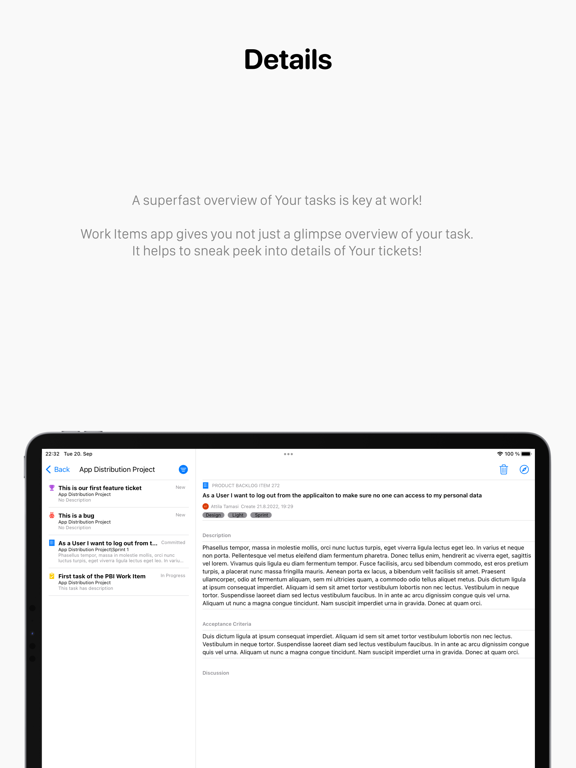
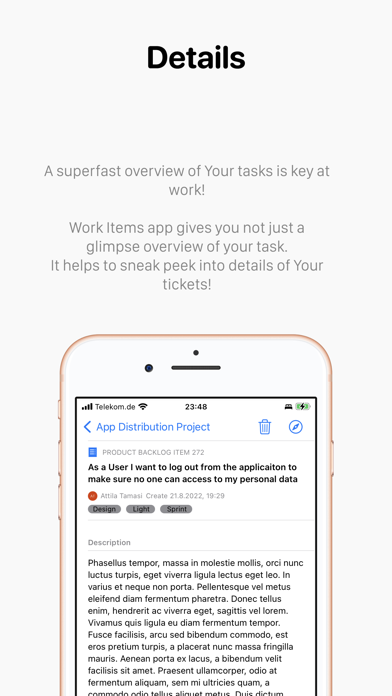
- Gain detailed and comprehensive overviews of your Work Items, empowering you with valuable insights.
- Seamlessly incorporate tags and key properties during ticket creation on MacOS, enhancing organization and streamlining your workflow.
- Stay up to date with the latest developments by focusing on the most recently created 100 items, ensuring you never miss a beat.
Discover the Backlog View, a powerful tool for managing your Work Item list, and embrace the Board Views for both Agile and non-Agile projects. Work Items Lite grants you read-only access to most features, ensuring a seamless and immersive experience, free from distractions like advertisements.
Unlock a world of possibilities by connecting to your Azure organization with a Personal Access Token. Utilize the convenient quick filters to effortlessly locate tickets, and gain comprehensive insights into Work Items with detailed overviews. Seamlessly incorporate tags and fundamental properties to create tickets with ease, all on your beloved MacOS. Stay up to date with the latest 100 items, keeping your focus sharp and your workflow efficient.
For any inquiries or assistance, our dedicated team is here to help. Reach out to us at info@workitem.app or visit our website at https://workitems.app/. Experience the future of ticket management with Work Items Lite, where efficiency meets simplicity.
We are always happy to assist you.
Features
- Filtering iterations supported in Backlog and Board views.
- Filtering Work Items by States and Types
- Show Related Items in the Board View (iPad and MacOS)
- Seamlessly create tickets with Quick Entry, providing a hassle-free ticket creation experience (exclusive to the full version).
- Effortlessly connect to Your Azure organization using a Personal Access Token, ensuring a secure and seamless integration.
- Discover the power of Quick filters, enabling you to swiftly locate your desired tickets with ease.
- Embrace the efficiency of the Backlog view, offering a comprehensive tool for managing your Work Items effortlessly.
- Immerse yourself in the Azure DevOps Board view, providing a visual and intuitive interface for agile project management.
- Gain detailed and comprehensive overviews of your Work Items, empowering you with valuable insights.
- Seamlessly incorporate tags and key properties during ticket creation on MacOS, enhancing organization and streamlining your workflow.
- Stay up to date with the latest developments by focusing on the most recently created 100 items, ensuring you never miss a beat.
Show More
最新版本1.5.0更新日誌
Last updated on 2023年12月10日
歷史版本
In this release of the Work Items app, we focused on essential maintenance tasks to ensure a smoother user experience. While no significant features were added, this update includes bug fixes and optimizations to enhance overall performance.
Show More
Version History
1.5.0
2023年12月10日
In this release of the Work Items app, we focused on essential maintenance tasks to ensure a smoother user experience. While no significant features were added, this update includes bug fixes and optimizations to enhance overall performance.
1.4.2
2023年10月02日
bug fixes
1.4.1
2023年10月02日
Bug fixing
1.4.0
2023年09月26日
We are introducing the ability to filter work items by state. Now, you can easily filter work items based on condition and effortlessly assign tasks to the right team members.
Currently, only a single state can be selected. We are working on multiple state selections available in the next release.
This version also introduces a new login screen for a better onboarding experience.
Currently, only a single state can be selected. We are working on multiple state selections available in the next release.
This version also introduces a new login screen for a better onboarding experience.
1.3.8
2023年09月11日
Introducing the ability to filter work items by state. Now, you can easily filter work items based on condition and assign tasks to the right team members effortlessly
Currently, only a single state can be selected. We are working on multiple state selections available in the next release.
1.3.7
2023年08月27日
Simple maintenance updates and bug fixes to ensure a smoother and more reliable experience.
1.3.5
2023年08月09日
- Introducing the ability to filter work items by iteration. Now you can easily filter work items based on iterations and assign tasks to the right team members effortlessly.
- This version also introduces Related Items functionality. Now you can quickly see related items and their status.
1.3.4
2023年07月07日
Simple maintenance updates and bug fixes to ensure a smoother and more reliable experience.
1.3.2
2023年07月06日
- Introducing the ability to see the effort of the work items. Now you can track the effort spent on tasks and get a better overview of your team's workload.
- Improved onboarding experience. Now you can easily set up your account and start with Work Items.
1.3.1
2023年06月24日
- Fixed various bugs and improved stability
- Made small cosmetic changes to improve user experience
1.3.0
2023年06月23日
We are excited to announce the release of the Work Items App, packed with new features and improvements to enhance your productivity. Here's what's new:
- Quick Entry: Introducing Quick Entry, a powerful new functionality allowing you to create tickets easily. Enter the necessary information, and Work Items will cover the rest. Please note that Quick Entry is unavailable in the Lite app version.
- Assignee Filter and Selector: Managing work items just got easier! We have added an assignee filter and selector to help you organize and track tasks more efficiently. Now you can easily filter work items based on assignees and assign tasks to the right team members effortlessly.
- Updated Quick Filter User Interface: We have revamped the user interface for quick filters, making it more intuitive and visually appealing.
- Enhanced Quick Filters: We listened to your feedback and expanded the functionality of quick filters.
- Improved Work Item Details View: We have significantly improved the view to give you a better overview of your tickets.
- Updated Loading Indicators and Visual Elements: We understand the importance of a smooth user experience. In this update, we have enhanced the loading indicators and other visual elements throughout the app.
Thank you for your continued support and valuable feedback. We hope these new features and improvements in this new version will help you stay organized and boost your productivity. Get the latest update today and take your work management to the next level!
If you have any questions or need assistance, please get in touch with our support team at info@workitemsapp.com or visit our website at https://workitems.app/.
- Quick Entry: Introducing Quick Entry, a powerful new functionality allowing you to create tickets easily. Enter the necessary information, and Work Items will cover the rest. Please note that Quick Entry is unavailable in the Lite app version.
- Assignee Filter and Selector: Managing work items just got easier! We have added an assignee filter and selector to help you organize and track tasks more efficiently. Now you can easily filter work items based on assignees and assign tasks to the right team members effortlessly.
- Updated Quick Filter User Interface: We have revamped the user interface for quick filters, making it more intuitive and visually appealing.
- Enhanced Quick Filters: We listened to your feedback and expanded the functionality of quick filters.
- Improved Work Item Details View: We have significantly improved the view to give you a better overview of your tickets.
- Updated Loading Indicators and Visual Elements: We understand the importance of a smooth user experience. In this update, we have enhanced the loading indicators and other visual elements throughout the app.
Thank you for your continued support and valuable feedback. We hope these new features and improvements in this new version will help you stay organized and boost your productivity. Get the latest update today and take your work management to the next level!
If you have any questions or need assistance, please get in touch with our support team at info@workitemsapp.com or visit our website at https://workitems.app/.
1.2.0
2023年05月22日
Ability to create Work Item tickets
Introducing the ability to create Work Item tickets directly within the app, making task management easier. This feature is only available in the payed version of the Work Items application.
Updated Preferences screen
Enjoy an updated Preferences screen with a fresh new look and improved functionality.
Maintenance and bug fixes
Maintenance updates and fixed bugs to ensure a smoother and more reliable experience.
Introducing the ability to create Work Item tickets directly within the app, making task management easier. This feature is only available in the payed version of the Work Items application.
Updated Preferences screen
Enjoy an updated Preferences screen with a fresh new look and improved functionality.
Maintenance and bug fixes
Maintenance updates and fixed bugs to ensure a smoother and more reliable experience.
1.1.4
2023年04月11日
We are introducing a new feature to display project avatars! Our latest update includes important bug fixes and performance improvements to keep the app running smoothly. Enjoy!
1.1.2
2023年03月30日
This release includes bug fixes, maintenance improvements, and a new feature allowing you to order the team list on the board view in alphabetic.
Enjoy a smoother and more efficient experience with this update!
1.1.1
2023年03月06日
- change app store category
- minor bug fixes and general app maintenance
1.1.0
2023年02月28日
Welcome to the Azure DevOps Board view!
- Switch between Backlog and Board view
- Supports multiple teams under projects to manage work items on the board
- Drag and drop to move Work Items between columns and prioritize them
- New filter view for the board view
Currently, the Azure DevOps Board view is supported only on MacOS and iPad.
- Switch between Backlog and Board view
- Supports multiple teams under projects to manage work items on the board
- Drag and drop to move Work Items between columns and prioritize them
- New filter view for the board view
Currently, the Azure DevOps Board view is supported only on MacOS and iPad.
1.0.9
2023年01月15日
Based on requests this version supports self-hosted Azure DevOps. Also, due to user requests, I removed the quick filter from the sidebar. This feature will be available in the next version in a more advanced way.
- App polishing on the user interface
- Supports self-hosted Azure DevOps instances from now on
- Some little improvements before bigger features will be introduced
- App polishing on the user interface
- Supports self-hosted Azure DevOps instances from now on
- Some little improvements before bigger features will be introduced
1.0.7
2022年11月07日
- stabilization and maintenance
- minor bug fixes
- minor bug fixes
1.0.6
2022年11月01日
- Minor user interface updates
- General app maintenance and bug fixing
1.0.5
2022年10月26日
EDIT YOUR WORK ITEM FIELDS
- Swipe left to delete tickets from the work items list
- Add Comments on your Work Items
REGULAR MAINTENANCE AND STABILIZATION
- Fix Work Item ID format
- Swipe left to delete tickets from the work items list
- Add Comments on your Work Items
REGULAR MAINTENANCE AND STABILIZATION
- Fix Work Item ID format
1.0.4
2022年09月30日
This version adds a handy filter to quickly check all the tickets that have been created by you. This helps to follow up on your tickets that you created with a reason!
Remember, ensuring the tickets you create will be followed up in agile environments is crucial!
1.0.3
2022年09月23日
- New enhanced Work Item view for your projects
- New detailed overview of your tickets
- New filters to get a better list of tasks
- Maintenance and bug fixes
- New detailed overview of your tickets
- New filters to get a better list of tasks
- Maintenance and bug fixes
1.0.2
2022年09月12日
- Simplified Azure DevOps account setup
- Quick filter for ticket types

1.0.1
2022年09月03日
Work Items FAQ
點擊此處瞭解如何在受限國家或地區下載Work Items。
以下為Work Items的最低配置要求。
iPhone
須使用 iOS 16.0 或以上版本。
iPad
須使用 iPadOS 16.0 或以上版本。
Mac
須使用 macOS 13.0 或以上版本。
Work Items支持英文
Work Items包含應用內購買。 以下為Work Items應用內購買價格清單。
Coffee and croissant
$9.99
Spare change
$0.99