
BreezeView BT
Free
1.3for iPhone
Age Rating
BreezeView BT Screenshots
About BreezeView BT
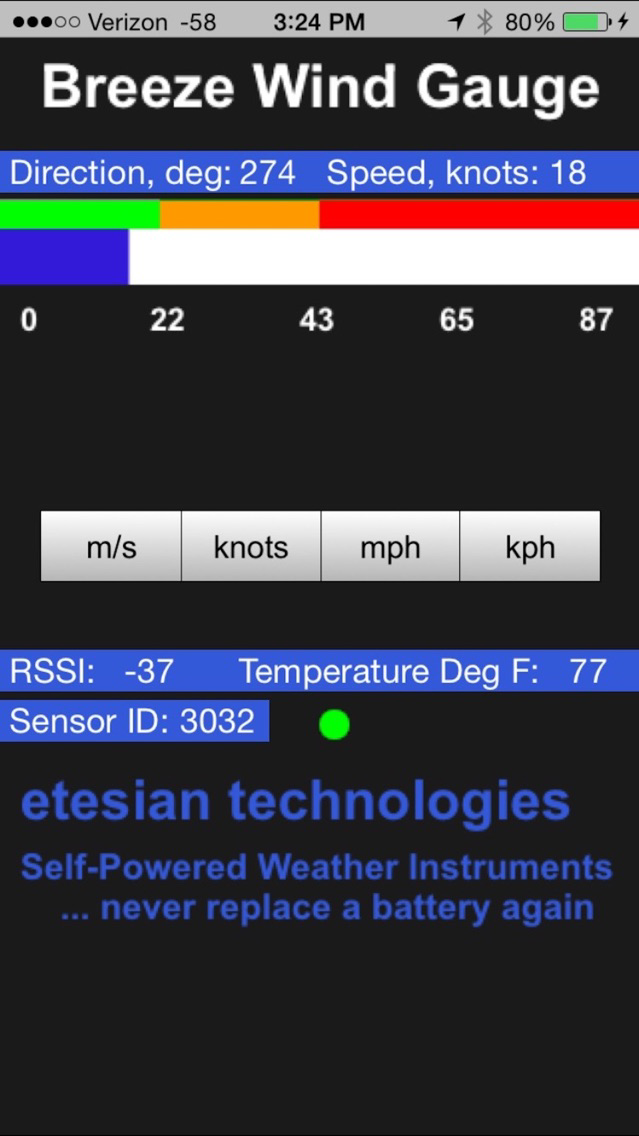
This app shows windspeed from an Etesian Technologies wireless Bluetooth Smart cup anemometer. All functionality of the app is on a single screen. The user enters the sensor ID to select the proper sensor. This is required in the event that more than one Etesian Bluetooth Smart sensor is located within range of the iPhone.
This ID number only need be entered once. It is saved to a file so that on subsequent running of the app, the app retrieves the sensor ID from the file. But, if the user has more than one sensor, they can at any time change the ID number to select the preferred sensor.
An option for the user is to choose their preferred units of measurement: miles per hour (mph), meters per second (m/s), knots, or kilometers per hour (kph).
The wind speed is shown both in a text box and graphically. A single bar that has a white background fills with blue in real time according to the wind speed received from the sensor. Along the top of the bar are three colors: green, amber, red, which correspond roughly with the level of concern one might have in regards to potentially damaging winds. In mph the breaks are at 25 and 50 mph. If the combined wind speed / wind direction sensor was purchased, this revised app will also display the wind direction.
There is a virtual flashing green "LED" to indicate that a Bluetooth packet has been successfully received, decoded and displayed. The sensor advertises once every 3 seconds. The data is packaged in the Bluetooth advertisement. Using this method more than one iPhone can view data from a single sensor.
If no signal is present for about 7 seconds, the bar will display the text "No Signal", and the data replaced with"NA".
Every sensor has an auxiliary temperature sensor. The ambient temperature and the signal strength are indicated in text boxes in the bottom half of the display, just above the company name and tag line.
This ID number only need be entered once. It is saved to a file so that on subsequent running of the app, the app retrieves the sensor ID from the file. But, if the user has more than one sensor, they can at any time change the ID number to select the preferred sensor.
An option for the user is to choose their preferred units of measurement: miles per hour (mph), meters per second (m/s), knots, or kilometers per hour (kph).
The wind speed is shown both in a text box and graphically. A single bar that has a white background fills with blue in real time according to the wind speed received from the sensor. Along the top of the bar are three colors: green, amber, red, which correspond roughly with the level of concern one might have in regards to potentially damaging winds. In mph the breaks are at 25 and 50 mph. If the combined wind speed / wind direction sensor was purchased, this revised app will also display the wind direction.
There is a virtual flashing green "LED" to indicate that a Bluetooth packet has been successfully received, decoded and displayed. The sensor advertises once every 3 seconds. The data is packaged in the Bluetooth advertisement. Using this method more than one iPhone can view data from a single sensor.
If no signal is present for about 7 seconds, the bar will display the text "No Signal", and the data replaced with"NA".
Every sensor has an auxiliary temperature sensor. The ambient temperature and the signal strength are indicated in text boxes in the bottom half of the display, just above the company name and tag line.
Show More
What's New in the Latest Version 1.3
Last updated on Sep 6, 2016
Old Versions
For those who purchase the combined wind speed / wind direction sensor, the data for wind direction is now presented by the app.
Show More
Version History
1.3
Apr 26, 2016
For those who purchase the combined wind speed / wind direction sensor, the data for wind direction is now presented by the app.
BreezeView BT FAQ
Click here to learn how to download BreezeView BT in restricted country or region.
Check the following list to see the minimum requirements of BreezeView BT.
iPhone
BreezeView BT supports English