Classes Lite
Free
2.7for iPhone, iPad and more
Age Rating
Classes Lite Screenshots
About Classes Lite
Classes is a smart schedule for school and university.
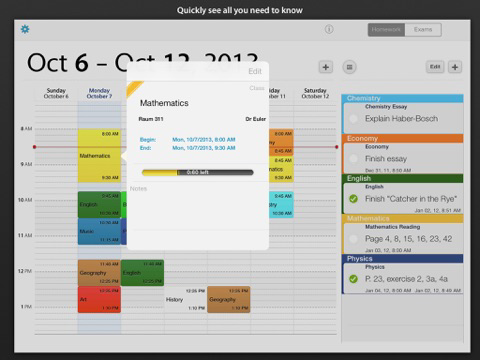
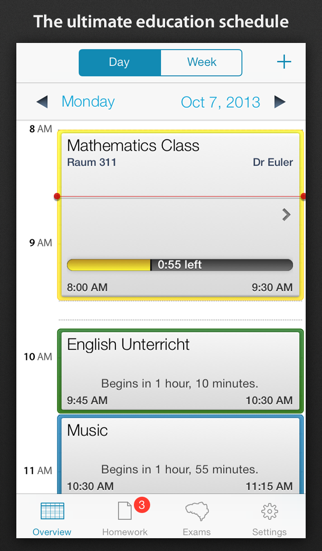
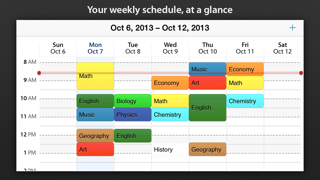
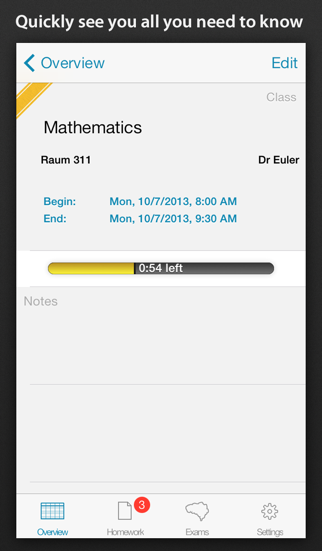
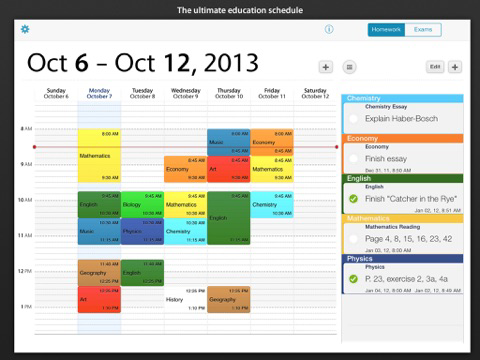
Immediately after starting the app, the next class is displayed with all relevant information. On rotating the device, you are presented with the complete timetable in landscape mode.
Classes shows all the information you need, when you need it.
Classes features:
• Instantly displays all relevant on the current event in portrait mode
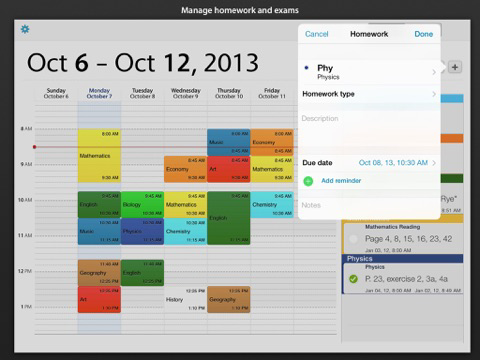
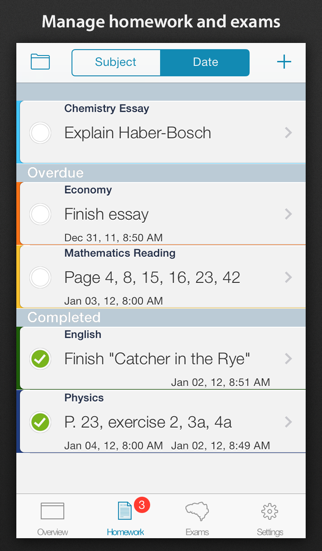
• Manage exams and assignments
• Notifications for assignments and classes
• Interactive week overview in landscape mode
• Define name, abbreviation, location, lecturer and beginning end for events
• Add notes to events
• Organize your schedule with colors
• Displays the progress of the current class, and the time left
• Allows you to place different classes at the same time
Differences from the full version:
• The number of subjects, classes and homework is limited

Immediately after starting the app, the next class is displayed with all relevant information. On rotating the device, you are presented with the complete timetable in landscape mode.
Classes shows all the information you need, when you need it.
Classes features:
• Instantly displays all relevant on the current event in portrait mode
• Manage exams and assignments
• Notifications for assignments and classes
• Interactive week overview in landscape mode
• Define name, abbreviation, location, lecturer and beginning end for events
• Add notes to events
• Organize your schedule with colors
• Displays the progress of the current class, and the time left
• Allows you to place different classes at the same time
Differences from the full version:
• The number of subjects, classes and homework is limited
Show More
What's New in the Latest Version 2.7
Last updated on Oct 19, 2015
Old Versions
This app has been updated by Apple to display the Apple Watch app icon.
Bug Fixes for iOS 8.4 - Fully compatible with iOS8.4 now
Color palette added to generate your own colors.
Fully compatible on iPhone 6 and iPhone 6 plus
Grades module is free now.
Bug Fixes for iOS 8.4 - Fully compatible with iOS8.4 now
Color palette added to generate your own colors.
Fully compatible on iPhone 6 and iPhone 6 plus
Grades module is free now.
Show More
Version History
2.7
Oct 19, 2015
This app has been updated by Apple to display the Apple Watch app icon.
Bug Fixes for iOS 8.4 - Fully compatible with iOS8.4 now
Color palette added to generate your own colors.
Fully compatible on iPhone 6 and iPhone 6 plus
Grades module is free now.
Bug Fixes for iOS 8.4 - Fully compatible with iOS8.4 now
Color palette added to generate your own colors.
Fully compatible on iPhone 6 and iPhone 6 plus
Grades module is free now.
2.6.9
Nov 1, 2014
• Fixed problems with iOS 8 on iPad
2.6.8
Oct 8, 2014
• Improvements for iOS 8
• Better date input
• Fixed problem where sometimes events were displayed on the wrong day or with incorrect width
• Improvements for the backup feature
• Various other bug fixes
• Better date input
• Fixed problem where sometimes events were displayed on the wrong day or with incorrect width
• Improvements for the backup feature
• Various other bug fixes
2.6.7
Aug 23, 2014
• Classes now requires at least iOS 6
• Improvements for backup
• Bug fixes
• Improvements for backup
• Bug fixes
2.6.6
Jul 27, 2014
• Classes now requires at least iOS 6
• Improvements for backup
• Bug fixes
• Improvements for backup
• Bug fixes
2.6.5
Jul 11, 2014
• Improvements for iOS 7
• Rewritten backup feature
• Bug fixes
• Last version with support for iOS 5
• Rewritten backup feature
• Bug fixes
• Last version with support for iOS 5
2.6.2
Oct 14, 2013
• Support for iOS 7
• Exams and homework can now be hidden on iPad by swiping to the side
• Bug fixes
• Exams and homework can now be hidden on iPad by swiping to the side
• Bug fixes
2.5.9
Jul 25, 2013
• Improvements for iOS 7 beta
Fixed:
• Events where sometimes not shown on the right day
• Events after 11pm were not shown correctly
Fixed:
• Events where sometimes not shown on the right day
• Events after 11pm were not shown correctly
2.5.8
Jul 3, 2013
• Improvements for printing/PDF export
• Holidays are shown in the timetable
• Fixed problem with disappearing to-dos or exams
• Fixed some crashes
• Various small improvements
• Holidays are shown in the timetable
• Fixed problem with disappearing to-dos or exams
• Fixed some crashes
• Various small improvements
2.5.6
Mar 13, 2013
Fixed a problem where the settings could not be closed
2.5.5
Dec 14, 2012
✔ Support for drag & drop in the timetable
✔ Various bug fixes
✔ Korean translation
✔ Various bug fixes
✔ Korean translation
2.5.4
Oct 12, 2012
✔ Compatibility with iOS 6 and iPhone 5
2.5.2
Sep 5, 2012
• App now requires iOS 5
• Various bug fixes
• Usability improvements
• Performance improvements
• Various bug fixes
• Usability improvements
• Performance improvements
2.5.0.7
Apr 21, 2012
✔ Fixed problems with holidays
✔ Display improvements
✔ Small bugfixes
✔ Display improvements
✔ Small bugfixes
2.5.0.6
Apr 12, 2012
✔ iPad retina display improvements
✔ Added A/B weeks switch in settings
✔ Fixed freezes on iPad when adding subjects
✔ Small visual and usability improvements
✔ Ability to add and edit title for exams
✔ Added A/B weeks switch in settings
✔ Fixed freezes on iPad when adding subjects
✔ Small visual and usability improvements
✔ Ability to add and edit title for exams
2.5.0.5
Apr 3, 2012
Classes Lite FAQ
Click here to learn how to download Classes Lite in restricted country or region.
Check the following list to see the minimum requirements of Classes Lite.
iPhone
Requires iOS 6.0 or later.
iPad
Requires iPadOS 6.0 or later.
iPod touch
Requires iOS 6.0 or later.
Classes Lite supports English, Czech, Danish, Dutch, French, German, Italian, Japanese, Korean, Norwegian Bokmål, Portuguese, Russian, Simplified Chinese, Spanish, Vietnamese