

Age Rating
DocsPlus: Writing Support Screenshots
About DocsPlus: Writing Support
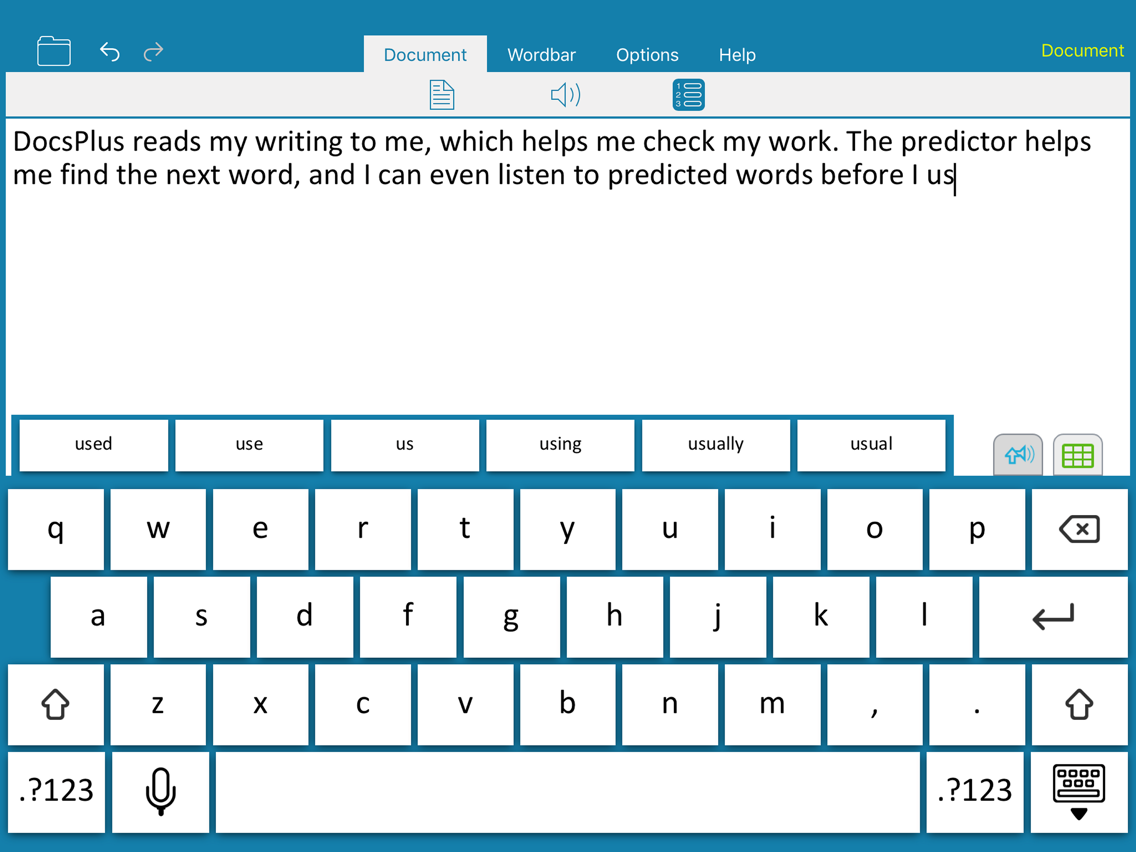
DocsPlus is a specially designed word processor with an adult look and feel, yet providing extensive writing support through high quality speech, powerful word prediction and our acclaimed Wordbars. DocsPlus is the latest in the Crick Software product range, continuously developed over 20 years and used in schools around the world.
REVIEW WRITING WITH CLEAR SPEECH
As students write, their work is read back to them as each sentence is completed. Research shows that this active engagement with text encourages students to find and correct errors for themselves.
DEVELOP VOCABULARY AND SPELLING WITH WORD PREDICTION
The intelligent predictor suggests words that fit the context of students’ writing. It’s easily customized to the right reading level, helping students to use good vocabulary and create flowing text with accurate spelling. Students can listen to words in both the predictor and the spell checker before using them, helping them to find the word they want.
BUILD WRITING CONFIDENCE WITH WORDBARS
The unique Wordbars provide tabbed vocabulary support for any subject or topic – just tap a word to add it to the document. Make your own Wordbars in a flash to support any topic, or get free, ready-made ones from our LearningGrids site, accessible within the app and covering a range of curriculum topics.
CHECK WORDS BEFORE THEY ARE USED
Learners can listen to words before they write them, helping them to find the word they want and achieve writing success. Any word in the predictor, spell checker or Wordbar can be heard before it is used with our unique Sound Shift tool.
USE IT YOUR WAY
Choose between American, British and Australian voices, and customize the font and colors to suit the individual. Open and save documents on your iPad, iCloud, Dropbox, OneDrive, Google Drive or WebDav. DocsPlus, MS Word and PDF formats are supported, and DocsPlus works anywhere, whether or not you have an Internet connection.
PART OF CRICK SOFTWARE’S FAMILY
Based in the UK and US, Crick Software has a worldwide reputation for supporting students of all ages and abilities. To find more apps, search for Crick Software in the App Store.
REPLACES WRITEONLINE
DocsPlus is a brand new app that replaces our "WriteOnline" App.
REVIEW WRITING WITH CLEAR SPEECH
As students write, their work is read back to them as each sentence is completed. Research shows that this active engagement with text encourages students to find and correct errors for themselves.
DEVELOP VOCABULARY AND SPELLING WITH WORD PREDICTION
The intelligent predictor suggests words that fit the context of students’ writing. It’s easily customized to the right reading level, helping students to use good vocabulary and create flowing text with accurate spelling. Students can listen to words in both the predictor and the spell checker before using them, helping them to find the word they want.
BUILD WRITING CONFIDENCE WITH WORDBARS
The unique Wordbars provide tabbed vocabulary support for any subject or topic – just tap a word to add it to the document. Make your own Wordbars in a flash to support any topic, or get free, ready-made ones from our LearningGrids site, accessible within the app and covering a range of curriculum topics.
CHECK WORDS BEFORE THEY ARE USED
Learners can listen to words before they write them, helping them to find the word they want and achieve writing success. Any word in the predictor, spell checker or Wordbar can be heard before it is used with our unique Sound Shift tool.
USE IT YOUR WAY
Choose between American, British and Australian voices, and customize the font and colors to suit the individual. Open and save documents on your iPad, iCloud, Dropbox, OneDrive, Google Drive or WebDav. DocsPlus, MS Word and PDF formats are supported, and DocsPlus works anywhere, whether or not you have an Internet connection.
PART OF CRICK SOFTWARE’S FAMILY
Based in the UK and US, Crick Software has a worldwide reputation for supporting students of all ages and abilities. To find more apps, search for Crick Software in the App Store.
REPLACES WRITEONLINE
DocsPlus is a brand new app that replaces our "WriteOnline" App.
Show More
What's New in the Latest Version 1.0.2
Last updated on Apr 26, 2018
Old Versions
- The App now displays in Portrait mode as well as Lansdcape
- Can also now choose to print the document in either Portrait or Landscape orientation
- Fixed a Spell Checker bug where an extra space was being added when replacing misspelled words
- Various other minor bug fixes and enhancements
- Can also now choose to print the document in either Portrait or Landscape orientation
- Fixed a Spell Checker bug where an extra space was being added when replacing misspelled words
- Various other minor bug fixes and enhancements
Show More
Version History
1.0.2
Apr 26, 2018
- The App now displays in Portrait mode as well as Lansdcape
- Can also now choose to print the document in either Portrait or Landscape orientation
- Fixed a Spell Checker bug where an extra space was being added when replacing misspelled words
- Various other minor bug fixes and enhancements
- Can also now choose to print the document in either Portrait or Landscape orientation
- Fixed a Spell Checker bug where an extra space was being added when replacing misspelled words
- Various other minor bug fixes and enhancements
DocsPlus: Writing Support Price
Today:
$54.99
Lowest:
$32.99
Highest:
$54.99
DocsPlus: Writing Support FAQ
Click here to learn how to download DocsPlus: Writing Support in restricted country or region.
Check the following list to see the minimum requirements of DocsPlus: Writing Support.
iPad
DocsPlus: Writing Support supports English





