Helium Remote
Free
8.0for iPad
Age Rating
Helium Remote Screenshots
About Helium Remote
Take control of your music from anywhere in your home. Helium Remote connects to Helium running on your PC over
your home network, so you can browse, play, and manage your entire music library from the comfort of your
couch — or anywhere else in the house.
No more walking back to your PC just to skip a track or adjust the volume. With Helium Remote, your phone
becomes a full-featured controller for your music.
Features
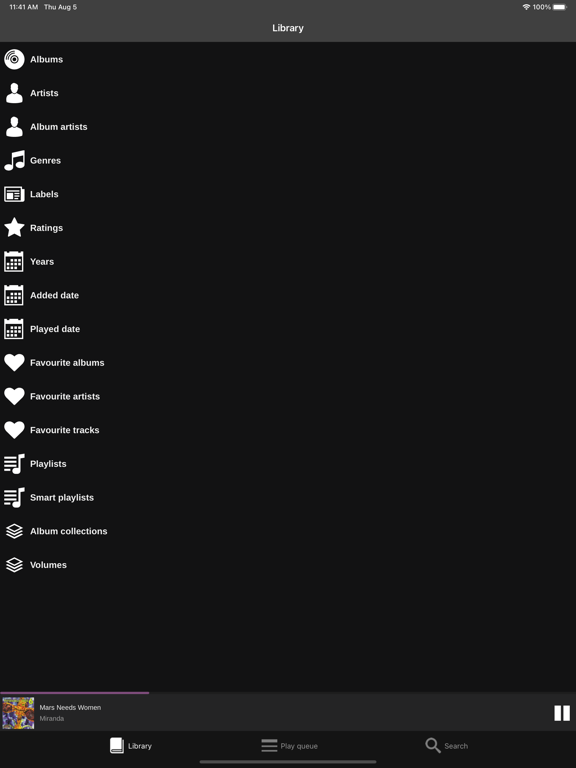
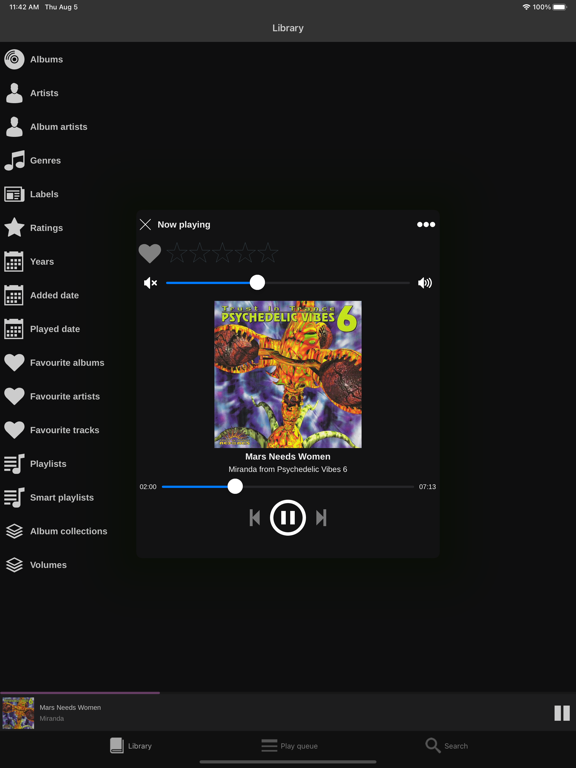
- Play, pause, skip to next or previous track
- Full volume control
- Manage your play queue
- Set ratings and mark tracks as favourites
- See album artwork and track details
- Browse and play Playlists and Smart Playlists
- Browse Favourite Albums, Artists and Tracks
- Search your entire library by album, artist, title, genre, year or publisher
- No additional software needed on your PC
Requirements
- Helium 18 Premium or later (download at www.imploded.com)
- Wi-Fi connection to the PC running Helium

your home network, so you can browse, play, and manage your entire music library from the comfort of your
couch — or anywhere else in the house.
No more walking back to your PC just to skip a track or adjust the volume. With Helium Remote, your phone
becomes a full-featured controller for your music.
Features
- Play, pause, skip to next or previous track
- Full volume control
- Manage your play queue
- Set ratings and mark tracks as favourites
- See album artwork and track details
- Browse and play Playlists and Smart Playlists
- Browse Favourite Albums, Artists and Tracks
- Search your entire library by album, artist, title, genre, year or publisher
- No additional software needed on your PC
Requirements
- Helium 18 Premium or later (download at www.imploded.com)
- Wi-Fi connection to the PC running Helium
Show More
What's New in the Latest Version 8.0
Last updated on May 18, 2026
Old Versions
Brand new app compatible with Helium 18.
Show More
Version History
8.0
May 18, 2026
Brand new app compatible with Helium 18.
Helium Remote FAQ
Click here to learn how to download Helium Remote in restricted country or region.
Check the following list to see the minimum requirements of Helium Remote.
iPad