LearnBolt
Free
1.9.6for iPhone, iPad and more
Age Rating
LearnBolt Screenshots
About LearnBolt
Description:
LearnBolt is a new breed of training and productivity solution that goes from the training need, to the collecting and storing of support media, to the organization of the idea, to immediate sharing and delivery to a learners iPhone/iPad. Training and learning has become a more dynamic in the moment process, and LearnBolt is leading the charge.
Snap a picture, record audio/video, grab a text file from dropbox/google drive, then easily organize content using our Learn Path templates on iPad, then quickly share to another iPhone/iPad. It can be that fast! Just "Bolt it!" Try it for FREE today!
Who is it for:
Any small-to large business, from the 50 person pizza shop, to the 350-person regional multi-location car wash, to the 100,000-person international hotel chain, that wants to save money and time creating best practices and on-boarding new employees. LearnBolt brings employee learning to all sized businesses through its flexible mobile platform. LearnBolt can also be a great training option for teachers and coaches.
Features:
• Empower employees to quickly capture and share “training moments” via a mobile device.
• Create on iPad, share(push) to iPad/iPhones
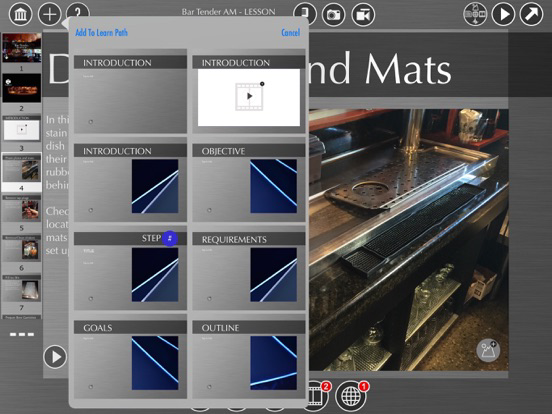
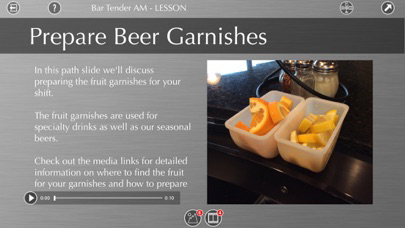
• Quickly package employee learning moments into learning programs using pre-defined templates for your most common training needs, such as How-Tos, Lessons, Reports, Tours, and Recipes, or create your own program from scratch.
• Pull in supplementary content from the web, social media, or cloud storage such as Dropbox or Google Drive
• Securely store learning content in the cloud and make it available on-demand when and where it’s needed.
Train to sustain and grow your business!
Product:
LearnBolt - Basic - Free
• LearnBolt Player - View shared training via guest log in
• LearnBolt - Create account and use many of the LearnBolt training creation options and sharing features (iPad)
• 50MB of cloud storage and 3 share seats per Learn Path
LearnBolt - Starter - 9.99 USD monthly or 99.99 USD yearly subscription
• 1000MB of cloud storage and 10 share seats per Learn Path
• Enjoy all LearnBolt training creation and sharing features for employee training
• LearnBolt Player - View shared training via guest log in
LearnBolt - Plus - 19.99 USD monthly or 199.99 USD yearly subscription
• 3000MB of cloud storage and 25 share seats per Learn Path
• Enjoy all LearnBolt training creation and sharing features for employee training
• LearnBolt Player - View shared training via guest log in
LearnBolt - Premium - 29.99 USD monthly subscription
• 8000MB of cloud storage and 50 share and roster seats per Learn Path
• Roster - Create user accounts with unique account privilege role assignments - 30 seats
• Reporting - Learn Path activity reporting
• Enjoy all LearnBolt training creation and sharing features for employee training
• LearnBolt Player - View shared training via guest log in
LearnBolt - Guest - Free
• LearnBolt Player - View shared training via guest log in (iPad/iPhone)
- Subscribe to LearnBolt and you will be charged in your local currency at the prevailing exchange rate as defined by iTunes.
- Payment will be charged to iTunes Account at confirmation of purchase.
- Subscription automatically renews unless auto-renew is turned off at least 24-hours before the end of the current period.
- Account will be charged for renewal within 24-hours prior to the end of the current period, and identify the cost of the renewal.
- Subscriptions may be managed by the user and auto-renewal may be turned off by going to the user's Account Settings after purchase.
- No cancellation of the current subscription is allowed during active subscription period.
- Any unused portion of a free trial period, if offered, will be forfeited when the user purchases a subscription.
Privacy policy: http://www.learnbolt.com/docs/lbprivacypolicy.html
Terms of Service: http://www.learnbolt.com/docs/lbtermsofservice.html
Follow us on Twitter: http://twitter.com/learnbolt
LearnBolt is a new breed of training and productivity solution that goes from the training need, to the collecting and storing of support media, to the organization of the idea, to immediate sharing and delivery to a learners iPhone/iPad. Training and learning has become a more dynamic in the moment process, and LearnBolt is leading the charge.
Snap a picture, record audio/video, grab a text file from dropbox/google drive, then easily organize content using our Learn Path templates on iPad, then quickly share to another iPhone/iPad. It can be that fast! Just "Bolt it!" Try it for FREE today!
Who is it for:
Any small-to large business, from the 50 person pizza shop, to the 350-person regional multi-location car wash, to the 100,000-person international hotel chain, that wants to save money and time creating best practices and on-boarding new employees. LearnBolt brings employee learning to all sized businesses through its flexible mobile platform. LearnBolt can also be a great training option for teachers and coaches.
Features:
• Empower employees to quickly capture and share “training moments” via a mobile device.
• Create on iPad, share(push) to iPad/iPhones
• Quickly package employee learning moments into learning programs using pre-defined templates for your most common training needs, such as How-Tos, Lessons, Reports, Tours, and Recipes, or create your own program from scratch.
• Pull in supplementary content from the web, social media, or cloud storage such as Dropbox or Google Drive
• Securely store learning content in the cloud and make it available on-demand when and where it’s needed.
Train to sustain and grow your business!
Product:
LearnBolt - Basic - Free
• LearnBolt Player - View shared training via guest log in
• LearnBolt - Create account and use many of the LearnBolt training creation options and sharing features (iPad)
• 50MB of cloud storage and 3 share seats per Learn Path
LearnBolt - Starter - 9.99 USD monthly or 99.99 USD yearly subscription
• 1000MB of cloud storage and 10 share seats per Learn Path
• Enjoy all LearnBolt training creation and sharing features for employee training
• LearnBolt Player - View shared training via guest log in
LearnBolt - Plus - 19.99 USD monthly or 199.99 USD yearly subscription
• 3000MB of cloud storage and 25 share seats per Learn Path
• Enjoy all LearnBolt training creation and sharing features for employee training
• LearnBolt Player - View shared training via guest log in
LearnBolt - Premium - 29.99 USD monthly subscription
• 8000MB of cloud storage and 50 share and roster seats per Learn Path
• Roster - Create user accounts with unique account privilege role assignments - 30 seats
• Reporting - Learn Path activity reporting
• Enjoy all LearnBolt training creation and sharing features for employee training
• LearnBolt Player - View shared training via guest log in
LearnBolt - Guest - Free
• LearnBolt Player - View shared training via guest log in (iPad/iPhone)
- Subscribe to LearnBolt and you will be charged in your local currency at the prevailing exchange rate as defined by iTunes.
- Payment will be charged to iTunes Account at confirmation of purchase.
- Subscription automatically renews unless auto-renew is turned off at least 24-hours before the end of the current period.
- Account will be charged for renewal within 24-hours prior to the end of the current period, and identify the cost of the renewal.
- Subscriptions may be managed by the user and auto-renewal may be turned off by going to the user's Account Settings after purchase.
- No cancellation of the current subscription is allowed during active subscription period.
- Any unused portion of a free trial period, if offered, will be forfeited when the user purchases a subscription.
Privacy policy: http://www.learnbolt.com/docs/lbprivacypolicy.html
Terms of Service: http://www.learnbolt.com/docs/lbtermsofservice.html
Follow us on Twitter: http://twitter.com/learnbolt
Show More
What's New in the Latest Version 1.9.6
Last updated on Aug 6, 2019
Old Versions
Fixed Issue with file upload from Google Drive
Bug Fixes and enhanced performance
Show More
Version History
1.9.6
Aug 6, 2019
Fixed Issue with file upload from Google Drive
Bug Fixes and enhanced performance
1.9.5
Aug 20, 2018
- Bug fixes & performance improvements.
1.9.4
Feb 23, 2018
LearnBolt 1.9.4 update provides bug fix for Roster imports from DropBox and Media Pack share issues.
Features:
Increased efficiency for loading media assets in Media Library. Added Learn Path, Course, and Media Pack New Share capabilities.
Fixes:
• Roster - Import .cvs file from dropbox now available
Features:
Increased efficiency for loading media assets in Media Library. Added Learn Path, Course, and Media Pack New Share capabilities.
Fixes:
• Roster - Import .cvs file from dropbox now available
1.9.3
Oct 24, 2017
Learn Path create and edit slide and media link issues addressed for iOS11
1.9.2
Sep 23, 2017
VERSION 1.9.2 UPDATE
LearnBolt 1.9.2 update now includes provides bug fix for a Learn Path and performance issue
New Features:
- Learn Path and Media loading enhancement
Fixes
• Learn Path Library - Learn Path slide loss in Edit mode
LearnBolt 1.9.2 update now includes provides bug fix for a Learn Path and performance issue
New Features:
- Learn Path and Media loading enhancement
Fixes
• Learn Path Library - Learn Path slide loss in Edit mode
1.9.1
Sep 20, 2017
VERSION 1.9.1 UPDATE
LearnBolt 1.9.1 update now includes In-App notifications when a Learn Path, Course, and Media Pack has been Bolted (shared) to Learner(s) on your Roster. In addition, the Supervisor or Trainer pushing the training can immediately remove the Learn Path, Course, and Media Pack from a Learners device by simply tapping Unshare. In addition the have been several efficiency enhancements for viewing, editing and displaying media.
New Features:
• Media Library - iPad/iPhone - Share/Unshare Media Pack - In App notification - Premium
• Learn Path Library - iPad/iPhone - Share/Unshare Learn Paths - In App notification - Premium
• Learn Path Library - iPad/iPhone - Share/Unshare Courses - In App notification - Premium
Fixes
• Learn Path Library - Learn Path and Course Delete
• Media Library - Media Pack Edit and Delete
• Load media enhancements
LearnBolt 1.9.1 update now includes In-App notifications when a Learn Path, Course, and Media Pack has been Bolted (shared) to Learner(s) on your Roster. In addition, the Supervisor or Trainer pushing the training can immediately remove the Learn Path, Course, and Media Pack from a Learners device by simply tapping Unshare. In addition the have been several efficiency enhancements for viewing, editing and displaying media.
New Features:
• Media Library - iPad/iPhone - Share/Unshare Media Pack - In App notification - Premium
• Learn Path Library - iPad/iPhone - Share/Unshare Learn Paths - In App notification - Premium
• Learn Path Library - iPad/iPhone - Share/Unshare Courses - In App notification - Premium
Fixes
• Learn Path Library - Learn Path and Course Delete
• Media Library - Media Pack Edit and Delete
• Load media enhancements
1.9
Aug 1, 2017
LearnBolt 1.9 update adds several great new features and performance upgrades. Premium accounts will now enjoy a new feature called Media Packs that provides the ability to group media files and share them. Administrators, Supervisors, and Trainers in Premium accounts can create unique groups of media files to share them to guest and Learners on their rosters. Organize groups of video tutorials, images, and documents to share for Learners to search and find specific content when and where they need it. iPhone users will now notice the addition of the Home screen after log in. the Home Screen on the iPhone now allows users to access the info screen, demo tutorial, Media Library, Learn Path Library, and Profile screen.
New Features:
• Media Library - iPad - Add Media Pack - A group of media files - Premium
• Media Library - iPad - Add Custom image background for Media Pack Thumbnail - Premium
• Media Library - iPad - Share Media Packs - Premium
• Media Library - iPad - Search and Sort media Packs - Premium
• Media Library - iPad -Delete and Edit media in Media Packs - Premium
• Home Screen - iPhone - Home screen now available on iPhone
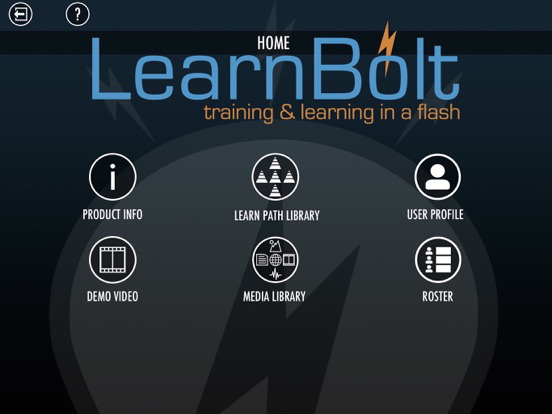
• Home Screen - iPhone - Access and View Info, Demo video, Media Library, Learn Path Library, and Profile screens from Home screen
Fixes
• Learn Path Library - Learn Path and Course thumbnail refresh
• Theme download performance enhancement
New Features:
• Media Library - iPad - Add Media Pack - A group of media files - Premium
• Media Library - iPad - Add Custom image background for Media Pack Thumbnail - Premium
• Media Library - iPad - Share Media Packs - Premium
• Media Library - iPad - Search and Sort media Packs - Premium
• Media Library - iPad -Delete and Edit media in Media Packs - Premium
• Home Screen - iPhone - Home screen now available on iPhone
• Home Screen - iPhone - Access and View Info, Demo video, Media Library, Learn Path Library, and Profile screens from Home screen
Fixes
• Learn Path Library - Learn Path and Course thumbnail refresh
• Theme download performance enhancement
1.8.3
May 30, 2017
Theme fixes
1.8.2
May 16, 2017
Efficiency improvements.
1.8.1
Apr 19, 2017
Premium Learner Learn Path Library display issue fixed
1.8
Apr 6, 2017
VERSION 1.8 UPDATE
LearnBolt 1.8 update adds several great new features and performance upgrades. Premium accounts will now enjoy the ability to capture video, audio, and images from the iPhone, then automatically upload and store those files in the Media Library. Clean up video and audio recordings. Trim the beginning and end of video and audio recordings on iPhone and video on iPad. In addition, now export user activity reports (.csv files), and Redeem promo codes for special upgrade options. Let us know what ya think. Enjoy!
New Features:
• Media Library - iPhone - Record, audio, video and images and automatically store in Cloud Media Library - Premium
• Media Library - iPhone - Trim beginning and end of captured audio and video - Premium
• Media Library, Learn Path Edit - iPad - Trim beginning and end of captured video - Premium
• Learn Path Library - Learn Path Report - Export user activity reports to DropBox (.csv file) - Premium
• Learn Path Library - Course Report - Export user activity reports to DropBox (.csv file) - Premium
• Course Create Screen - Add Custom image background for Course Thumbnail - Premium
Fixes
• Learn Path Library - Learn Path and Course thumbnail refresh
• Theme download performance enhancement
LearnBolt 1.8 update adds several great new features and performance upgrades. Premium accounts will now enjoy the ability to capture video, audio, and images from the iPhone, then automatically upload and store those files in the Media Library. Clean up video and audio recordings. Trim the beginning and end of video and audio recordings on iPhone and video on iPad. In addition, now export user activity reports (.csv files), and Redeem promo codes for special upgrade options. Let us know what ya think. Enjoy!
New Features:
• Media Library - iPhone - Record, audio, video and images and automatically store in Cloud Media Library - Premium
• Media Library - iPhone - Trim beginning and end of captured audio and video - Premium
• Media Library, Learn Path Edit - iPad - Trim beginning and end of captured video - Premium
• Learn Path Library - Learn Path Report - Export user activity reports to DropBox (.csv file) - Premium
• Learn Path Library - Course Report - Export user activity reports to DropBox (.csv file) - Premium
• Course Create Screen - Add Custom image background for Course Thumbnail - Premium
Fixes
• Learn Path Library - Learn Path and Course thumbnail refresh
• Theme download performance enhancement
1.7
Feb 8, 2017
VERSION 1.7 UPDATE
LearnBolt 1.7 is a major update that adds a powerful new Course creation feature. Create several Learn Paths, then group them in a specific order and share them as a Course(Premium). All accounts will notice a few new control buttons updated for better navigation as well as performance enhancements for faster loading and sharing of Learn Paths. The Home screen “DEMO VIDEO” getting started tutorial has been updated to better explain functionality, new features, and production flow.
Let us know what ya think. Enjoy!
New Features:
• Learn Path Library - Add Button now has a pop-down to Create a Learn Path and Create a Course - Premium
• Create Course Screen - Select Learn Paths to include, Theme for Title screen, and Name Course - Premium
• Course Edit Screen - Add, Delete, Re-order Learn Paths in a Course, view Course Learn Paths activity - Premium
• Learn Path Library - Course Thumbnail - Long hold provides - delete,Play, Edit, Rename, and Duplicate options - Premium
• Learn Path Library - Course Share - Share button available when Course is selected for Sharing - Premium
• Learn Path Library - Course Report - Report button available when Course is selected to view Course activity report - Premium
• Learn Path Library Learner - View and Play Courses and includes Learn Paths on iPad/iPhone - Premium
• Course Report Screen - View user Course activity - Premium
• Learn Path Library - Course Sort - Quickly View only Courses by selecting Course in Filter pop-down - Premium
• Home screen - Demo Video - New getting started tutorial video including new features and infuse updates in 1.7 - All accounts
• Learn Path Edit - New control buttons for clarifying interface navigation - All accounts
• Learn Path Library - Improved Learn Path performance - All accounts
Fixes
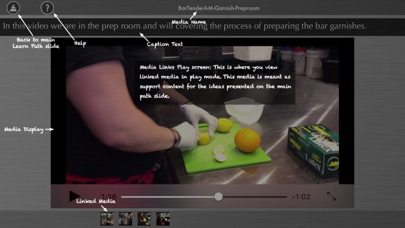
• Learn Path Play - view Learn Path media button now shows all linked “play mode” designated media
• Reduced App file size for Quicker download
LearnBolt 1.7 is a major update that adds a powerful new Course creation feature. Create several Learn Paths, then group them in a specific order and share them as a Course(Premium). All accounts will notice a few new control buttons updated for better navigation as well as performance enhancements for faster loading and sharing of Learn Paths. The Home screen “DEMO VIDEO” getting started tutorial has been updated to better explain functionality, new features, and production flow.
Let us know what ya think. Enjoy!
New Features:
• Learn Path Library - Add Button now has a pop-down to Create a Learn Path and Create a Course - Premium
• Create Course Screen - Select Learn Paths to include, Theme for Title screen, and Name Course - Premium
• Course Edit Screen - Add, Delete, Re-order Learn Paths in a Course, view Course Learn Paths activity - Premium
• Learn Path Library - Course Thumbnail - Long hold provides - delete,Play, Edit, Rename, and Duplicate options - Premium
• Learn Path Library - Course Share - Share button available when Course is selected for Sharing - Premium
• Learn Path Library - Course Report - Report button available when Course is selected to view Course activity report - Premium
• Learn Path Library Learner - View and Play Courses and includes Learn Paths on iPad/iPhone - Premium
• Course Report Screen - View user Course activity - Premium
• Learn Path Library - Course Sort - Quickly View only Courses by selecting Course in Filter pop-down - Premium
• Home screen - Demo Video - New getting started tutorial video including new features and infuse updates in 1.7 - All accounts
• Learn Path Edit - New control buttons for clarifying interface navigation - All accounts
• Learn Path Library - Improved Learn Path performance - All accounts
Fixes
• Learn Path Play - view Learn Path media button now shows all linked “play mode” designated media
• Reduced App file size for Quicker download
1.6
Nov 9, 2016
VERSION 1.6 UPDATE
LearnBolt 1.6 is a performance update that introduces new techniques for quickly loading editable and shared LearnPaths.
All account users will see and noticeable improvement in LearnBolt’s overall speed and access of content on Mobile and Wifi networks
Let us know what ya think. Enjoy!
New Features:
• Learn Path Library - Thumbnails for Learn Paths will load much quicker - All accounts
• Learn Path Library - Loading Learn Paths and related media now loading quicker when accessed
• Learn Path Library - Cloud Refresh button - Tap to check and reloads Thumbnails, Learn Paths and related media
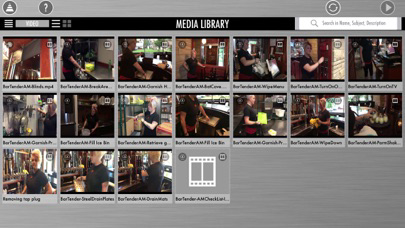
• Media Library - Media Library thumbnails (text, image, sound, video, and web links) quicker loads - All accounts
• Media Library - View and search shared media items in Media Library on iPhone/iPad - Learners - Premium
Fixes
• LearnBolt Thumbnails refresh
• Long “Loading…” spinner in Learn Path Library - Quick load and display thumbnails
LearnBolt 1.6 is a performance update that introduces new techniques for quickly loading editable and shared LearnPaths.
All account users will see and noticeable improvement in LearnBolt’s overall speed and access of content on Mobile and Wifi networks
Let us know what ya think. Enjoy!
New Features:
• Learn Path Library - Thumbnails for Learn Paths will load much quicker - All accounts
• Learn Path Library - Loading Learn Paths and related media now loading quicker when accessed
• Learn Path Library - Cloud Refresh button - Tap to check and reloads Thumbnails, Learn Paths and related media
• Media Library - Media Library thumbnails (text, image, sound, video, and web links) quicker loads - All accounts
• Media Library - View and search shared media items in Media Library on iPhone/iPad - Learners - Premium
Fixes
• LearnBolt Thumbnails refresh
• Long “Loading…” spinner in Learn Path Library - Quick load and display thumbnails
1.5
Oct 9, 2016
LearnBolt 1.5 introduces several major new features as well as providing a few fixes.
New Features:
• Learn Path Library - Search Library for Learn Paths by Title, SubTitle, Type, and description - All accounts
• Learn Path Library - Share Learn Paths to guest and roster users via the iPhone - Admin, Supervisor, and Educator roles - Premium
- Need to on-board or cross-train an employee, open your iPhone and share training Learn Paths immediately from anywhere at anytime
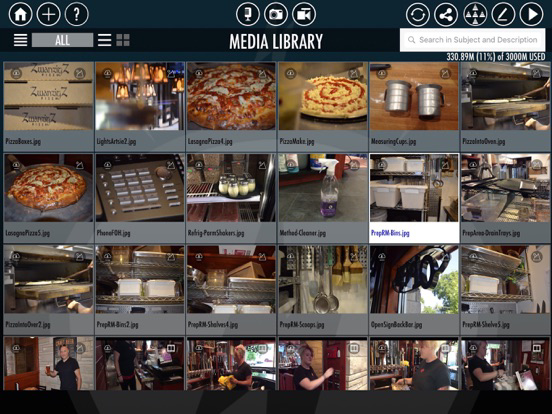
• Media Library - Share custom Media Library (text, image, sound, video, and web links) to Learners on roster - Premium
• Media Library - View and search shared media items in Media Library on iPhone/iPad - Learners - Premium
- Empower employees, by making business best practices and procedures immediately available in their pockets in-the-moment when needed.
• Learn Paths Activity Report - Set activity data updates to Manual or Automatic - iPad - Premium
- in Automatic mode, sit back and watch the users Learn Path activity update live as you watch.
Fixes
• Media link screen caption text and image update fix
• Profile image corruption fix
• IPhone 6, 6+ launch image fixes
• App crash on initial launch - LearnBolt 1.4.1
New Features:
• Learn Path Library - Search Library for Learn Paths by Title, SubTitle, Type, and description - All accounts
• Learn Path Library - Share Learn Paths to guest and roster users via the iPhone - Admin, Supervisor, and Educator roles - Premium
- Need to on-board or cross-train an employee, open your iPhone and share training Learn Paths immediately from anywhere at anytime
• Media Library - Share custom Media Library (text, image, sound, video, and web links) to Learners on roster - Premium
• Media Library - View and search shared media items in Media Library on iPhone/iPad - Learners - Premium
- Empower employees, by making business best practices and procedures immediately available in their pockets in-the-moment when needed.
• Learn Paths Activity Report - Set activity data updates to Manual or Automatic - iPad - Premium
- in Automatic mode, sit back and watch the users Learn Path activity update live as you watch.
Fixes
• Media link screen caption text and image update fix
• Profile image corruption fix
• IPhone 6, 6+ launch image fixes
• App crash on initial launch - LearnBolt 1.4.1
1.4.1
Jul 28, 2016
Version 1.4.1 provides fixes for updating the App, InApp purchases as well as basic functionality. Basic accounts can now add a profile account name. Version 1.4 is a major update where Premium accounts can create custom rosters as well as see reports on user activity. LearnBolt is the first true turnkey mobile learning solution for the "Now" generation that helps businesses collect, organize, share and manage a Learning and Development program all from a mobile device.
1.4
Jul 13, 2016
LearnBolt 1.4 now offers account upgrade options via inApp subscription.
Upgrade from Basic, to Starter, to Plus to even Premium accounts all with in the LearnBolt App.
Basic, Starter, and Plus updates
- 3 New Learn Path Themes
- Speed enhancements for Learn Path sharing and viewing
- Email invite and account creation updates
Premium updates
- Learn Path Report Screen - This all New feature allows account Admin, Supervisors, and Educators to view shared Learn Path user activity. Create a Learn Path, share to your custom Roster, then immediately view the activities of your Learners.
- View Guest activity in Learn Path reports screens
- Roster editing feature enhancements for managing user accounts
- 3 New Learn Path Themes
- Email invite and account creation updates
- Speed enhancements for Learn Path sharing and viewing
Upgrade from Basic, to Starter, to Plus to even Premium accounts all with in the LearnBolt App.
Basic, Starter, and Plus updates
- 3 New Learn Path Themes
- Speed enhancements for Learn Path sharing and viewing
- Email invite and account creation updates
Premium updates
- Learn Path Report Screen - This all New feature allows account Admin, Supervisors, and Educators to view shared Learn Path user activity. Create a Learn Path, share to your custom Roster, then immediately view the activities of your Learners.
- View Guest activity in Learn Path reports screens
- Roster editing feature enhancements for managing user accounts
- 3 New Learn Path Themes
- Email invite and account creation updates
- Speed enhancements for Learn Path sharing and viewing
1.3
Jun 10, 2016
LearnBolt 1.3 provides several speed enhancements as well as new features for Basic and Business accounts.
1. LearnBolt Basic can now be upgraded to LearnBolt Starter via InApp purchase in the Profile screen - adds additional storage and shares
2. Business Premium accounts will see several enhancements to the Roster.
- Add new users to your account – with unique usernames and password log in, send email notification to new user
- Add a single user account
- Add multiple user accounts through Import via .csv file on DropBox
- Search roster, name, email, groups
- Account user roles now available - Account Admin can assign user roles. Supervisor (edit Roster, Media Library, and Learn Paths, Educators(edit Media Library, and Learn Paths), and Learners(view Learn Paths)
- Admin, Supervisor, and Educator share the same media Library and Learn Path Library. All can add media to Media Library and work on the same Learn Paths.
- Create user groups for sharing Learn Paths . Quickly share a Learn Path to the entire class with a group selection. Users can be n multiple groups
- User Acccount management - Edit and delete users on your roster (Admin, Supervisor)
- Develop and manage a training program all from your mobile device. Yes, it's now possible!
1. LearnBolt Basic can now be upgraded to LearnBolt Starter via InApp purchase in the Profile screen - adds additional storage and shares
2. Business Premium accounts will see several enhancements to the Roster.
- Add new users to your account – with unique usernames and password log in, send email notification to new user
- Add a single user account
- Add multiple user accounts through Import via .csv file on DropBox
- Search roster, name, email, groups
- Account user roles now available - Account Admin can assign user roles. Supervisor (edit Roster, Media Library, and Learn Paths, Educators(edit Media Library, and Learn Paths), and Learners(view Learn Paths)
- Admin, Supervisor, and Educator share the same media Library and Learn Path Library. All can add media to Media Library and work on the same Learn Paths.
- Create user groups for sharing Learn Paths . Quickly share a Learn Path to the entire class with a group selection. Users can be n multiple groups
- User Acccount management - Edit and delete users on your roster (Admin, Supervisor)
- Develop and manage a training program all from your mobile device. Yes, it's now possible!
1.2.1
Jun 3, 2016
Version 1.2.1 fixes the bug in creating a new account using the SIGN UP button on the Welcome screen.
1.2
May 17, 2016
LearnBolt version 1.2 provides better performance for streaming video and loading Learn Path content. The Profile screen has been updated and provides additional editing options. Business account users will notice many new options with adding, editing, grouping, and deleting users from the roster. User roles of Supervisor, Educator, and Learner can now be assigned via the Business account roster. Learn Paths can now be shared to individuals or groups of users from the account roster. iPhone Guest, Learner and Educators will notice better performance a cleaner interface when loading and viewing Learn Paths. Works great on iPad Pro 9.7! Stay Tuned - New upgrade account options and advanced editing features coming soon!
1.1
Mar 29, 2016
LearnBolt version 1.1 provides increased stability and efficientcy for sharing and viewing Learn Paths. The "Go" button is now active on the keyboard when logging in. Learn Paths should now auto-load when signing in as a Learner. Users signing in with Educator credentials will see both "My Learn Paths" and "Shared Learn Paths" when logging in via iPhone. iPad - Searching Media Library when Adding media in Learn Path is now available to all accounts. iPad/iPhone - When logging in as a Learner or Guest "author designated" media included in a Learn Path can be view directly via the Media Library Button. Stay Tuned - Advanced accounts and editing features coming soon!

1.0
Mar 8, 2016
LearnBolt FAQ
Click here to learn how to download LearnBolt in restricted country or region.
Check the following list to see the minimum requirements of LearnBolt.
iPhone
Requires iOS 8.0 or later.
iPad
Requires iPadOS 8.0 or later.
iPod touch
Requires iOS 8.0 or later.
LearnBolt supports English