Timecode Tool
$0.99
2.0.2for iPhone
Age Rating
Timecode Tool Screenshots
About Timecode Tool
Visit the web site to see a video of this app in action.
https://www.youtube.com/watch?v=QKM8PU2tonM
https://www.youtube.com/watch?v=LV0UYB_5tOk
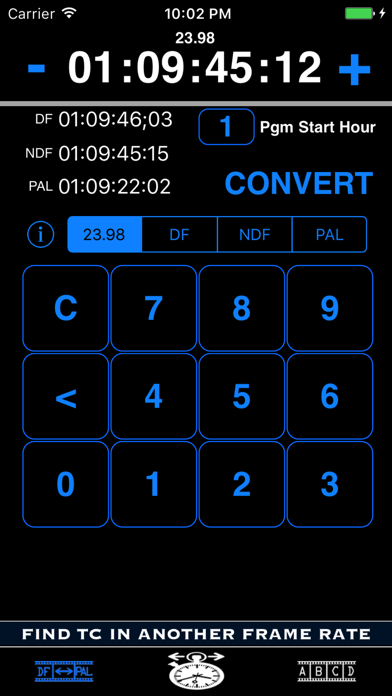
The primary feature of Timecode Tool gives the user the ability to convert between 23.98, DF, NDF and PAL timecodes. PAL video runs at a faster speed than NTSC and consequently causes issues when trying to find the same spot in a feature film between those standards. Perhaps you are performing a QC pass on a PAL version of a feature film and find an issue at 2:14:30:23. How do you find the same spot in the NTSC version? Timecode Tool will easily allow you to enter the PAL timecode of 2:14:30:23 and will return to you the equivalent 23.98, DF, and NDF timecodes. It has a default value of 1 Hour as the starting time of your program material but the other 23 even hours can be selected if necessary. (A future version may allow the user to select a specific "non-even hour" timecode if there are enough requests)
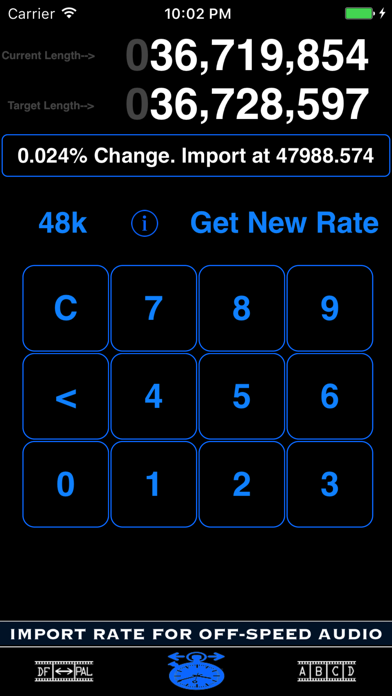
The second feature of Timecode Tool helps the user vari-speed audio that is currently running at the wrong speed. The hope is that you are using a software program that allows you to convert your audio by entering a specific sample rate ("Import Audio"). Both the difference in percentage and the correct sample rate necessary to vari-speed (VSO) when importing/exporting are provided. Example: you may have an audio file that is 20 frames shorter than it is supposed to be. After entering that file's current length, target length, and current sample rate, a simple math calculation is performed and the user is provided with the numbers necessary to import that file at a custom rate where it should stay in proper sync.
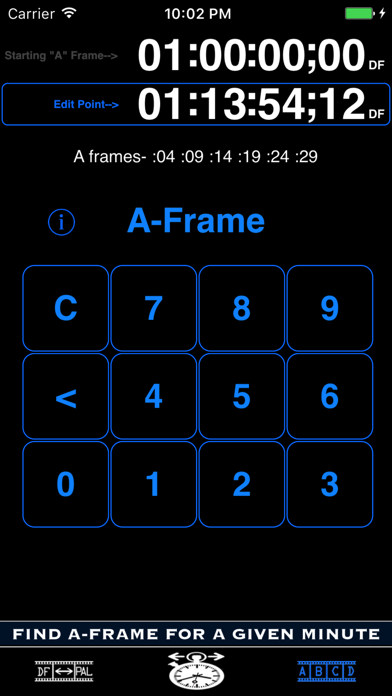
The third feature is A-Frame Verification. A-Frames occur on the same frames from second to second within a given minute. If you need to locate an A-Frame to keep the proper cadence when editing, tap the upper timecode to change the starting A-Frame for your program material/feature (if other than 01:00:00:00) and then tap the lower timecode to enter your edit point. Touch the A-Frame button to display the frames on which your A-Frame will occur within that given minute of time.

https://www.youtube.com/watch?v=QKM8PU2tonM
https://www.youtube.com/watch?v=LV0UYB_5tOk
The primary feature of Timecode Tool gives the user the ability to convert between 23.98, DF, NDF and PAL timecodes. PAL video runs at a faster speed than NTSC and consequently causes issues when trying to find the same spot in a feature film between those standards. Perhaps you are performing a QC pass on a PAL version of a feature film and find an issue at 2:14:30:23. How do you find the same spot in the NTSC version? Timecode Tool will easily allow you to enter the PAL timecode of 2:14:30:23 and will return to you the equivalent 23.98, DF, and NDF timecodes. It has a default value of 1 Hour as the starting time of your program material but the other 23 even hours can be selected if necessary. (A future version may allow the user to select a specific "non-even hour" timecode if there are enough requests)
The second feature of Timecode Tool helps the user vari-speed audio that is currently running at the wrong speed. The hope is that you are using a software program that allows you to convert your audio by entering a specific sample rate ("Import Audio"). Both the difference in percentage and the correct sample rate necessary to vari-speed (VSO) when importing/exporting are provided. Example: you may have an audio file that is 20 frames shorter than it is supposed to be. After entering that file's current length, target length, and current sample rate, a simple math calculation is performed and the user is provided with the numbers necessary to import that file at a custom rate where it should stay in proper sync.
The third feature is A-Frame Verification. A-Frames occur on the same frames from second to second within a given minute. If you need to locate an A-Frame to keep the proper cadence when editing, tap the upper timecode to change the starting A-Frame for your program material/feature (if other than 01:00:00:00) and then tap the lower timecode to enter your edit point. Touch the A-Frame button to display the frames on which your A-Frame will occur within that given minute of time.
Show More
What's New in the Latest Version 2.0.2
Last updated on Jun 25, 2025
Old Versions
App Store compliance update.
Show More
Version History
2.0.2
Jun 25, 2025
App Store compliance update.
Timecode Tool FAQ
Click here to learn how to download Timecode Tool in restricted country or region.
Check the following list to see the minimum requirements of Timecode Tool.
iPhone